76
BU Score
Strong
Connection Stabilizer Booster
✍️ BU Analytics Review
“
Connection Stabilizer Booster is an Android app from Supersonic Software in the Tools category, currently rated 4.5★ across 138,986 ratings. Initial signal reads as largely positive sentiment, users highlighting consistency and feature depth.
Our BU Score puts it at 76 — Strong (healthy traction). For a Tools app, that means healthy traction.
Track changes month-over-month in the Performance section below — live snapshot history and revenue forecast included.
creator
📊 Performance Tracking LIVE
Loading…
Rating
—
Reviews
—
Forecast Revenue / mo
—
Snapshots tracked
0
since first record
Range:
💰 Forecast Revenue / mo
MODELRevenue forecast computed from BU's 234 trigger model on each snapshot. Calibrated against ground-truth from 58 verified-revenue apps.
🔬Forecast Breakdown — Why This Estimate?Top 3 of 3 triggers
Our ML model uses 200+ signals from public data. These are the most influential for this app:
| High install base (138,986 ratings)METRIC | +$12,000 | |
| Excellent rating (4.5★)METRIC | +$2,200 | |
| Ad-supported / freemiumMETRIC | +$600 |
METRIC = structural app data · REVIEW = mined from user reviews · ✓ VERIFIED = Stripe-verified anchor (TrustMRR)
📈 Reviews Growth
LIVECumulative review count from first BU snapshot. Each point = a tracked update.
⭐ Rating Trend
LIVEAverage rating evolution. Updates with each new review batch.
🗓️ Snapshot Timeline
HISTORYEach bar shows a tracked update and the metric delta from the previous snapshot.
App Specs
🔐 Own this app? Claim & verify MRR →🔖 vVaries with device🔄 updated 9mo ago📂 Tools💰 Free
📝 About this app
<b>Connection Stabilizer Booster is designed to tackle internet connectivity issues on 2G, EDGE, 3G, HSPA+, 4G LTE, 5G NR and Wi-Fi wireless networks.</b>
If you are having trouble with your WiFi or mobile data connection, this is the app for you. Loaded with lots of powerful features, this app delivers a stable mobile internet connectivity.
<b>★ Active Keep Alive ★</b>
Does your wireless service provider disconnect your 3G, 4G LTE or 5G data connection after a certain period of inactivity? Does your WLAN connection drop unexpectedly? Is there no data transfer even when connection is live?
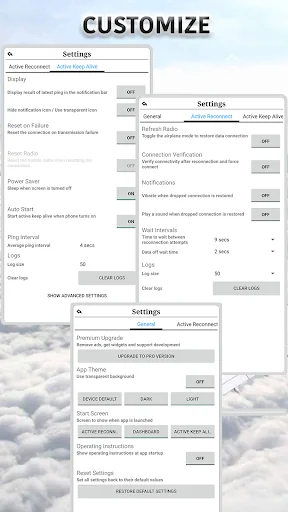
Queueing delays, packet loss, and blocking of new connections are typical problems in busy networks. Active Keep Alive along with Reset on Failure feature keeps your connection working in such cases. It keeps traffic flowing between your device and the internet via your ISP’s infrastructure. It attempts to optimize and enhance your internet experience by holding your spot and preventing timeout. The network may assign a higher priority to your device, resulting in significant improvement in network performance, especially in poor network conditions.
<b>★ Active Reconnect ★</b>
Does your device often lose data signal and fails to reconnect even though network is available? Do you miss out important chats, calls and emails until you turn mobile data off and on, maybe multiple times to get reconnected? This is a known problem caused by handset or mobile network operator issues.
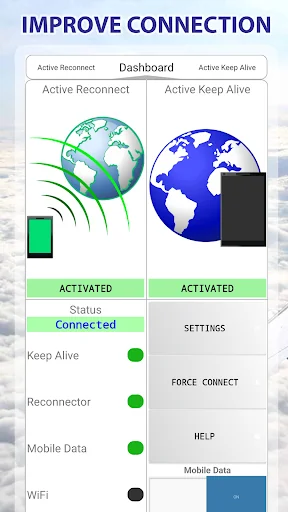
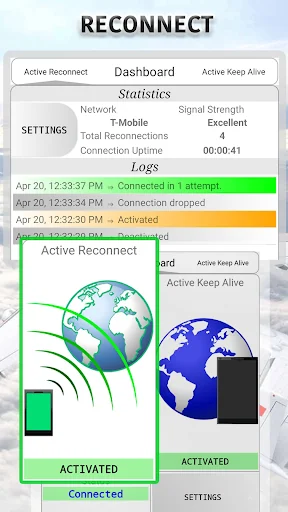
The app comes with an automatic reconnector called Active Reconnect. It monitors and re-establishes dropped connections. It automatically reconnects your 3G, 4G LTE, or 5G mobile data connection as soon as it gets disconnected.
On newer android versions, this feature needs root or additional setup to work.
★ Force Connect ★
Repetitively attempts to connect to internet and establish mobile data connectivity. Useful in adverse network conditions.
✔ Helping users around the world since 2014
✔ Support available via email
✔ <i>It can fix 3G, 4G LTE and 5G NR internet connection problems on T-Mobile, Verizon, Sprint, AT&T, Vodafone, Telkomsel, O2, Boost, Metro, Telekom, Airtel, Jio, or any other carrier.</i>
✔ It can help in holding connection in busy or weak wireless LAN or cellular networks.
<u>PRO TIPS</u>
➤ If you are facing random disconnection problem, activate Active Reconnect. It will automatically detect connection drops and actively reconnect the connection.
➤ If you are having trouble in establishing connection to the internet over the mobile network, use Force Connect button on the dashboard to immediately try forcing the connection.
➤ If your cellular data or WiFi disconnects after a period of inactivity, activate Active Keep Alive. You can adjust the ping interval from the Active Keep Alive settings to find the setting which works best for your network.
➤ If you are facing any other problem with your connection (e.g., no data transmission even though internet is connected), activate Active Keep Alive with Reset on Failure. Its ping and reset actions are known to work wonders and mitigate congestion related network issues.
☆ Please don't use Play Store's review system for support. In case of issues, or for any question or suggestion, please contact us directly via e-mail.
German Translation by Mokkami.
<u>DISCLAIMER</u>
An app cannot directly increase the power of cellular or WiFi radio signals. However, there are a lot of variables at play in wireless networks. This app focuses on maximum possible utilization of available network resources and maintaining a stable working internet connection. This in turn boosts your wireless connection experience.
<u>IMPORTANT INFORMATION</u>
→ When Active Reconnect is enabled, don’t turn off the mobile data connection directly from your device. Instead, press the data setting ON/OFF button on the app's dashboard or <i>deactivate Active Reconnect before turning off mobile data from android settings.</i>
If you are having trouble with your WiFi or mobile data connection, this is the app for you. Loaded with lots of powerful features, this app delivers a stable mobile internet connectivity.
<b>★ Active Keep Alive ★</b>
Does your wireless service provider disconnect your 3G, 4G LTE or 5G data connection after a certain period of inactivity? Does your WLAN connection drop unexpectedly? Is there no data transfer even when connection is live?
Queueing delays, packet loss, and blocking of new connections are typical problems in busy networks. Active Keep Alive along with Reset on Failure feature keeps your connection working in such cases. It keeps traffic flowing between your device and the internet via your ISP’s infrastructure. It attempts to optimize and enhance your internet experience by holding your spot and preventing timeout. The network may assign a higher priority to your device, resulting in significant improvement in network performance, especially in poor network conditions.
<b>★ Active Reconnect ★</b>
Does your device often lose data signal and fails to reconnect even though network is available? Do you miss out important chats, calls and emails until you turn mobile data off and on, maybe multiple times to get reconnected? This is a known problem caused by handset or mobile network operator issues.
The app comes with an automatic reconnector called Active Reconnect. It monitors and re-establishes dropped connections. It automatically reconnects your 3G, 4G LTE, or 5G mobile data connection as soon as it gets disconnected.
On newer android versions, this feature needs root or additional setup to work.
★ Force Connect ★
Repetitively attempts to connect to internet and establish mobile data connectivity. Useful in adverse network conditions.
✔ Helping users around the world since 2014
✔ Support available via email
✔ <i>It can fix 3G, 4G LTE and 5G NR internet connection problems on T-Mobile, Verizon, Sprint, AT&T, Vodafone, Telkomsel, O2, Boost, Metro, Telekom, Airtel, Jio, or any other carrier.</i>
✔ It can help in holding connection in busy or weak wireless LAN or cellular networks.
<u>PRO TIPS</u>
➤ If you are facing random disconnection problem, activate Active Reconnect. It will automatically detect connection drops and actively reconnect the connection.
➤ If you are having trouble in establishing connection to the internet over the mobile network, use Force Connect button on the dashboard to immediately try forcing the connection.
➤ If your cellular data or WiFi disconnects after a period of inactivity, activate Active Keep Alive. You can adjust the ping interval from the Active Keep Alive settings to find the setting which works best for your network.
➤ If you are facing any other problem with your connection (e.g., no data transmission even though internet is connected), activate Active Keep Alive with Reset on Failure. Its ping and reset actions are known to work wonders and mitigate congestion related network issues.
☆ Please don't use Play Store's review system for support. In case of issues, or for any question or suggestion, please contact us directly via e-mail.
German Translation by Mokkami.
<u>DISCLAIMER</u>
An app cannot directly increase the power of cellular or WiFi radio signals. However, there are a lot of variables at play in wireless networks. This app focuses on maximum possible utilization of available network resources and maintaining a stable working internet connection. This in turn boosts your wireless connection experience.
<u>IMPORTANT INFORMATION</u>
→ When Active Reconnect is enabled, don’t turn off the mobile data connection directly from your device. Instead, press the data setting ON/OFF button on the app's dashboard or <i>deactivate Active Reconnect before turning off mobile data from android settings.</i>
Profile & Insights
Everything we know — and don't — about this app and its company.
Identification
- App name
- Connection Stabilizer Booster
- Developer
- Supersonic Software
- Bundle ID
- com.connectionstabilizerbooster
- App Store URL
- Open in App Store
- Category
- Tools
- Content rating
- Not found
- Languages
- Not found
Company
- Website
- Not found
- Tagline
- Not found
- Description
- Not found
- Founded
- Not found
- HQ / Address
- Not found
- Employees
- Not found
- Logo
- Not found
Revenue
- Verified revenue / mo
- Not found
- AI revenue estimate / mo
- Not found
- AI annual estimate
- Not found
- ML model estimate / mo
- $2.7K/mo
- Top-grossing rank
- Not found
- All-time revenue
- Not found
- Pricing
- Not found
Founder
- Name
- Not found
- X / Twitter
- Not found
- Not found
- GitHub
- Not found
- X followers
- Not found
- Public statements
- Not found
Funding
- Total raised
- Not found
- Last round
- Not found
- Investors
- Not found
- Crunchbase
- Not found
- AngelList
- Not found
Press & Links
- Articles found
- Not found
- Listed on
- Not found
- Blog
- Not found
- Press / News
- Not found
Contacts & Socials
- Socials
- Not found
- Not found
- Phone
- Not found
- Contact page
- Not found
- About page
- Not found
Profile is built from iTunes Lookup + developer site scrape + ML revenue model. Empty fields show "Not found" — additional sources (Crunchbase, X, IndieHackers, Acquire.com) coming.
More Tools
Phone by Google
★ 4.5 · 47,248,471 reviews
Google Play services
★ 4.3 · 44,619,167 reviews
★ 4.1 · 29,135,018 reviews
Gboard - the Google Keyboard
★ 4.5 · 18,500,531 reviews
SHAREit: Transfer, Share Files
★ 4.3 · 18,247,718 reviews
gov.br
★ 4.5 · 12,551,225 reviews
MyTelkomsel – Buy Internet
★ 3.7 · 11,917,556 reviews
myIM3: Data Plan & Buy Package
★ 4.4 · 10,992,500 reviews
Browse BU Analytics
📚 All 55,000+ Books
🜍 Alchemy & Hermeticism
🔮 Magic & Ritual
🌙 Witchcraft & Paganism
⭐ Astrology & Cosmology
🃏 Divination & Tarot
📜 Tools
✡️ Kabbalah & Jewish Mysticism
🕉️ Mysticism & Contemplation
🕊️ Theosophy & Anthroposophy
🏛️ Freemasonry & Secret Societies
👻 Spiritualism & Afterlife
📖 Sacred Texts & Gnosticism
👁️ Supernatural & Occult Fiction
🧘 Spiritual Development
📚 Esoteric History & Biography
Info
About BU Analytics