56
BU Score
Solid
Screen Recorder with Audio
βοΈ bumetric analysis
“
Screen Recorder with Audio is an Android app from MAXMOBILE CO., LTD in the Video Players & Editors category, currently rated 3.0β across 12,734 ratings. Initial signal reads as mixed reviews: supporters praise core features while critics cite stability and value gaps.
Our BU Score puts it at 56: Solid (established niche player). For a Video Players & Editors app, that means established niche player.
Track changes month-over-month in the Performance section below: live snapshot history and revenue forecast included.
π Performance Tracking LIVE
Loadingβ¦
Rating
β
Reviews
β
Forecast Revenue / mo
β
Snapshots tracked
0
since first record
Range:
π° Forecast Revenue / mo
MODELRevenue forecast computed from BU's 234 trigger model on each snapshot. Calibrated against ground-truth from 58 verified-revenue apps.
π¬Forecast Breakdown β Why This Estimate?Top 4 of 4 triggers
Our ML model uses 200+ signals from public data. These are the most influential for this app:
| Mid install base (12,734 ratings)METRIC | +$5,500 | |
| Below-average rating (3.0β )METRIC | β$1,500 | |
| Established app (5y old)METRIC | +$800 | |
| Ad-supported / freemiumMETRIC | +$600 |
METRIC = structural app data Β· REVIEW = mined from user reviews Β· β VERIFIED = Stripe-verified anchor (TrustMRR)
π Reviews Growth
LIVECumulative review count from first BU snapshot. Each point = a tracked update.
β Rating Trend
LIVEAverage rating evolution. Updates with each new review batch.
ποΈ Snapshot Timeline
HISTORYEach bar shows a tracked update and the metric delta from the previous snapshot.
π v2.4.5π updated 4mo agoπ Video Players & Editorsπ° FreeπΊ Ad-supportedπ IAP $4.99 - $39.99 per itemπ Launched 2020 (5y old)
π About this app
π Screen Recorder is a powerful and easy-to-use screen recording app with audio & video recorder. This is a screen recording and screen capture tool that helps you record screens, videos, tutorials, gameplay, video calls, and any moments you like. π You can also trim, crop, and rotate to edit videos before sharing and itβs totally FREE!
π₯Feature Highlightsπ₯
π Free, NO watermark, NO root needed, NO time limit screen recorder.
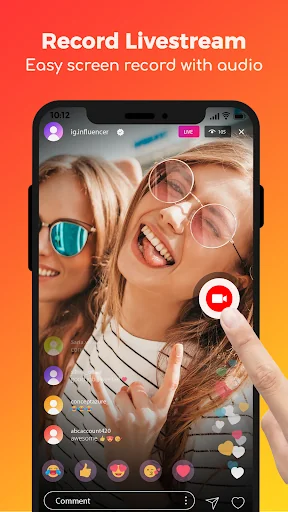
π All screen record support: gameplay, video call, live stream, or tutorials.
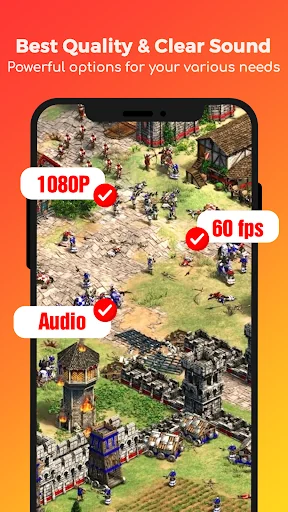
π Record with high quality: 1080P, 16Mbps, 120FPS
π Record with audio: Screen recorder with internal and external audio
π Trim, Crop and Rotate: finish video record, edit, and share right within the app
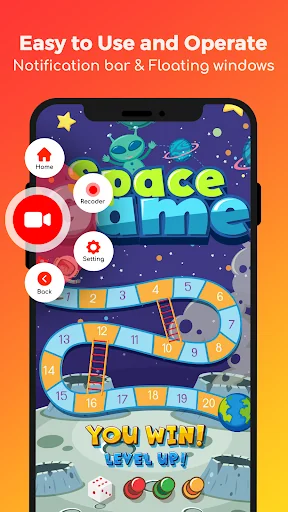
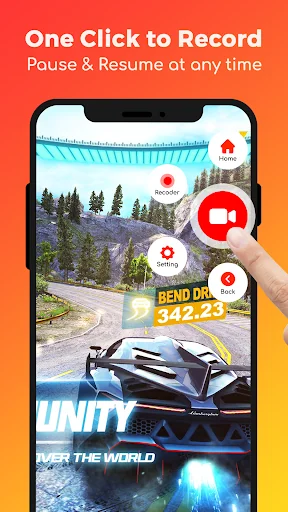
π Floating ball: One tap to start/ pause/ resume screen recording
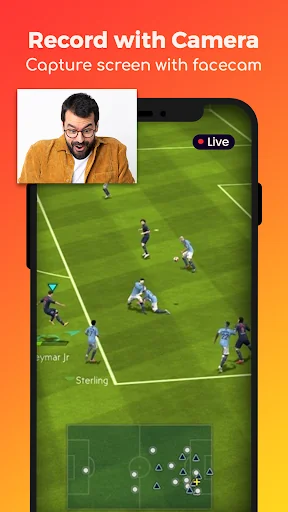
π Facecam: show your face in the video to record reactions
π Brush: draw on the screen to customize your video
π Gesture control: quickly stop, pause, resume, and take screenshots, etc.
π No worry about the pop-up notification after screenshots
π More user-friendly functions: orientation selection, countdown
π Simple and useful video editor
π Easy sharing for screen record
π±With this powerful screen recorder, you can:
- Fine-tune your recording experience with customizable settings and controls.
- Highlight or add notes to your recording with a built-in brush tool.
- Record live streams or videos even if the platform doesn't allow downloads.
- Upload your captures directly to your favorite social media sites with just one tap.
- Record videos free without worrying about time limits or any distracting watermarks.
This screen recording app is your one-stop shop for capturing and sharing videos, games, and screenshots. Capture, Edit, and Share with Screen Recorder - Video Recorder!
β Effortless Screen Recording: With Screen Recorder Video Recorder, you can record your screen and capture screenshots with stunning HD with smooth, high-quality video. Customize settings to fit your needs or use our adaptive settings for perfect video recording every time.
β Built-in Powerful Video Editor: Don't wait! Edit your recordings right after capturing them. Trim to highlight key moments, crop unwanted video sections, and rotate the recordings for the perfect orientation. Then, share it directly on YouTube!
β Intuitive Screen Recording Floating Control: No need to fumble with menus. This screen recording app uses a simple floating button for one-tap control. Start, pause, resume, or take screenshots while recording with a single touch. Hide it when not in use for a smooth experience.
β Engage Your Audience While Recording: Open the facecam and show your face on the screen for engaging tutorials, gameplay videos, and presentations. Real reactions and expressions make your videos more interesting and entertaining.
β Screen Recorder with Brush: Explain concepts in a snap with the on-screen brush tool. Combined with the face cam, you can visually interact with viewers and keep them engaged with the screen recording. This is perfect for creating effective lessons and clear tutorials.
β Record and Share Your Masterpieces: Easily capture, annotate, and share your high-quality screen recordings with friends and colleagues.
πΈ No costs needed! Record your screen for free with Screen Recorder Video Recorder and get more followers.
πΉ Download Screen Recorder Video Recorder today and take your screen recording experience to the next level!
[Disclaimer]:
All copyrights are reserved to their respective owners.
If you notice that any content in our app violates copyrights then please inform us so that we remove that content.
Privacy Policy: https://maxlabs-company-limited.github.io/Privacy-Policy
Contact Us: maxlabs.ltd@gmail.com
π₯Feature Highlightsπ₯
π Free, NO watermark, NO root needed, NO time limit screen recorder.
π All screen record support: gameplay, video call, live stream, or tutorials.
π Record with high quality: 1080P, 16Mbps, 120FPS
π Record with audio: Screen recorder with internal and external audio
π Trim, Crop and Rotate: finish video record, edit, and share right within the app
π Floating ball: One tap to start/ pause/ resume screen recording
π Facecam: show your face in the video to record reactions
π Brush: draw on the screen to customize your video
π Gesture control: quickly stop, pause, resume, and take screenshots, etc.
π No worry about the pop-up notification after screenshots
π More user-friendly functions: orientation selection, countdown
π Simple and useful video editor
π Easy sharing for screen record
π±With this powerful screen recorder, you can:
- Fine-tune your recording experience with customizable settings and controls.
- Highlight or add notes to your recording with a built-in brush tool.
- Record live streams or videos even if the platform doesn't allow downloads.
- Upload your captures directly to your favorite social media sites with just one tap.
- Record videos free without worrying about time limits or any distracting watermarks.
This screen recording app is your one-stop shop for capturing and sharing videos, games, and screenshots. Capture, Edit, and Share with Screen Recorder - Video Recorder!
β Effortless Screen Recording: With Screen Recorder Video Recorder, you can record your screen and capture screenshots with stunning HD with smooth, high-quality video. Customize settings to fit your needs or use our adaptive settings for perfect video recording every time.
β Built-in Powerful Video Editor: Don't wait! Edit your recordings right after capturing them. Trim to highlight key moments, crop unwanted video sections, and rotate the recordings for the perfect orientation. Then, share it directly on YouTube!
β Intuitive Screen Recording Floating Control: No need to fumble with menus. This screen recording app uses a simple floating button for one-tap control. Start, pause, resume, or take screenshots while recording with a single touch. Hide it when not in use for a smooth experience.
β Engage Your Audience While Recording: Open the facecam and show your face on the screen for engaging tutorials, gameplay videos, and presentations. Real reactions and expressions make your videos more interesting and entertaining.
β Screen Recorder with Brush: Explain concepts in a snap with the on-screen brush tool. Combined with the face cam, you can visually interact with viewers and keep them engaged with the screen recording. This is perfect for creating effective lessons and clear tutorials.
β Record and Share Your Masterpieces: Easily capture, annotate, and share your high-quality screen recordings with friends and colleagues.
πΈ No costs needed! Record your screen for free with Screen Recorder Video Recorder and get more followers.
πΉ Download Screen Recorder Video Recorder today and take your screen recording experience to the next level!
[Disclaimer]:
All copyrights are reserved to their respective owners.
If you notice that any content in our app violates copyrights then please inform us so that we remove that content.
Privacy Policy: https://maxlabs-company-limited.github.io/Privacy-Policy
Contact Us: maxlabs.ltd@gmail.com
Profile & Insights
Everything we know β and don't β about this app and its company.
Identification
- App name
- Screen Recorder with Audio
- Developer
- MAXMOBILE CO., LTD
- Bundle ID
- com.cutestudio.screenrecorder
- App Store URL
- Open in App Store
- Category
- Video Players & Editors
- Content rating
- Not found
- Languages
- Not found
Company
- Website
- www.maxmobile-software.com
- Tagline
- Not found
- Description
- Not found
- Founded
- Not found
- HQ / Address
- Not found
- Employees
- Not found
- Logo
- Not found
Revenue
- Verified revenue / mo
- Not found
- AI revenue estimate / mo
- Not found
- AI annual estimate
- Not found
- ML model estimate / mo
- $1.1K/mo
- Top-grossing rank
- Not found
- All-time revenue
- Not found
- Pricing
- $4.99 - $39.99 per item
Founder
- Name
- Not found
- X / Twitter
- Not found
- Not found
- GitHub
- Not found
- X followers
- Not found
- Public statements
- Not found
Funding
- Total raised
- Not found
- Last round
- Not found
- Investors
- Not found
- Crunchbase
- Not found
- AngelList
- Not found
Press & Links
- Articles found
- Not found
- Listed on
- Not found
- Blog
- Not found
- Press / News
- Not found
Contacts & Socials
- Socials
- Not found
- Not found
- Phone
- Not found
- Contact page
- Not found
- About page
- Not found
πRatings growth12,734 ratings+46% lifetimeShow 3-year history estimate βΎ
Tracked (1 weeks) Pre-tracking estimate (37 weeks) Β· model-based, Β±5% noise Β· anchored to release date and current value
Profile is built from iTunes Lookup + developer site scrape + ML revenue model. Empty fields show "Not found" β additional sources (Crunchbase, X, IndieHackers, Acquire.com) coming.
Full revenue analysis
Read the article-style breakdown for Screen Recorder with Audio: category rank, percentile, growth signal, comparable apps, and how the forecast is calibrated against verified-MRR anchors in this niche.