73
BU Score
Strong
Altimeter & Altitude Widget
✍️ BU Analytics Review
“
Altimeter & Altitude Widget is an Android app from Disciple Skies Software in the Tools category, currently rated 4.6★ across 22,861 ratings. Initial signal reads as largely positive sentiment, users highlighting consistency and feature depth.
Our BU Score puts it at 73 — Strong (healthy traction). For a Tools app, that means healthy traction.
Track changes month-over-month in the Performance section below — live snapshot history and revenue forecast included.
creator
📊 Performance Tracking LIVE
Loading…
Rating
—
Reviews
—
Forecast Revenue / mo
—
Snapshots tracked
0
since first record
Range:
💰 Forecast Revenue / mo
MODELRevenue forecast computed from BU's 234 trigger model on each snapshot. Calibrated against ground-truth from 58 verified-revenue apps.
🔬Forecast Breakdown — Why This Estimate?Top 4 of 4 triggers
Our ML model uses 200+ signals from public data. These are the most influential for this app:
| Mid install base (22,861 ratings)METRIC | +$5,500 | |
| Excellent rating (4.6★)METRIC | +$2,200 | |
| Mature app (13y old)METRIC | +$1,500 | |
| Ad-supported / freemiumMETRIC | +$600 |
METRIC = structural app data · REVIEW = mined from user reviews · ✓ VERIFIED = Stripe-verified anchor (TrustMRR)
📈 Reviews Growth
LIVECumulative review count from first BU snapshot. Each point = a tracked update.
⭐ Rating Trend
LIVEAverage rating evolution. Updates with each new review batch.
🗓️ Snapshot Timeline
HISTORYEach bar shows a tracked update and the metric delta from the previous snapshot.
App Specs
🔐 Own this app? Claim & verify MRR →🔖 v4.63🔄 updated 8mo ago📂 Tools💰 Free📺 Ad-supported💎 IAP $2.99 per item🚀 Launched 2013 (13y old)
📝 About this app
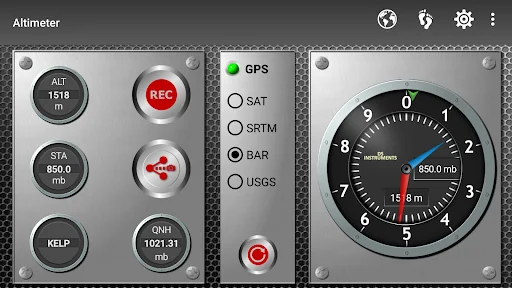
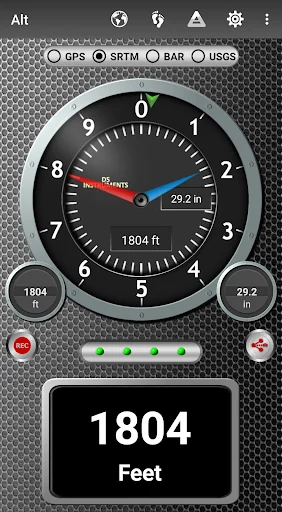
DS Altimeter is an elevation meter, elevation logger, and altitude mapper. In addition to showing and optionally tracking your altitude, the app allows you to search the altitude for other locations as well.
You can select from the best sources of elevation data, including:
<b>1. Location based altitude from NASA's Shuttle Radar Topography Mission</b>.
<b>2. Satellite based altitude (GPS altitude) corrected to height above mean sea level (AMSL)</b>.
<b>3. Get actual land survey altitude values for your location from the United States Geologic Survey - available for customers in the contiguous United States, southern Canada and northern Mexico</b>.
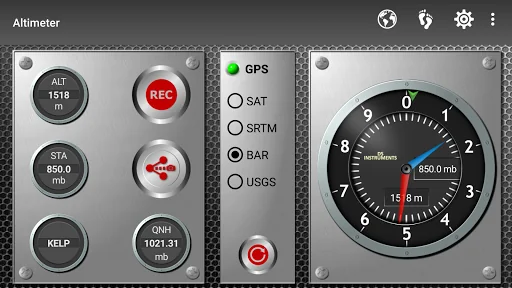
<b> 4. Devices equipped with a barometer sensor can also obtain pressure altitude which is converted to elevation above sea level. For the most precise readings, calibrate the pressure altitude</b>.
The barometric altimeter offers 4 calibration tools:
1. Calibrate to the nearest airport. Choose your airport from the app's dynamic list of nearest airfields. Airfield data is usually updated every 20 - 30 minutes.
2. Enter a QNH value.
3. Enter the benchmark (known) altitude value for your location.
4. Calibrate the barometric altimeter against the SRTM altitude map.
DS Altimeter also works offline: barometric altitude and GPS altitude corrected to elevation above sea level do not require an internet connection.
NEW IN DS ALTIMETER:
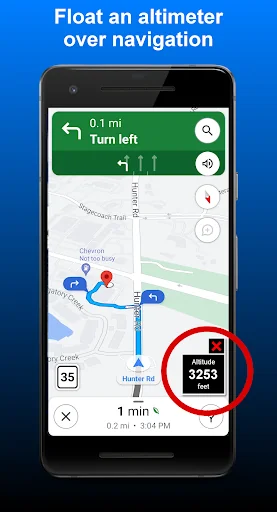
● Floating Altimeter that you can place over your navigation app or any other app.
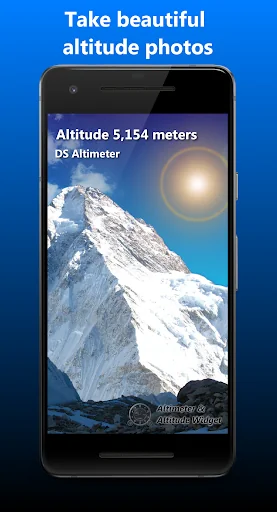
● Photo altimeter. Snap a picture of your favorite high places with the altitude shown on your photograph.
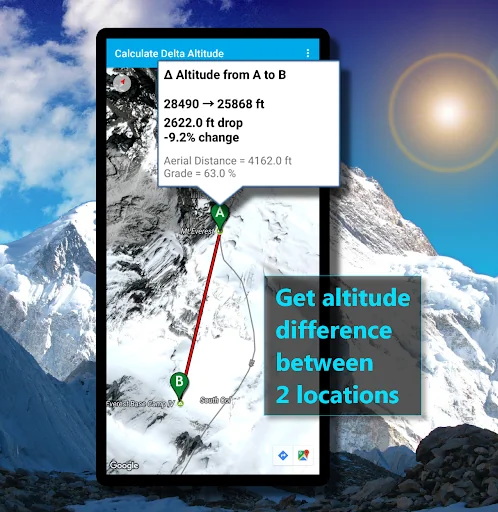
● Easily get the altitude difference and grade between two locations by tapping 2 points on a map.
● Record altitude profiles and elevation tracks for your favorite journeys to the highlands, the lowlands and everything in-between!
● <b>[SPECIAL]</b> View your altitude recordings on the included maps with all track points displayed. Tap any track point and get the altitude at that point.
● Elevation Search: Enter a place name or address and get the altitude above sea level at that location.
Upgrade the application to pro and gain access to even more features including the <b>Altimeter Widget</b>.
Going skiing? Record your ski run with DS Altimeter, then view your ski trail with its elevation points on the included maps. Minimum and maximum altitude points for your run will be clearly shown.
<b>Altitude mapping is included with DS Altimeter. Tap anywhere on a map to find the altitude and address at that location.</b>
● The application includes a detailed help section.
* The perfect altimeter for skiing, hiking, mountain climbing and other outdoor sports. Use it anytime you are curious about your elevation!
PERMISSIONS AND PRIVACY:
1. Location permission if required for GPS. GPS data is used for land survey altitude matching and to determine elevation above the Geoid (then corrected to elevation above sea level).
2. Photos/Media/Files permission is required for the screen capture procedure allowing you to share an image of your altitude result.
3. Boot permission and Wake-up phone (Wake-Lock) permission are required to periodically refresh the values on the Altimeter Widget and to reactivate the Altimeter Widget when the phone is rebooted / restarted. (Wake-Lock is required only on phones running Android Lollipop and earlier).
4. Internet and Network permissions are needed to access online land survey databases in Government facilities.
5. Billing permission is required to purchase the application for the purpose of activating the altimeter widget, remove advertising and to receive unlimited altitude-track recordings.
6. Vibrate permission - to vibrate the phone for important alerts.
You can select from the best sources of elevation data, including:
<b>1. Location based altitude from NASA's Shuttle Radar Topography Mission</b>.
<b>2. Satellite based altitude (GPS altitude) corrected to height above mean sea level (AMSL)</b>.
<b>3. Get actual land survey altitude values for your location from the United States Geologic Survey - available for customers in the contiguous United States, southern Canada and northern Mexico</b>.
<b> 4. Devices equipped with a barometer sensor can also obtain pressure altitude which is converted to elevation above sea level. For the most precise readings, calibrate the pressure altitude</b>.
The barometric altimeter offers 4 calibration tools:
1. Calibrate to the nearest airport. Choose your airport from the app's dynamic list of nearest airfields. Airfield data is usually updated every 20 - 30 minutes.
2. Enter a QNH value.
3. Enter the benchmark (known) altitude value for your location.
4. Calibrate the barometric altimeter against the SRTM altitude map.
DS Altimeter also works offline: barometric altitude and GPS altitude corrected to elevation above sea level do not require an internet connection.
NEW IN DS ALTIMETER:
● Floating Altimeter that you can place over your navigation app or any other app.
● Photo altimeter. Snap a picture of your favorite high places with the altitude shown on your photograph.
● Easily get the altitude difference and grade between two locations by tapping 2 points on a map.
● Record altitude profiles and elevation tracks for your favorite journeys to the highlands, the lowlands and everything in-between!
● <b>[SPECIAL]</b> View your altitude recordings on the included maps with all track points displayed. Tap any track point and get the altitude at that point.
● Elevation Search: Enter a place name or address and get the altitude above sea level at that location.
Upgrade the application to pro and gain access to even more features including the <b>Altimeter Widget</b>.
Going skiing? Record your ski run with DS Altimeter, then view your ski trail with its elevation points on the included maps. Minimum and maximum altitude points for your run will be clearly shown.
<b>Altitude mapping is included with DS Altimeter. Tap anywhere on a map to find the altitude and address at that location.</b>
● The application includes a detailed help section.
* The perfect altimeter for skiing, hiking, mountain climbing and other outdoor sports. Use it anytime you are curious about your elevation!
PERMISSIONS AND PRIVACY:
1. Location permission if required for GPS. GPS data is used for land survey altitude matching and to determine elevation above the Geoid (then corrected to elevation above sea level).
2. Photos/Media/Files permission is required for the screen capture procedure allowing you to share an image of your altitude result.
3. Boot permission and Wake-up phone (Wake-Lock) permission are required to periodically refresh the values on the Altimeter Widget and to reactivate the Altimeter Widget when the phone is rebooted / restarted. (Wake-Lock is required only on phones running Android Lollipop and earlier).
4. Internet and Network permissions are needed to access online land survey databases in Government facilities.
5. Billing permission is required to purchase the application for the purpose of activating the altimeter widget, remove advertising and to receive unlimited altitude-track recordings.
6. Vibrate permission - to vibrate the phone for important alerts.
Profile & Insights
Everything we know — and don't — about this app and its company.
Identification
- App name
- Altimeter & Altitude Widget
- Developer
- Disciple Skies Software
- Bundle ID
- com.discipleskies.android.altimeter
- App Store URL
- Open in App Store
- Category
- Tools
- Content rating
- Not found
- Languages
- Not found
Company
- Website
- www.discipleskies.com
- Tagline
- Not found
- Description
- Not found
- Founded
- Not found
- HQ / Address
- Not found
- Employees
- Not found
- Logo
- Not found
Revenue
- Verified revenue / mo
- Not found
- AI revenue estimate / mo
- Not found
- AI annual estimate
- Not found
- ML model estimate / mo
- $1.6K/mo
- Top-grossing rank
- Not found
- All-time revenue
- Not found
- Pricing
- $2.99 per item
Founder
- Name
- Not found
- X / Twitter
- Not found
- Not found
- GitHub
- Not found
- X followers
- Not found
- Public statements
- Not found
Funding
- Total raised
- Not found
- Last round
- Not found
- Investors
- Not found
- Crunchbase
- Not found
- AngelList
- Not found
Press & Links
- Articles found
- Not found
- Listed on
- Not found
- Blog
- Not found
- Press / News
- Not found
Contacts & Socials
- Socials
- Not found
- Not found
- Phone
- Not found
- Contact page
- Not found
- About page
- Not found
📈Ratings growth22,861 ratings+24% lifetimeShow 3-year history estimate ▾
Tracked (1 weeks) Pre-tracking estimate (37 weeks) · model-based, ±5% noise · anchored to release date and current value
Profile is built from iTunes Lookup + developer site scrape + ML revenue model. Empty fields show "Not found" — additional sources (Crunchbase, X, IndieHackers, Acquire.com) coming.
More Tools
Phone by Google
★ 4.5 · 47,248,471 reviews
Google Play services
★ 4.3 · 44,619,167 reviews
★ 4.1 · 29,135,018 reviews
Gboard - the Google Keyboard
★ 4.5 · 18,500,531 reviews
SHAREit: Transfer, Share Files
★ 4.3 · 18,247,718 reviews
gov.br
★ 4.5 · 12,551,225 reviews
MyTelkomsel – Buy Internet
★ 3.7 · 11,917,556 reviews
myIM3: Data Plan & Buy Package
★ 4.4 · 10,992,500 reviews
Browse BU Analytics
📚 All 55,000+ Books
🜍 Alchemy & Hermeticism
🔮 Magic & Ritual
🌙 Witchcraft & Paganism
⭐ Astrology & Cosmology
🃏 Divination & Tarot
📜 Tools
✡️ Kabbalah & Jewish Mysticism
🕉️ Mysticism & Contemplation
🕊️ Theosophy & Anthroposophy
🏛️ Freemasonry & Secret Societies
👻 Spiritualism & Afterlife
📖 Sacred Texts & Gnosticism
👁️ Supernatural & Occult Fiction
🧘 Spiritual Development
📚 Esoteric History & Biography
Info
About BU Analytics