63
BU Score
Solid
PrintHand Mobile Print
✍️ BU Analytics Review
“
PrintHand Mobile Print is an Android app from PrintHand in the Productivity category, currently rated 3.5★ across 33,058 ratings. Initial signal reads as mixed reviews — supporters praise core features while critics cite stability/value gaps.
Our BU Score puts it at 63 — Solid (established niche player). For a Productivity app, that means established niche player.
Track changes month-over-month in the Performance section below — live snapshot history and revenue forecast included.
creator
📊 Performance Tracking LIVE
Loading…
Rating
—
Reviews
—
Forecast Revenue / mo
—
Snapshots tracked
0
since first record
Range:
💰 Forecast Revenue / mo
MODELRevenue forecast computed from BU's 234 trigger model on each snapshot. Calibrated against ground-truth from 58 verified-revenue apps.
📈 Reviews Growth
LIVECumulative review count from first BU snapshot. Each point = a tracked update.
⭐ Rating Trend
LIVEAverage rating evolution. Updates with each new review batch.
🗓️ Snapshot Timeline
HISTORYEach bar shows a tracked update and the metric delta from the previous snapshot.
App Specs
🔐 Own this app? Claim & verify MRR →🔖 v14.9.1🔄 updated 1mo ago📂 Productivity💰 Free
📝 About this app
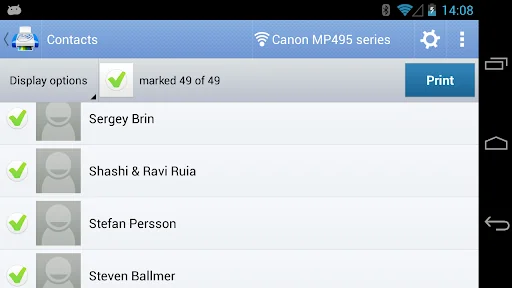
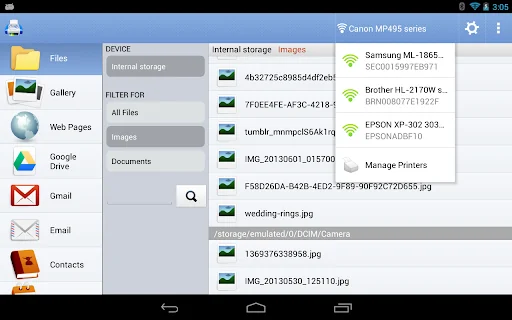
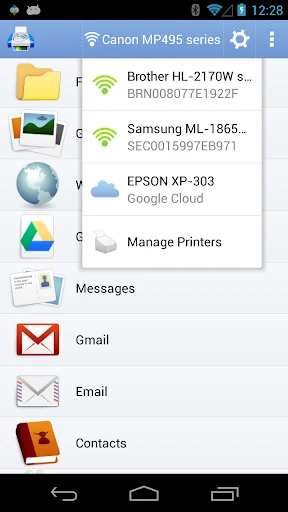
Print directly from your phone or tablet via WiFi, Bluetooth or USB cable without a computer. Direct mobile scanning is available for selected multifunction printers.
IMPORTANT: PrintHand app is NOT FREE. In order to print real pages, you’ll need to upgrade to Premium Mode by making in-app purchase.
We do recommend printing a free test page prior to upgrading.
NOTE: Unfortunately, we had to remove the SMS and Call log printing features from our app due to the update to the Permissions policy on Google Play. Dear customers, we are as much upset by this issue as you are. And we are doing our best to resolve the issue.
For this reason please stay tuned to the app updates. Once we obtain the necessary Messages and Call log permissions from Google, we are planning to bring the features back to the app.
Using PrintHand you can print the following content:
- Office documents, including MS Word, Excel, PowerPoint, PDF;
- Text files and other popular file types;
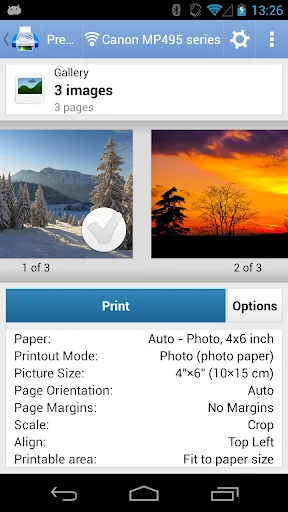
- Photos and images;
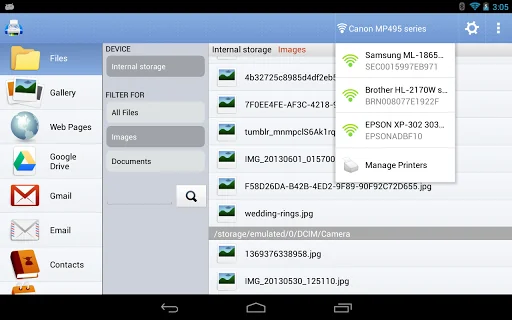
- Web pages, emails and attachments;
- Google Drive content;
- Events from Calendar app;
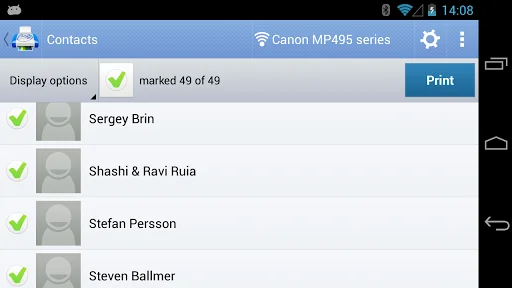
- Contacts;
- Facebook albums;
- Files from Dropbox;
- Files from Box;
- Files from OneDrive;
- Files from Creative Cloud;
- Files from SugarSync;
- Notes from Evernote;
- Content shared from other apps.
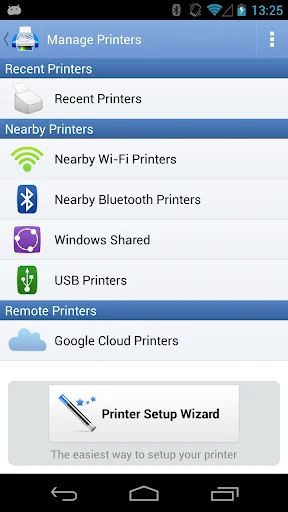
Print to Mac or Windows shared printers, Workgroup, Domain and Active Directory. Print directly via USB cable from Android 4.0 and above. Share the printer with our free software for Mac and PC from printhand.com, and print to any printer as long as you can print from the computer.
You can print via:
- Wi-Fi (using a Wi-Fi Direct printer or using a Wi-Fi router as a middle man);
- Bluetooth;
- USB if USB OTG is fully supported by your device and it has Android 4.0+ installed. Please note that some of the mobile devices are unable to communicate with a printer properly even if USB Host mode is supported. This happens due to specific electrical design of the USB port. Sadly in such case the app is not likely to work properly.
- PC or Mac (if your printer is shared using PrintHand desktop client or standard tools of your computer's OS);
Here is the list of printers supported by PrintHand app:
http://printhand.com/list_of_supported_printers.php?platform=android
Aslo here is the list of supported portable printers:
http://printhand.com/list_of_supported_portable_printers.php?platform=android
Please make sure that your printer is supported.
Our Printer Setup Wizard will detect your printers automatically and guide through the configuration process if needed. In a few clicks you’ll be able to print.
You can now scan documents directly from the selected multifunction printers to your device. This feature is available in beta mode, please contact support@printhand.com for details. List of supported devices available at http://printhand.com/list_of_supported_scanners.php.
You can try to print test page in our free app, but for unlimited printing you have to purchase premium app or make in-app purchase in free app.
Have a good print!
IMPORTANT: PrintHand app is NOT FREE. In order to print real pages, you’ll need to upgrade to Premium Mode by making in-app purchase.
We do recommend printing a free test page prior to upgrading.
NOTE: Unfortunately, we had to remove the SMS and Call log printing features from our app due to the update to the Permissions policy on Google Play. Dear customers, we are as much upset by this issue as you are. And we are doing our best to resolve the issue.
For this reason please stay tuned to the app updates. Once we obtain the necessary Messages and Call log permissions from Google, we are planning to bring the features back to the app.
Using PrintHand you can print the following content:
- Office documents, including MS Word, Excel, PowerPoint, PDF;
- Text files and other popular file types;
- Photos and images;
- Web pages, emails and attachments;
- Google Drive content;
- Events from Calendar app;
- Contacts;
- Facebook albums;
- Files from Dropbox;
- Files from Box;
- Files from OneDrive;
- Files from Creative Cloud;
- Files from SugarSync;
- Notes from Evernote;
- Content shared from other apps.
Print to Mac or Windows shared printers, Workgroup, Domain and Active Directory. Print directly via USB cable from Android 4.0 and above. Share the printer with our free software for Mac and PC from printhand.com, and print to any printer as long as you can print from the computer.
You can print via:
- Wi-Fi (using a Wi-Fi Direct printer or using a Wi-Fi router as a middle man);
- Bluetooth;
- USB if USB OTG is fully supported by your device and it has Android 4.0+ installed. Please note that some of the mobile devices are unable to communicate with a printer properly even if USB Host mode is supported. This happens due to specific electrical design of the USB port. Sadly in such case the app is not likely to work properly.
- PC or Mac (if your printer is shared using PrintHand desktop client or standard tools of your computer's OS);
Here is the list of printers supported by PrintHand app:
http://printhand.com/list_of_supported_printers.php?platform=android
Aslo here is the list of supported portable printers:
http://printhand.com/list_of_supported_portable_printers.php?platform=android
Please make sure that your printer is supported.
Our Printer Setup Wizard will detect your printers automatically and guide through the configuration process if needed. In a few clicks you’ll be able to print.
You can now scan documents directly from the selected multifunction printers to your device. This feature is available in beta mode, please contact support@printhand.com for details. List of supported devices available at http://printhand.com/list_of_supported_scanners.php.
You can try to print test page in our free app, but for unlimited printing you have to purchase premium app or make in-app purchase in free app.
Have a good print!
Profile & Insights
Everything we know — and don't — about this app and its company.
Identification
- App name
- PrintHand Mobile Print
- Developer
- PrintHand
- Bundle ID
- com.dynamixsoftware.printhand
- App Store URL
- Open in App Store
- Category
- Productivity
- Content rating
- Not found
- Languages
- Not found
Company
- Website
- Not found
- Tagline
- Not found
- Description
- Not found
- Founded
- Not found
- HQ / Address
- Not found
- Employees
- Not found
- Logo
- Not found
Revenue
- Verified revenue / mo
- Not found
- AI revenue estimate / mo
- Not found
- AI annual estimate
- Not found
- ML model estimate / mo
- $1.4K/mo
- Top-grossing rank
- Not found
- All-time revenue
- Not found
- Pricing
- Not found
Founder
- Name
- Not found
- X / Twitter
- Not found
- Not found
- GitHub
- Not found
- X followers
- Not found
- Public statements
- Not found
Funding
- Total raised
- Not found
- Last round
- Not found
- Investors
- Not found
- Crunchbase
- Not found
- AngelList
- Not found
Press & Links
- Articles found
- Not found
- Listed on
- Not found
- Blog
- Not found
- Press / News
- Not found
Contacts & Socials
- Socials
- Not found
- Not found
- Phone
- Not found
- Contact page
- Not found
- About page
- Not found
Profile is built from iTunes Lookup + developer site scrape + ML revenue model. Empty fields show "Not found" — additional sources (Crunchbase, X, IndieHackers, Acquire.com) coming.
More by PrintHand
View all →More Productivity
Microsoft Outlook
★ 4.8 · 8,891,395 reviews
Google Drive – online backup
★ 4.8 · 7,526,498 reviews
ChatGPT
★ 4.8 · 7,136,919 reviews
Yahoo Mail – Alles im Blick
★ 4.7 · 4,623,459 reviews
HP
★ 4.6 · 4,011,497 reviews
Google Docs
★ 4.8 · 3,078,214 reviews
Microsoft Word
★ 4.7 · 2,843,856 reviews
Gmail – E-Mail von Google
★ 4.7 · 2,406,337 reviews
Browse BU Analytics
📚 All 55,000+ Books
🜍 Alchemy & Hermeticism
🔮 Magic & Ritual
🌙 Witchcraft & Paganism
⭐ Astrology & Cosmology
🃏 Divination & Tarot
📜 Productivity
✡️ Kabbalah & Jewish Mysticism
🕉️ Mysticism & Contemplation
🕊️ Theosophy & Anthroposophy
🏛️ Freemasonry & Secret Societies
👻 Spiritualism & Afterlife
📖 Sacred Texts & Gnosticism
👁️ Supernatural & Occult Fiction
🧘 Spiritual Development
📚 Esoteric History & Biography
Info
About BU Analytics