77
BU Score
Strong
AppLock
✍️ BU Analytics Review
“
AppLock is an Android app from KewlApps in the Tools category, currently rated 4.4★ across 279,171 ratings. Initial signal reads as largely positive sentiment, users highlighting consistency and feature depth.
Our BU Score puts it at 77 — Strong (healthy traction). For a Tools app, that means healthy traction.
Track changes month-over-month in the Performance section below — live snapshot history and revenue forecast included.
creator
📊 Performance Tracking LIVE
Loading…
Rating
—
Reviews
—
Forecast Revenue / mo
—
Snapshots tracked
0
since first record
Range:
💰 Forecast Revenue / mo
MODELRevenue forecast computed from BU's 234 trigger model on each snapshot. Calibrated against ground-truth from 58 verified-revenue apps.
🔬Forecast Breakdown — Why This Estimate?Top 3 of 3 triggers
Our ML model uses 200+ signals from public data. These are the most influential for this app:
| High install base (279,171 ratings)METRIC | +$12,000 | |
| Good rating (4.4★)METRIC | +$800 | |
| Ad-supported / freemiumMETRIC | +$600 |
METRIC = structural app data · REVIEW = mined from user reviews · ✓ VERIFIED = Stripe-verified anchor (TrustMRR)
📈 Reviews Growth
LIVECumulative review count from first BU snapshot. Each point = a tracked update.
⭐ Rating Trend
LIVEAverage rating evolution. Updates with each new review batch.
🗓️ Snapshot Timeline
HISTORYEach bar shows a tracked update and the metric delta from the previous snapshot.
App Specs
🔐 Own this app? Claim & verify MRR →🔖 v3.2.19🔄 updated 1mo ago📂 Tools💰 Free
📝 About this app
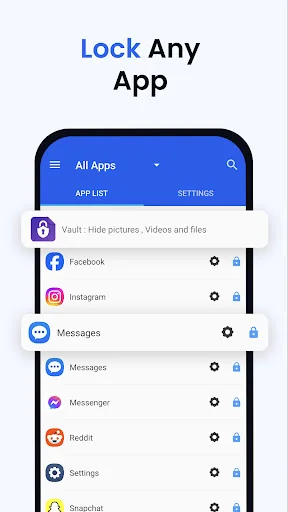
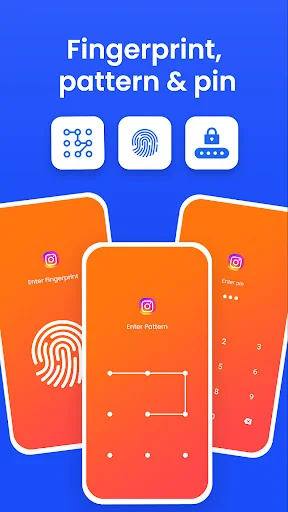
AppLock allows you to lock apps and protect your apps using Pattern , Pin , Fingerprint and crash screen with many other options.
---- Features -----
▶ Lock Apps / App Locker
AppLock allows you to lock apps like gallery , message apps , social apps and email apps with fingerprint , pin , pattern and crash screen.
▶ Capture Intruder Picture
If someone tries to open locked apps with wrong password , AppLock will capture the pictuer of intruder from front camera and show you when you open AppLock.
▶ Lock Recent Apps
You can lock recent apps page so no one can see the content of recently used apps.
▶ Custom Settings
Use separate combination of locking methods with different pin or pattern for a specific apps.
▶ Crash screen
set crash screen for locked app , so no one can know that if an app is locked.
▶ Fingerprint Support
Use fingerprint as secondary , or use only fingerprint to un-lock apps.
▶ Improved Lock Engine
AppLock use two locking engines , default engine is fast and the "Improved Lock Engine" is battery efficient with more features that does not drain your battery.
▶ Turn Off AppLock
you can turn off AppLock completely , just go to app settings and turn off the app.
▶ Lock Timeout
you can to re-lock apps after some time [1-60] minuets , immediately or after screen off.
▶ Simple and Beautiful UI
Beautiful and simple UI so you can perform any task easily.
▶ Lock Screen Theme
lock screen changes color according to the app that you locked , every time when lock screen appears you will experience AppLock differently.
▶ Prevent Uninstall
To protect AppLock from uninstall you can go to AppLock setting and press "Prevent Force Close/Uninstall".
<b>FAQs</b>
<b>----------</b>
<b> Q 2: How can I create different pin & pattern for each application?</b>
A: Select the app that you want to lock from App list, Lock the app and then click on Custom, Then enable "Custom Settings" and then change pin, and pattern.
<b> Q 3: How can I prevent someone from uninstalling my AppLock?</b>
A: Go to settings and click on “Prevent Force Close/Uninstall”. Then Lock your mobile Settings.
<b> Q 4: Will AppLock works if I restart my Mobile?</b>
A: Yes it will start working, and your locked apps will be protected.
<b> Q 5: How can I check which apps are locked?</b>
A: In the top right corner of AppLock From the drop-down menu select “Locked Apps”.
<b> Q 6: What does “Lock recent apps” do?</b>
A: This option prevents someone from seeing your recent Opened Apps.
<b> Q 7: I installed AppLock, but there is no option to lock my apps with the fingerprint?</b>
A: It depends on your mobile if your mobile has a fingerprint scanner and Android version 6.0 (Marshmallow) then finger print app lock method will also work.
<b> Q 8: In my Huawei device when I open AppLock it again asks to On the Option of AppLock service?</b>
A: Because you have not added AppLock in your Protected Apps list of your Huawei Mobile.
<b> Q 9: What is "Crash Screen"?</b>
A: If you enable Crash screen for some application it will show a window with a message of “App Crashed” after long pressing "OK" you can go to lock screen.
<b> Q 10: How to enable Crash screen option in AppLock?</b>
A: In, App List lock your desired app Click on “custom” and enable custom settings, and then enable “Crash.”
<b> Q 15: How to uninstall AppLock?</b>
A: First Remove AppLock from Device Admin from mobile settings or AppLock settings and then simply uninstall it.
<b>Permissions:</b>
• Accessibility Service: This app uses Accessibility services to enable "Improved Lock Engine" and stop battery drain.
• Draw Over Other Apps: AppLock uses this permission to draw lock screen on top of your locked app.
• Usage Access: AppLock uses this permission to detect if a lock app is opened.
• This app uses the Device Administrator permission : We use this permission to prevent other users from uninstalling this app so your locked content can be fully secured.
---- Features -----
▶ Lock Apps / App Locker
AppLock allows you to lock apps like gallery , message apps , social apps and email apps with fingerprint , pin , pattern and crash screen.
▶ Capture Intruder Picture
If someone tries to open locked apps with wrong password , AppLock will capture the pictuer of intruder from front camera and show you when you open AppLock.
▶ Lock Recent Apps
You can lock recent apps page so no one can see the content of recently used apps.
▶ Custom Settings
Use separate combination of locking methods with different pin or pattern for a specific apps.
▶ Crash screen
set crash screen for locked app , so no one can know that if an app is locked.
▶ Fingerprint Support
Use fingerprint as secondary , or use only fingerprint to un-lock apps.
▶ Improved Lock Engine
AppLock use two locking engines , default engine is fast and the "Improved Lock Engine" is battery efficient with more features that does not drain your battery.
▶ Turn Off AppLock
you can turn off AppLock completely , just go to app settings and turn off the app.
▶ Lock Timeout
you can to re-lock apps after some time [1-60] minuets , immediately or after screen off.
▶ Simple and Beautiful UI
Beautiful and simple UI so you can perform any task easily.
▶ Lock Screen Theme
lock screen changes color according to the app that you locked , every time when lock screen appears you will experience AppLock differently.
▶ Prevent Uninstall
To protect AppLock from uninstall you can go to AppLock setting and press "Prevent Force Close/Uninstall".
<b>FAQs</b>
<b>----------</b>
<b> Q 2: How can I create different pin & pattern for each application?</b>
A: Select the app that you want to lock from App list, Lock the app and then click on Custom, Then enable "Custom Settings" and then change pin, and pattern.
<b> Q 3: How can I prevent someone from uninstalling my AppLock?</b>
A: Go to settings and click on “Prevent Force Close/Uninstall”. Then Lock your mobile Settings.
<b> Q 4: Will AppLock works if I restart my Mobile?</b>
A: Yes it will start working, and your locked apps will be protected.
<b> Q 5: How can I check which apps are locked?</b>
A: In the top right corner of AppLock From the drop-down menu select “Locked Apps”.
<b> Q 6: What does “Lock recent apps” do?</b>
A: This option prevents someone from seeing your recent Opened Apps.
<b> Q 7: I installed AppLock, but there is no option to lock my apps with the fingerprint?</b>
A: It depends on your mobile if your mobile has a fingerprint scanner and Android version 6.0 (Marshmallow) then finger print app lock method will also work.
<b> Q 8: In my Huawei device when I open AppLock it again asks to On the Option of AppLock service?</b>
A: Because you have not added AppLock in your Protected Apps list of your Huawei Mobile.
<b> Q 9: What is "Crash Screen"?</b>
A: If you enable Crash screen for some application it will show a window with a message of “App Crashed” after long pressing "OK" you can go to lock screen.
<b> Q 10: How to enable Crash screen option in AppLock?</b>
A: In, App List lock your desired app Click on “custom” and enable custom settings, and then enable “Crash.”
<b> Q 15: How to uninstall AppLock?</b>
A: First Remove AppLock from Device Admin from mobile settings or AppLock settings and then simply uninstall it.
<b>Permissions:</b>
• Accessibility Service: This app uses Accessibility services to enable "Improved Lock Engine" and stop battery drain.
• Draw Over Other Apps: AppLock uses this permission to draw lock screen on top of your locked app.
• Usage Access: AppLock uses this permission to detect if a lock app is opened.
• This app uses the Device Administrator permission : We use this permission to prevent other users from uninstalling this app so your locked content can be fully secured.
Profile & Insights
Everything we know — and don't — about this app and its company.
Identification
- App name
- AppLock
- Developer
- KewlApps
- Bundle ID
- com.gamemalt.applocker
- App Store URL
- Open in App Store
- Category
- Tools
- Content rating
- Not found
- Languages
- Not found
Company
- Website
- Not found
- Tagline
- Not found
- Description
- Not found
- Founded
- Not found
- HQ / Address
- Not found
- Employees
- Not found
- Logo
- Not found
Revenue
- Verified revenue / mo
- Not found
- AI revenue estimate / mo
- Not found
- AI annual estimate
- Not found
- ML model estimate / mo
- $3.3K/mo
- Top-grossing rank
- Not found
- All-time revenue
- Not found
- Pricing
- Not found
Founder
- Name
- Not found
- X / Twitter
- Not found
- Not found
- GitHub
- Not found
- X followers
- Not found
- Public statements
- Not found
Funding
- Total raised
- Not found
- Last round
- Not found
- Investors
- Not found
- Crunchbase
- Not found
- AngelList
- Not found
Press & Links
- Articles found
- Not found
- Listed on
- Not found
- Blog
- Not found
- Press / News
- Not found
Contacts & Socials
- Socials
- Not found
- Not found
- Phone
- Not found
- Contact page
- Not found
- About page
- Not found
Profile is built from iTunes Lookup + developer site scrape + ML revenue model. Empty fields show "Not found" — additional sources (Crunchbase, X, IndieHackers, Acquire.com) coming.
More by KewlApps
View all →App Lock - Lock Apps
★ 4.4 · 37,940 reviews
Vault, App Lock: Security Plus
★ 4.5 · 17,236 reviews
Easy Vault : Hide Pictures, Videos, Gallery, Files
★ 4.2 · 5,474 reviews
Lower Brightness Blue Light Filter - Light Delight
★ 4.2 · 1,451 reviews
Urdu Keyboard Fast English & Urdu Typing - اردو
★ 4.2 · 1,269 reviews
xTorrent -Torrent Video Player
★ 3.6 · 552 reviews
AppLock Pro
★ 3.1 · 527 reviews
TorrentWiz -Torrent Downloader
★ 4.0 · 55 reviews
More Tools
Phone by Google
★ 4.5 · 47,248,471 reviews
Google Play services
★ 4.3 · 44,619,167 reviews
★ 4.1 · 29,135,018 reviews
Gboard - the Google Keyboard
★ 4.5 · 18,500,531 reviews
SHAREit: Transfer, Share Files
★ 4.3 · 18,247,718 reviews
gov.br
★ 4.5 · 12,551,225 reviews
MyTelkomsel – Buy Internet
★ 3.7 · 11,917,556 reviews
myIM3: Data Plan & Buy Package
★ 4.4 · 10,992,500 reviews
Browse BU Analytics
📚 All 55,000+ Books
🜍 Alchemy & Hermeticism
🔮 Magic & Ritual
🌙 Witchcraft & Paganism
⭐ Astrology & Cosmology
🃏 Divination & Tarot
📜 Tools
✡️ Kabbalah & Jewish Mysticism
🕉️ Mysticism & Contemplation
🕊️ Theosophy & Anthroposophy
🏛️ Freemasonry & Secret Societies
👻 Spiritualism & Afterlife
📖 Sacred Texts & Gnosticism
👁️ Supernatural & Occult Fiction
🧘 Spiritual Development
📚 Esoteric History & Biography
Info
About BU Analytics