61
BU Score
Solid
SMS forwarder
✍️ BU Analytics Review
“
SMS forwarder is an Android app from GawkAr in the Tools category, currently rated 4.1★ across 9,194 ratings. Initial signal reads as mixed reviews — supporters praise core features while critics cite stability/value gaps.
Our BU Score puts it at 61 — Solid (established niche player). For a Tools app, that means established niche player.
Track changes month-over-month in the Performance section below — live snapshot history and revenue forecast included.
📊 Performance Tracking LIVE
Loading…
Rating
—
Reviews
—
Forecast Revenue / mo
—
Snapshots tracked
0
since first record
Range:
💰 Forecast Revenue / mo
MODELRevenue forecast computed from BU's 234 trigger model on each snapshot. Calibrated against ground-truth from 58 verified-revenue apps.
🔬Forecast Breakdown — Why This Estimate?Top 4 of 4 triggers
Our ML model uses 200+ signals from public data. These are the most influential for this app:
| Low install base (9,194 ratings)METRIC | +$1,500 | |
| Good rating (4.1★)METRIC | +$800 | |
| Established app (7y old)METRIC | +$800 | |
| Ad-supported / freemiumMETRIC | +$600 |
METRIC = structural app data · REVIEW = mined from user reviews · ✓ VERIFIED = Stripe-verified anchor (TrustMRR)
📈 Reviews Growth
LIVECumulative review count from first BU snapshot. Each point = a tracked update.
⭐ Rating Trend
LIVEAverage rating evolution. Updates with each new review batch.
🗓️ Snapshot Timeline
HISTORYEach bar shows a tracked update and the metric delta from the previous snapshot.
App Specs
🔐 Own this app? Claim & verify MRR →🔖 v10.9.4🔄 updated 4d ago📂 Tools💰 Free💎 IAP $3.59 - $299.00 per item🚀 Launched 2018 (7y old)
📝 About this app
<i>SMS Forwarding - Device Synchronization - SMS/MMS/Notifications to other devices</i>
Need to forward your SMS messages to another device, email, Telegram, or elsewhere? This app will help you do it as easily as possible.
Modern design, numerous flexible settings, and active technical support that cares about users. Thousands of active users. Stability thanks to multiple servers worldwide.
Subscription model. ALL users have access to one simple filter (without advanced or flexible settings). NEW users receive 7 days of free access to all app features so you can try the app and decide if the premium version is right for you.
<b>Brief instructions on how to get started:</b>
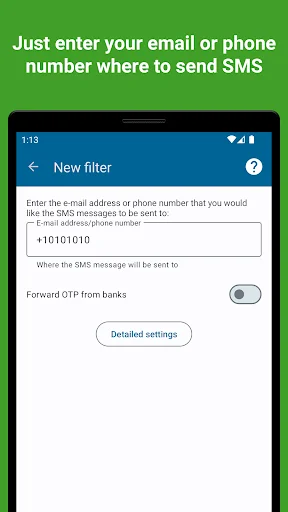
1. Install the app and complete the initial app setup (don't skip the steps)
2. Register an account, confirm your e-mail and log in (Or test it without registration)
3. In the window that appears, enter the phone number or e-mail where you want to forward your SMS
For more detailed settings, check out our help site (https://sms-forwarder.com/support/) and the application interface
<h1>What can an app do?</h1>
<u><b>What can an application redirect:</b></u>
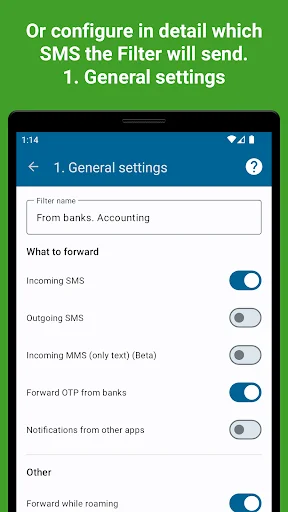
— <b>SMS.</b> Select whether incoming or outgoing SMS messages will be forwarded or both
— <b>Notifications.</b> All notifications or just some apps
— <b>MMS</b>
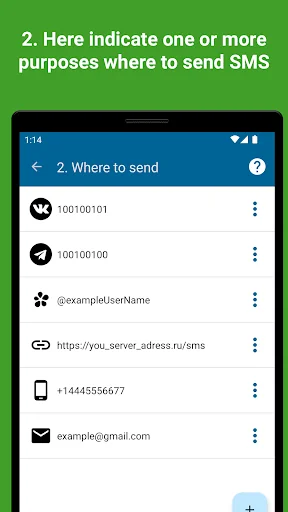
<u><b>Where you can send messages:</b></u>
— <b>To another phone number.</b> Forwarding is carried out through your phone, be careful, your mobile operator may charge a fee for sending SMS
— <b>To e-mail.</b> Several options are available for sending SMS to PC mail: via our server, via GMail API, via any SMTP server
— <b>In Telegram.</b> You can send SMS and other messages to private messages or group chats in telegram through our bot or your own (bypassing our server).
— <b>To any URL.</b> Send message data to your personal server according to the data format. You can do anything with these messages on your server
— <b>In Vkontakte.</b> Redirect messages to private messages or group conversations
— <b>MAX</b>
<i>Please contact us if you require other delivery locations</i>
<u><b>Application Features:</b></u>
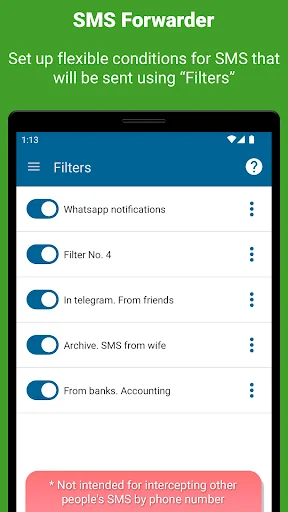
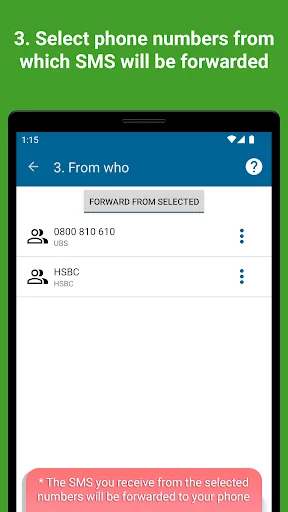
— Forward SMS from specific contacts/applications. You can configure from which of your contacts SMS will be forwarded or from which applications notifications will be redirected.
— Set text rules. Define messages containing or not containing which words/phrases will be automatically sent
— You can set RegEx (special) rules to change the text of messages before forwarding them to a PC or elsewhere
— Roaming. Specify whether the application should work in roaming to save traffic
— Support for two SIM cards. Choose whether to send SMS from only one SIM card or from both, if they are installed in the phone
— Message templates. You can set the look that suits you how the redirected messages will look. Specify additional data such as sender number, departure time, message type and so on
— OTP. The application provides a separate option to enable/disable OTP forwarding from banks
— Password protection. You can set a password that will not allow other people to enter the application and view its settings
<h1>Is the application paid?</h1>
<b>Free version</b>
The application is distributed according to the freemium model. You will have access to a limited free version that allows you to create one simple filter (no advanced settings)
<b>Trial version</b>
All new users get a week's access to the premium version. You will not be charged at the end of this period. You decide whether to purchase a subscription or not.
<b>Premium</b>
You can subscribe for a month or a year (with a discount) to access all the features of the app.
<b>The most important permissions required by the app</b>
RECEIVE_SMS and READ_SMS - to access SMS/main application function
RECEIVE_WAP_PUSH - to access WAP PUSH messages
SEND_SMS - to send SMS to phone
LISTENER_NOTIFICATION - to access notifications
Need to forward your SMS messages to another device, email, Telegram, or elsewhere? This app will help you do it as easily as possible.
Modern design, numerous flexible settings, and active technical support that cares about users. Thousands of active users. Stability thanks to multiple servers worldwide.
Subscription model. ALL users have access to one simple filter (without advanced or flexible settings). NEW users receive 7 days of free access to all app features so you can try the app and decide if the premium version is right for you.
<b>Brief instructions on how to get started:</b>
1. Install the app and complete the initial app setup (don't skip the steps)
2. Register an account, confirm your e-mail and log in (Or test it without registration)
3. In the window that appears, enter the phone number or e-mail where you want to forward your SMS
For more detailed settings, check out our help site (https://sms-forwarder.com/support/) and the application interface
<h1>What can an app do?</h1>
<u><b>What can an application redirect:</b></u>
— <b>SMS.</b> Select whether incoming or outgoing SMS messages will be forwarded or both
— <b>Notifications.</b> All notifications or just some apps
— <b>MMS</b>
<u><b>Where you can send messages:</b></u>
— <b>To another phone number.</b> Forwarding is carried out through your phone, be careful, your mobile operator may charge a fee for sending SMS
— <b>To e-mail.</b> Several options are available for sending SMS to PC mail: via our server, via GMail API, via any SMTP server
— <b>In Telegram.</b> You can send SMS and other messages to private messages or group chats in telegram through our bot or your own (bypassing our server).
— <b>To any URL.</b> Send message data to your personal server according to the data format. You can do anything with these messages on your server
— <b>In Vkontakte.</b> Redirect messages to private messages or group conversations
— <b>MAX</b>
<i>Please contact us if you require other delivery locations</i>
<u><b>Application Features:</b></u>
— Forward SMS from specific contacts/applications. You can configure from which of your contacts SMS will be forwarded or from which applications notifications will be redirected.
— Set text rules. Define messages containing or not containing which words/phrases will be automatically sent
— You can set RegEx (special) rules to change the text of messages before forwarding them to a PC or elsewhere
— Roaming. Specify whether the application should work in roaming to save traffic
— Support for two SIM cards. Choose whether to send SMS from only one SIM card or from both, if they are installed in the phone
— Message templates. You can set the look that suits you how the redirected messages will look. Specify additional data such as sender number, departure time, message type and so on
— OTP. The application provides a separate option to enable/disable OTP forwarding from banks
— Password protection. You can set a password that will not allow other people to enter the application and view its settings
<h1>Is the application paid?</h1>
<b>Free version</b>
The application is distributed according to the freemium model. You will have access to a limited free version that allows you to create one simple filter (no advanced settings)
<b>Trial version</b>
All new users get a week's access to the premium version. You will not be charged at the end of this period. You decide whether to purchase a subscription or not.
<b>Premium</b>
You can subscribe for a month or a year (with a discount) to access all the features of the app.
<b>The most important permissions required by the app</b>
RECEIVE_SMS and READ_SMS - to access SMS/main application function
RECEIVE_WAP_PUSH - to access WAP PUSH messages
SEND_SMS - to send SMS to phone
LISTENER_NOTIFICATION - to access notifications
Profile & Insights
Everything we know — and don't — about this app and its company.
Identification
- App name
- SMS forwarder
- Developer
- GawkAr
- Bundle ID
- com.gawk.smsforwarder
- App Store URL
- Open in App Store
- Category
- Tools
- Content rating
- Not found
- Languages
- Not found
Company
- Website
- sms-forwarder.com
- Tagline
- Not found
- Description
- Not found
- Founded
- Not found
- HQ / Address
- Not found
- Employees
- Not found
- Logo
- Not found
Revenue
- Verified revenue / mo
- Not found
- AI revenue estimate / mo
- Not found
- AI annual estimate
- Not found
- ML model estimate / mo
- $858/mo
- Top-grossing rank
- Not found
- All-time revenue
- Not found
- Pricing
- $3.59 - $299.00 per item
Founder
- Name
- Not found
- X / Twitter
- Not found
- Not found
- GitHub
- Not found
- X followers
- Not found
- Public statements
- Not found
Funding
- Total raised
- Not found
- Last round
- Not found
- Investors
- Not found
- Crunchbase
- Not found
- AngelList
- Not found
Press & Links
- Articles found
- Not found
- Listed on
- Not found
- Blog
- Not found
- Press / News
- Not found
Contacts & Socials
- Socials
- Not found
- Not found
- Phone
- Not found
- Contact page
- Not found
- About page
- Not found
📈Ratings growth9,194 ratings+57% lifetimeShow 3-year history estimate ▾
Tracked (1 weeks) Pre-tracking estimate (37 weeks) · model-based, ±5% noise · anchored to release date and current value
Profile is built from iTunes Lookup + developer site scrape + ML revenue model. Empty fields show "Not found" — additional sources (Crunchbase, X, IndieHackers, Acquire.com) coming.
More by GawkAr
View all →More Tools
Phone by Google
★ 4.5 · 47,248,471 reviews
Google Play services
★ 4.3 · 44,619,167 reviews
★ 4.1 · 29,135,018 reviews
Gboard - the Google Keyboard
★ 4.5 · 18,500,531 reviews
SHAREit: Transfer, Share Files
★ 4.3 · 18,247,718 reviews
gov.br
★ 4.5 · 12,551,225 reviews
MyTelkomsel – Buy Internet
★ 3.7 · 11,917,556 reviews
myIM3: Data Plan & Buy Package
★ 4.4 · 10,992,500 reviews
Browse BU Analytics
📚 All 55,000+ Books
🜍 Alchemy & Hermeticism
🔮 Magic & Ritual
🌙 Witchcraft & Paganism
⭐ Astrology & Cosmology
🃏 Divination & Tarot
📜 Tools
✡️ Kabbalah & Jewish Mysticism
🕉️ Mysticism & Contemplation
🕊️ Theosophy & Anthroposophy
🏛️ Freemasonry & Secret Societies
👻 Spiritualism & Afterlife
📖 Sacred Texts & Gnosticism
👁️ Supernatural & Occult Fiction
🧘 Spiritual Development
📚 Esoteric History & Biography
Info
About BU Analytics