71
BU Score
Strong
FitNotes - Gym Workout Log
✍️ bumetric analysis
“
FitNotes - Gym Workout Log is an Android app from James Gay in the Health & Fitness category, currently rated 4.8★ across 31,053 ratings. Initial signal reads as largely positive sentiment, users highlighting consistency and feature depth.
Our BU Score puts it at 71: Strong (healthy traction). For a Health & Fitness app, that means healthy traction.
Track changes month-over-month in the Performance section below: live snapshot history and revenue forecast included.
📊 Performance Tracking LIVE
Loading…
Rating
—
Reviews
—
Forecast Revenue / mo
—
Snapshots tracked
0
since first record
Range:
💰 Forecast Revenue / mo
MODELRevenue forecast computed from BU's 234 trigger model on each snapshot. Calibrated against ground-truth from 58 verified-revenue apps.
🔬Forecast Breakdown — Why This Estimate?Top 4 of 4 triggers
Our ML model uses 200+ signals from public data. These are the most influential for this app:
| Mid install base (31,053 ratings)METRIC | +$5,500 | |
| Excellent rating (4.8★)METRIC | +$2,200 | |
| Mature app (13y old)METRIC | +$1,500 | |
| Ad-supported / freemiumMETRIC | +$600 |
METRIC = structural app data · REVIEW = mined from user reviews · ✓ VERIFIED = Stripe-verified anchor (TrustMRR)
📈 Reviews Growth
LIVECumulative review count from first BU snapshot. Each point = a tracked update.
⭐ Rating Trend
LIVEAverage rating evolution. Updates with each new review batch.
🗓️ Snapshot Timeline
HISTORYEach bar shows a tracked update and the metric delta from the previous snapshot.
App Specs
🔐 Own this app? Claim & verify MRR →🔖 v25.1🔄 updated 6mo ago📂 Health & Fitness💰 Free🚀 Launched 2013 (13y old)
📝 About this app
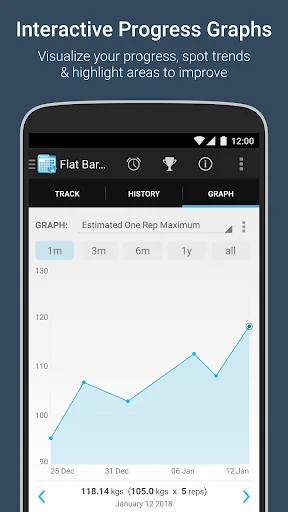
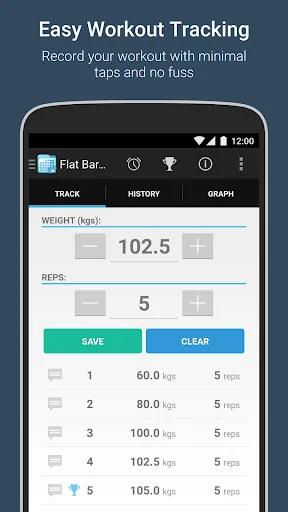
FitNotes is a workout tracker with a focus on simplicity and clean design.
<b>Ad Free!</b>
<b>Workout Log</b>
- View and navigate daily workout logs quickly by swiping between them
- Navigate to a specific day using the inbuilt calendar
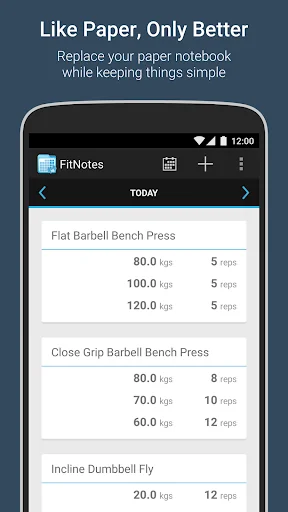
- Add an exercise to the workout log and record sets of weight and reps or distance and time
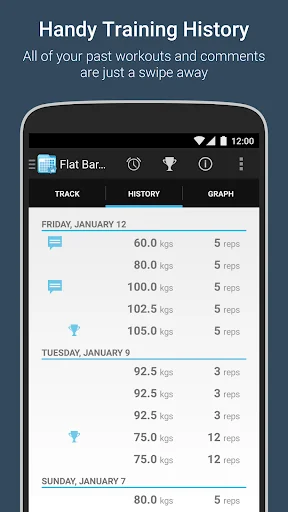
- Swipe across when recording sets to view your workout history with the exercise
- Attach comments/notes to sets
- Rest timer with sound and vibration options
- Re-order exercises you've added to a workout log (long press an exercise card to initiate 'edit mode' and then press and drag the blue drag icon at the top right of the card)
<b>Exercise Database</b>
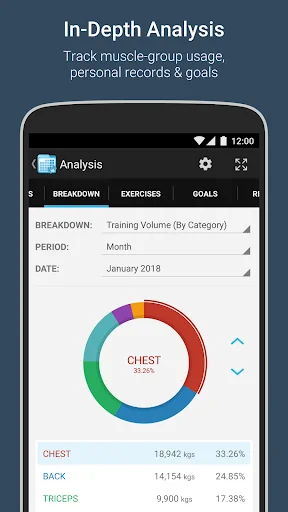
- Includes a default selection of categories (Chest, Back, Legs, etc)
- Each category contains a small default list of exercises
- Create custom categories to better suit your training program
- e.g. Olympic Lifts, Plyometrics, Ab Training, etc
- Add new exercises quickly using 'Save and New' feature
- Two exercise types: Resistance and Cardio
- Resistance - record training in weight and reps
- Cardio - record training in distance and time
<b>Routines</b>
- Create a routine to provide quick access to your most commonly used exercises
- Assign exercises to a particular day within the routine
- Name a day whatever you want (Monday, Chest Day, Workout A, etc)
- Select a single exercise from a day within the routine to add it to the training log
or hit 'Log All' to add an empty set for each exercise which can then be filled in later
- Create as many routines as you want and switch between them using dropdown list
- Remembers which routine you selected last
<b>Calendar</b>
- Dates on which you have recorded training logs are highlighted
- Tap a day in the calendar to display a popup listing the exercises performed on that day
- Navigate to a specific day's training log by selecting it in the calendar and hitting 'Go!'
- Filter which days are highlighted in the calendar
- e.g.
Highlight days where I did bench press and lifted more than 80kg for at least 5 reps
Highlight days where I ran outdoors and travelled more than 3 miles in less than 20 minutesr
<b>Backup/Restore</b>
- Backup your data to device storage or an online cloud service (DropBox or Google Drive - please ensure you have the corresponding apps installed on your device if you would like to backup to one of these services)
<b>Export</b>
- Export your training logs in CSV format so they can be analyzed in your spreadsheet application of choice
<b>Permissions</b>
- Modify or delete the contents of your USB storage: Required in order to be able to backup/export data to your device storage or sd card
- Control vibration: Used if you have selected the 'Vibrate' option for the rest timer
- Prevent device from sleeping: Required in order to ensure the rest timer continues to count down when the screen is off
If you have any feedback then please email FitNotesApp@gmail.com
<b>Ad Free!</b>
<b>Workout Log</b>
- View and navigate daily workout logs quickly by swiping between them
- Navigate to a specific day using the inbuilt calendar
- Add an exercise to the workout log and record sets of weight and reps or distance and time
- Swipe across when recording sets to view your workout history with the exercise
- Attach comments/notes to sets
- Rest timer with sound and vibration options
- Re-order exercises you've added to a workout log (long press an exercise card to initiate 'edit mode' and then press and drag the blue drag icon at the top right of the card)
<b>Exercise Database</b>
- Includes a default selection of categories (Chest, Back, Legs, etc)
- Each category contains a small default list of exercises
- Create custom categories to better suit your training program
- e.g. Olympic Lifts, Plyometrics, Ab Training, etc
- Add new exercises quickly using 'Save and New' feature
- Two exercise types: Resistance and Cardio
- Resistance - record training in weight and reps
- Cardio - record training in distance and time
<b>Routines</b>
- Create a routine to provide quick access to your most commonly used exercises
- Assign exercises to a particular day within the routine
- Name a day whatever you want (Monday, Chest Day, Workout A, etc)
- Select a single exercise from a day within the routine to add it to the training log
or hit 'Log All' to add an empty set for each exercise which can then be filled in later
- Create as many routines as you want and switch between them using dropdown list
- Remembers which routine you selected last
<b>Calendar</b>
- Dates on which you have recorded training logs are highlighted
- Tap a day in the calendar to display a popup listing the exercises performed on that day
- Navigate to a specific day's training log by selecting it in the calendar and hitting 'Go!'
- Filter which days are highlighted in the calendar
- e.g.
Highlight days where I did bench press and lifted more than 80kg for at least 5 reps
Highlight days where I ran outdoors and travelled more than 3 miles in less than 20 minutesr
<b>Backup/Restore</b>
- Backup your data to device storage or an online cloud service (DropBox or Google Drive - please ensure you have the corresponding apps installed on your device if you would like to backup to one of these services)
<b>Export</b>
- Export your training logs in CSV format so they can be analyzed in your spreadsheet application of choice
<b>Permissions</b>
- Modify or delete the contents of your USB storage: Required in order to be able to backup/export data to your device storage or sd card
- Control vibration: Used if you have selected the 'Vibrate' option for the rest timer
- Prevent device from sleeping: Required in order to ensure the rest timer continues to count down when the screen is off
If you have any feedback then please email FitNotesApp@gmail.com
Profile & Insights
Everything we know — and don't — about this app and its company.
Identification
- App name
- FitNotes - Gym Workout Log
- Developer
- James Gay
- Bundle ID
- com.github.jamesgay.fitnotes
- App Store URL
- Open in App Store
- Category
- Health & Fitness
- Content rating
- Not found
- Languages
- Not found
Company
- Website
- Not found
- Tagline
- Not found
- Description
- Not found
- Founded
- Not found
- HQ / Address
- Not found
- Employees
- Not found
- Logo
- Not found
Revenue
- Verified revenue / mo
- Not found
- AI revenue estimate / mo
- Not found
- AI annual estimate
- Not found
- ML model estimate / mo
- $992/mo
- Top-grossing rank
- Not found
- All-time revenue
- Not found
- Pricing
- Not found
Founder
- Name
- Not found
- X / Twitter
- Not found
- Not found
- GitHub
- Not found
- X followers
- Not found
- Public statements
- Not found
Funding
- Total raised
- Not found
- Last round
- Not found
- Investors
- Not found
- Crunchbase
- Not found
- AngelList
- Not found
Press & Links
- Articles found
- Not found
- Listed on
- Not found
- Blog
- Not found
- Press / News
- Not found
Contacts & Socials
- Socials
- Not found
- Not found
- Phone
- Not found
- Contact page
- Not found
- About page
- Not found
📈Ratings growth31,053 ratings+13% lifetimeShow 3-year history estimate ▾
Tracked (1 weeks) Pre-tracking estimate (37 weeks) · model-based, ±5% noise · anchored to release date and current value
Profile is built from iTunes Lookup + developer site scrape + ML revenue model. Empty fields show "Not found" — additional sources (Crunchbase, X, IndieHackers, Acquire.com) coming.
More by James Gay
View all →Full revenue analysis
Read the article-style breakdown for FitNotes - Gym Workout Log: category rank, percentile, growth signal, comparable apps, and how the forecast is calibrated against verified-MRR anchors in this niche.