61
BU Score
Solid
Buttons Remapper: Map & Combo
✍️ BU Analytics Review
“
Buttons Remapper: Map & Combo is an Android app from Irishin in the Personalization category, currently rated 3.4★ across 19,770 ratings. Initial signal reads as mixed reviews — supporters praise core features while critics cite stability/value gaps.
Our BU Score puts it at 61 — Solid (established niche player). For a Personalization app, that means established niche player.
Track changes month-over-month in the Performance section below — live snapshot history and revenue forecast included.
📊 Performance Tracking LIVE
Loading…
Rating
—
Reviews
—
Forecast Revenue / mo
—
Snapshots tracked
0
since first record
Range:
💰 Forecast Revenue / mo
MODELRevenue forecast computed from BU's 234 trigger model on each snapshot. Calibrated against ground-truth from 58 verified-revenue apps.
🔬Forecast Breakdown — Why This Estimate?Top 4 of 4 triggers
Our ML model uses 200+ signals from public data. These are the most influential for this app:
| Mid install base (19,770 ratings)METRIC | +$5,500 | |
| Below-average rating (3.4★)METRIC | −$1,500 | |
| Mature app (10y old)METRIC | +$1,500 | |
| Ad-supported / freemiumMETRIC | +$600 |
METRIC = structural app data · REVIEW = mined from user reviews · ✓ VERIFIED = Stripe-verified anchor (TrustMRR)
📈 Reviews Growth
LIVECumulative review count from first BU snapshot. Each point = a tracked update.
⭐ Rating Trend
LIVEAverage rating evolution. Updates with each new review batch.
🗓️ Snapshot Timeline
HISTORYEach bar shows a tracked update and the metric delta from the previous snapshot.
App Specs
🔐 Own this app? Claim & verify MRR →🔖 v1.25.1🔄 updated 2mo ago📂 Personalization💰 Free💎 IAP $2.69 per item🚀 Launched 2016 (10y old)
📝 About this app
With Buttons Remapper, you can easily customize your device and make it work the way you want it to. Here are just a few of the amazing features you can enjoy:
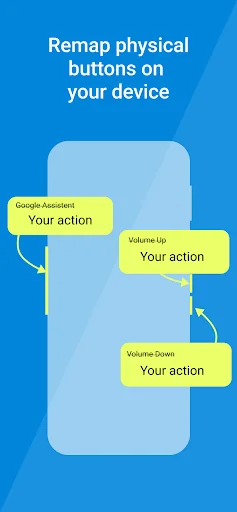
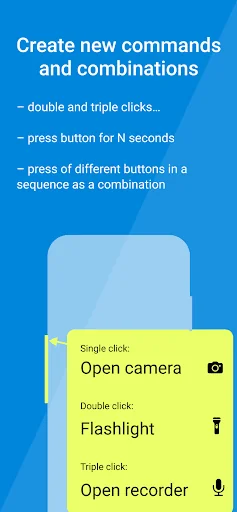
• Unlock a world of possibilities with the power to assign custom actions to a combination of keys
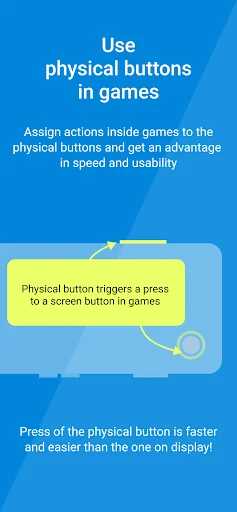
• Remap buttons to screen taps and touch events, even for games! Say goodbye to awkward controls and hello to a more immersive gaming experience. You can even automate certain actions in games using scripts.
• Create macros, a sequence of commands to be executed at once, making it easier to perform repetitive tasks with just one button press
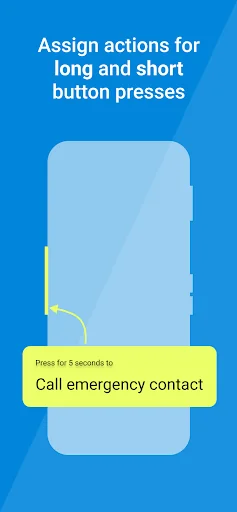
• Change the default function of buttons to call emergency contacts or open your favorite apps
• Create custom button layouts by swapping buttons or assigning new functions to keys, so you can find the perfect layout that works for you
• Change the default volume setting, so you can be sure that you're always adjusting the media volume, not the call or notification volume
• Enable a flashlight via a double click on the volume button (or any other), so you always have a convenient light source at your fingertips
• Open your favorite browser, dialer, or camera apps with just the touch of a button, for even more convenience
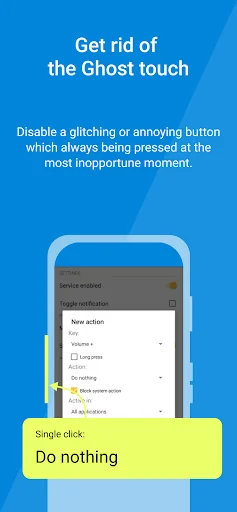
• Disable a glitching button and assign the function to another button, so you can save money on device replacements
• Change the combination for taking a screenshot, making it even easier to capture your screen
• Use the Last App feature, similar to Android N for old devices, allowing you to switch between apps with ease
• Make full use of your QWERTY keyboard, external gamepad, or any other remote control device, for the ultimate customization experience
• Use the app on your Android TV to remap your remote control buttons to any actions, and remap your remote control buttons to any actions, and reassign the buttons that are mapped to video services you don't use.
Take full control of your Android device and make it work for you with Buttons Remapper. Download now and start customizing!
Buttons Remapper supports ONLY hardware buttons (including capacitive ones) and is not compatible with on-screen soft buttons.
Some of the actions are available only on modern Android versions:
• Simulate screen taps (Android 7.0+)
• Simulate hold of the screen (Android 9.0+)
• Lock the screen (Android 9.0+)
• Screenshot (Android 9.0+)
• Answer a phone call (Android 8.0+ or Root)
• End a phone call (Android 9.0+ or Root)
Some features only available with Root:
• Menu
• Search
• Kill current process
• Emulate other buttons via keycode
The following features are available only in the Premium version of the app:
• Simulate screen events
• Executing a sequence of commands
• Screenshot
• Answering and rejecting phone calls
• Disabling microphone
• Brightness control
• Last App feature
• Combinations
ATTENTION!
Buttons Remapper uses Android Accessibility services to provide faster app access and simplified actions. The app only uses specific features of the service, including filtering key events, tracking "window changed" events, and dispatching gestures for the Emulate touch feature. These features are intended to benefit drivers, users with disabilities, and anyone who wants to customize their device.
This app doesn't store or send any key events or last opened package outside of the device. Events are processed in RAM only for combinations and the Last app action. No internet permission is required, and there are no ads.
• Unlock a world of possibilities with the power to assign custom actions to a combination of keys
• Remap buttons to screen taps and touch events, even for games! Say goodbye to awkward controls and hello to a more immersive gaming experience. You can even automate certain actions in games using scripts.
• Create macros, a sequence of commands to be executed at once, making it easier to perform repetitive tasks with just one button press
• Change the default function of buttons to call emergency contacts or open your favorite apps
• Create custom button layouts by swapping buttons or assigning new functions to keys, so you can find the perfect layout that works for you
• Change the default volume setting, so you can be sure that you're always adjusting the media volume, not the call or notification volume
• Enable a flashlight via a double click on the volume button (or any other), so you always have a convenient light source at your fingertips
• Open your favorite browser, dialer, or camera apps with just the touch of a button, for even more convenience
• Disable a glitching button and assign the function to another button, so you can save money on device replacements
• Change the combination for taking a screenshot, making it even easier to capture your screen
• Use the Last App feature, similar to Android N for old devices, allowing you to switch between apps with ease
• Make full use of your QWERTY keyboard, external gamepad, or any other remote control device, for the ultimate customization experience
• Use the app on your Android TV to remap your remote control buttons to any actions, and remap your remote control buttons to any actions, and reassign the buttons that are mapped to video services you don't use.
Take full control of your Android device and make it work for you with Buttons Remapper. Download now and start customizing!
Buttons Remapper supports ONLY hardware buttons (including capacitive ones) and is not compatible with on-screen soft buttons.
Some of the actions are available only on modern Android versions:
• Simulate screen taps (Android 7.0+)
• Simulate hold of the screen (Android 9.0+)
• Lock the screen (Android 9.0+)
• Screenshot (Android 9.0+)
• Answer a phone call (Android 8.0+ or Root)
• End a phone call (Android 9.0+ or Root)
Some features only available with Root:
• Menu
• Search
• Kill current process
• Emulate other buttons via keycode
The following features are available only in the Premium version of the app:
• Simulate screen events
• Executing a sequence of commands
• Screenshot
• Answering and rejecting phone calls
• Disabling microphone
• Brightness control
• Last App feature
• Combinations
ATTENTION!
Buttons Remapper uses Android Accessibility services to provide faster app access and simplified actions. The app only uses specific features of the service, including filtering key events, tracking "window changed" events, and dispatching gestures for the Emulate touch feature. These features are intended to benefit drivers, users with disabilities, and anyone who wants to customize their device.
This app doesn't store or send any key events or last opened package outside of the device. Events are processed in RAM only for combinations and the Last app action. No internet permission is required, and there are no ads.
Profile & Insights
Everything we know — and don't — about this app and its company.
Identification
- App name
- Buttons Remapper: Map & Combo
- Developer
- Irishin
- Bundle ID
- com.irishin.buttonsremapper
- App Store URL
- Open in App Store
- Category
- Personalization
- Content rating
- Not found
- Languages
- Not found
Company
- Website
- irishinapps.wordpress.com
- Tagline
- Not found
- Description
- Not found
- Founded
- Not found
- HQ / Address
- Not found
- Employees
- Not found
- Logo
- Not found
Revenue
- Verified revenue / mo
- Not found
- AI revenue estimate / mo
- Not found
- AI annual estimate
- Not found
- ML model estimate / mo
- $1.1K/mo
- Top-grossing rank
- Not found
- All-time revenue
- Not found
- Pricing
- $2.69 per item
Founder
- Name
- Not found
- X / Twitter
- Not found
- Not found
- GitHub
- Not found
- X followers
- Not found
- Public statements
- Not found
Funding
- Total raised
- Not found
- Last round
- Not found
- Investors
- Not found
- Crunchbase
- Not found
- AngelList
- Not found
Press & Links
- Articles found
- Not found
- Listed on
- Not found
- Blog
- Not found
- Press / News
- Not found
Contacts & Socials
- Socials
- Not found
- Not found
- Phone
- Not found
- Contact page
- Not found
- About page
- Not found
📈Ratings growth19,770 ratings+49% lifetimeShow 3-year history estimate ▾
Tracked (1 weeks) Pre-tracking estimate (37 weeks) · model-based, ±5% noise · anchored to release date and current value
Profile is built from iTunes Lookup + developer site scrape + ML revenue model. Empty fields show "Not found" — additional sources (Crunchbase, X, IndieHackers, Acquire.com) coming.