69
BU Score
Solid
App Manager: Uninstaller & APK
✍️ bumetric analysis
“
App Manager: Uninstaller & APK is an Android app from SMARTWHO in the Productivity category, currently rated 4.2★ across 18,839 ratings. Initial signal reads as largely positive sentiment, users highlighting consistency and feature depth.
Our BU Score puts it at 69: Solid (established niche player). For a Productivity app, that means established niche player.
Track changes month-over-month in the Performance section below: live snapshot history and revenue forecast included.
📊 Performance Tracking LIVE
Loading…
Rating
—
Reviews
—
Forecast Revenue / mo
—
Snapshots tracked
0
since first record
Range:
💰 Forecast Revenue / mo
MODELRevenue forecast computed from BU's 234 trigger model on each snapshot. Calibrated against ground-truth from 58 verified-revenue apps.
🔬Forecast Breakdown — Why This Estimate?Top 4 of 4 triggers
Our ML model uses 200+ signals from public data. These are the most influential for this app:
| Mid install base (18,839 ratings)METRIC | +$5,500 | |
| Mature app (15y old)METRIC | +$1,500 | |
| Good rating (4.2★)METRIC | +$800 | |
| Ad-supported / freemiumMETRIC | +$600 |
METRIC = structural app data · REVIEW = mined from user reviews · ✓ VERIFIED = Stripe-verified anchor (TrustMRR)
📈 Reviews Growth
LIVECumulative review count from first BU snapshot. Each point = a tracked update.
⭐ Rating Trend
LIVEAverage rating evolution. Updates with each new review batch.
🗓️ Snapshot Timeline
HISTORYEach bar shows a tracked update and the metric delta from the previous snapshot.
App Specs
🔐 Own this app? Claim & verify MRR →🔖 v5.1.7🔄 updated 1w ago📂 Productivity💰 Free📺 Ad-supported🚀 Launched 2010 (15y old)
📝 About this app
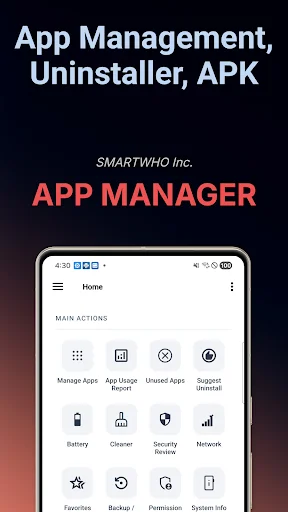
App Manager is the all-in-one app uninstaller, APK backup, junk cleaner, battery analyzer, and data usage tracker for your phone. Uninstall unused apps in batch, back up APKs before factory reset, clean junk and cache, analyze which apps drain your battery, and track per-app Wi-Fi and mobile data usage. App Manager helps you reclaim storage, control app permissions, and identify security risks. Every essential utility in one beautifully designed app with full Dark Mode.
[Key Features]
Powerful App Uninstaller
- Batch uninstall multiple apps at once with one tap
- Smart recommendations based on usage patterns and storage impact
- Detect unused apps you have not opened in months
- Safe deletion guidance, never accidentally remove important apps
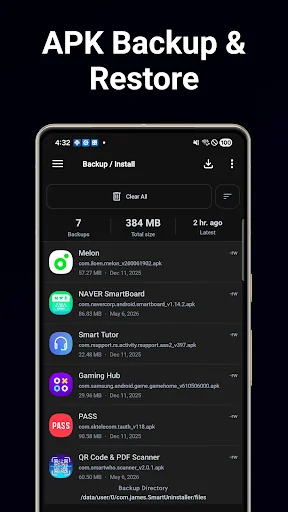
APK Backup and Restore
- Back up installed apps as APK files to external storage
- Easy app restoration from backed-up APK files
- Install APKs directly from external storage
- Perfect before factory reset or device migration
Junk Cleaner
- Scan and remove app cache, temp files, empty folders, thumbnails, log files, and old APKs
- Real-time progress with category-by-category size breakdown
- Reclaim storage with one-tap batch cleaning
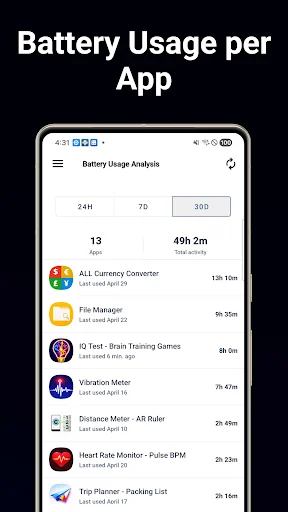
Battery Usage Analysis
- See which apps consumed the most foreground time over 24h, 7 days, or 30 days
- Top battery drainers ranked by activity time, the strongest proxy for battery impact
- Tap any row to jump to system battery details and force-stop options
- Identify hidden background apps eating into your battery life
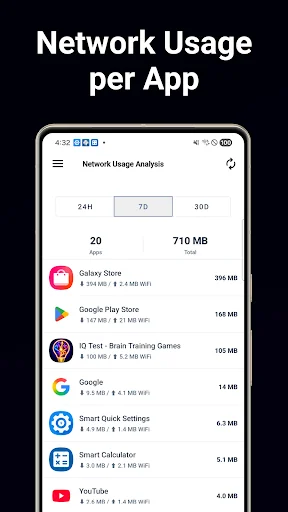
Network Usage Analysis
- Per-app Wi-Fi and mobile data usage with accurate breakdown
- Adjustable period: 24 hours, 7 days, or 30 days for trend tracking
- Spot bandwidth-hungry apps and runaway background data
- Tap any row to open system data details for the selected app
Comprehensive App Manager
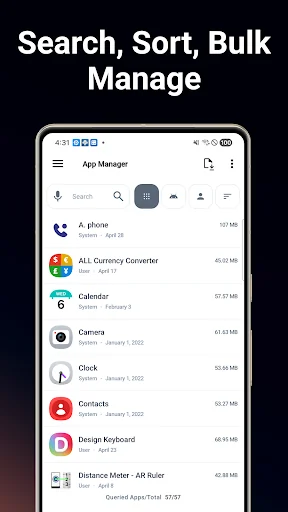
- Powerful search with multi-criteria sorting (name, date, size, usage)
- Detailed app profiles: data usage, cache size, install date, update history
- All installed apps in one centralized place
Intelligent Dashboard
- Device health overview: apps, memory, storage, and battery at a glance
- Real-time analysis of security, permission, and notification trends
- Actionable insights instead of raw data
App Security Diagnosis
- Scan installed apps for potential security risks and vulnerabilities
- Identify apps with suspicious behaviors and tracking capabilities
- Clear risk reports with actionable recommendations
Permission Diagnosis
- Comprehensive audit of all app permissions on your device
- Visual breakdown of sensitive permission usage across apps
- Quickly identify apps with dangerous permission combinations
App Usage Analytics
- Daily and hourly usage breakdown for screen time habits
- Launch frequency and total usage time per app
- Identify most-used apps and discover hidden time sinks
Push Notification Analytics
- Notification volume per app with detailed statistics
- Identify the noisiest apps flooding your notification bar
- Data-driven insights to control notification overload
Unused App Detection
- Detect apps you have not used in a configurable period
- See how much storage space unused apps consume
Favorite Apps
- Pin most-used apps for instant access
- Launch favorites directly from a home screen widget
System Information
- Device specs: CPU, memory, storage, battery, display
- Export detailed system reports as PDF documents
Home Screen Widgets (5 Types)
- System dashboard, device summary, app advisor, quick search, favorites
Dark Mode
- Full dark theme that follows your system settings
- OLED-friendly
[Permission Guide]
Storage (Optional), for APK backup, restore, and junk scanning
Usage Access, powers battery analysis, network usage, and personalized recommendations; data stays on device only
Notification Access, counts notifications only; never reads content
[Key Features]
Powerful App Uninstaller
- Batch uninstall multiple apps at once with one tap
- Smart recommendations based on usage patterns and storage impact
- Detect unused apps you have not opened in months
- Safe deletion guidance, never accidentally remove important apps
APK Backup and Restore
- Back up installed apps as APK files to external storage
- Easy app restoration from backed-up APK files
- Install APKs directly from external storage
- Perfect before factory reset or device migration
Junk Cleaner
- Scan and remove app cache, temp files, empty folders, thumbnails, log files, and old APKs
- Real-time progress with category-by-category size breakdown
- Reclaim storage with one-tap batch cleaning
Battery Usage Analysis
- See which apps consumed the most foreground time over 24h, 7 days, or 30 days
- Top battery drainers ranked by activity time, the strongest proxy for battery impact
- Tap any row to jump to system battery details and force-stop options
- Identify hidden background apps eating into your battery life
Network Usage Analysis
- Per-app Wi-Fi and mobile data usage with accurate breakdown
- Adjustable period: 24 hours, 7 days, or 30 days for trend tracking
- Spot bandwidth-hungry apps and runaway background data
- Tap any row to open system data details for the selected app
Comprehensive App Manager
- Powerful search with multi-criteria sorting (name, date, size, usage)
- Detailed app profiles: data usage, cache size, install date, update history
- All installed apps in one centralized place
Intelligent Dashboard
- Device health overview: apps, memory, storage, and battery at a glance
- Real-time analysis of security, permission, and notification trends
- Actionable insights instead of raw data
App Security Diagnosis
- Scan installed apps for potential security risks and vulnerabilities
- Identify apps with suspicious behaviors and tracking capabilities
- Clear risk reports with actionable recommendations
Permission Diagnosis
- Comprehensive audit of all app permissions on your device
- Visual breakdown of sensitive permission usage across apps
- Quickly identify apps with dangerous permission combinations
App Usage Analytics
- Daily and hourly usage breakdown for screen time habits
- Launch frequency and total usage time per app
- Identify most-used apps and discover hidden time sinks
Push Notification Analytics
- Notification volume per app with detailed statistics
- Identify the noisiest apps flooding your notification bar
- Data-driven insights to control notification overload
Unused App Detection
- Detect apps you have not used in a configurable period
- See how much storage space unused apps consume
Favorite Apps
- Pin most-used apps for instant access
- Launch favorites directly from a home screen widget
System Information
- Device specs: CPU, memory, storage, battery, display
- Export detailed system reports as PDF documents
Home Screen Widgets (5 Types)
- System dashboard, device summary, app advisor, quick search, favorites
Dark Mode
- Full dark theme that follows your system settings
- OLED-friendly
[Permission Guide]
Storage (Optional), for APK backup, restore, and junk scanning
Usage Access, powers battery analysis, network usage, and personalized recommendations; data stays on device only
Notification Access, counts notifications only; never reads content
Profile & Insights
Everything we know — and don't — about this app and its company.
Identification
- App name
- App Manager: Uninstaller & APK
- Developer
- SMARTWHO
- Bundle ID
- com.james.SmartUninstaller
- App Store URL
- Open in App Store
- Category
- Productivity
- Content rating
- Not found
- Languages
- Not found
Company
- Website
- smartwho.net
- Tagline
- Not found
- Description
- Not found
- Founded
- Not found
- HQ / Address
- Not found
- Employees
- Not found
- Logo
- Not found
Revenue
- Verified revenue / mo
- Not found
- AI revenue estimate / mo
- Not found
- AI annual estimate
- Not found
- ML model estimate / mo
- $1.2K/mo
- Top-grossing rank
- Not found
- All-time revenue
- Not found
- Pricing
- Not found
Founder
- Name
- Not found
- X / Twitter
- Not found
- Not found
- GitHub
- Not found
- X followers
- Not found
- Public statements
- Not found
Funding
- Total raised
- Not found
- Last round
- Not found
- Investors
- Not found
- Crunchbase
- Not found
- AngelList
- Not found
Press & Links
- Articles found
- Not found
- Listed on
- Not found
- Blog
- Not found
- Press / News
- Not found
Contacts & Socials
- Socials
- Not found
- Not found
- Phone
- Not found
- Contact page
- Not found
- About page
- Not found
📈Ratings growth18,839 ratings+14% lifetimeShow 3-year history estimate ▾
Tracked (1 weeks) Pre-tracking estimate (37 weeks) · model-based, ±5% noise · anchored to release date and current value
Profile is built from iTunes Lookup + developer site scrape + ML revenue model. Empty fields show "Not found" — additional sources (Crunchbase, X, IndieHackers, Acquire.com) coming.
Full revenue analysis
Read the article-style breakdown for App Manager: Uninstaller & APK: category rank, percentile, growth signal, comparable apps, and how the forecast is calibrated against verified-MRR anchors in this niche.