71
BU Score
Strong
Root Checker
✍️ bumetric analysis
“
Root Checker is an Android app from joeykrim in the Tools category, currently rated 3.9★ across 360,467 ratings. Initial signal reads as mixed reviews: supporters praise core features while critics cite stability and value gaps.
Our BU Score puts it at 71: Strong (healthy traction). For a Tools app, that means healthy traction.
Track changes month-over-month in the Performance section below: live snapshot history and revenue forecast included.
📊 Performance Tracking LIVE
Loading…
Rating
—
Reviews
—
Forecast Revenue / mo
—
Snapshots tracked
0
since first record
Range:
💰 Forecast Revenue / mo
MODELRevenue forecast computed from BU's 234 trigger model on each snapshot. Calibrated against ground-truth from 58 verified-revenue apps.
📈 Reviews Growth
LIVECumulative review count from first BU snapshot. Each point = a tracked update.
⭐ Rating Trend
LIVEAverage rating evolution. Updates with each new review batch.
🗓️ Snapshot Timeline
HISTORYEach bar shows a tracked update and the metric delta from the previous snapshot.
App Specs
🔐 Own this app? Claim & verify MRR →🔖 vVaries with device🔄 updated 1w ago📂 Tools💰 Free
📝 About this app
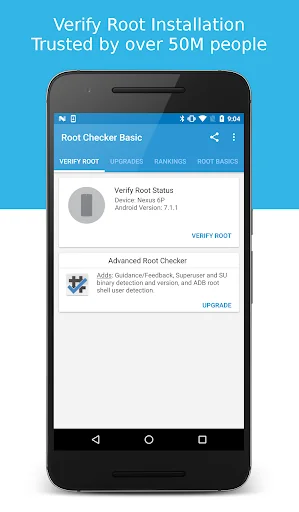
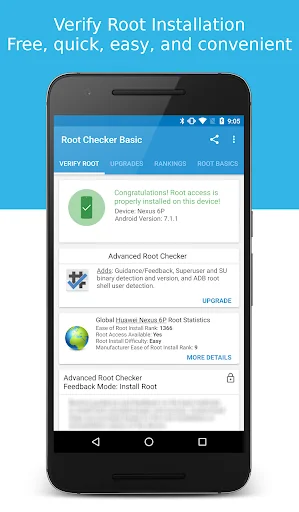
Verify proper root (superuser or su) access is configured and working using Root Checker! Free, fast, easy, and used on over 50 million Android devices, Root Checker shows the user whether or not root (superuser) access is properly installed and working.
This application provides even the newest Android user with a simple method to check their device for root (administrator, superuser, or su) access. The application provides a very simple user interface that easily notifies the user whether or not they have properly setup root (superuser) access.
*Feel free to email me with any questions. I always reply!*
This application will test the device for root (superuser) access using a very simple, quick, and reliable method that has been successful for over 50 million Android devices. The su binary is the most common binary used on Android devices to grant and manage root (superuser) access. Root Checker will check and verify that the su binary is located in a common standard location on the device. In addition, Root Checker will verify whether the su binary is properly functioning in granting root (superuser) access.
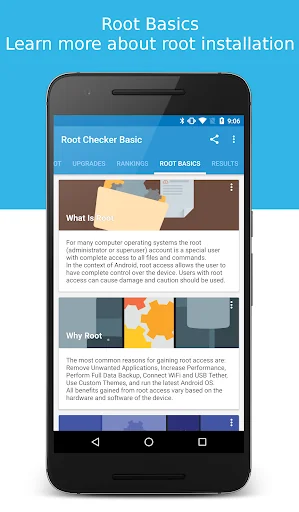
Many times users experience issues along the path of installing, configuring, and gaining root access or uninstalling and removing root access. For some users the process can seem complex while for others the process can seem simple. Regardless of the user's technical skill set, Root Checker, will quickly and correctly verify whether or not root access is 100% functioning. The process of confirming root access is sometimes known by other terms such as, gaining superuser access or gaining administrator access. Root Checker covers all these terms as they relate to one core function, being able to execute commands through the su binary with root access.
If the Superuser management applications (SuperSU, Superuser, etc.) are installed and working properly, these applications will prompt the user to accept or deny the root access request from Root Checker. Accepting the request will allow Root Checker to check for and confirm root access. Denying the request will result in Root Checker reporting no root access.
For scenarios when there is concern somebody else might have installed root access on the device, Root Checker can validate whether root access is installed providing more insight and knowledge.
Please don't leave negative feedback about a concern, bug or issue! Instead, please email me, tweet me, contact me on my web site - https://joeykrim.com/contact, IRC, or on the forums (XDA, RootzWiki, SDX, etc.) with your feedback, suggestions and comments!
Facebook AdChoices: https://m.facebook.com/ads/ad_choices
I do my best to assist as many people as possible and appreciate all the support that has made this application successful! Thank you!
This application provides even the newest Android user with a simple method to check their device for root (administrator, superuser, or su) access. The application provides a very simple user interface that easily notifies the user whether or not they have properly setup root (superuser) access.
*Feel free to email me with any questions. I always reply!*
This application will test the device for root (superuser) access using a very simple, quick, and reliable method that has been successful for over 50 million Android devices. The su binary is the most common binary used on Android devices to grant and manage root (superuser) access. Root Checker will check and verify that the su binary is located in a common standard location on the device. In addition, Root Checker will verify whether the su binary is properly functioning in granting root (superuser) access.
Many times users experience issues along the path of installing, configuring, and gaining root access or uninstalling and removing root access. For some users the process can seem complex while for others the process can seem simple. Regardless of the user's technical skill set, Root Checker, will quickly and correctly verify whether or not root access is 100% functioning. The process of confirming root access is sometimes known by other terms such as, gaining superuser access or gaining administrator access. Root Checker covers all these terms as they relate to one core function, being able to execute commands through the su binary with root access.
If the Superuser management applications (SuperSU, Superuser, etc.) are installed and working properly, these applications will prompt the user to accept or deny the root access request from Root Checker. Accepting the request will allow Root Checker to check for and confirm root access. Denying the request will result in Root Checker reporting no root access.
For scenarios when there is concern somebody else might have installed root access on the device, Root Checker can validate whether root access is installed providing more insight and knowledge.
Please don't leave negative feedback about a concern, bug or issue! Instead, please email me, tweet me, contact me on my web site - https://joeykrim.com/contact, IRC, or on the forums (XDA, RootzWiki, SDX, etc.) with your feedback, suggestions and comments!
Facebook AdChoices: https://m.facebook.com/ads/ad_choices
I do my best to assist as many people as possible and appreciate all the support that has made this application successful! Thank you!
Profile & Insights
Everything we know — and don't — about this app and its company.
Identification
- App name
- Root Checker
- Developer
- joeykrim
- Bundle ID
- com.joeykrim.rootcheck
- App Store URL
- Open in App Store
- Category
- Tools
- Content rating
- Not found
- Languages
- Not found
Company
- Website
- Not found
- Tagline
- Not found
- Description
- Not found
- Founded
- Not found
- HQ / Address
- Not found
- Employees
- Not found
- Logo
- Not found
Revenue
- Verified revenue / mo
- Not found
- AI revenue estimate / mo
- Not found
- AI annual estimate
- Not found
- ML model estimate / mo
- $3.4K/mo
- Top-grossing rank
- Not found
- All-time revenue
- Not found
- Pricing
- Not found
Founder
- Name
- Not found
- X / Twitter
- Not found
- Not found
- GitHub
- Not found
- X followers
- Not found
- Public statements
- Not found
Funding
- Total raised
- Not found
- Last round
- Not found
- Investors
- Not found
- Crunchbase
- Not found
- AngelList
- Not found
Press & Links
- Articles found
- Not found
- Listed on
- Not found
- Blog
- Not found
- Press / News
- Not found
Contacts & Socials
- Socials
- Not found
- Not found
- Phone
- Not found
- Contact page
- Not found
- About page
- Not found
Profile is built from iTunes Lookup + developer site scrape + ML revenue model. Empty fields show "Not found" — additional sources (Crunchbase, X, IndieHackers, Acquire.com) coming.
Full revenue analysis
Read the article-style breakdown for Root Checker: category rank, percentile, growth signal, comparable apps, and how the forecast is calibrated against verified-MRR anchors in this niche.