76
BU Score
Strong
Location Changer - Fake GPS
✍️ BU Analytics Review
“
Location Changer - Fake GPS is an Android app from Netlinkd in the Tools category, currently rated 4.7★ across 72,012 ratings. Initial signal reads as largely positive sentiment, users highlighting consistency and feature depth.
Our BU Score puts it at 76 — Strong (healthy traction). For a Tools app, that means healthy traction.
Track changes month-over-month in the Performance section below — live snapshot history and revenue forecast included.
creator
📊 Performance Tracking LIVE
Loading…
Rating
—
Reviews
—
Forecast Revenue / mo
—
Snapshots tracked
0
since first record
Range:
💰 Forecast Revenue / mo
MODELRevenue forecast computed from BU's 234 trigger model on each snapshot. Calibrated against ground-truth from 58 verified-revenue apps.
🔬Forecast Breakdown — Why This Estimate?Top 4 of 4 triggers
Our ML model uses 200+ signals from public data. These are the most influential for this app:
| Mid install base (72,012 ratings)METRIC | +$5,500 | |
| Excellent rating (4.7★)METRIC | +$2,200 | |
| Mature app (10y old)METRIC | +$1,500 | |
| Ad-supported / freemiumMETRIC | +$600 |
METRIC = structural app data · REVIEW = mined from user reviews · ✓ VERIFIED = Stripe-verified anchor (TrustMRR)
📈 Reviews Growth
LIVECumulative review count from first BU snapshot. Each point = a tracked update.
⭐ Rating Trend
LIVEAverage rating evolution. Updates with each new review batch.
🗓️ Snapshot Timeline
HISTORYEach bar shows a tracked update and the metric delta from the previous snapshot.
App Specs
🔐 Own this app? Claim & verify MRR →🔖 v3.46🔄 updated 4mo ago📂 Tools💰 Free📺 Ad-supported💎 IAP $1.99 - $2.99 per item🚀 Launched 2016 (10y old)
📝 About this app
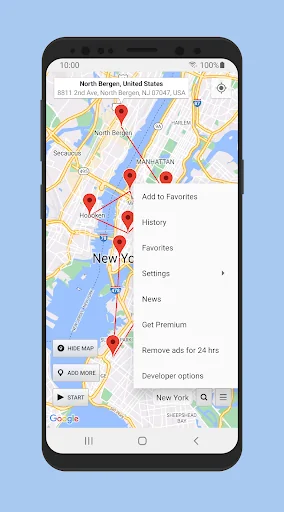
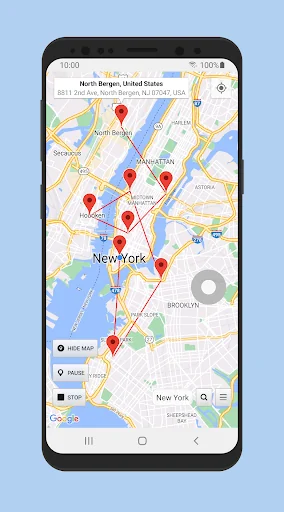
Change your GPS location with this simple fake location app with Joystick. Prevent apps and websites from tracking your real location and protect your privacy. Test your location based apps. This app also shows detailed location information, so it can be used as a powerful location status tool. Set a pin on the map using a long press (same as Google Maps), you can also double tap to zoom in/out on the map. Will also keep working if you reboot your phone. To turn it off just tap on the Stop button (also found in the notification).
* Please read everything from this page before using the app: https://www.netlinkd.com/locationchanger/
* Please note: if the app suddenly stops working or the notification disappears after some time, it is probably because it is background restricted in your Battery settings, please make sure to whitelist it so it can run in the background and work properly. Also, if you are using Mock locations mode it is possible that some apps may detect that you are using a fake location and you may get an error message saying that they failed to detect your location, this is normal and Location Changer still works correctly but unfortunately Android can let apps know if you are using a Mock location.
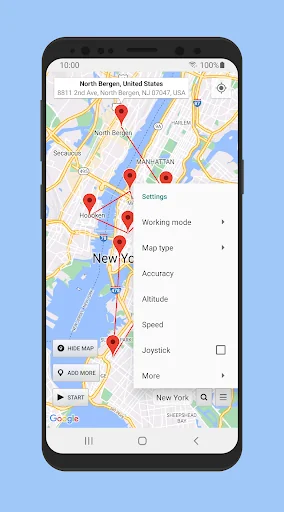
* Joystick: this can be enabled from Settings - Joystick. To set the maximum speed (in km/h) go to Settings - Speed. Double tap on the Joystick and hold it down to drag it to a new preferred position.
* What is "Mock locations"? Mock locations is a hidden setting in Developer options in the Android operating system that allows a device owner to set any GPS location for testing purposes. To enable Developer options go to your device Settings - About and tap Build number 7 times. This may be different on some devices, in this case you have to search how to do it for your device. Please use caution by not changing other system settings.
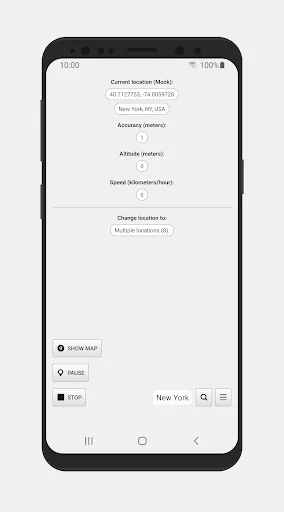
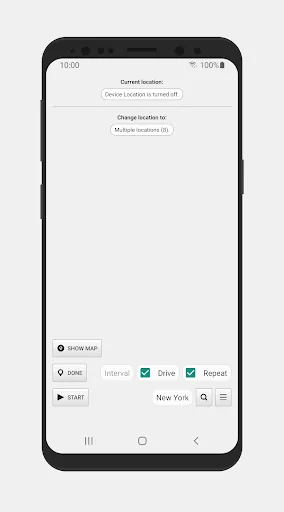
* You can add multiple pins (Add more) on the map and set an interval in seconds to change the location to each pin. Please note that in Android the interval will vary significantly when you turn off your screen/the device goes into sleep mode. To clear the pins, tap on Done and then long press on the map or search for a location to set a new single pin. You can also change the pins from the location status screen (tap on where it says Multiple locations).
Enabling Drive will drive the location to the next pin instead of teleporting, based on your speed and will update based on your interval.
* Please note that this app does not change your IP address, this is not a VPN. Applications/websites that check your location based on your IP address may still detect your real location.
* Please note: to disable Mock locations on your device you will need to do it from Developer options. You normally do not need to disable it back, but some apps may not like it that you have it enabled, as they can detect this. Also, it is important to tap on the Stop button before you disable Mock locations to get your real location back.
Please note that we are not responsible in any way how users choose to use this tool. Please use this app responsibly.
* Please read everything from this page before using the app: https://www.netlinkd.com/locationchanger/
* Please note: if the app suddenly stops working or the notification disappears after some time, it is probably because it is background restricted in your Battery settings, please make sure to whitelist it so it can run in the background and work properly. Also, if you are using Mock locations mode it is possible that some apps may detect that you are using a fake location and you may get an error message saying that they failed to detect your location, this is normal and Location Changer still works correctly but unfortunately Android can let apps know if you are using a Mock location.
* Joystick: this can be enabled from Settings - Joystick. To set the maximum speed (in km/h) go to Settings - Speed. Double tap on the Joystick and hold it down to drag it to a new preferred position.
* What is "Mock locations"? Mock locations is a hidden setting in Developer options in the Android operating system that allows a device owner to set any GPS location for testing purposes. To enable Developer options go to your device Settings - About and tap Build number 7 times. This may be different on some devices, in this case you have to search how to do it for your device. Please use caution by not changing other system settings.
* You can add multiple pins (Add more) on the map and set an interval in seconds to change the location to each pin. Please note that in Android the interval will vary significantly when you turn off your screen/the device goes into sleep mode. To clear the pins, tap on Done and then long press on the map or search for a location to set a new single pin. You can also change the pins from the location status screen (tap on where it says Multiple locations).
Enabling Drive will drive the location to the next pin instead of teleporting, based on your speed and will update based on your interval.
* Please note that this app does not change your IP address, this is not a VPN. Applications/websites that check your location based on your IP address may still detect your real location.
* Please note: to disable Mock locations on your device you will need to do it from Developer options. You normally do not need to disable it back, but some apps may not like it that you have it enabled, as they can detect this. Also, it is important to tap on the Stop button before you disable Mock locations to get your real location back.
Please note that we are not responsible in any way how users choose to use this tool. Please use this app responsibly.
Profile & Insights
Everything we know — and don't — about this app and its company.
Identification
- App name
- Location Changer - Fake GPS
- Developer
- Netlinkd
- Bundle ID
- com.locationchanger
- App Store URL
- Open in App Store
- Category
- Tools
- Content rating
- Not found
- Languages
- Not found
Company
- Website
- www.netlinkd.com
- Tagline
- Not found
- Description
- Not found
- Founded
- Not found
- HQ / Address
- Not found
- Employees
- Not found
- Logo
- Not found
Revenue
- Verified revenue / mo
- Not found
- AI revenue estimate / mo
- Not found
- AI annual estimate
- Not found
- ML model estimate / mo
- $1.1K/mo
- Top-grossing rank
- Not found
- All-time revenue
- Not found
- Pricing
- $1.99 - $2.99 per item
Founder
- Name
- Not found
- X / Twitter
- Not found
- Not found
- GitHub
- Not found
- X followers
- Not found
- Public statements
- Not found
Funding
- Total raised
- Not found
- Last round
- Not found
- Investors
- Not found
- Crunchbase
- Not found
- AngelList
- Not found
Press & Links
- Articles found
- Not found
- Listed on
- Not found
- Blog
- Not found
- Press / News
- Not found
Contacts & Socials
- Socials
- Not found
- Not found
- Phone
- Not found
- Contact page
- Not found
- About page
- Not found
📈Ratings growth72,012 ratings+55% lifetimeShow 3-year history estimate ▾
Tracked (1 weeks) Pre-tracking estimate (37 weeks) · model-based, ±5% noise · anchored to release date and current value
Profile is built from iTunes Lookup + developer site scrape + ML revenue model. Empty fields show "Not found" — additional sources (Crunchbase, X, IndieHackers, Acquire.com) coming.
More Tools
Phone by Google
★ 4.5 · 47,248,471 reviews
Google Play services
★ 4.3 · 44,619,167 reviews
★ 4.1 · 29,135,018 reviews
Gboard - the Google Keyboard
★ 4.5 · 18,500,531 reviews
SHAREit: Transfer, Share Files
★ 4.3 · 18,247,718 reviews
gov.br
★ 4.5 · 12,551,225 reviews
MyTelkomsel – Buy Internet
★ 3.7 · 11,917,556 reviews
myIM3: Data Plan & Buy Package
★ 4.4 · 10,992,500 reviews
Browse BU Analytics
📚 All 55,000+ Books
🜍 Alchemy & Hermeticism
🔮 Magic & Ritual
🌙 Witchcraft & Paganism
⭐ Astrology & Cosmology
🃏 Divination & Tarot
📜 Tools
✡️ Kabbalah & Jewish Mysticism
🕉️ Mysticism & Contemplation
🕊️ Theosophy & Anthroposophy
🏛️ Freemasonry & Secret Societies
👻 Spiritualism & Afterlife
📖 Sacred Texts & Gnosticism
👁️ Supernatural & Occult Fiction
🧘 Spiritual Development
📚 Esoteric History & Biography
Info
About BU Analytics