75
BU Score
Strong
Frequency Sound Generator
✍️ BU Analytics Review
“
Frequency Sound Generator is an Android app from LuxDeLux in the Tools category, currently rated 4.6★ across 47,532 ratings. Initial signal reads as largely positive sentiment, users highlighting consistency and feature depth.
Our BU Score puts it at 75 — Strong (healthy traction). For a Tools app, that means healthy traction.
Track changes month-over-month in the Performance section below — live snapshot history and revenue forecast included.
📊 Performance Tracking LIVE
Loading…
Rating
—
Reviews
—
Forecast Revenue / mo
—
Snapshots tracked
0
since first record
Range:
💰 Forecast Revenue / mo
MODELRevenue forecast computed from BU's 234 trigger model on each snapshot. Calibrated against ground-truth from 58 verified-revenue apps.
🔬Forecast Breakdown — Why This Estimate?Top 3 of 3 triggers
Our ML model uses 200+ signals from public data. These are the most influential for this app:
| Mid install base (47,532 ratings)METRIC | +$5,500 | |
| Excellent rating (4.6★)METRIC | +$2,200 | |
| Ad-supported / freemiumMETRIC | +$600 |
METRIC = structural app data · REVIEW = mined from user reviews · ✓ VERIFIED = Stripe-verified anchor (TrustMRR)
📈 Reviews Growth
LIVECumulative review count from first BU snapshot. Each point = a tracked update.
⭐ Rating Trend
LIVEAverage rating evolution. Updates with each new review batch.
🗓️ Snapshot Timeline
HISTORYEach bar shows a tracked update and the metric delta from the previous snapshot.
App Specs
🔐 Own this app? Claim & verify MRR →🔖 v3.1.2🔄 updated 4mo ago📂 Tools💰 Free
📝 About this app
Are you producing? Want to sound test your speakers or tune your instruments? Or simply, do you want to generate sounds and listen to the generated sounds in different frequencies? Well, then you need a frequency sound generator and sound analyzer to produce sound waves in different frequencies. Introducing <b>Frequency Sound Generator</b>!
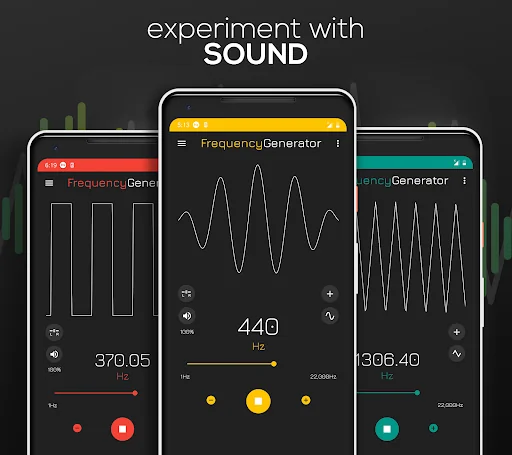
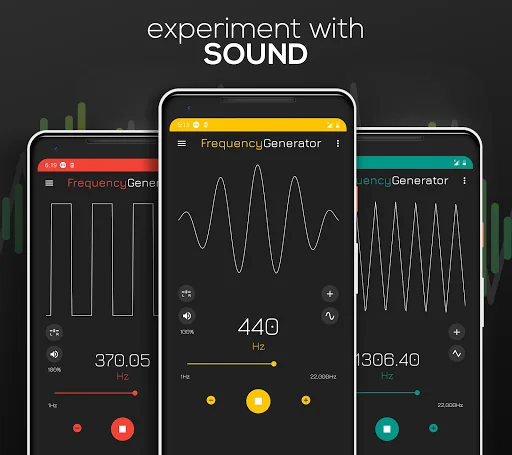
Frequency Generator Sound player lets you generate a sine, square, sawtooth or triangle sound wave with a <b>frequency between 1Hz and 22000Hz (hertz)</b>. It produces accurate tone & soundwaves while being simple and easy to use.
No matter if you need to sound test and generate high frequency sounds or low frequency sounds, our frequency tone generator is your #1 best solution.
▶️<b>EASY CONTROL</b>
Frequency Sound Generator allows you to easily change the soundwaves from the main menu. Simply tap on the sound wave icon and pick between sine, square, sawtooth or triangle. Additionally, pick from a wide variety of notes by taping the notes 🎵 icon.
📲<b>ANIMATED SOUND WAVE</b>
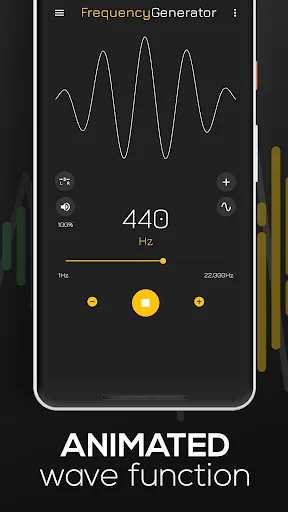
You’ll love the animated sound wave function which visually represents the sound for a given frequency. You can change waveform by clicking on a round button at the left side and get a different sound and animated wave.
🎚️<b>ADJUST FREQUENCY & VOLUME</b>
Adjust the sound generating frequency easily by dragging the yellow dot. Make use of the - & + buttons for added adjusting precision. Additionally, control the volume of the generated sounds from 0-100%.
📑<b>SAVE YOUR OWN PRESETS</b>
By clicking on the three dots in the top right corner you can create and load your own favorite frequency sound presets so you do not have to dial it every time again.
🎼<b>PLAY FREQUENCY SOUNDS IN THE BACKGROUND</b>
In the frequency generator app settings, you can choose if you want the frequency sound to continue playing in the background when you minimize the frequency sound playing app.
🔊<b>NUMEROUS USES:</b>
This sound generating app can be used in multiple use cases:
● <b>Test your hearing</b>. A human being is capable of hearing frequencies in the average range of 20Hz-20000Hz. This range is getting smaller by age, so it’s interesting to sound test your hearing capabilities.
● <b>Test speakers and headphones</b> for the high end (treble) and low end (bass) tones.
● Use this app as an <b>instrument tuner</b> when playing or producing.
● <b>Cleaning water</b> from the speaker. Since sound is making small vibrations it can help to shake off unwanted water from your speakers.
● Find your <b>tinnitus frequency</b>.
⚙️<b> SETTINGS:</b>
There are few settings you can adjust to customize Frequency Generator app behavior.
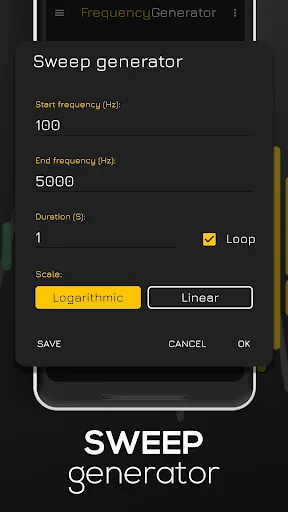
● Change frequency <b>slider range</b> to allow you more precision while selecting frequencies.
● Choose between <b>two slider scales</b>: linear or logarithmic.
● Low latency setting enables <b>high-performance low latency audio</b> which makes slider more responsive and eliminates lag. (NOTE: Low latency setting may result in high frequencies on some devices sound inaccurate, especially on higher volume.)
● Enable or disable <b>decimal precision</b> up two decimals in case of need for more precise sound generation.
● Change +/- button step for even easier adjustments.
<b>NOTE</b>: Since mobile phones are not high-quality audio sources and in-built speakers may vary in quality, sometimes users can hear sounds at very low or high frequencies even beyond the scope of human hearing. That noise is not sound of a given frequency but static or “parasite” noise generated by your mobile device. For the best experience use a pair of good quality headphones.
Frequency Generator Sound player lets you generate a sine, square, sawtooth or triangle sound wave with a <b>frequency between 1Hz and 22000Hz (hertz)</b>. It produces accurate tone & soundwaves while being simple and easy to use.
No matter if you need to sound test and generate high frequency sounds or low frequency sounds, our frequency tone generator is your #1 best solution.
▶️<b>EASY CONTROL</b>
Frequency Sound Generator allows you to easily change the soundwaves from the main menu. Simply tap on the sound wave icon and pick between sine, square, sawtooth or triangle. Additionally, pick from a wide variety of notes by taping the notes 🎵 icon.
📲<b>ANIMATED SOUND WAVE</b>
You’ll love the animated sound wave function which visually represents the sound for a given frequency. You can change waveform by clicking on a round button at the left side and get a different sound and animated wave.
🎚️<b>ADJUST FREQUENCY & VOLUME</b>
Adjust the sound generating frequency easily by dragging the yellow dot. Make use of the - & + buttons for added adjusting precision. Additionally, control the volume of the generated sounds from 0-100%.
📑<b>SAVE YOUR OWN PRESETS</b>
By clicking on the three dots in the top right corner you can create and load your own favorite frequency sound presets so you do not have to dial it every time again.
🎼<b>PLAY FREQUENCY SOUNDS IN THE BACKGROUND</b>
In the frequency generator app settings, you can choose if you want the frequency sound to continue playing in the background when you minimize the frequency sound playing app.
🔊<b>NUMEROUS USES:</b>
This sound generating app can be used in multiple use cases:
● <b>Test your hearing</b>. A human being is capable of hearing frequencies in the average range of 20Hz-20000Hz. This range is getting smaller by age, so it’s interesting to sound test your hearing capabilities.
● <b>Test speakers and headphones</b> for the high end (treble) and low end (bass) tones.
● Use this app as an <b>instrument tuner</b> when playing or producing.
● <b>Cleaning water</b> from the speaker. Since sound is making small vibrations it can help to shake off unwanted water from your speakers.
● Find your <b>tinnitus frequency</b>.
⚙️<b> SETTINGS:</b>
There are few settings you can adjust to customize Frequency Generator app behavior.
● Change frequency <b>slider range</b> to allow you more precision while selecting frequencies.
● Choose between <b>two slider scales</b>: linear or logarithmic.
● Low latency setting enables <b>high-performance low latency audio</b> which makes slider more responsive and eliminates lag. (NOTE: Low latency setting may result in high frequencies on some devices sound inaccurate, especially on higher volume.)
● Enable or disable <b>decimal precision</b> up two decimals in case of need for more precise sound generation.
● Change +/- button step for even easier adjustments.
<b>NOTE</b>: Since mobile phones are not high-quality audio sources and in-built speakers may vary in quality, sometimes users can hear sounds at very low or high frequencies even beyond the scope of human hearing. That noise is not sound of a given frequency but static or “parasite” noise generated by your mobile device. For the best experience use a pair of good quality headphones.
Profile & Insights
Everything we know — and don't — about this app and its company.
Identification
- App name
- Frequency Sound Generator
- Developer
- LuxDeLux
- Bundle ID
- com.luxdelux.frequencygenerator
- App Store URL
- Open in App Store
- Category
- Tools
- Content rating
- Not found
- Languages
- Not found
Company
- Website
- Not found
- Tagline
- Not found
- Description
- Not found
- Founded
- Not found
- HQ / Address
- Not found
- Employees
- Not found
- Logo
- Not found
Revenue
- Verified revenue / mo
- Not found
- AI revenue estimate / mo
- Not found
- AI annual estimate
- Not found
- ML model estimate / mo
- $1.9K/mo
- Top-grossing rank
- Not found
- All-time revenue
- Not found
- Pricing
- Not found
Founder
- Name
- Not found
- X / Twitter
- Not found
- Not found
- GitHub
- Not found
- X followers
- Not found
- Public statements
- Not found
Funding
- Total raised
- Not found
- Last round
- Not found
- Investors
- Not found
- Crunchbase
- Not found
- AngelList
- Not found
Press & Links
- Articles found
- Not found
- Listed on
- Not found
- Blog
- Not found
- Press / News
- Not found
Contacts & Socials
- Socials
- Not found
- Not found
- Phone
- Not found
- Contact page
- Not found
- About page
- Not found
Profile is built from iTunes Lookup + developer site scrape + ML revenue model. Empty fields show "Not found" — additional sources (Crunchbase, X, IndieHackers, Acquire.com) coming.