70
BU Score
Strong
MMGuardian Parental Control
✍️ bumetric analysis
“
MMGuardian Parental Control is an Android app from MMGuardian.com in the Parenting category, currently rated 4.2★ across 26,674 ratings. Initial signal reads as mixed reviews: supporters praise core features while critics cite stability and value gaps.
Our BU Score puts it at 70: Strong (healthy traction). For a Parenting app, that means healthy traction.
Track changes month-over-month in the Performance section below: live snapshot history and revenue forecast included.
📊 Performance Tracking LIVE
Loading…
Rating
—
Reviews
—
Forecast Revenue / mo
—
Snapshots tracked
0
since first record
Range:
💰 Forecast Revenue / mo
MODELRevenue forecast computed from BU's 234 trigger model on each snapshot. Calibrated against ground-truth from 58 verified-revenue apps.
🔬Forecast Breakdown — Why This Estimate?Top 3 of 3 triggers
Our ML model uses 200+ signals from public data. These are the most influential for this app:
| Mid install base (26,674 ratings)METRIC | +$5,500 | |
| Good rating (4.2★)METRIC | +$800 | |
| Ad-supported / freemiumMETRIC | +$600 |
METRIC = structural app data · REVIEW = mined from user reviews · ✓ VERIFIED = Stripe-verified anchor (TrustMRR)
📈 Reviews Growth
LIVECumulative review count from first BU snapshot. Each point = a tracked update.
⭐ Rating Trend
LIVEAverage rating evolution. Updates with each new review batch.
🗓️ Snapshot Timeline
HISTORYEach bar shows a tracked update and the metric delta from the previous snapshot.
App Specs
🔐 Own this app? Claim & verify MRR →🔖 v3.7.38🔄 updated 1mo ago📂 Parenting💰 Free
📝 About this app
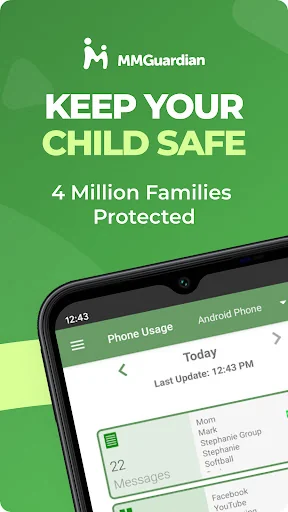
Use MMGuardian Parental Control in your family to help keep your kids safe online. Our advanced parental controls enable easy remote child monitoring. Link this parent app with your child's phone to set parent limits on screen time, block apps & games, filter the internet, monitor text messages and get safety alerts. MMGuardian also includes a GPS location tracker.
This is the app for the parent's phone - you must also install a different app on your child's phone. Install this parent app first, and you will be guided to download the relevant Android parental control app or iPhone parental control app from Google Play or the App Store, on your child's phone.
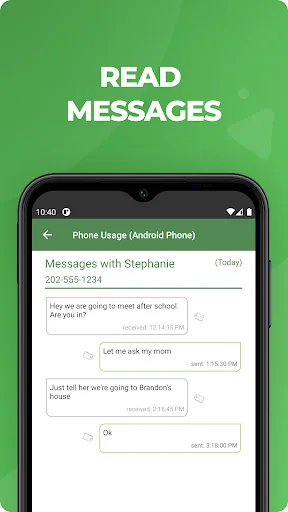
Receive alerts when your child's text messages, supported social media chat messages or web searches are indicative of drugs, sexting, cyberbullying, child grooming, violence, suicidal thoughts and more.
What does MMGuardian Do?
With the MMGuardian Child Phone App installed to your child's Android phone, you will be able to monitor and block:
• SMS text messages
• Web browsing activity
• Application usage
• Phone calls
Social Media Chat Monitoring
In addition to normal SMS texts, chat messages from Facebook Messenger, WhatsApp, Snapchat, Instagram, Kik, TikTok and Discord are reported. Alerts will be sent to you if the content in a SMS text or chat message appears to relate to one of nine special categories including sexting, cyberbullying and suicidal thoughts.
The benefits of using MMGuardian Parental Control when your child has an Android phone include:
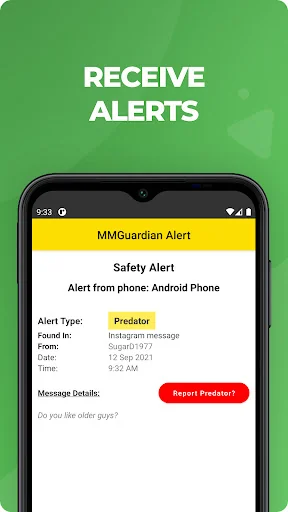
• Alerting you when text messages or web searches are indicative of sexting, cyberbullying, suicidal thoughts and more.
• Alerting you when pictures on your child's phone, or sent in an MMS message, are of an adult nature or indicative of sexting.
• Comprehensive reports for text messages, app usage, web browsing and voice calls.
Additional Functions
• Locate your child's phone
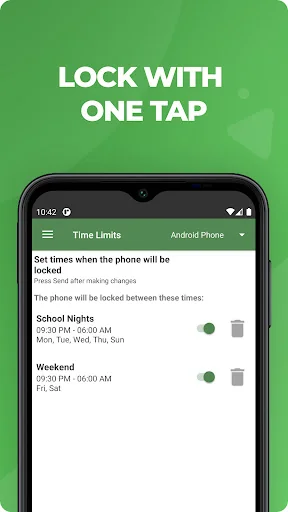
• Quickly lock or unlock your child's phone
• Set limits for screen time, app usage, web filtering
This app on your phone and the one on your child's phone must be registered using the same (parent's) email address.
Both your phone and your child's phone should have network data capability, as the app uses data to send and receive configuration commands, reports and alerts.
Free 14 day trial
You do not need to set up a subscription to get the free 14 day trial. After the free trial period of the app on the child's phone has ended, unless the child phone app is licensed by a subscription, the functions in this Parent App that relate to premium functions on the child's app will be disabled. However you can still use MMGuardian to locate your child's phone remotely.
Subscriptions
You may purchase a subscription from within this Parental Control app app to apply to the MMGuardian app installed on your child's phone. Subscriptions are $4.99/mo or $49.99/year for one child phone. Family plans for up to 5 child devices are twice these amounts.
We encourage parents to discuss the reasons to use a parental control app with their children, which include helping to protect them from potential risks of their own actions and the actions of others, such as excessive screen time, cyberbullying and sexting.
This is the app for the parent's phone - you must also install a different app on your child's phone. Install this parent app first, and you will be guided to download the relevant Android parental control app or iPhone parental control app from Google Play or the App Store, on your child's phone.
Receive alerts when your child's text messages, supported social media chat messages or web searches are indicative of drugs, sexting, cyberbullying, child grooming, violence, suicidal thoughts and more.
What does MMGuardian Do?
With the MMGuardian Child Phone App installed to your child's Android phone, you will be able to monitor and block:
• SMS text messages
• Web browsing activity
• Application usage
• Phone calls
Social Media Chat Monitoring
In addition to normal SMS texts, chat messages from Facebook Messenger, WhatsApp, Snapchat, Instagram, Kik, TikTok and Discord are reported. Alerts will be sent to you if the content in a SMS text or chat message appears to relate to one of nine special categories including sexting, cyberbullying and suicidal thoughts.
The benefits of using MMGuardian Parental Control when your child has an Android phone include:
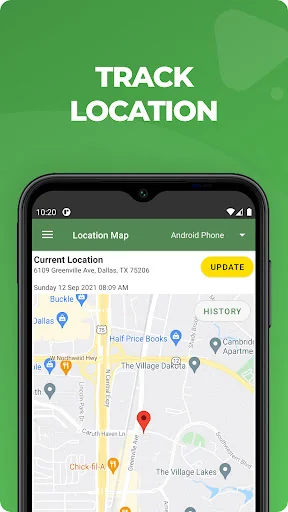
• Alerting you when text messages or web searches are indicative of sexting, cyberbullying, suicidal thoughts and more.
• Alerting you when pictures on your child's phone, or sent in an MMS message, are of an adult nature or indicative of sexting.
• Comprehensive reports for text messages, app usage, web browsing and voice calls.
Additional Functions
• Locate your child's phone
• Quickly lock or unlock your child's phone
• Set limits for screen time, app usage, web filtering
This app on your phone and the one on your child's phone must be registered using the same (parent's) email address.
Both your phone and your child's phone should have network data capability, as the app uses data to send and receive configuration commands, reports and alerts.
Free 14 day trial
You do not need to set up a subscription to get the free 14 day trial. After the free trial period of the app on the child's phone has ended, unless the child phone app is licensed by a subscription, the functions in this Parent App that relate to premium functions on the child's app will be disabled. However you can still use MMGuardian to locate your child's phone remotely.
Subscriptions
You may purchase a subscription from within this Parental Control app app to apply to the MMGuardian app installed on your child's phone. Subscriptions are $4.99/mo or $49.99/year for one child phone. Family plans for up to 5 child devices are twice these amounts.
We encourage parents to discuss the reasons to use a parental control app with their children, which include helping to protect them from potential risks of their own actions and the actions of others, such as excessive screen time, cyberbullying and sexting.
Profile & Insights
Everything we know — and don't — about this app and its company.
Identification
- App name
- MMGuardian Parental Control
- Developer
- MMGuardian.com
- Bundle ID
- com.mmguardian.parentapp
- App Store URL
- Open in App Store
- Category
- Parenting
- Content rating
- Not found
- Languages
- Not found
Company
- Website
- Not found
- Tagline
- Not found
- Description
- Not found
- Founded
- Not found
- HQ / Address
- Not found
- Employees
- Not found
- Logo
- Not found
Revenue
- Verified revenue / mo
- Not found
- AI revenue estimate / mo
- Not found
- AI annual estimate
- Not found
- ML model estimate / mo
- $1.5K/mo
- Top-grossing rank
- Not found
- All-time revenue
- Not found
- Pricing
- Not found
Founder
- Name
- Not found
- X / Twitter
- Not found
- Not found
- GitHub
- Not found
- X followers
- Not found
- Public statements
- Not found
Funding
- Total raised
- Not found
- Last round
- Not found
- Investors
- Not found
- Crunchbase
- Not found
- AngelList
- Not found
Press & Links
- Articles found
- Not found
- Listed on
- Not found
- Blog
- Not found
- Press / News
- Not found
Contacts & Socials
- Socials
- Not found
- Not found
- Phone
- Not found
- Contact page
- Not found
- About page
- Not found
Profile is built from iTunes Lookup + developer site scrape + ML revenue model. Empty fields show "Not found" — additional sources (Crunchbase, X, IndieHackers, Acquire.com) coming.
More by MMGuardian.com
View all →Full revenue analysis
Read the article-style breakdown for MMGuardian Parental Control: category rank, percentile, growth signal, comparable apps, and how the forecast is calibrated against verified-MRR anchors in this niche.