
59
BU Score
Solid
mappy (맵피)
✍️ bumetric analysis
“
mappy (맵피) is an Android app from 현대오토에버㈜ in the Maps & Navigation category, currently rated 3.3★ across 19,590 ratings. Initial signal reads as mixed reviews: supporters praise core features while critics cite stability and value gaps.
Our BU Score puts it at 59: Solid (established niche player). For a Maps & Navigation app, that means established niche player.
Track changes month-over-month in the Performance section below: live snapshot history and revenue forecast included.
📊 Performance Tracking LIVE
Loading…
Rating
—
Reviews
—
Forecast Revenue / mo
—
Snapshots tracked
0
since first record
Range:
💰 Forecast Revenue / mo
MODELRevenue forecast computed from BU's 234 trigger model on each snapshot. Calibrated against ground-truth from 58 verified-revenue apps.
🔬Forecast Breakdown — Why This Estimate?Top 4 of 4 triggers
Our ML model uses 200+ signals from public data. These are the most influential for this app:
| Mid install base (19,590 ratings)METRIC | +$5,500 | |
| Below-average rating (3.3★)METRIC | −$1,500 | |
| Mature app (11y old)METRIC | +$1,500 | |
| Ad-supported / freemiumMETRIC | +$600 |
METRIC = structural app data · REVIEW = mined from user reviews · ✓ VERIFIED = Stripe-verified anchor (TrustMRR)
📈 Reviews Growth
LIVECumulative review count from first BU snapshot. Each point = a tracked update.
⭐ Rating Trend
LIVEAverage rating evolution. Updates with each new review batch.
🗓️ Snapshot Timeline
HISTORYEach bar shows a tracked update and the metric delta from the previous snapshot.
App Specs
🔐 Own this app? Claim & verify MRR →🔖 v3.4.20🔄 updated 6mo ago📂 Maps & Navigation💰 Free📺 Ad-supported🚀 Launched 2014 (11y old)
📝 About this app
mappy (mappy) is a mobile navigation service that anyone can download and use for free.
Anyone can download and use it for free, and it guides you on the fast and accurate route by reflecting real-time traffic information.
It is so simple that even first-time users can use it easily, and it provides intuitive usability.
[Major features of Mappy]
- Apply new interface (UI)
Mappy is reborn as a new interface considering the mobile environment.
More convenient use is possible with the introduction of various gestures that are helpful in the mobile environment.
- New design (GUI) applied
The introduction of blue tone key color has improved the aesthetics of mobile navigation.
The menus and maps have been revamped in every way.
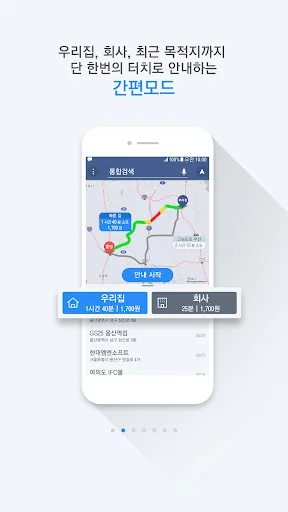
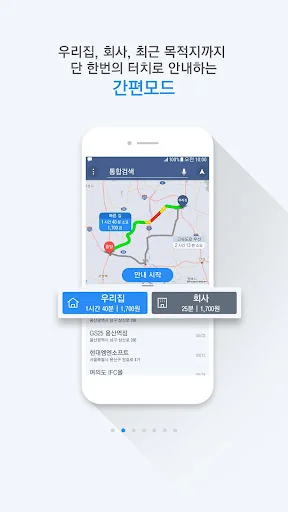
- Applied 'simple mode' to receive route guidance with one touch
On the first screen of the new Mappy, the home and company registered by the user, and the recently visited
Destinations can be viewed at a glance without separate search or route search, and you can receive guidance with one touch.
This feature is designed to save you as much time as possible in your busy life.
- Integration of search menu
Search functions that were previously distributed for each menu are integrated into one page.
Use Integrated Search/Address Search/Nearby Search/Favorites on one screen without moving to a separate page.
- Linkage between search result screen and map
Now, when you search for a destination you want to go to, you can see the search result list and map at the same time.
When going somewhere you don't know, check the area around your destination accurately on the map.
- Optimized landscape mode configuration
We provide an optimized landscape mode for those who use Mappy in a horizontal screen.
- Improved nearby search function
Mappy's surrounding search has been newly changed to 9 categories.
It guides you to various facilities around your location, and a new charging station guide for electric vehicle users is applied.
- Improved route search screen and waypoint settings
The waypoint setting of the existing mappy had the inconvenience of having to enter another menu on the route search screen.
It has been improved so that waypoints can be set directly from the route search screen.
- Introduction of a new concept of TBT guidance
While receiving route guidance, 'TBT Guidance' is introduced to check the various turn sections ahead of the route in advance.
TBT guidance is available by touching the next/next turn guidance area.
- Introduction of destination name sharing and name change function
This is a good feature for those who have many meetings.
After changing the name of the meeting place in Mappy, you can share it.
Try changing the name of the meeting to something like "OOO Alumni Association".
[Notes in case of problems after update]
1. Please delete the existing mappy app from the application manager of your smartphone.
2. Run a file explorer (My Files, etc.) and manually delete the MappyOBN folder remaining in the root.
3. Please download mappy again from the Google Play Store.
[Guidance on access rights]
1. Required access rights
- Use of location information
- Use of storage device
- Check phone status
2. Optional access rights
- Use drawing on top of other apps
※ You can use the service even if you do not agree to the optional access right
- For Mappy, Android 6.0 (marshmallow) or higher os version users can individually select access rights, but users under 6.0 cannot agree to the optional access rights.
- When upgrading the os to Android 6.0 or higher, please first check whether the upgrade is possible before upgrading, and the os upgrade and access rights in the existing mappy are maintained.
- To reset Mappy's access rights, delete and reinstall it.
[Unsupported smartphone]
- Galaxy R / Gz'one / Vega no.6 / Optimus Vu / Optimus LTE
* Please understand that normal use of the above smartphone is not possible due to GPS H/W compatibility and overheating. In addition, we inform you that some terminals may not be additionally supported.
Anyone can download and use it for free, and it guides you on the fast and accurate route by reflecting real-time traffic information.
It is so simple that even first-time users can use it easily, and it provides intuitive usability.
[Major features of Mappy]
- Apply new interface (UI)
Mappy is reborn as a new interface considering the mobile environment.
More convenient use is possible with the introduction of various gestures that are helpful in the mobile environment.
- New design (GUI) applied
The introduction of blue tone key color has improved the aesthetics of mobile navigation.
The menus and maps have been revamped in every way.
- Applied 'simple mode' to receive route guidance with one touch
On the first screen of the new Mappy, the home and company registered by the user, and the recently visited
Destinations can be viewed at a glance without separate search or route search, and you can receive guidance with one touch.
This feature is designed to save you as much time as possible in your busy life.
- Integration of search menu
Search functions that were previously distributed for each menu are integrated into one page.
Use Integrated Search/Address Search/Nearby Search/Favorites on one screen without moving to a separate page.
- Linkage between search result screen and map
Now, when you search for a destination you want to go to, you can see the search result list and map at the same time.
When going somewhere you don't know, check the area around your destination accurately on the map.
- Optimized landscape mode configuration
We provide an optimized landscape mode for those who use Mappy in a horizontal screen.
- Improved nearby search function
Mappy's surrounding search has been newly changed to 9 categories.
It guides you to various facilities around your location, and a new charging station guide for electric vehicle users is applied.
- Improved route search screen and waypoint settings
The waypoint setting of the existing mappy had the inconvenience of having to enter another menu on the route search screen.
It has been improved so that waypoints can be set directly from the route search screen.
- Introduction of a new concept of TBT guidance
While receiving route guidance, 'TBT Guidance' is introduced to check the various turn sections ahead of the route in advance.
TBT guidance is available by touching the next/next turn guidance area.
- Introduction of destination name sharing and name change function
This is a good feature for those who have many meetings.
After changing the name of the meeting place in Mappy, you can share it.
Try changing the name of the meeting to something like "OOO Alumni Association".
[Notes in case of problems after update]
1. Please delete the existing mappy app from the application manager of your smartphone.
2. Run a file explorer (My Files, etc.) and manually delete the MappyOBN folder remaining in the root.
3. Please download mappy again from the Google Play Store.
[Guidance on access rights]
1. Required access rights
- Use of location information
- Use of storage device
- Check phone status
2. Optional access rights
- Use drawing on top of other apps
※ You can use the service even if you do not agree to the optional access right
- For Mappy, Android 6.0 (marshmallow) or higher os version users can individually select access rights, but users under 6.0 cannot agree to the optional access rights.
- When upgrading the os to Android 6.0 or higher, please first check whether the upgrade is possible before upgrading, and the os upgrade and access rights in the existing mappy are maintained.
- To reset Mappy's access rights, delete and reinstall it.
[Unsupported smartphone]
- Galaxy R / Gz'one / Vega no.6 / Optimus Vu / Optimus LTE
* Please understand that normal use of the above smartphone is not possible due to GPS H/W compatibility and overheating. In addition, we inform you that some terminals may not be additionally supported.
Profile & Insights
Everything we know — and don't — about this app and its company.
Identification
- App name
- mappy (맵피)
- Developer
- 현대오토에버㈜
- Bundle ID
- com.mnsoft.mappyobn
- App Store URL
- Open in App Store
- Category
- Maps & Navigation
- Content rating
- Not found
- Languages
- Not found
Company
- Website
- www.hyundai-autoever.com
- Tagline
- Not found
- Description
- Not found
- Founded
- Not found
- HQ / Address
- Not found
- Employees
- Not found
- Logo
- Not found
Revenue
- Verified revenue / mo
- Not found
- AI revenue estimate / mo
- Not found
- AI annual estimate
- Not found
- ML model estimate / mo
- $1.3K/mo
- Top-grossing rank
- Not found
- All-time revenue
- Not found
- Pricing
- Not found
Founder
- Name
- Not found
- X / Twitter
- Not found
- Not found
- GitHub
- Not found
- X followers
- Not found
- Public statements
- Not found
Funding
- Total raised
- Not found
- Last round
- Not found
- Investors
- Not found
- Crunchbase
- Not found
- AngelList
- Not found
Press & Links
- Articles found
- Not found
- Listed on
- Not found
- Blog
- Not found
- Press / News
- Not found
Contacts & Socials
- Socials
- Not found
- Not found
- Phone
- Not found
- Contact page
- Not found
- About page
- Not found
📈Ratings growth19,590 ratings+27% lifetimeShow 3-year history estimate ▾
Tracked (1 weeks) Pre-tracking estimate (37 weeks) · model-based, ±5% noise · anchored to release date and current value
Profile is built from iTunes Lookup + developer site scrape + ML revenue model. Empty fields show "Not found" — additional sources (Crunchbase, X, IndieHackers, Acquire.com) coming.
Full revenue analysis
Read the article-style breakdown for mappy (맵피): category rank, percentile, growth signal, comparable apps, and how the forecast is calibrated against verified-MRR anchors in this niche.

