73
BU Score
Strong
Turn Off Screen - Screen Lock
✍️ BU Analytics Review
“
Turn Off Screen - Screen Lock is an Android app from redmanit in the Tools category, currently rated 4.5★ across 38,848 ratings. Initial signal reads as largely positive sentiment, users highlighting consistency and feature depth.
Our BU Score puts it at 73 — Strong (healthy traction). For a Tools app, that means healthy traction.
Track changes month-over-month in the Performance section below — live snapshot history and revenue forecast included.
creator
📊 Performance Tracking LIVE
Loading…
Rating
—
Reviews
—
Forecast Revenue / mo
—
Snapshots tracked
0
since first record
Range:
💰 Forecast Revenue / mo
MODELRevenue forecast computed from BU's 234 trigger model on each snapshot. Calibrated against ground-truth from 58 verified-revenue apps.
🔬Forecast Breakdown — Why This Estimate?Top 3 of 3 triggers
Our ML model uses 200+ signals from public data. These are the most influential for this app:
| Mid install base (38,848 ratings)METRIC | +$5,500 | |
| Good rating (4.5★)METRIC | +$800 | |
| Ad-supported / freemiumMETRIC | +$600 |
METRIC = structural app data · REVIEW = mined from user reviews · ✓ VERIFIED = Stripe-verified anchor (TrustMRR)
📈 Reviews Growth
LIVECumulative review count from first BU snapshot. Each point = a tracked update.
⭐ Rating Trend
LIVEAverage rating evolution. Updates with each new review batch.
🗓️ Snapshot Timeline
HISTORYEach bar shows a tracked update and the metric delta from the previous snapshot.
App Specs
🔐 Own this app? Claim & verify MRR →🔖 v8.1🔄 updated 1w ago📂 Tools💰 Free
📝 About this app
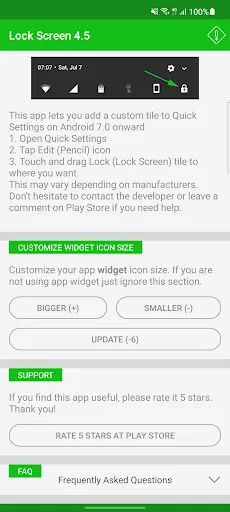
Want a faster, easier way to lock your screen without pressing the power button? <b>Turn Off Screen (Screen Lock)</b> lets you lock and turn off your phone screen with just one tap - including a <b>floating button</b> that stays on top of all apps. <b>Well-optimized</b> for almost every manufacturer.
Trusted by over 1 million users worldwide. Perfect for large-screen phones, one-handed use, or anyone who wants a more convenient screen lock - no physical button press needed.
<b>FEATURES</b>
• <b>One tap to lock and turn off screen instantly</b>
• <b>Floating Button</b>, <b>Widget</b>, <b>Quick Settings Tile</b>, <b>Home Screen Icon</b> & <b>Notification Panel</b> - multiple ways to lock from anywhere
• Works seamlessly with <b>fingerprint sensor</b> and <b>Smart Lock</b> (bluetooth, trusted devices, face, location...) - lock immediately on Android 9+ without requiring a PIN/password to unlock.
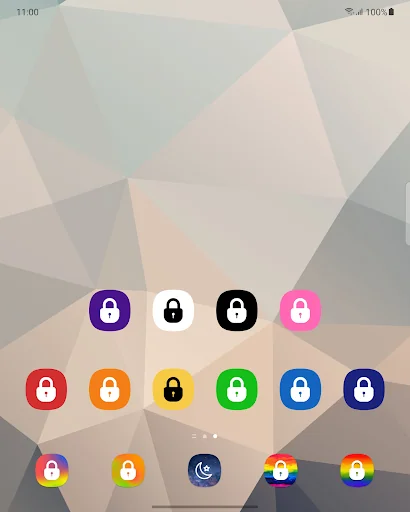
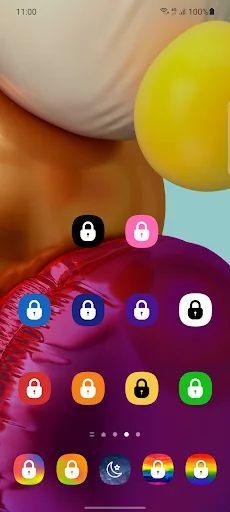
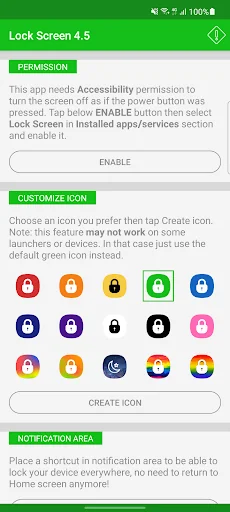
• <b>Various icon colors</b> to choose from (red, orange, yellow, green, blue, indigo, purple, white, black, pink...)
• <b>Adaptive icon</b> (Android 8+) and <b>Dark theme</b> support (Android 9+)
• Works flawlessly on <b>foldable phones</b>
• Well-optimized for every manufacturer: Samsung, Xiaomi, OPPO, Vivo, Realme, Huawei, Google Pixel...
• Supports multiple languages and RTL layout:
🇺🇸 🇸🇦 🇧🇩 🇨🇳 🇹🇼 🇳🇱 🇫🇷 🇩🇪 🇮🇳 🇮🇩 🇮🇹 🇯🇵 🇰🇷 🇲🇲 🇮🇷 🇵🇱 🇧🇷 🇵🇹 🇷🇺 🇪🇸 🇹🇭 🇹🇷 🇵🇰 🇻🇳
<b>MULTIPLE WAYS TO LOCK</b>
• <b>Floating Button</b> - always visible, tap to lock, drag anywhere you want
• <b>Home Screen Icon</b> - tap the icon to turn off screen instantly
• <b>Widget</b> - place a screen lock widget anywhere on your screen
• <b>Notification Panel</b> - swipe down and tap to lock screen quickly
• <b>Quick Settings Tile</b> - pull down the shade and tap to lock in one motion
<b>WHY 1M+ USERS CHOOSE THIS APP?</b>
• <b>Skip the physical button press</b> - lock screen from anywhere, instantly
• <b>Perfect for large phones</b> - no more stretching to reach the corner button
• <b>Ultra-light</b> - no battery drain, no memory usage
• <b>Free</b> - full features, no limitations
<b>HOW TO USE</b>
1. Install and grant permission as guided
2. Enable the floating button or place the lock icon on your home screen
3. One tap - screen off and locked immediately
4. Unlock normally with fingerprint, password, or face recognition
<b>PERMISSION</b>
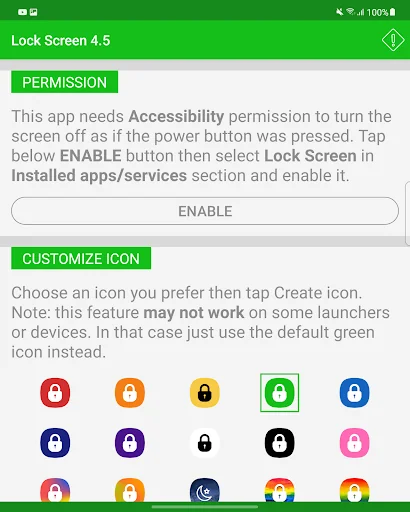
<b>Android 9+</b>: Requires <b>Accessibility permission</b> to lock screen like pressing the power button. Note: don't kill the app to avoid re-granting permission.
<b>Android 8 and below</b>: Uses <b>Device Administrator permission</b>. To uninstall, tap <b>Deactivate</b> in app settings first.
<b>SUPPORT</b>
Open the app → <b>FAQ</b> → <b>Feedback and bug report</b> to email the developer.
Trusted by over 1 million users worldwide. Perfect for large-screen phones, one-handed use, or anyone who wants a more convenient screen lock - no physical button press needed.
<b>FEATURES</b>
• <b>One tap to lock and turn off screen instantly</b>
• <b>Floating Button</b>, <b>Widget</b>, <b>Quick Settings Tile</b>, <b>Home Screen Icon</b> & <b>Notification Panel</b> - multiple ways to lock from anywhere
• Works seamlessly with <b>fingerprint sensor</b> and <b>Smart Lock</b> (bluetooth, trusted devices, face, location...) - lock immediately on Android 9+ without requiring a PIN/password to unlock.
• <b>Various icon colors</b> to choose from (red, orange, yellow, green, blue, indigo, purple, white, black, pink...)
• <b>Adaptive icon</b> (Android 8+) and <b>Dark theme</b> support (Android 9+)
• Works flawlessly on <b>foldable phones</b>
• Well-optimized for every manufacturer: Samsung, Xiaomi, OPPO, Vivo, Realme, Huawei, Google Pixel...
• Supports multiple languages and RTL layout:
🇺🇸 🇸🇦 🇧🇩 🇨🇳 🇹🇼 🇳🇱 🇫🇷 🇩🇪 🇮🇳 🇮🇩 🇮🇹 🇯🇵 🇰🇷 🇲🇲 🇮🇷 🇵🇱 🇧🇷 🇵🇹 🇷🇺 🇪🇸 🇹🇭 🇹🇷 🇵🇰 🇻🇳
<b>MULTIPLE WAYS TO LOCK</b>
• <b>Floating Button</b> - always visible, tap to lock, drag anywhere you want
• <b>Home Screen Icon</b> - tap the icon to turn off screen instantly
• <b>Widget</b> - place a screen lock widget anywhere on your screen
• <b>Notification Panel</b> - swipe down and tap to lock screen quickly
• <b>Quick Settings Tile</b> - pull down the shade and tap to lock in one motion
<b>WHY 1M+ USERS CHOOSE THIS APP?</b>
• <b>Skip the physical button press</b> - lock screen from anywhere, instantly
• <b>Perfect for large phones</b> - no more stretching to reach the corner button
• <b>Ultra-light</b> - no battery drain, no memory usage
• <b>Free</b> - full features, no limitations
<b>HOW TO USE</b>
1. Install and grant permission as guided
2. Enable the floating button or place the lock icon on your home screen
3. One tap - screen off and locked immediately
4. Unlock normally with fingerprint, password, or face recognition
<b>PERMISSION</b>
<b>Android 9+</b>: Requires <b>Accessibility permission</b> to lock screen like pressing the power button. Note: don't kill the app to avoid re-granting permission.
<b>Android 8 and below</b>: Uses <b>Device Administrator permission</b>. To uninstall, tap <b>Deactivate</b> in app settings first.
<b>SUPPORT</b>
Open the app → <b>FAQ</b> → <b>Feedback and bug report</b> to email the developer.
Profile & Insights
Everything we know — and don't — about this app and its company.
Identification
- App name
- Turn Off Screen - Screen Lock
- Developer
- redmanit
- Bundle ID
- com.redmanit.lockscreen
- App Store URL
- Open in App Store
- Category
- Tools
- Content rating
- Not found
- Languages
- Not found
Company
- Website
- Not found
- Tagline
- Not found
- Description
- Not found
- Founded
- Not found
- HQ / Address
- Not found
- Employees
- Not found
- Logo
- Not found
Revenue
- Verified revenue / mo
- Not found
- AI revenue estimate / mo
- Not found
- AI annual estimate
- Not found
- ML model estimate / mo
- $1.8K/mo
- Top-grossing rank
- Not found
- All-time revenue
- Not found
- Pricing
- Not found
Founder
- Name
- Not found
- X / Twitter
- Not found
- Not found
- GitHub
- Not found
- X followers
- Not found
- Public statements
- Not found
Funding
- Total raised
- Not found
- Last round
- Not found
- Investors
- Not found
- Crunchbase
- Not found
- AngelList
- Not found
Press & Links
- Articles found
- Not found
- Listed on
- Not found
- Blog
- Not found
- Press / News
- Not found
Contacts & Socials
- Socials
- Not found
- Not found
- Phone
- Not found
- Contact page
- Not found
- About page
- Not found
Profile is built from iTunes Lookup + developer site scrape + ML revenue model. Empty fields show "Not found" — additional sources (Crunchbase, X, IndieHackers, Acquire.com) coming.
More Tools
Phone by Google
★ 4.5 · 47,248,471 reviews
Google Play services
★ 4.3 · 44,619,167 reviews
★ 4.1 · 29,135,018 reviews
Gboard - the Google Keyboard
★ 4.5 · 18,500,531 reviews
SHAREit: Transfer, Share Files
★ 4.3 · 18,247,718 reviews
gov.br
★ 4.5 · 12,551,225 reviews
MyTelkomsel – Buy Internet
★ 3.7 · 11,917,556 reviews
myIM3: Data Plan & Buy Package
★ 4.4 · 10,992,500 reviews
Browse BU Analytics
📚 All 55,000+ Books
🜍 Alchemy & Hermeticism
🔮 Magic & Ritual
🌙 Witchcraft & Paganism
⭐ Astrology & Cosmology
🃏 Divination & Tarot
📜 Tools
✡️ Kabbalah & Jewish Mysticism
🕉️ Mysticism & Contemplation
🕊️ Theosophy & Anthroposophy
🏛️ Freemasonry & Secret Societies
👻 Spiritualism & Afterlife
📖 Sacred Texts & Gnosticism
👁️ Supernatural & Occult Fiction
🧘 Spiritual Development
📚 Esoteric History & Biography
Info
About BU Analytics