72
BU Score
Strong
AirDroid: File & Remote Access
✍️ BU Analytics Review
“
AirDroid: File & Remote Access is an Android app from SAND STUDIO in the Tools category, currently rated 3.8★ across 631,154 ratings. Initial signal reads as mixed reviews — supporters praise core features while critics cite stability/value gaps.
Our BU Score puts it at 72 — Strong (healthy traction). For a Tools app, that means healthy traction.
Track changes month-over-month in the Performance section below — live snapshot history and revenue forecast included.
creator
📊 Performance Tracking LIVE
Loading…
Rating
—
Reviews
—
Forecast Revenue / mo
—
Snapshots tracked
0
since first record
Range:
💰 Forecast Revenue / mo
MODELRevenue forecast computed from BU's 234 trigger model on each snapshot. Calibrated against ground-truth from 58 verified-revenue apps.
📈 Reviews Growth
LIVECumulative review count from first BU snapshot. Each point = a tracked update.
⭐ Rating Trend
LIVEAverage rating evolution. Updates with each new review batch.
🗓️ Snapshot Timeline
HISTORYEach bar shows a tracked update and the metric delta from the previous snapshot.
App Specs
🔐 Own this app? Claim & verify MRR →🔖 v4.3.11.0🔄 updated 5mo ago📂 Tools💰 Free
📝 About this app
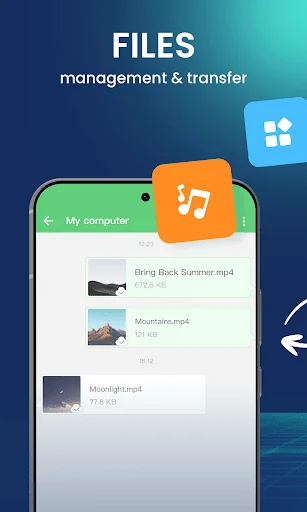
AirDroid is your best personal mobile device management suite, which is built on 10 years of non-stop improvements, including file transfer and management, screen mirroring, remote control, and receive SMS notifications right from your computer - all can be done with just one AirDroid app.
<b>Major features:</b>
<b>1. Enjoy hyper-fast file transferring without limitations</b>
You can use AirDroid to enjoy the incredibly fast file-transferring speed at 20MB/s, under both local and remote connections. Enjoy the uncompromising experience for productivity even when switching to Wi-Fi, 4G, or 5G network. The nearby feature also allows you to instantly and directly send photos & video files to your nearby friends, even without an account or internet connection.
<b>2. All-in-one file management</b>
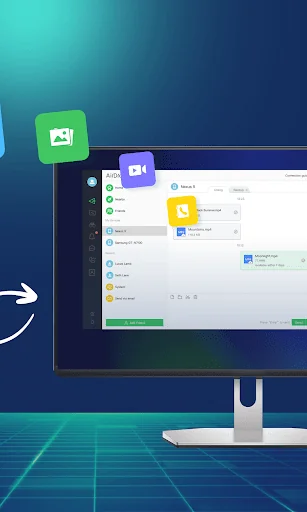
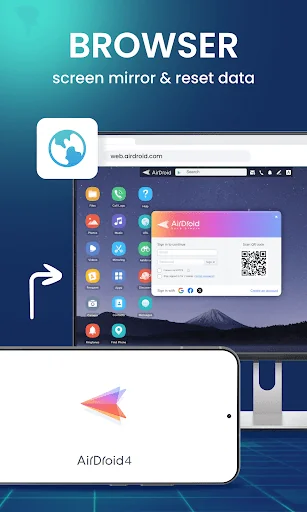
From the desktop client or the web client web.airdroid.com, you can check up and manage photos, videos, music, apps, storage, and more on your devices. You can even automatically sync and upload your photos & videos to your PC, that way you can not only save up your device's storage but also avoid the risk of having your privacy leaked.
<b>3. Screen Mirroring</b>
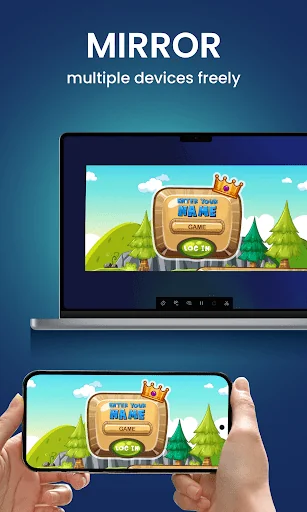
Mirror your Android devices to pc wirelessly so that you can share your screen with your students or partners. You can also stream your broadcast with AirDroid, to share your games or pictures with your audience more efficiently.
Screen mirroring doesn't require the phones and the computer to be on the same network. A practical solution for various scenarios.
<b>4. Remote Control Android devices</b>
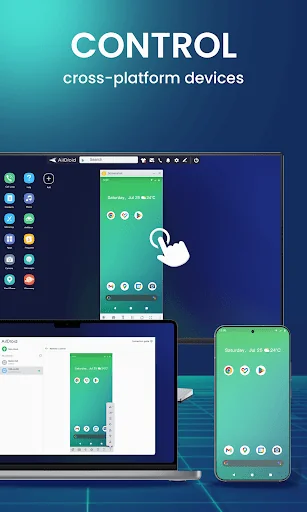
You can take full control of your Android devices, without rooting your devices, just need to connect to the AirDroid PC client for a fast setting, to do whatever you want to do on your Android devices remotely, ex, play games, open an app, check the phone status.
Remote control for AirDroid is easy to set up and runs smoothly even if your device is on the other side of the globe.
*If you need to remote control an Android device from another Android device, you need to download AirMirror for the controller device.
<b>5. Remote Monitoring</b>
Make use of unused Android phones and have them be your eyes by using the remote camera feature. Monitor the device surroundings, or listen in on environmental sounds with One-Way Audio, so you don't need to stay on the screen at all times.
You can check in on newborns and pets or safeguard your home, all without spending extra on new cameras.
<b>5. Notifications & SMS Management</b>
AirDroid helps you focus on work by letting you manage the phone right from your computer.
You can receive and send texts, connect to headsets, enter or copy the phone number and make the call right from the computer. The Notification feature allows you to sync your phone's app notifications (such as WhatsApp, Line, and Facebook Messenger) to the computer, and you can directly reply to them on your desktop. Important messages are always up-to-date.
<b>6. Make calls on PC</b>
You can import phone numbers in bulk directly on the AirDroid desktop client, click to call, and talk to your customers or friends through the handset or Bluetooth headset of the phone. AirDroid helps you avoids the trouble of manually entering phone numbers on mobile phones and possible errors, and improves your efficiency.
<b>FAQs:</b>
Q: Do I have to register an account to use AirDroid?
A: With an AirDroid account, you can enjoy all the features under the local and remote connection. If you don't want to register, you can use AirDroid under the same wifi with limited features.
Q: Does AirDroid free to use?
A: You can use AirDroid for free under the local area network. When running under a non-local network, the free account has a 200MB/month data limit and cannot use the remote camera. We recommend that you upgrade to premium to enjoy unlimited remote data and unlock all functions and services.
<b>Major features:</b>
<b>1. Enjoy hyper-fast file transferring without limitations</b>
You can use AirDroid to enjoy the incredibly fast file-transferring speed at 20MB/s, under both local and remote connections. Enjoy the uncompromising experience for productivity even when switching to Wi-Fi, 4G, or 5G network. The nearby feature also allows you to instantly and directly send photos & video files to your nearby friends, even without an account or internet connection.
<b>2. All-in-one file management</b>
From the desktop client or the web client web.airdroid.com, you can check up and manage photos, videos, music, apps, storage, and more on your devices. You can even automatically sync and upload your photos & videos to your PC, that way you can not only save up your device's storage but also avoid the risk of having your privacy leaked.
<b>3. Screen Mirroring</b>
Mirror your Android devices to pc wirelessly so that you can share your screen with your students or partners. You can also stream your broadcast with AirDroid, to share your games or pictures with your audience more efficiently.
Screen mirroring doesn't require the phones and the computer to be on the same network. A practical solution for various scenarios.
<b>4. Remote Control Android devices</b>
You can take full control of your Android devices, without rooting your devices, just need to connect to the AirDroid PC client for a fast setting, to do whatever you want to do on your Android devices remotely, ex, play games, open an app, check the phone status.
Remote control for AirDroid is easy to set up and runs smoothly even if your device is on the other side of the globe.
*If you need to remote control an Android device from another Android device, you need to download AirMirror for the controller device.
<b>5. Remote Monitoring</b>
Make use of unused Android phones and have them be your eyes by using the remote camera feature. Monitor the device surroundings, or listen in on environmental sounds with One-Way Audio, so you don't need to stay on the screen at all times.
You can check in on newborns and pets or safeguard your home, all without spending extra on new cameras.
<b>5. Notifications & SMS Management</b>
AirDroid helps you focus on work by letting you manage the phone right from your computer.
You can receive and send texts, connect to headsets, enter or copy the phone number and make the call right from the computer. The Notification feature allows you to sync your phone's app notifications (such as WhatsApp, Line, and Facebook Messenger) to the computer, and you can directly reply to them on your desktop. Important messages are always up-to-date.
<b>6. Make calls on PC</b>
You can import phone numbers in bulk directly on the AirDroid desktop client, click to call, and talk to your customers or friends through the handset or Bluetooth headset of the phone. AirDroid helps you avoids the trouble of manually entering phone numbers on mobile phones and possible errors, and improves your efficiency.
<b>FAQs:</b>
Q: Do I have to register an account to use AirDroid?
A: With an AirDroid account, you can enjoy all the features under the local and remote connection. If you don't want to register, you can use AirDroid under the same wifi with limited features.
Q: Does AirDroid free to use?
A: You can use AirDroid for free under the local area network. When running under a non-local network, the free account has a 200MB/month data limit and cannot use the remote camera. We recommend that you upgrade to premium to enjoy unlimited remote data and unlock all functions and services.
Profile & Insights
Everything we know — and don't — about this app and its company.
Identification
- App name
- AirDroid: File & Remote Access
- Developer
- SAND STUDIO
- Bundle ID
- com.sand.airdroid
- App Store URL
- Open in App Store
- Category
- Tools
- Content rating
- Not found
- Languages
- Not found
Company
- Website
- Not found
- Tagline
- Not found
- Description
- Not found
- Founded
- Not found
- HQ / Address
- Not found
- Employees
- Not found
- Logo
- Not found
Revenue
- Verified revenue / mo
- Not found
- AI revenue estimate / mo
- Not found
- AI annual estimate
- Not found
- ML model estimate / mo
- $4.0K/mo
- Top-grossing rank
- Not found
- All-time revenue
- Not found
- Pricing
- Not found
Founder
- Name
- Not found
- X / Twitter
- Not found
- Not found
- GitHub
- Not found
- X followers
- Not found
- Public statements
- Not found
Funding
- Total raised
- Not found
- Last round
- Not found
- Investors
- Not found
- Crunchbase
- Not found
- AngelList
- Not found
Press & Links
- Articles found
- Not found
- Listed on
- Not found
- Blog
- Not found
- Press / News
- Not found
Contacts & Socials
- Socials
- Not found
- Not found
- Phone
- Not found
- Contact page
- Not found
- About page
- Not found
Profile is built from iTunes Lookup + developer site scrape + ML revenue model. Empty fields show "Not found" — additional sources (Crunchbase, X, IndieHackers, Acquire.com) coming.
More Tools
Phone by Google
★ 4.5 · 47,248,471 reviews
Google Play services
★ 4.3 · 44,619,167 reviews
★ 4.1 · 29,135,018 reviews
Gboard - the Google Keyboard
★ 4.5 · 18,500,531 reviews
SHAREit: Transfer, Share Files
★ 4.3 · 18,247,718 reviews
gov.br
★ 4.5 · 12,551,225 reviews
MyTelkomsel – Buy Internet
★ 3.7 · 11,917,556 reviews
myIM3: Data Plan & Buy Package
★ 4.4 · 10,992,500 reviews
Browse BU Analytics
📚 All 55,000+ Books
🜍 Alchemy & Hermeticism
🔮 Magic & Ritual
🌙 Witchcraft & Paganism
⭐ Astrology & Cosmology
🃏 Divination & Tarot
📜 Tools
✡️ Kabbalah & Jewish Mysticism
🕉️ Mysticism & Contemplation
🕊️ Theosophy & Anthroposophy
🏛️ Freemasonry & Secret Societies
👻 Spiritualism & Afterlife
📖 Sacred Texts & Gnosticism
👁️ Supernatural & Occult Fiction
🧘 Spiritual Development
📚 Esoteric History & Biography
Info
About BU Analytics