75
BU Score
Strong
Smallpdf: Scanner & PDF Editor
✍️ BU Analytics Review
“
Smallpdf: Scanner & PDF Editor is an Android app from Smallpdf AG in the Productivity category, currently rated 4.4★ across 122,489 ratings. Initial signal reads as mostly critical sentiment so far — users flag rough edges and unmet expectations.
Our BU Score puts it at 75 — Strong (healthy traction). For a Productivity app, that means healthy traction.
Track changes month-over-month in the Performance section below — live snapshot history and revenue forecast included.
creator
📊 Performance Tracking LIVE
Loading…
Rating
—
Reviews
—
Forecast Revenue / mo
—
Snapshots tracked
0
since first record
Range:
💰 Forecast Revenue / mo
MODELRevenue forecast computed from BU's 234 trigger model on each snapshot. Calibrated against ground-truth from 58 verified-revenue apps.
🔬Forecast Breakdown — Why This Estimate?Top 4 of 4 triggers
Our ML model uses 200+ signals from public data. These are the most influential for this app:
| High install base (122,489 ratings)METRIC | +$12,000 | |
| Good rating (4.4★)METRIC | +$800 | |
| Established app (6y old)METRIC | +$800 | |
| Ad-supported / freemiumMETRIC | +$600 |
METRIC = structural app data · REVIEW = mined from user reviews · ✓ VERIFIED = Stripe-verified anchor (TrustMRR)
📈 Reviews Growth
LIVECumulative review count from first BU snapshot. Each point = a tracked update.
⭐ Rating Trend
LIVEAverage rating evolution. Updates with each new review batch.
🗓️ Snapshot Timeline
HISTORYEach bar shows a tracked update and the metric delta from the previous snapshot.
App Specs
🔐 Own this app? Claim & verify MRR →🔖 v3.3.0🔄 updated 3mo ago📂 Productivity💰 Free💎 IAP $7.99 - $119.99 per item🚀 Launched 2020 (6y old)
📝 About this app
<b>Smallpdf: All-In-One PDF Editor and Document Organizer</b>
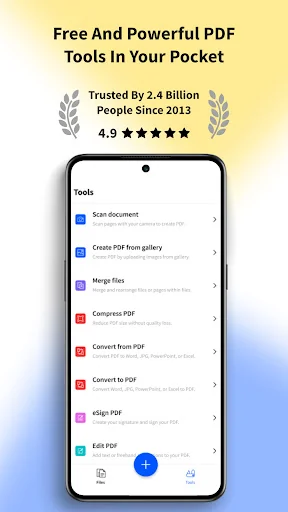
Smallpdf is your go-to PDF tool, designed to simplify your document management. Whether you need to convert, compress, edit, sign, merge, split, or scan PDFs, our app makes it effortless. Trusted by 1.7 billion people since 2013, Smallpdf offers a seamless PDF experience right at your fingertips.
<b>Key Features:</b>
• Convert PDFs Across All Document Formats Easily:
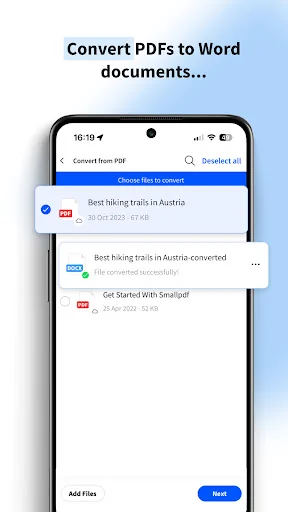
- PDF to Word doc
- PDF to Excel
- PDF to PPT
- PDF to JPG
- PDF to PNG
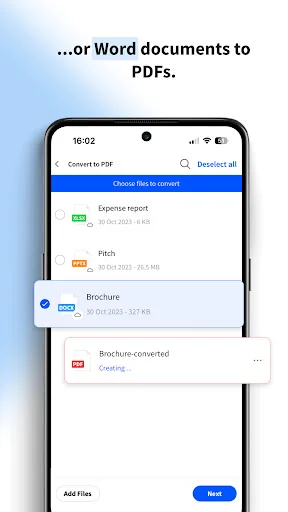
- Images to PDF and vice versa!
• Edit PDFs:
- Edit text, images, and links directly in your PDF files
- Add annotations, highlights, and comments easily
- Rotate, delete, and rearrange PDF pages
- Modify PDF text
- PDF editing tools
• Compress PDFs:
- Reduce the file size of your PDFs without compromising quality
- Optimize PDFs for sharing and saving storage space
- Shrink PDF files
- Compress PDF documents
• Sign PDFs:
- Add e-signatures to your documents
- Request signatures from others and track the signing process in real-time
- Digitally sign PDFs securely
- Electronic signatures for PDFs
• Merge & Split PDFs:
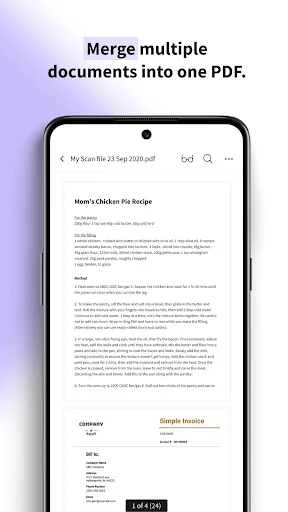
- Combine multiple PDF files into one
- Split a large PDF into smaller, more manageable parts
- Merge PDF documents
- Split PDF pages
• Scan Documents to PDF:
- Use your camera to scan documents, receipts, notes, and more into PDFs
- Enhance scans with automatic cropping and optimization
- Convert scanned images to editable text with OCR
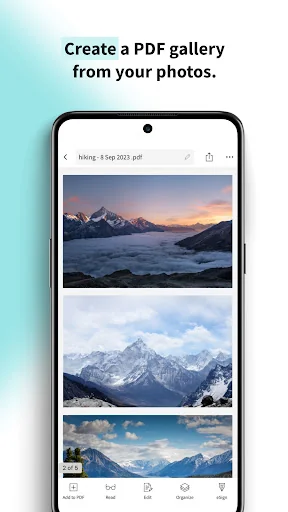
- Scan image to PDF
- Scan doc to PDF
- Scan jpg to PDF
- Scan receipts to PD
• OCR Technology:
- Convert scanned documents into editable text with our advanced OCR feature
- Support for multiple languages
- OCR PDF converter
- Text recognition in PDFs
<b>Why Choose Smallpdf?</b>
• User-Friendly Interface: Intuitive and easy to navigate, making PDF tasks simpler than ever.
• Cloud Integration: Access and save your files directly from Google Drive, Dropbox, and other cloud services. Local device storage is available too.
• Privacy and data protection: All uploaded files deleted 1 hour after processing (unless saved locally or to the cloud)
• Cross-Platform Availability: All major operating systems. Available on iOS, Android, and desktop. Work on your PDFs anytime, anywhere.
• Fast and Reliable: Quick processing times ensure you can get your work done efficiently.
• High Security: We prioritize your privacy and data security, complying with GDPR standards.
<b>Additional Features:</b>
• PDF Reader: View and read PDF documents with ease.
• PDF Scanner: Quickly scan and digitize your paper documents.
• PDF Filler: Fill out PDF forms and documents electronically.
• PDF Maker: Create PDFs from various file formats effortlessly.
• PDF Annotator: Highlight, underline, and strikethrough text in your PDFs.
<b>Download Smallpdf Now!</b>
Smallpdf is free to use with 1 daily tool task per day!
If you would like to try out PRO for unlimited conversions across ALL tools, there’s a free 7-day trial available. Monthly subscription available for $7.99 per month or save 48% on an annual plan!
Team & Enterprise plans available for businesses upon request. Prices may vary from country to country.
<b>Smallpdf for Business</b>
Smallpdf App is the all-in-one business solution app for all your document organization needs. Simplify your tax return or scan in receipts easily using your camera to save, edit and manage thousands of documents in all formats. Save backups on the drive or share directly to email to manage your documents on the go!
Join 1.7B+ satisfied users and simplify your PDF tasks today. Download Smallpdf and enjoy a free trial of all premium features.
We love feedback, so feel free to send yours to support@smallpdf.com.
Smallpdf is your go-to PDF tool, designed to simplify your document management. Whether you need to convert, compress, edit, sign, merge, split, or scan PDFs, our app makes it effortless. Trusted by 1.7 billion people since 2013, Smallpdf offers a seamless PDF experience right at your fingertips.
<b>Key Features:</b>
• Convert PDFs Across All Document Formats Easily:
- PDF to Word doc
- PDF to Excel
- PDF to PPT
- PDF to JPG
- PDF to PNG
- Images to PDF and vice versa!
• Edit PDFs:
- Edit text, images, and links directly in your PDF files
- Add annotations, highlights, and comments easily
- Rotate, delete, and rearrange PDF pages
- Modify PDF text
- PDF editing tools
• Compress PDFs:
- Reduce the file size of your PDFs without compromising quality
- Optimize PDFs for sharing and saving storage space
- Shrink PDF files
- Compress PDF documents
• Sign PDFs:
- Add e-signatures to your documents
- Request signatures from others and track the signing process in real-time
- Digitally sign PDFs securely
- Electronic signatures for PDFs
• Merge & Split PDFs:
- Combine multiple PDF files into one
- Split a large PDF into smaller, more manageable parts
- Merge PDF documents
- Split PDF pages
• Scan Documents to PDF:
- Use your camera to scan documents, receipts, notes, and more into PDFs
- Enhance scans with automatic cropping and optimization
- Convert scanned images to editable text with OCR
- Scan image to PDF
- Scan doc to PDF
- Scan jpg to PDF
- Scan receipts to PD
• OCR Technology:
- Convert scanned documents into editable text with our advanced OCR feature
- Support for multiple languages
- OCR PDF converter
- Text recognition in PDFs
<b>Why Choose Smallpdf?</b>
• User-Friendly Interface: Intuitive and easy to navigate, making PDF tasks simpler than ever.
• Cloud Integration: Access and save your files directly from Google Drive, Dropbox, and other cloud services. Local device storage is available too.
• Privacy and data protection: All uploaded files deleted 1 hour after processing (unless saved locally or to the cloud)
• Cross-Platform Availability: All major operating systems. Available on iOS, Android, and desktop. Work on your PDFs anytime, anywhere.
• Fast and Reliable: Quick processing times ensure you can get your work done efficiently.
• High Security: We prioritize your privacy and data security, complying with GDPR standards.
<b>Additional Features:</b>
• PDF Reader: View and read PDF documents with ease.
• PDF Scanner: Quickly scan and digitize your paper documents.
• PDF Filler: Fill out PDF forms and documents electronically.
• PDF Maker: Create PDFs from various file formats effortlessly.
• PDF Annotator: Highlight, underline, and strikethrough text in your PDFs.
<b>Download Smallpdf Now!</b>
Smallpdf is free to use with 1 daily tool task per day!
If you would like to try out PRO for unlimited conversions across ALL tools, there’s a free 7-day trial available. Monthly subscription available for $7.99 per month or save 48% on an annual plan!
Team & Enterprise plans available for businesses upon request. Prices may vary from country to country.
<b>Smallpdf for Business</b>
Smallpdf App is the all-in-one business solution app for all your document organization needs. Simplify your tax return or scan in receipts easily using your camera to save, edit and manage thousands of documents in all formats. Save backups on the drive or share directly to email to manage your documents on the go!
Join 1.7B+ satisfied users and simplify your PDF tasks today. Download Smallpdf and enjoy a free trial of all premium features.
We love feedback, so feel free to send yours to support@smallpdf.com.
Profile & Insights
Everything we know — and don't — about this app and its company.
Identification
- App name
- Smallpdf: Scanner & PDF Editor
- Developer
- Smallpdf AG
- Bundle ID
- com.smallpdf.app.android
- App Store URL
- Open in App Store
- Category
- Productivity
- Content rating
- Not found
- Languages
- Not found
Company
- Website
- smallpdf.com
- Tagline
- Not found
- Description
- Not found
- Founded
- Not found
- HQ / Address
- Not found
- Employees
- Not found
- Logo
- Not found
Revenue
- Verified revenue / mo
- Not found
- AI revenue estimate / mo
- Not found
- AI annual estimate
- Not found
- ML model estimate / mo
- $1.7K/mo
- Top-grossing rank
- Not found
- All-time revenue
- Not found
- Pricing
- $7.99 - $119.99 per item
Founder
- Name
- Not found
- X / Twitter
- Not found
- Not found
- GitHub
- Not found
- X followers
- Not found
- Public statements
- Not found
Funding
- Total raised
- Not found
- Last round
- Not found
- Investors
- Not found
- Crunchbase
- Not found
- AngelList
- Not found
Press & Links
- Articles found
- Not found
- Listed on
- Not found
- Blog
- Not found
- Press / News
- Not found
Contacts & Socials
- Socials
- Not found
- Not found
- Phone
- Not found
- Contact page
- Not found
- About page
- Not found
📈Ratings growth122,489 ratings+61% lifetimeShow 3-year history estimate ▾
Tracked (1 weeks) Pre-tracking estimate (37 weeks) · model-based, ±5% noise · anchored to release date and current value
Profile is built from iTunes Lookup + developer site scrape + ML revenue model. Empty fields show "Not found" — additional sources (Crunchbase, X, IndieHackers, Acquire.com) coming.
More Productivity
Microsoft Outlook
★ 4.8 · 8,891,395 reviews
Google Drive – online backup
★ 4.8 · 7,526,498 reviews
ChatGPT
★ 4.8 · 7,136,919 reviews
Yahoo Mail – Alles im Blick
★ 4.7 · 4,623,459 reviews
HP
★ 4.6 · 4,011,497 reviews
Google Docs
★ 4.8 · 3,078,214 reviews
Microsoft Word
★ 4.7 · 2,843,856 reviews
Gmail – E-Mail von Google
★ 4.7 · 2,406,337 reviews
Browse BU Analytics
📚 All 55,000+ Books
🜍 Alchemy & Hermeticism
🔮 Magic & Ritual
🌙 Witchcraft & Paganism
⭐ Astrology & Cosmology
🃏 Divination & Tarot
📜 Productivity
✡️ Kabbalah & Jewish Mysticism
🕉️ Mysticism & Contemplation
🕊️ Theosophy & Anthroposophy
🏛️ Freemasonry & Secret Societies
👻 Spiritualism & Afterlife
📖 Sacred Texts & Gnosticism
👁️ Supernatural & Occult Fiction
🧘 Spiritual Development
📚 Esoteric History & Biography
Info
About BU Analytics