66
BU Score
Solid
Ftp Server
✍️ BU Analytics Review
“
Ftp Server is an Android app from The Olive Tree in the Tools category, currently rated 4.1★ across 8,942 ratings. Initial signal reads as largely positive sentiment, users highlighting consistency and feature depth.
Our BU Score puts it at 66 — Solid (established niche player). For a Tools app, that means established niche player.
Track changes month-over-month in the Performance section below — live snapshot history and revenue forecast included.
creator
📊 Performance Tracking LIVE
Loading…
Rating
—
Reviews
—
Forecast Revenue / mo
—
Snapshots tracked
0
since first record
Range:
💰 Forecast Revenue / mo
MODELRevenue forecast computed from BU's 234 trigger model on each snapshot. Calibrated against ground-truth from 58 verified-revenue apps.
🔬Forecast Breakdown — Why This Estimate?Top 4 of 4 triggers
Our ML model uses 200+ signals from public data. These are the most influential for this app:
| Low install base (8,942 ratings)METRIC | +$1,500 | |
| Mature app (14y old)METRIC | +$1,500 | |
| Good rating (4.1★)METRIC | +$800 | |
| Ad-supported / freemiumMETRIC | +$600 |
METRIC = structural app data · REVIEW = mined from user reviews · ✓ VERIFIED = Stripe-verified anchor (TrustMRR)
📈 Reviews Growth
LIVECumulative review count from first BU snapshot. Each point = a tracked update.
⭐ Rating Trend
LIVEAverage rating evolution. Updates with each new review batch.
🗓️ Snapshot Timeline
HISTORYEach bar shows a tracked update and the metric delta from the previous snapshot.
App Specs
🔐 Own this app? Claim & verify MRR →🔖 v1.32🔄 updated 8y ago📂 Tools💰 Free📺 Ad-supported🚀 Launched 2011 (14y old)
📝 About this app
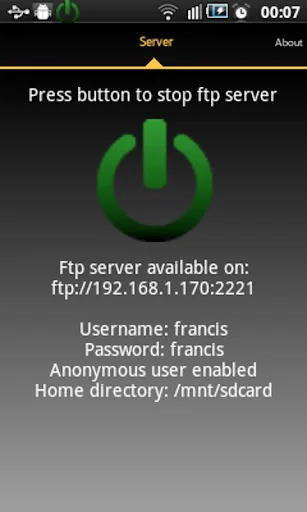
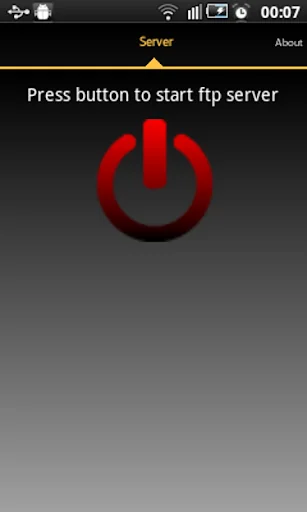
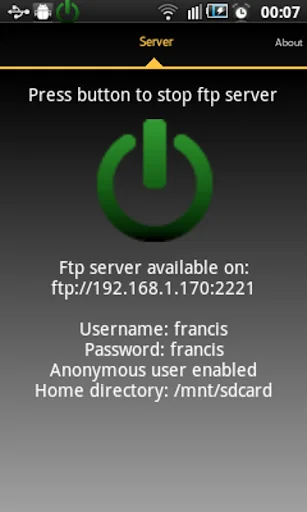
Read/write any folder, including sdcard, in your android device with this ftp server. You can backup your photos to your PC, copy music and movies to your device, etc.
If you still do not have a ftp client I recommend FileZilla client (you can download it on http://filezilla-project.org/) but you can also use file explorer on windows.
Free version does not allow landscape screen.
Features:
Use any network interface in your device including: WIFI, Ethernet, Mobile network, USB...
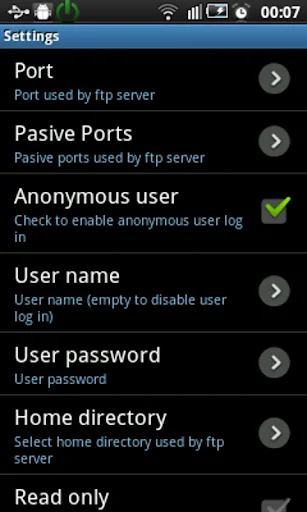
Anonymous user (can be disabled).
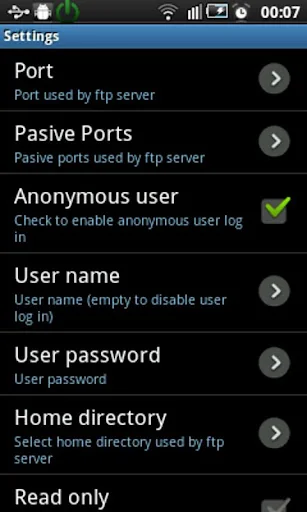
One Ftp user (can be disabled). Name and password can be changed.
Home directory can be root directory,
Read only mode.
Passive and active modes.
Show hidden files.
Custom home folder.
Option to run server as a foreground service.
Energy save mode.
Languages supported: English, Spanish, Romanian, French, Italian, Hungarian, German, Chinese, Portuguese, Korean, Russian and Catalan.
Intents:
com.theolivetree.ftpserver.StartFtpServer
com.theolivetree.ftpserver.StopFtpServer
TODO:
Run server as root user (only rooted devices).
TLS/SSL support for secure connections.
How to connect with Ftp server using USB cable:
This can useful when you have USB cable and not network available.
1) On your phone go to Settings->Applications->Development and set option "USB debugging".
2) Connect your phone to your PC using USB cable.
3) Start adb server. On your PC run command "adb start-server".
adb is a program that you can find on android sdk. Usually you will find it on android-sdk\platform-tools\adb.
4) Forward needed ports from your PC to your phone. On your PC run command "adb forward tcp:2221 tcp:2221"
You will need to repeat this step for all ftp server and passive ports configured in your phone. It will be easier if you use a small range of passive ports.
With this, any connection in your pc to 127.0.0.1:2221 will be forwarded to your phone in port 2221.
5) Run Ftp server in your phone, open settings and in "Network interfaces" select "Loopback (127.0.0.1)" or "All"
6) Start ftp server.
7) In your PC connect your ftp client to ftp://127.0.0.1:2221 (port might be different, it depends on your Ftp Server configuration).
Connections in this mode need to be always started by PC so only passive mode is available when using USB connection.
Permissions needed:
INTERNET
ACCESS_NETWORK_STATE
ACCESS_WIFI_STATE
Network permission to enable server to open network communication with ftp clients.
WRITE_EXTERNAL_STORAGE
Enables ftp server write received files from ftp clients on sdcard.
WAKE_LOCK
Keeps phone wake only while server is running. If phone is not wake connections to ftp server can fail.
Libraries used by this program: Apache ftp server v1.0.6. Apache2 License. Android viewflow pakerfeldt (01/Nov/2011). Apache2 License: http://www.apache.org/licenses/LICENSE-2.0.html
Special thanks to: Beatriz Vera, Surjit Panda, Alex Sovu, Balazs David Molnar, Damien Varvenne, Simone Balducci, Juanvi, Chengcheng Hu, Noelia, Noxa Tagakov, Joon Lim, Tomokazu Wakasugi and Paulino Feitio.
If you still do not have a ftp client I recommend FileZilla client (you can download it on http://filezilla-project.org/) but you can also use file explorer on windows.
Free version does not allow landscape screen.
Features:
Use any network interface in your device including: WIFI, Ethernet, Mobile network, USB...
Anonymous user (can be disabled).
One Ftp user (can be disabled). Name and password can be changed.
Home directory can be root directory,
Read only mode.
Passive and active modes.
Show hidden files.
Custom home folder.
Option to run server as a foreground service.
Energy save mode.
Languages supported: English, Spanish, Romanian, French, Italian, Hungarian, German, Chinese, Portuguese, Korean, Russian and Catalan.
Intents:
com.theolivetree.ftpserver.StartFtpServer
com.theolivetree.ftpserver.StopFtpServer
TODO:
Run server as root user (only rooted devices).
TLS/SSL support for secure connections.
How to connect with Ftp server using USB cable:
This can useful when you have USB cable and not network available.
1) On your phone go to Settings->Applications->Development and set option "USB debugging".
2) Connect your phone to your PC using USB cable.
3) Start adb server. On your PC run command "adb start-server".
adb is a program that you can find on android sdk. Usually you will find it on android-sdk\platform-tools\adb.
4) Forward needed ports from your PC to your phone. On your PC run command "adb forward tcp:2221 tcp:2221"
You will need to repeat this step for all ftp server and passive ports configured in your phone. It will be easier if you use a small range of passive ports.
With this, any connection in your pc to 127.0.0.1:2221 will be forwarded to your phone in port 2221.
5) Run Ftp server in your phone, open settings and in "Network interfaces" select "Loopback (127.0.0.1)" or "All"
6) Start ftp server.
7) In your PC connect your ftp client to ftp://127.0.0.1:2221 (port might be different, it depends on your Ftp Server configuration).
Connections in this mode need to be always started by PC so only passive mode is available when using USB connection.
Permissions needed:
INTERNET
ACCESS_NETWORK_STATE
ACCESS_WIFI_STATE
Network permission to enable server to open network communication with ftp clients.
WRITE_EXTERNAL_STORAGE
Enables ftp server write received files from ftp clients on sdcard.
WAKE_LOCK
Keeps phone wake only while server is running. If phone is not wake connections to ftp server can fail.
Libraries used by this program: Apache ftp server v1.0.6. Apache2 License. Android viewflow pakerfeldt (01/Nov/2011). Apache2 License: http://www.apache.org/licenses/LICENSE-2.0.html
Special thanks to: Beatriz Vera, Surjit Panda, Alex Sovu, Balazs David Molnar, Damien Varvenne, Simone Balducci, Juanvi, Chengcheng Hu, Noelia, Noxa Tagakov, Joon Lim, Tomokazu Wakasugi and Paulino Feitio.
Profile & Insights
Everything we know — and don't — about this app and its company.
Identification
- App name
- Ftp Server
- Developer
- The Olive Tree
- Bundle ID
- com.theolivetree.ftpserver
- App Store URL
- Open in App Store
- Category
- Tools
- Content rating
- Not found
- Languages
- Not found
Company
- Website
- Not found
- Tagline
- Not found
- Description
- Not found
- Founded
- Not found
- HQ / Address
- Not found
- Employees
- Not found
- Logo
- Not found
Revenue
- Verified revenue / mo
- Not found
- AI revenue estimate / mo
- Not found
- AI annual estimate
- Not found
- ML model estimate / mo
- $1.2K/mo
- Top-grossing rank
- Not found
- All-time revenue
- Not found
- Pricing
- Not found
Founder
- Name
- Not found
- X / Twitter
- Not found
- Not found
- GitHub
- Not found
- X followers
- Not found
- Public statements
- Not found
Funding
- Total raised
- Not found
- Last round
- Not found
- Investors
- Not found
- Crunchbase
- Not found
- AngelList
- Not found
Press & Links
- Articles found
- Not found
- Listed on
- Not found
- Blog
- Not found
- Press / News
- Not found
Contacts & Socials
- Socials
- Not found
- Not found
- Phone
- Not found
- Contact page
- Not found
- About page
- Not found
📈Ratings growth8,942 ratings+-3% lifetimeShow 3-year history estimate ▾
Tracked (1 weeks) Pre-tracking estimate (37 weeks) · model-based, ±5% noise · anchored to release date and current value
Profile is built from iTunes Lookup + developer site scrape + ML revenue model. Empty fields show "Not found" — additional sources (Crunchbase, X, IndieHackers, Acquire.com) coming.
More Tools
Phone by Google
★ 4.5 · 47,248,471 reviews
Google Play services
★ 4.3 · 44,619,167 reviews
★ 4.1 · 29,135,018 reviews
Gboard - the Google Keyboard
★ 4.5 · 18,500,531 reviews
SHAREit: Transfer, Share Files
★ 4.3 · 18,247,718 reviews
gov.br
★ 4.5 · 12,551,225 reviews
MyTelkomsel – Buy Internet
★ 3.7 · 11,917,556 reviews
myIM3: Data Plan & Buy Package
★ 4.4 · 10,992,500 reviews
Browse BU Analytics
📚 All 55,000+ Books
🜍 Alchemy & Hermeticism
🔮 Magic & Ritual
🌙 Witchcraft & Paganism
⭐ Astrology & Cosmology
🃏 Divination & Tarot
📜 Tools
✡️ Kabbalah & Jewish Mysticism
🕉️ Mysticism & Contemplation
🕊️ Theosophy & Anthroposophy
🏛️ Freemasonry & Secret Societies
👻 Spiritualism & Afterlife
📖 Sacred Texts & Gnosticism
👁️ Supernatural & Occult Fiction
🧘 Spiritual Development
📚 Esoteric History & Biography
Info
About BU Analytics