69
BU Score
Solid
PDF Scanner Scan files & notes
✍️ BU Analytics Review
“
PDF Scanner Scan files & notes is an Android app from Offiwiz in the Productivity category, currently rated 4.2★ across 18,518 ratings. Initial signal reads as largely positive sentiment, users highlighting consistency and feature depth.
Our BU Score puts it at 69 — Solid (established niche player). For a Productivity app, that means established niche player.
Track changes month-over-month in the Performance section below — live snapshot history and revenue forecast included.
creator
📊 Performance Tracking LIVE
Loading…
Rating
—
Reviews
—
Forecast Revenue / mo
—
Snapshots tracked
0
since first record
Range:
💰 Forecast Revenue / mo
MODELRevenue forecast computed from BU's 234 trigger model on each snapshot. Calibrated against ground-truth from 58 verified-revenue apps.
🔬Forecast Breakdown — Why This Estimate?Top 3 of 3 triggers
Our ML model uses 200+ signals from public data. These are the most influential for this app:
| Mid install base (18,518 ratings)METRIC | +$5,500 | |
| Good rating (4.2★)METRIC | +$800 | |
| Ad-supported / freemiumMETRIC | +$600 |
METRIC = structural app data · REVIEW = mined from user reviews · ✓ VERIFIED = Stripe-verified anchor (TrustMRR)
📈 Reviews Growth
LIVECumulative review count from first BU snapshot. Each point = a tracked update.
⭐ Rating Trend
LIVEAverage rating evolution. Updates with each new review batch.
🗓️ Snapshot Timeline
HISTORYEach bar shows a tracked update and the metric delta from the previous snapshot.
App Specs
🔐 Own this app? Claim & verify MRR →🔖 v191.0🔄 updated 10mo ago📂 Productivity💰 Free
📝 About this app
PDF Scanner Scan files documents, photos, ID, passport, notes...
Scan edit convert all your documents & photos to PDF files with camera scanner
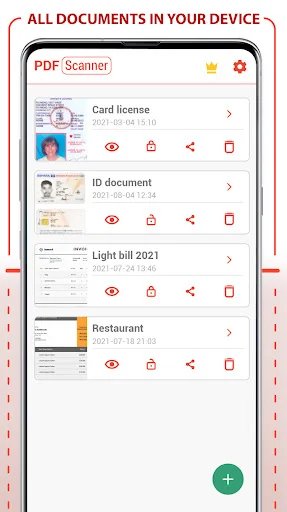
PDF Scanner Scan files documents, photos, ID, passport, notes... is the best app to create PDF from images and photos of your Phone. Your PDF scanner to scan files and docs. Create your own Doc file, you can create books, notes, journals, backups, photo albums ...
Scan your photos and convert your images into PDF format to generate your documents and scan your files. You can add filters to the images to make the texts clearer.
PDF Scanner Scan files documents, photos, ID, passport, notes... Key Features:
- Photo and Image Scanner
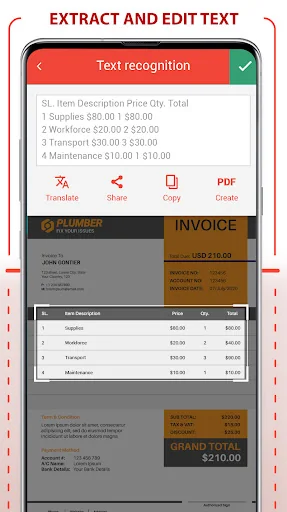
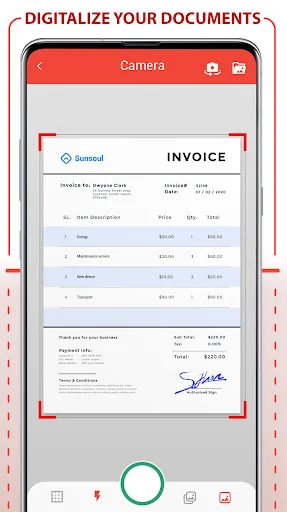
Using the camera of your phone, you can scan receipts, notes, invoices, business cards, certificates ...
- Paper Size:
Choose the best size for your document as A3, A4, A5, note, letter, postal and legal.
- Password to protect your PDF
Protect your scanned docs with the use of a password, keep your privacy and block any documents.
- Improvement with the help of filters:
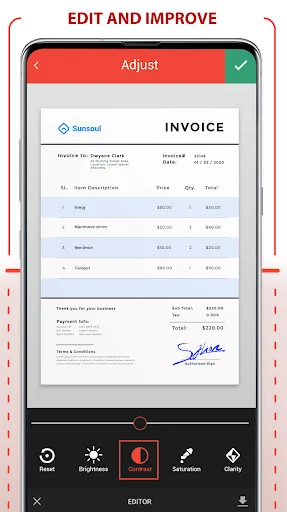
Improve the quality of your documents with filters like Black and White, magic color, grayscale ...
- Adjusting images
You can deform the image and photos of your document to fit your needs
- Intuitive interface
Document Scanner is the most intuitive and practical tool for creating your PDF document.
Convert to PDF, create, digitize files in PDF format is easy and fast thanks to Scanner Document - PDF Creator, the best photo scanner app. This PDF scanner app scan Doc to PDF. Simply use the document scanner, scan document, scan images, any photo or image you have in the gallery or generate a new photo from the mobile camera, you can apply filters to the pages to Create your perfect PDF file. It is a photo scanner and Doc scanner application to scan documents and scan images, very useful for making photo albums, journals, notes, letters, books ... Scan Doc to PDF, scan your photos and images, scan documents with the PDF scanner is immediate, the best way to scan Doc to PDF.
Once the images have been scanned and converted to PDF you can apply the filter you want for a correct visualization, you can choose between black and white, magic color, grayscale etc. Once you have generated all the pages of your PDF document you can select the paper size of your PDF file, you can choose from many formats: A3, A4, A5, notes, letters, legal and postcards. You can also protect your PDF documents with password. You can Protect PDF documents with password to increases privacy and security since you can only see the PDF document that you created with your PDF scanner by scanning images if you enter the password previously chosen.
This PDF scanner and photo scanner allows you to scan document, and scan PDF file. Generate PDF using the document scanner and create your PDF files to increase your PDF document library. Scanfy - PDF Scanner App is a photo scanner app, also a image scanner, document scanner. It is a mobile and portable scanner app to convert images to PDF and it scan Doc to PDF
Scan edit convert all your documents & photos to PDF files with camera scanner
PDF Scanner Scan files documents, photos, ID, passport, notes... is the best app to create PDF from images and photos of your Phone. Your PDF scanner to scan files and docs. Create your own Doc file, you can create books, notes, journals, backups, photo albums ...
Scan your photos and convert your images into PDF format to generate your documents and scan your files. You can add filters to the images to make the texts clearer.
PDF Scanner Scan files documents, photos, ID, passport, notes... Key Features:
- Photo and Image Scanner
Using the camera of your phone, you can scan receipts, notes, invoices, business cards, certificates ...
- Paper Size:
Choose the best size for your document as A3, A4, A5, note, letter, postal and legal.
- Password to protect your PDF
Protect your scanned docs with the use of a password, keep your privacy and block any documents.
- Improvement with the help of filters:
Improve the quality of your documents with filters like Black and White, magic color, grayscale ...
- Adjusting images
You can deform the image and photos of your document to fit your needs
- Intuitive interface
Document Scanner is the most intuitive and practical tool for creating your PDF document.
Convert to PDF, create, digitize files in PDF format is easy and fast thanks to Scanner Document - PDF Creator, the best photo scanner app. This PDF scanner app scan Doc to PDF. Simply use the document scanner, scan document, scan images, any photo or image you have in the gallery or generate a new photo from the mobile camera, you can apply filters to the pages to Create your perfect PDF file. It is a photo scanner and Doc scanner application to scan documents and scan images, very useful for making photo albums, journals, notes, letters, books ... Scan Doc to PDF, scan your photos and images, scan documents with the PDF scanner is immediate, the best way to scan Doc to PDF.
Once the images have been scanned and converted to PDF you can apply the filter you want for a correct visualization, you can choose between black and white, magic color, grayscale etc. Once you have generated all the pages of your PDF document you can select the paper size of your PDF file, you can choose from many formats: A3, A4, A5, notes, letters, legal and postcards. You can also protect your PDF documents with password. You can Protect PDF documents with password to increases privacy and security since you can only see the PDF document that you created with your PDF scanner by scanning images if you enter the password previously chosen.
This PDF scanner and photo scanner allows you to scan document, and scan PDF file. Generate PDF using the document scanner and create your PDF files to increase your PDF document library. Scanfy - PDF Scanner App is a photo scanner app, also a image scanner, document scanner. It is a mobile and portable scanner app to convert images to PDF and it scan Doc to PDF
Profile & Insights
Everything we know — and don't — about this app and its company.
Identification
- App name
- PDF Scanner Scan files & notes
- Developer
- Offiwiz
- Bundle ID
- com.ticktalk.scannerdocument
- App Store URL
- Open in App Store
- Category
- Productivity
- Content rating
- Not found
- Languages
- Not found
Company
- Website
- Not found
- Tagline
- Not found
- Description
- Not found
- Founded
- Not found
- HQ / Address
- Not found
- Employees
- Not found
- Logo
- Not found
Revenue
- Verified revenue / mo
- Not found
- AI revenue estimate / mo
- Not found
- AI annual estimate
- Not found
- ML model estimate / mo
- $1.2K/mo
- Top-grossing rank
- Not found
- All-time revenue
- Not found
- Pricing
- Not found
Founder
- Name
- Not found
- X / Twitter
- Not found
- Not found
- GitHub
- Not found
- X followers
- Not found
- Public statements
- Not found
Funding
- Total raised
- Not found
- Last round
- Not found
- Investors
- Not found
- Crunchbase
- Not found
- AngelList
- Not found
Press & Links
- Articles found
- Not found
- Listed on
- Not found
- Blog
- Not found
- Press / News
- Not found
Contacts & Socials
- Socials
- Not found
- Not found
- Phone
- Not found
- Contact page
- Not found
- About page
- Not found
Profile is built from iTunes Lookup + developer site scrape + ML revenue model. Empty fields show "Not found" — additional sources (Crunchbase, X, IndieHackers, Acquire.com) coming.
More by Offiwiz
View all →PDF Converter AI Convert files
★ 3.3 · 57,422 reviews
PDF Editor - Edit & Sign Docs
★ 4.1 · 11,876 reviews
Image converter - Photo, PDF
★ 3.4 · 6,246 reviews
MP3 Converter (music ogg flac wav wma aac)
★ 3.4 · 2,173 reviews
All Files Converter - PDF, DOC, JPG, GIF, MP3, AVI
★ 3.3 · 1,669 reviews
PDF Manager & Editor: Split Merge Compress Extract
★ 2.9 · 1,335 reviews
Photo & Image Resizer - Resize and Crop Picture HD
★ 2.2 · 756 reviews
Video Converter: MP3 AVI MPEG GIF FLV WMV MP4
★ 2.7 · 55 reviews
More Productivity
Microsoft Outlook
★ 4.8 · 8,891,395 reviews
Google Drive – online backup
★ 4.8 · 7,526,498 reviews
ChatGPT
★ 4.8 · 7,136,919 reviews
Yahoo Mail – Alles im Blick
★ 4.7 · 4,623,459 reviews
HP
★ 4.6 · 4,011,497 reviews
Google Docs
★ 4.8 · 3,078,214 reviews
Microsoft Word
★ 4.7 · 2,843,856 reviews
Gmail – E-Mail von Google
★ 4.7 · 2,406,337 reviews
Browse BU Analytics
📚 All 55,000+ Books
🜍 Alchemy & Hermeticism
🔮 Magic & Ritual
🌙 Witchcraft & Paganism
⭐ Astrology & Cosmology
🃏 Divination & Tarot
📜 Productivity
✡️ Kabbalah & Jewish Mysticism
🕉️ Mysticism & Contemplation
🕊️ Theosophy & Anthroposophy
🏛️ Freemasonry & Secret Societies
👻 Spiritualism & Afterlife
📖 Sacred Texts & Gnosticism
👁️ Supernatural & Occult Fiction
🧘 Spiritual Development
📚 Esoteric History & Biography
Info
About BU Analytics