61
BU Score
Solid
APK Installer by Uptodown
✍️ BU Analytics Review
“
APK Installer by Uptodown is an Android app from Uptodown Technologies SL in the Tools category, currently rated 3.6★ across 9,403 ratings. Initial signal reads as largely positive sentiment, users highlighting consistency and feature depth.
Our BU Score puts it at 61 — Solid (established niche player). For a Tools app, that means established niche player.
Track changes month-over-month in the Performance section below — live snapshot history and revenue forecast included.
creator
📊 Performance Tracking LIVE
Loading…
Rating
—
Reviews
—
Forecast Revenue / mo
—
Snapshots tracked
0
since first record
Range:
💰 Forecast Revenue / mo
MODELRevenue forecast computed from BU's 234 trigger model on each snapshot. Calibrated against ground-truth from 58 verified-revenue apps.
📈 Reviews Growth
LIVECumulative review count from first BU snapshot. Each point = a tracked update.
⭐ Rating Trend
LIVEAverage rating evolution. Updates with each new review batch.
🗓️ Snapshot Timeline
HISTORYEach bar shows a tracked update and the metric delta from the previous snapshot.
App Specs
🔐 Own this app? Claim & verify MRR →🔖 v0.2.42🔄 updated 2mo ago📂 Tools💰 Free
📝 About this app
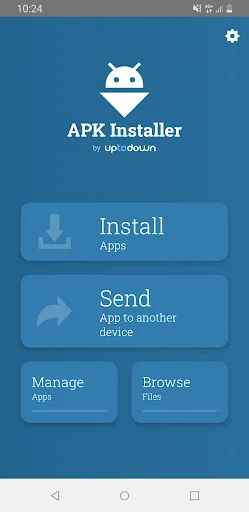
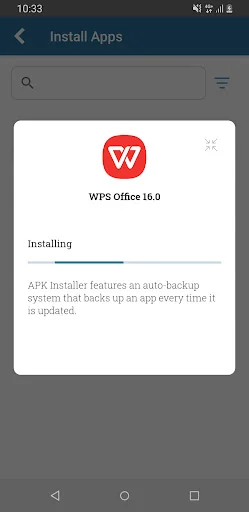
APK installer is a free tool that lets you install Android apps that use formats that are not detected by the default package installer included in the operating system. It uses the standard XAPK packaging to support the new APK distribution system used by Google, the so-called APK split.
This app works both ways so you can create backups of your installed apps and install the private copies in your smartphone, regardless of the packaging format. Apk Installer includes these features:
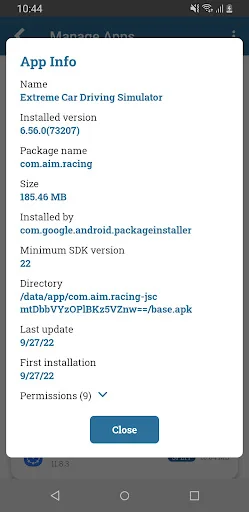
■ Automatically searches for all the apps installed on your Android and creates backup copies.
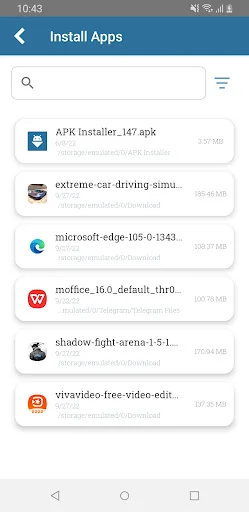
■ Installs any APK or XAPK in your smartphone’s memory. You can forget about its internal structure - search, install and go!
■ Browses your smartphone’s folders using an integrated file browser
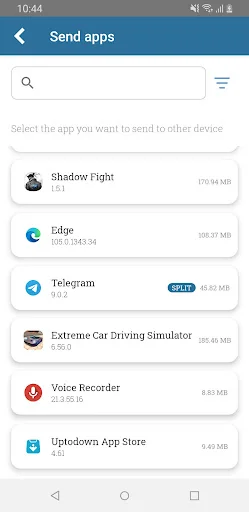
■ Send apps to nearby devices connected to the same network
The way to install and download apps has evolved over time. A short while ago, installing an app using an external APK involved simply clicking on it and letting the package installer included by default in your Android do all the work. This was true until the arrival of other standards that added complexity to the process.
.OBB data (a file that includes extra multimedia files within the app such as video or audio) turned out to be the way to exceed the maximum size allowed by Google for uploading APKs to its platform. That change complicated things when manually installing apps by having to install these additional files separately in specific folders on the device. Therefore, the most convenient solution was to insert the APK and OBB data into the same file and have it installed by an external tool. Thus, the XAPK standard was born.
Later on, Google started using a dynamic distribution system, the so-called Android App Bundle. When a developer publishes an app on Google Play, it is 'disassembled' into several pieces called split-APKs. From then on, many apps consisted of a base APK and several others that included information related to the language of the app, the supported screen dimensions, and the required CPU architecture. Therefore, when a user downloads the app in question, they only install the 'pieces' that are necessary for the app to work correctly on their device, saving bandwidth and costs for both parties, the user and the distribution platform itself.
Apk Installer’s main objective is to make it possible for you to continue installing Android apps manually without having to do extensive research on file formats and destination folders. When making backups, the app packages all these files (APK + split-APKs + OBB if any) into a single XAPK file. Therefore, when you install private copies of your apps you only have to find one file and install it without having to worry about formats and standards.
This app works both ways so you can create backups of your installed apps and install the private copies in your smartphone, regardless of the packaging format. Apk Installer includes these features:
■ Automatically searches for all the apps installed on your Android and creates backup copies.
■ Installs any APK or XAPK in your smartphone’s memory. You can forget about its internal structure - search, install and go!
■ Browses your smartphone’s folders using an integrated file browser
■ Send apps to nearby devices connected to the same network
The way to install and download apps has evolved over time. A short while ago, installing an app using an external APK involved simply clicking on it and letting the package installer included by default in your Android do all the work. This was true until the arrival of other standards that added complexity to the process.
.OBB data (a file that includes extra multimedia files within the app such as video or audio) turned out to be the way to exceed the maximum size allowed by Google for uploading APKs to its platform. That change complicated things when manually installing apps by having to install these additional files separately in specific folders on the device. Therefore, the most convenient solution was to insert the APK and OBB data into the same file and have it installed by an external tool. Thus, the XAPK standard was born.
Later on, Google started using a dynamic distribution system, the so-called Android App Bundle. When a developer publishes an app on Google Play, it is 'disassembled' into several pieces called split-APKs. From then on, many apps consisted of a base APK and several others that included information related to the language of the app, the supported screen dimensions, and the required CPU architecture. Therefore, when a user downloads the app in question, they only install the 'pieces' that are necessary for the app to work correctly on their device, saving bandwidth and costs for both parties, the user and the distribution platform itself.
Apk Installer’s main objective is to make it possible for you to continue installing Android apps manually without having to do extensive research on file formats and destination folders. When making backups, the app packages all these files (APK + split-APKs + OBB if any) into a single XAPK file. Therefore, when you install private copies of your apps you only have to find one file and install it without having to worry about formats and standards.
Profile & Insights
Everything we know — and don't — about this app and its company.
Identification
- App name
- APK Installer by Uptodown
- Developer
- Uptodown Technologies SL
- Bundle ID
- com.uptodown.installer
- App Store URL
- Open in App Store
- Category
- Tools
- Content rating
- Not found
- Languages
- Not found
Company
- Website
- Not found
- Tagline
- Not found
- Description
- Not found
- Founded
- Not found
- HQ / Address
- Not found
- Employees
- Not found
- Logo
- Not found
Revenue
- Verified revenue / mo
- Not found
- AI revenue estimate / mo
- Not found
- AI annual estimate
- Not found
- ML model estimate / mo
- $1.0K/mo
- Top-grossing rank
- Not found
- All-time revenue
- Not found
- Pricing
- Not found
Founder
- Name
- Not found
- X / Twitter
- Not found
- Not found
- GitHub
- Not found
- X followers
- Not found
- Public statements
- Not found
Funding
- Total raised
- Not found
- Last round
- Not found
- Investors
- Not found
- Crunchbase
- Not found
- AngelList
- Not found
Press & Links
- Articles found
- Not found
- Listed on
- Not found
- Blog
- Not found
- Press / News
- Not found
Contacts & Socials
- Socials
- Not found
- Not found
- Phone
- Not found
- Contact page
- Not found
- About page
- Not found
Profile is built from iTunes Lookup + developer site scrape + ML revenue model. Empty fields show "Not found" — additional sources (Crunchbase, X, IndieHackers, Acquire.com) coming.
More by Uptodown Technologies SL
View all →More Tools
Phone by Google
★ 4.5 · 47,248,471 reviews
Google Play services
★ 4.3 · 44,619,167 reviews
★ 4.1 · 29,135,018 reviews
Gboard - the Google Keyboard
★ 4.5 · 18,500,531 reviews
SHAREit: Transfer, Share Files
★ 4.3 · 18,247,718 reviews
gov.br
★ 4.5 · 12,551,225 reviews
MyTelkomsel – Buy Internet
★ 3.7 · 11,917,556 reviews
myIM3: Data Plan & Buy Package
★ 4.4 · 10,992,500 reviews
Browse BU Analytics
📚 All 55,000+ Books
🜍 Alchemy & Hermeticism
🔮 Magic & Ritual
🌙 Witchcraft & Paganism
⭐ Astrology & Cosmology
🃏 Divination & Tarot
📜 Tools
✡️ Kabbalah & Jewish Mysticism
🕉️ Mysticism & Contemplation
🕊️ Theosophy & Anthroposophy
🏛️ Freemasonry & Secret Societies
👻 Spiritualism & Afterlife
📖 Sacred Texts & Gnosticism
👁️ Supernatural & Occult Fiction
🧘 Spiritual Development
📚 Esoteric History & Biography
Info
About BU Analytics