64
BU Score
Solid
White Border: Square Fit Photo
✍️ BU Analytics Review
“
White Border: Square Fit Photo is an Android app from vector123 in the Photography category, currently rated 4.6★ across 4,117 ratings. Initial signal reads as mixed reviews — supporters praise core features while critics cite stability/value gaps.
Our BU Score puts it at 64 — Solid (established niche player). For a Photography app, that means established niche player.
Track changes month-over-month in the Performance section below — live snapshot history and revenue forecast included.
creator
📊 Performance Tracking LIVE
Loading…
Rating
—
Reviews
—
Forecast Revenue / mo
—
Snapshots tracked
0
since first record
Range:
💰 Forecast Revenue / mo
MODELRevenue forecast computed from BU's 234 trigger model on each snapshot. Calibrated against ground-truth from 58 verified-revenue apps.
🔬Forecast Breakdown — Why This Estimate?Top 4 of 4 triggers
Our ML model uses 200+ signals from public data. These are the most influential for this app:
| Excellent rating (4.6★)METRIC | +$2,200 | |
| Low install base (4,117 ratings)METRIC | +$1,500 | |
| Established app (6y old)METRIC | +$800 | |
| Ad-supported / freemiumMETRIC | +$600 |
METRIC = structural app data · REVIEW = mined from user reviews · ✓ VERIFIED = Stripe-verified anchor (TrustMRR)
📈 Reviews Growth
LIVECumulative review count from first BU snapshot. Each point = a tracked update.
⭐ Rating Trend
LIVEAverage rating evolution. Updates with each new review batch.
🗓️ Snapshot Timeline
HISTORYEach bar shows a tracked update and the metric delta from the previous snapshot.
App Specs
🔐 Own this app? Claim & verify MRR →🔖 v4.4.7🔄 updated 2mo ago📂 Photography💰 Free📺 Ad-supported💎 IAP $1.99 per item🚀 Launched 2020 (6y old)
📝 About this app
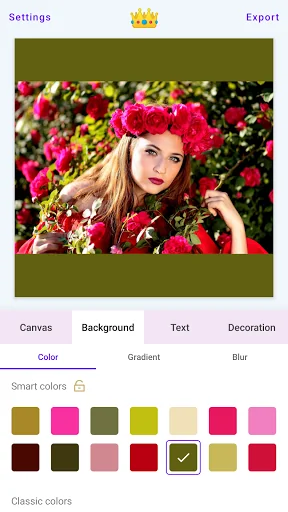
White Border is simple photo editing app help you create square photos with blur effect. Adding borders to your photo, post your photo to Instagram without cropping it. Use Awesome filters, fresh background gradients, blur backgrounds, frames, and text stickers. And High resolution output. No watermark. Clean user interface, easy to use. Share your pic on Instagram, Facebook, WhatsApp, Snapchat, Tumblr, Pinterest, Flickr and Twitter to get lots of likes!
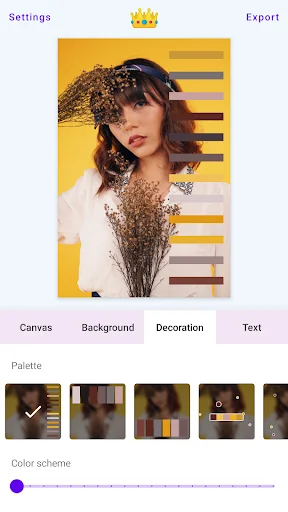
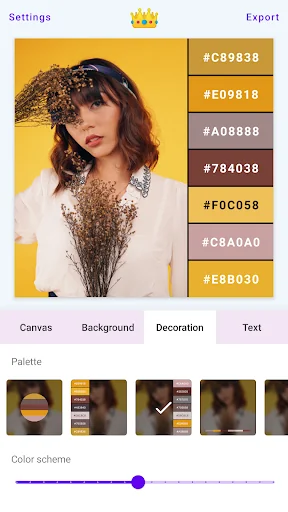
Fill a rectangular image with the color palette to make it a square image. You can even control whether or not to display hexadecimal color codes.
Collage Maker:
1. Create and share fashion collages.
2. Create your collage of photo and palette.
3. Turn your images into color palettes.
Features
- Customize border color.
- Use the blurred photo as background.
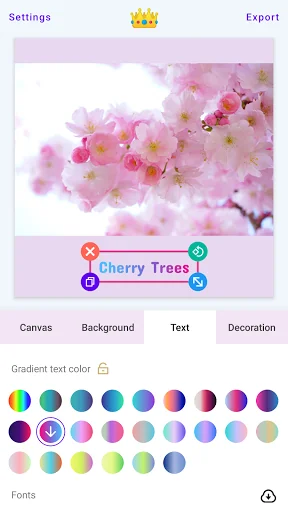
- Text stickers, add text to photos.
- Smart Color Picking.
- Support 1:1(Square), 4:3, 3:4, 16:9, 9:16, 4:5, 5:4, 3:2, 2:3, 2:1, 1:2, 5:7, 7:5, 10:16, 16:10, 1:0.618(Golden ratio), 0.618:1 Canvas(Photo).
- You can move the position of the picture in the frame at will.
- Scale your photo to leave blank space.
- Flexible setting of rounded and cut corners of photos.
- Customize shadow effects, including shadow radius and shadow color, to give images a more three-dimensional feel.
- Adjust image angle.
- Frames: Traffic lights(🚦), Heart(❤️), Circles(🔴), Pentagrams(⭐), Film(🎞️), Color bars, Scan boxes, REC, Double quotes.
- Geometric line border: Triangle(△), Rectangle(□), Diamond(◇), Heart(♡️), Circle(⚪), Fork(✖️), Pentagram(☆), Plus(➕), Nine-pattern grid, Rounded rectangle, Corner cut rectangle, Sector, Hexagon, Octagon.
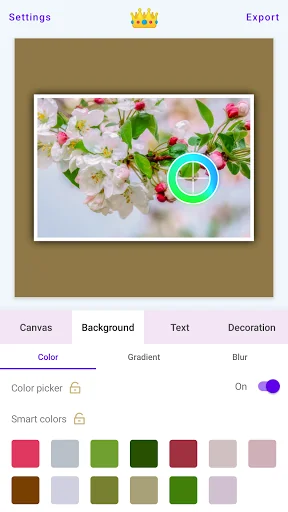
- Move the pipette(Color Picker) to pick an exact color on the picture.
- Text attributes: font size, text gradient color, letter spacing, line spacing, transparency, bold, italic, text background gradient……
- Blurred border background, Gaussian blur, hairy glass, bokeh background effect.
- Make wallpaper is very simple, select the wallpaper canvas, edit, save, set as wallpaper.
- Extracts colors from the image as a color palette.
- Extract the gradients from the image as color gradients.
Add amazing filters and effects to your photos.
There are 35 built-in filters, including Pixelation, Sepia Toon, Grayscale, Saturation, Vignette, Kuwahara, Sketch, Smooth Toon, Hue, Gamma, Brightness, Sobel Edge Detection, Threshold Edge Detection, Grouped Filters, Exposure, Highlight shadow, RGB, White Balance, Tone Curve, CGA Color Space, Dilation, RGB Dilation, Toon, Halftone, Glass Sphere, Haze, Laplacian, Swirl, False Color, Color Balance, Zoom Blur, Solarize, Vibrance, Contrast and Sharpness.
Image crop function, allowing you to zoom, rotate, change the crop aspect ratio, support touch gestures, etc.
Display shooting parameters such as shooting time, exposure time, and focal length at the bottom of the photo.
Morandi Colors: The Most Comfortable Color.
Adjustable image transparency.
Draw random dots, lines and circles on the photo to make it messy.
Fill a rectangular image with the color palette to make it a square image. You can even control whether or not to display hexadecimal color codes.
Collage Maker:
1. Create and share fashion collages.
2. Create your collage of photo and palette.
3. Turn your images into color palettes.
Features
- Customize border color.
- Use the blurred photo as background.
- Text stickers, add text to photos.
- Smart Color Picking.
- Support 1:1(Square), 4:3, 3:4, 16:9, 9:16, 4:5, 5:4, 3:2, 2:3, 2:1, 1:2, 5:7, 7:5, 10:16, 16:10, 1:0.618(Golden ratio), 0.618:1 Canvas(Photo).
- You can move the position of the picture in the frame at will.
- Scale your photo to leave blank space.
- Flexible setting of rounded and cut corners of photos.
- Customize shadow effects, including shadow radius and shadow color, to give images a more three-dimensional feel.
- Adjust image angle.
- Frames: Traffic lights(🚦), Heart(❤️), Circles(🔴), Pentagrams(⭐), Film(🎞️), Color bars, Scan boxes, REC, Double quotes.
- Geometric line border: Triangle(△), Rectangle(□), Diamond(◇), Heart(♡️), Circle(⚪), Fork(✖️), Pentagram(☆), Plus(➕), Nine-pattern grid, Rounded rectangle, Corner cut rectangle, Sector, Hexagon, Octagon.
- Move the pipette(Color Picker) to pick an exact color on the picture.
- Text attributes: font size, text gradient color, letter spacing, line spacing, transparency, bold, italic, text background gradient……
- Blurred border background, Gaussian blur, hairy glass, bokeh background effect.
- Make wallpaper is very simple, select the wallpaper canvas, edit, save, set as wallpaper.
- Extracts colors from the image as a color palette.
- Extract the gradients from the image as color gradients.
Add amazing filters and effects to your photos.
There are 35 built-in filters, including Pixelation, Sepia Toon, Grayscale, Saturation, Vignette, Kuwahara, Sketch, Smooth Toon, Hue, Gamma, Brightness, Sobel Edge Detection, Threshold Edge Detection, Grouped Filters, Exposure, Highlight shadow, RGB, White Balance, Tone Curve, CGA Color Space, Dilation, RGB Dilation, Toon, Halftone, Glass Sphere, Haze, Laplacian, Swirl, False Color, Color Balance, Zoom Blur, Solarize, Vibrance, Contrast and Sharpness.
Image crop function, allowing you to zoom, rotate, change the crop aspect ratio, support touch gestures, etc.
Display shooting parameters such as shooting time, exposure time, and focal length at the bottom of the photo.
Morandi Colors: The Most Comfortable Color.
Adjustable image transparency.
Draw random dots, lines and circles on the photo to make it messy.
Profile & Insights
Everything we know — and don't — about this app and its company.
Identification
- App name
- White Border: Square Fit Photo
- Developer
- vector123
- Bundle ID
- com.vector123.whiteborder
- App Store URL
- Open in App Store
- Category
- Photography
- Content rating
- Not found
- Languages
- Not found
Company
- Website
- store.vector123.com
- Tagline
- Not found
- Description
- Not found
- Founded
- Not found
- HQ / Address
- Not found
- Employees
- Not found
- Logo
- Not found
Revenue
- Verified revenue / mo
- Not found
- AI revenue estimate / mo
- Not found
- AI annual estimate
- Not found
- ML model estimate / mo
- $509/mo
- Top-grossing rank
- Not found
- All-time revenue
- Not found
- Pricing
- $1.99 per item
Founder
- Name
- Not found
- X / Twitter
- Not found
- Not found
- GitHub
- Not found
- X followers
- Not found
- Public statements
- Not found
Funding
- Total raised
- Not found
- Last round
- Not found
- Investors
- Not found
- Crunchbase
- Not found
- AngelList
- Not found
Press & Links
- Articles found
- Not found
- Listed on
- Not found
- Blog
- Not found
- Press / News
- Not found
Contacts & Socials
- Socials
- Not found
- Not found
- Phone
- Not found
- Contact page
- Not found
- About page
- Not found
📈Ratings growth4,117 ratings+59% lifetimeShow 3-year history estimate ▾
Tracked (1 weeks) Pre-tracking estimate (37 weeks) · model-based, ±5% noise · anchored to release date and current value
Profile is built from iTunes Lookup + developer site scrape + ML revenue model. Empty fields show "Not found" — additional sources (Crunchbase, X, IndieHackers, Acquire.com) coming.
More by vector123
View all →More Photography
Google Photos
★ 4.4 · 53,544,116 reviews
Video Editor & Maker - InShot
★ 4.8 · 24,090,534 reviews
Picsart AI Photo Editor, Video
★ 4.0 · 12,205,523 reviews
B612 AI Photo&Video Editor
★ 4.1 · 7,265,225 reviews
Photo Lab Picture Editor & Art
★ 4.5 · 6,569,016 reviews
Retrica
★ 3.8 · 5,928,297 reviews
Remini - AI Photo Enhancer
★ 4.1 · 5,771,084 reviews
FaceApp: Perfect Face Editor
★ 4.3 · 5,344,978 reviews
Browse BU Analytics
📚 All 55,000+ Books
🜍 Alchemy & Hermeticism
🔮 Magic & Ritual
🌙 Witchcraft & Paganism
⭐ Astrology & Cosmology
🃏 Divination & Tarot
📜 Photography
✡️ Kabbalah & Jewish Mysticism
🕉️ Mysticism & Contemplation
🕊️ Theosophy & Anthroposophy
🏛️ Freemasonry & Secret Societies
👻 Spiritualism & Afterlife
📖 Sacred Texts & Gnosticism
👁️ Supernatural & Occult Fiction
🧘 Spiritual Development
📚 Esoteric History & Biography
Info
About BU Analytics