76
BU Score
Strong
Video Compressor & Converter
✍️ bumetric analysis
“
Video Compressor & Converter is an Android app from TarrySoft in the Video Players & Editors category, currently rated 4.5★ across 165,888 ratings. Initial signal reads as mixed reviews: supporters praise core features while critics cite stability and value gaps.
Our BU Score puts it at 76: Strong (healthy traction). For a Video Players & Editors app, that means healthy traction.
Track changes month-over-month in the Performance section below: live snapshot history and revenue forecast included.
📊 Performance Tracking LIVE
Loading…
Rating
—
Reviews
—
Forecast Revenue / mo
—
Snapshots tracked
0
since first record
Range:
💰 Forecast Revenue / mo
MODELRevenue forecast computed from BU's 234 trigger model on each snapshot. Calibrated against ground-truth from 58 verified-revenue apps.
🔬Forecast Breakdown — Why This Estimate?Top 3 of 3 triggers
Our ML model uses 200+ signals from public data. These are the most influential for this app:
| High install base (165,888 ratings)METRIC | +$12,000 | |
| Good rating (4.5★)METRIC | +$800 | |
| Ad-supported / freemiumMETRIC | +$600 |
METRIC = structural app data · REVIEW = mined from user reviews · ✓ VERIFIED = Stripe-verified anchor (TrustMRR)
📈 Reviews Growth
LIVECumulative review count from first BU snapshot. Each point = a tracked update.
⭐ Rating Trend
LIVEAverage rating evolution. Updates with each new review batch.
🗓️ Snapshot Timeline
HISTORYEach bar shows a tracked update and the metric delta from the previous snapshot.
App Specs
🔐 Own this app? Claim & verify MRR →🔖 v4.0.0🔄 updated 2w ago📂 Video Players & Editors💰 Free
📝 About this app
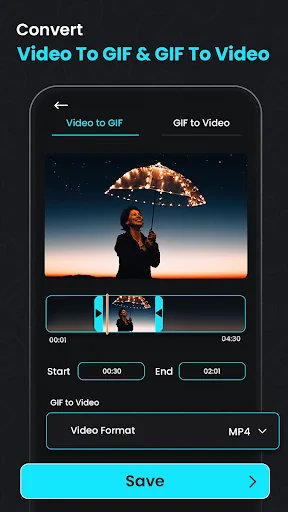
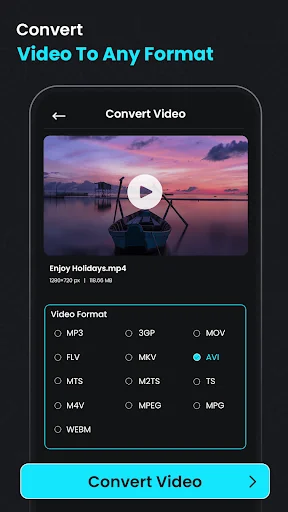
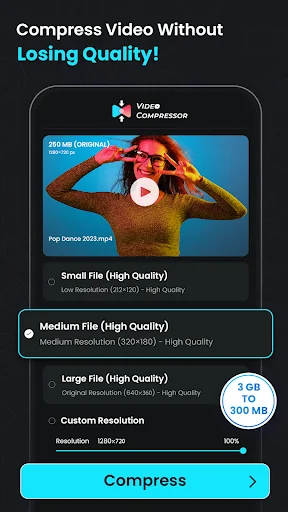
<h3>Video Compressor: Media Converter: Optimize, Compress & Enhance!</h3>Looking for a powerful solution to compress, convert, and optimize your media files? Video Compressor: Media Converter has everything you need to manage your footage collection efficiently. With features that include high-quality compression, clip-to-audio conversion, and file resizing, this Reverse Video Editor app transforms how you work with media. Enjoy enhanced footage quality, easy audio extraction, and seamless format conversions, making your footage more accessible and manageable.
📄 <b>Key Features of Video Compressor: Media Converter:</b> 📄
🎥 Compress Videos: MP4 to MP3 Converter;
🎥 Video Converter: Extract Audio From Video;
🎥 Audio Extractor & MP4 Compressor: Compress files efficiently with Video Compressor: Media Converter;
🎥 Video Quality Enhancer & MP4 Converter;
🎥 Video To MP3 Converter Audio Extractor;
🎥 Reverse Video Editor: Add a unique perspective by reversing clips;
🎥 Video To Audio Converter: Convert clips to MP3 for audio-only files;
🎥 Crop Video To MP3 Converter: Extract sound from clips and save as MP3;
🎥 Video To Audio Converter & Size Reducer: MP4, MKV, AVI, and more for maximum compatibility;
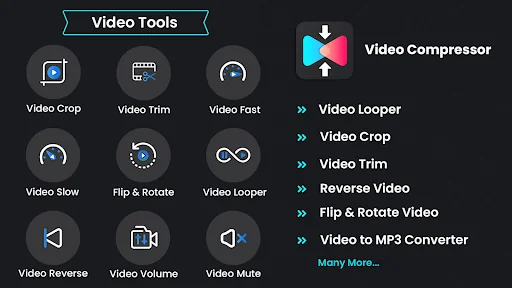
🎥 Mute & Trim: Remove audio or trim with the Video Compressor: Media Converter.
<h3>Efficient Compression & Conversion for Your Videos</h3>Easily compress clips to a smaller size with Compress Videos: MP4 to MP3 Converter. The Audio Extractor & MP4 Compressor ensures you don’t sacrifice quality while reducing file size, perfect for sharing on various platforms. Adjust the resolution and bitrate for tailored compression that meets your exact needs.
<b>Video To Audio Converter & Size Reducer:</b>
With the Video Converter: Extract Audio From Video feature, you can turn your favorite clips into audio files in seconds. Use our fantastic tool to create music or soundtracks, making audio extraction more straightforward. Its the Video To Audio Converter & Size Reducer, perfect for converting podcasts or lectures to MP3 for easy listening.
<b>Video Converter: Extract Audio From Video:</b>
The Video Quality Enhancer & MP4 Converter allows you to upgrade your quality before compressing, ensuring clarity and visual appeal. Need a different aspect ratio? The Crop Video To MP3 Converter lets you crop and resize any clip to fit specific dimensions, ideal for custom viewing needs.
<b>Compress Videos: MP4 to MP3 Converter:</b>
Try the Reverse Video Editor to flip time with a captivating effect by reversing any clip. The Mute feature removes unwanted audio for a more polished look. The Crop Video To MP3 Converter can also rotate clips for the perfect orientation, offering flexibility in presentation and editing.
<b>Audio Extractor & MP4 Compressor:</b>
With the Trimmer & Cutter features, trim and cut clips precisely to your preferred length. Perfect for creating concise clips, especially when sharing on status platforms or for quick messaging. The Video To MP3 Converter Audio Extractor app supports various formats, ensuring smooth device editing.
<h3>Try Our Video Quality Enhancer & MP4 Converter!</h3>Video Compressor: Media Converter is an essential tool for anyone who wants to convert, compress, and optimize clips with ease. Enhance your footage experience today by making your files more accessible and space-saving with the ultimate Video To MP3 Converter Audio Extractor.
📄 <b>Key Features of Video Compressor: Media Converter:</b> 📄
🎥 Compress Videos: MP4 to MP3 Converter;
🎥 Video Converter: Extract Audio From Video;
🎥 Audio Extractor & MP4 Compressor: Compress files efficiently with Video Compressor: Media Converter;
🎥 Video Quality Enhancer & MP4 Converter;
🎥 Video To MP3 Converter Audio Extractor;
🎥 Reverse Video Editor: Add a unique perspective by reversing clips;
🎥 Video To Audio Converter: Convert clips to MP3 for audio-only files;
🎥 Crop Video To MP3 Converter: Extract sound from clips and save as MP3;
🎥 Video To Audio Converter & Size Reducer: MP4, MKV, AVI, and more for maximum compatibility;
🎥 Mute & Trim: Remove audio or trim with the Video Compressor: Media Converter.
<h3>Efficient Compression & Conversion for Your Videos</h3>Easily compress clips to a smaller size with Compress Videos: MP4 to MP3 Converter. The Audio Extractor & MP4 Compressor ensures you don’t sacrifice quality while reducing file size, perfect for sharing on various platforms. Adjust the resolution and bitrate for tailored compression that meets your exact needs.
<b>Video To Audio Converter & Size Reducer:</b>
With the Video Converter: Extract Audio From Video feature, you can turn your favorite clips into audio files in seconds. Use our fantastic tool to create music or soundtracks, making audio extraction more straightforward. Its the Video To Audio Converter & Size Reducer, perfect for converting podcasts or lectures to MP3 for easy listening.
<b>Video Converter: Extract Audio From Video:</b>
The Video Quality Enhancer & MP4 Converter allows you to upgrade your quality before compressing, ensuring clarity and visual appeal. Need a different aspect ratio? The Crop Video To MP3 Converter lets you crop and resize any clip to fit specific dimensions, ideal for custom viewing needs.
<b>Compress Videos: MP4 to MP3 Converter:</b>
Try the Reverse Video Editor to flip time with a captivating effect by reversing any clip. The Mute feature removes unwanted audio for a more polished look. The Crop Video To MP3 Converter can also rotate clips for the perfect orientation, offering flexibility in presentation and editing.
<b>Audio Extractor & MP4 Compressor:</b>
With the Trimmer & Cutter features, trim and cut clips precisely to your preferred length. Perfect for creating concise clips, especially when sharing on status platforms or for quick messaging. The Video To MP3 Converter Audio Extractor app supports various formats, ensuring smooth device editing.
<h3>Try Our Video Quality Enhancer & MP4 Converter!</h3>Video Compressor: Media Converter is an essential tool for anyone who wants to convert, compress, and optimize clips with ease. Enhance your footage experience today by making your files more accessible and space-saving with the ultimate Video To MP3 Converter Audio Extractor.
Profile & Insights
Everything we know — and don't — about this app and its company.
Identification
- App name
- Video Compressor & Converter
- Developer
- TarrySoft
- Bundle ID
- com.videoconverter.videocompressor
- App Store URL
- Open in App Store
- Category
- Video Players & Editors
- Content rating
- Not found
- Languages
- Not found
Company
- Website
- Not found
- Tagline
- Not found
- Description
- Not found
- Founded
- Not found
- HQ / Address
- Not found
- Employees
- Not found
- Logo
- Not found
Revenue
- Verified revenue / mo
- Not found
- AI revenue estimate / mo
- Not found
- AI annual estimate
- Not found
- ML model estimate / mo
- $2.7K/mo
- Top-grossing rank
- Not found
- All-time revenue
- Not found
- Pricing
- Not found
Founder
- Name
- Not found
- X / Twitter
- Not found
- Not found
- GitHub
- Not found
- X followers
- Not found
- Public statements
- Not found
Funding
- Total raised
- Not found
- Last round
- Not found
- Investors
- Not found
- Crunchbase
- Not found
- AngelList
- Not found
Press & Links
- Articles found
- Not found
- Listed on
- Not found
- Blog
- Not found
- Press / News
- Not found
Contacts & Socials
- Socials
- Not found
- Not found
- Phone
- Not found
- Contact page
- Not found
- About page
- Not found
Profile is built from iTunes Lookup + developer site scrape + ML revenue model. Empty fields show "Not found" — additional sources (Crunchbase, X, IndieHackers, Acquire.com) coming.
Full revenue analysis
Read the article-style breakdown for Video Compressor & Converter: category rank, percentile, growth signal, comparable apps, and how the forecast is calibrated against verified-MRR anchors in this niche.