73
BU Score
Strong
Offline Map Navigation
✍️ bumetric analysis
“
Offline Map Navigation is an Android app from VirtualMaze in the Maps & Navigation category, currently rated 4.3★ across 98,216 ratings. Initial signal reads as mixed reviews: supporters praise core features while critics cite stability and value gaps.
Our BU Score puts it at 73: Strong (healthy traction). For a Maps & Navigation app, that means healthy traction.
Track changes month-over-month in the Performance section below: live snapshot history and revenue forecast included.
📊 Performance Tracking LIVE
Loading…
Rating
—
Reviews
—
Forecast Revenue / mo
—
Snapshots tracked
0
since first record
Range:
💰 Forecast Revenue / mo
MODELRevenue forecast computed from BU's 234 trigger model on each snapshot. Calibrated against ground-truth from 58 verified-revenue apps.
🔬Forecast Breakdown — Why This Estimate?Top 3 of 3 triggers
Our ML model uses 200+ signals from public data. These are the most influential for this app:
| Mid install base (98,216 ratings)METRIC | +$5,500 | |
| Good rating (4.3★)METRIC | +$800 | |
| Ad-supported / freemiumMETRIC | +$600 |
METRIC = structural app data · REVIEW = mined from user reviews · ✓ VERIFIED = Stripe-verified anchor (TrustMRR)
📈 Reviews Growth
LIVECumulative review count from first BU snapshot. Each point = a tracked update.
⭐ Rating Trend
LIVEAverage rating evolution. Updates with each new review batch.
🗓️ Snapshot Timeline
HISTORYEach bar shows a tracked update and the metric delta from the previous snapshot.
App Specs
🔐 Own this app? Claim & verify MRR →🔖 vVaries with device🔄 updated 3mo ago📂 Maps & Navigation💰 Free
📝 About this app
Ever get stuck with no signal? Download offline maps and use GPS navigation anywhere — even without internet.
Offline Map Navigation gives turn-by-turn directions, offline place search, and reliable routing for driving, biking, cycling, or walking.
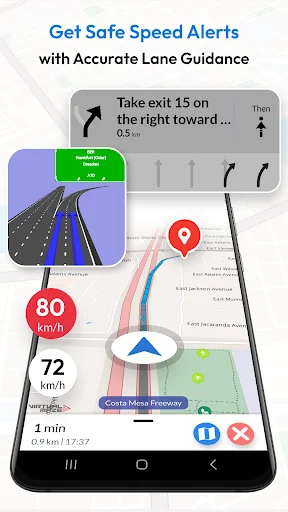
Drive more confidently with Lane Guidance (lane assist / lane assistance) and Junction View for highway exits and complex interchanges. Use Android Auto navigation on your car’s display for safer, hands-free in-car navigation (also supports Android Automotive OS).
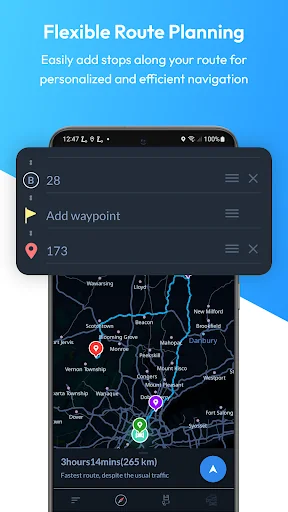
Plan trips faster: search offline for nearby hotels, restaurants and other points of interest, add multiple stops, and get precise ETA — plus weather updates when you’re online.
KEY FEATURES
OFFLINE MAPS + OFFLINE SEARCH
• Downloadable offline maps: Save maps to your phone and navigate without internet.
• Offline search: Find places and addresses offline.
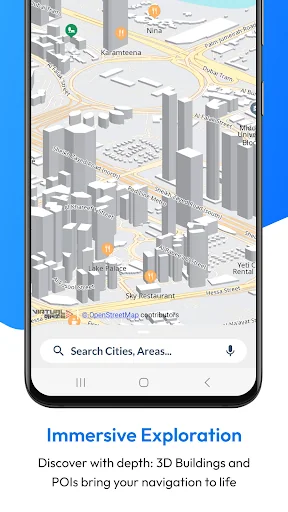
• Offline points of interest (POI): Hotels, restaurants, hospitals, ATMs, banks, EV charging stations, shopping and more.
TURN-BY-TURN GPS NAVIGATION
• Turn-by-turn navigation: Clear route instructions with accurate GPS positioning.
• Voice guidance: Spoken directions in multiple languages.
• Automatic rerouting: Instant recalculation if you miss a turn.
• Alternative routes: Choose the route that fits your trip.
LANE ASSIST + JUNCTION VIEW (HIGHWAY HELP)
• Lane guidance / lane assistance (lane assist): Know which lane to be in before a turn.
• Junction view: See upcoming junctions and interchanges more clearly.
• Exit guidance: Better confidence at complex intersections and highway exits.
ROUTE PLANNING + SAFETY
• Multi-stop routes: Add multiple way-points for optimized paths and precise ETA.
• Share routes: Share route instructions easily.
• Save locations: Store favorites for quick access.
• Over-speed alerts: Helpful speed warnings (where available).
• Day & night mode: Clear navigation anytime.
EV + TRAVEL EXTRAS
• EV routing: Includes charging station information for electric vehicles.
• Weather updates: See weather details for your location when online.
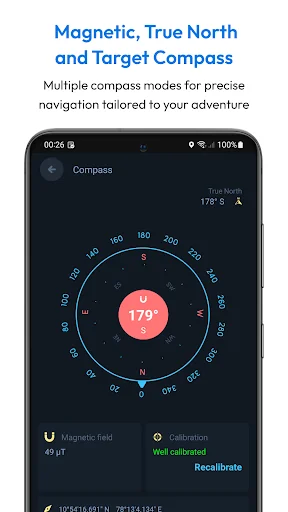
• Target compass: Navigate directly to a destination.
ANDROID AUTO + DEVICES
• Android Auto & Android Automotive: In-car navigation on your car display.
• Wear OS: Turn-by-turn navigation on your smartwatch.
WHY CHOOSE OFFLINE MAP NAVIGATION?
• Offline maps for travel: Avoid roaming costs and navigate without signal.
• Faster trip planning: Offline search + saved places + multi-stop routing.
• Clear highway guidance: Lane assist (lane guidance) + junction view.
• User-friendly: Simple, intuitive navigation UI.
SUBSCRIPTIONS (if applicable)
• You can manage or cancel subscriptions anytime in Google Play → Payments & subscriptions.
WEAR OS SETUP
1) Install the app on your Android phone and Wear OS watch.
2) Open the app on both devices and complete setup.
3) Start navigation on your phone.
4) Get turn-by-turn directions on your watch.
DISCLAIMER
Offline Map Navigation is a GPS-based app. Location permission is needed to show your position and provide navigation guidance. If you allow background location, the app may access location while running in the background for accurate navigation updates. You can control permissions anytime in Android settings.
Offline Map Navigation gives turn-by-turn directions, offline place search, and reliable routing for driving, biking, cycling, or walking.
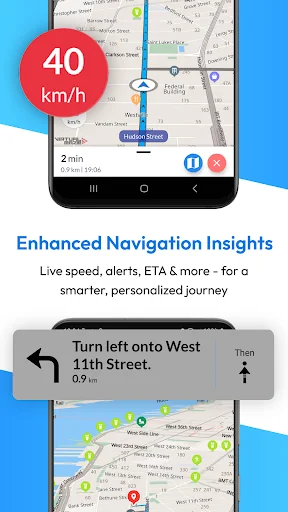
Drive more confidently with Lane Guidance (lane assist / lane assistance) and Junction View for highway exits and complex interchanges. Use Android Auto navigation on your car’s display for safer, hands-free in-car navigation (also supports Android Automotive OS).
Plan trips faster: search offline for nearby hotels, restaurants and other points of interest, add multiple stops, and get precise ETA — plus weather updates when you’re online.
KEY FEATURES
OFFLINE MAPS + OFFLINE SEARCH
• Downloadable offline maps: Save maps to your phone and navigate without internet.
• Offline search: Find places and addresses offline.
• Offline points of interest (POI): Hotels, restaurants, hospitals, ATMs, banks, EV charging stations, shopping and more.
TURN-BY-TURN GPS NAVIGATION
• Turn-by-turn navigation: Clear route instructions with accurate GPS positioning.
• Voice guidance: Spoken directions in multiple languages.
• Automatic rerouting: Instant recalculation if you miss a turn.
• Alternative routes: Choose the route that fits your trip.
LANE ASSIST + JUNCTION VIEW (HIGHWAY HELP)
• Lane guidance / lane assistance (lane assist): Know which lane to be in before a turn.
• Junction view: See upcoming junctions and interchanges more clearly.
• Exit guidance: Better confidence at complex intersections and highway exits.
ROUTE PLANNING + SAFETY
• Multi-stop routes: Add multiple way-points for optimized paths and precise ETA.
• Share routes: Share route instructions easily.
• Save locations: Store favorites for quick access.
• Over-speed alerts: Helpful speed warnings (where available).
• Day & night mode: Clear navigation anytime.
EV + TRAVEL EXTRAS
• EV routing: Includes charging station information for electric vehicles.
• Weather updates: See weather details for your location when online.
• Target compass: Navigate directly to a destination.
ANDROID AUTO + DEVICES
• Android Auto & Android Automotive: In-car navigation on your car display.
• Wear OS: Turn-by-turn navigation on your smartwatch.
WHY CHOOSE OFFLINE MAP NAVIGATION?
• Offline maps for travel: Avoid roaming costs and navigate without signal.
• Faster trip planning: Offline search + saved places + multi-stop routing.
• Clear highway guidance: Lane assist (lane guidance) + junction view.
• User-friendly: Simple, intuitive navigation UI.
SUBSCRIPTIONS (if applicable)
• You can manage or cancel subscriptions anytime in Google Play → Payments & subscriptions.
WEAR OS SETUP
1) Install the app on your Android phone and Wear OS watch.
2) Open the app on both devices and complete setup.
3) Start navigation on your phone.
4) Get turn-by-turn directions on your watch.
DISCLAIMER
Offline Map Navigation is a GPS-based app. Location permission is needed to show your position and provide navigation guidance. If you allow background location, the app may access location while running in the background for accurate navigation updates. You can control permissions anytime in Android settings.
Profile & Insights
Everything we know — and don't — about this app and its company.
Identification
- App name
- Offline Map Navigation
- Developer
- VirtualMaze
- Bundle ID
- com.virtualmaze.offlinemapnavigationtracker
- App Store URL
- Open in App Store
- Category
- Maps & Navigation
- Content rating
- Not found
- Languages
- Not found
Company
- Website
- Not found
- Tagline
- Not found
- Description
- Not found
- Founded
- Not found
- HQ / Address
- Not found
- Employees
- Not found
- Logo
- Not found
Revenue
- Verified revenue / mo
- Not found
- AI revenue estimate / mo
- Not found
- AI annual estimate
- Not found
- ML model estimate / mo
- $2.2K/mo
- Top-grossing rank
- Not found
- All-time revenue
- Not found
- Pricing
- Not found
Founder
- Name
- Not found
- X / Twitter
- Not found
- Not found
- GitHub
- Not found
- X followers
- Not found
- Public statements
- Not found
Funding
- Total raised
- Not found
- Last round
- Not found
- Investors
- Not found
- Crunchbase
- Not found
- AngelList
- Not found
Press & Links
- Articles found
- Not found
- Listed on
- Not found
- Blog
- Not found
- Press / News
- Not found
Contacts & Socials
- Socials
- Not found
- Not found
- Phone
- Not found
- Contact page
- Not found
- About page
- Not found
Profile is built from iTunes Lookup + developer site scrape + ML revenue model. Empty fields show "Not found" — additional sources (Crunchbase, X, IndieHackers, Acquire.com) coming.
Full revenue analysis
Read the article-style breakdown for Offline Map Navigation: category rank, percentile, growth signal, comparable apps, and how the forecast is calibrated against verified-MRR anchors in this niche.