60
BU Score
Solid
Call-Timer
✍️ BU Analytics Review
“
Call-Timer is an Android app from CTSOFT in the Communication category, currently rated 3.4★ across 18,922 ratings. Initial signal reads as largely positive sentiment, users highlighting consistency and feature depth.
Our BU Score puts it at 60 — Solid (established niche player). For a Communication app, that means established niche player.
Track changes month-over-month in the Performance section below — live snapshot history and revenue forecast included.
creator
📊 Performance Tracking LIVE
Loading…
Rating
—
Reviews
—
Forecast Revenue / mo
—
Snapshots tracked
0
since first record
Range:
💰 Forecast Revenue / mo
MODELRevenue forecast computed from BU's 234 trigger model on each snapshot. Calibrated against ground-truth from 58 verified-revenue apps.
🔬Forecast Breakdown — Why This Estimate?Top 4 of 4 triggers
Our ML model uses 200+ signals from public data. These are the most influential for this app:
| Mid install base (18,922 ratings)METRIC | +$5,500 | |
| Below-average rating (3.4★)METRIC | −$1,500 | |
| Mature app (14y old)METRIC | +$1,500 | |
| Ad-supported / freemiumMETRIC | +$600 |
METRIC = structural app data · REVIEW = mined from user reviews · ✓ VERIFIED = Stripe-verified anchor (TrustMRR)
📈 Reviews Growth
LIVECumulative review count from first BU snapshot. Each point = a tracked update.
⭐ Rating Trend
LIVEAverage rating evolution. Updates with each new review batch.
🗓️ Snapshot Timeline
HISTORYEach bar shows a tracked update and the metric delta from the previous snapshot.
App Specs
🔐 Own this app? Claim & verify MRR →🔖 v2.0.98R🔄 updated 1y ago📂 Communication💰 Free📺 Ad-supported🚀 Launched 2011 (14y old)
📝 About this app
Call-Timer can make your phone call automatically hang up when call reaches a configurable predefined time..
Why it is needed? Many network carriers or telecom services offer free calls for first 5, 10, 20, xx minutes. If you don’t want to monitoring the elapsed time and manually hang-up the call while talking, then you can have this application do it for you.
☆ <b>Has been choosen as featured product on Google Play Store many times.</b>
☆ <b>More than 2 milions downloads</b>
☆ <b>Support Android 12, 11, 10, 9.0, 8.1, 8.0, 7.1, 7.0, 6.1, 6.0 and below</b>
<b>FEATURES:</b>
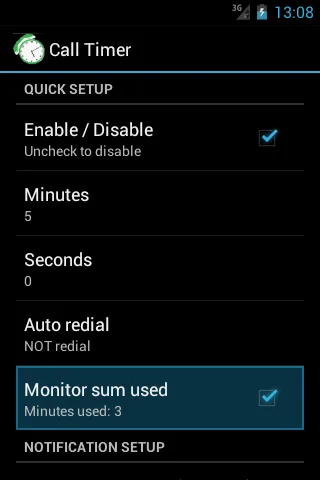
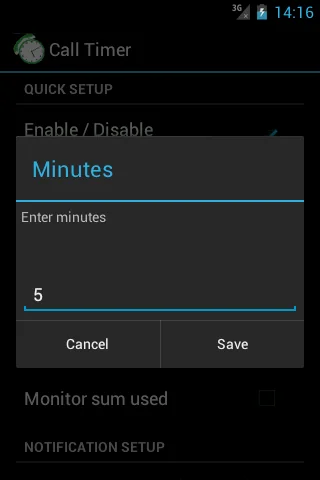
• Auto hang up: user sets time limit once the application will time calls and automatically hang up them for you. This is applied for both outgoing calls and incoming calls (depend on configuration).
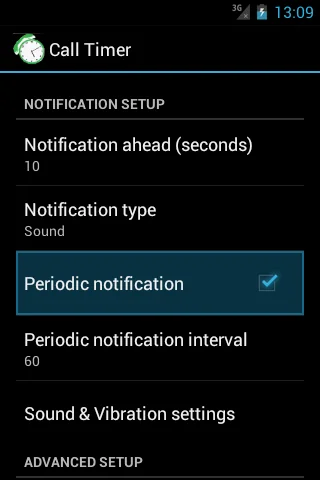
• Periodic notifications: This is useful for people who are charged per minute, per 30 seconds. per xx seconds (depend on configuration).
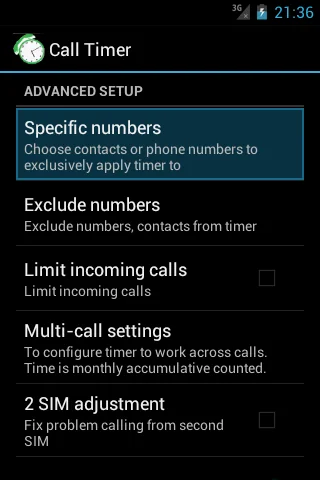
• Specific numbers (work in all Android versions except Android 9): Allow you to specify individual phone numbers to apply limit of talk time to. You can add phone number to specific number list either by picking up contact from contacts list or by adding phone number prefixes, which are common beginning digits of the phone numbers that you want to add to the specific number list. Please note that when you choose to use “Specific numbers” feature, Call Timer will ONLY be activated for those number on th configured specific list.
• Multi-call support. Please read more at http://call-timer.blogspot.com/2013/01/multi-call-feature.html
• Auto redial (except Android 9)
• To be notified before hang-up (through sound or vibration)
• Temporarily disable call timer for current call.
• Exclude contacts from timer (except Android 9): If you don't want call timer to have effect on certain contacts or prefixes (for example, toll free numbers), you could do that though "Exclude numbers".
• Widget for fast dialing frequently contacted numbers.
<b>NOTE on USAGE:</b>
OPEN THE APP AT LEAST ONCE AFTER INSTALL.
<b>NOTE on specific phone models</b>
<ul>
<li><strong>Xaomi phones: </strong> <em>
+ Open <strong>Settings</strong> app. Tap <strong>Installed Apps</strong> (or Apps or App Management) → <strong>Permissions → Autostart</strong>. Next, switch on <strong>Call Timer </strong>item.
You may also need to: Click Menu icon and swipe Call Timer screen down to lock the app </em></li>
<li><strong>Huawei phones: </strong><em>Open Settings (system app) → Battery → Launch (or Auto Launch, depends on phone model). Tap on Call Timer icon and click Ok (so that to change from manage automatically to manage manually.</em>
</li>
<li><strong>OPPO phones:</strong> <em>
+ Open <strong>Settings</strong> app. Tap <strong>Apps Management</strong> (or Applications) → <strong>Call Timer.</strong> Next, switch on <strong>Allow auto startup</strong>.
For Color OS 3.0, 3.1:
+ Go to Security Center → Privacy permissions → Startup Manager. Then turn on Call Timer to allow it startup in background.
+ Go to Batery → Batery optimization--Call Timer. Then choose "do not optimize".
</em></li>
</ul>
Please send suggestions or report bugs to support@ctsoftsolutions.com.
Thank you!
CREDITS:
- Many thanks to Fernando Salazar Peris for Spanish translation!
- Many thanks to Mikhail Kitaev for Russian translation!
- Many thanks to Yvette Wang for translation into Chinese
Why it is needed? Many network carriers or telecom services offer free calls for first 5, 10, 20, xx minutes. If you don’t want to monitoring the elapsed time and manually hang-up the call while talking, then you can have this application do it for you.
☆ <b>Has been choosen as featured product on Google Play Store many times.</b>
☆ <b>More than 2 milions downloads</b>
☆ <b>Support Android 12, 11, 10, 9.0, 8.1, 8.0, 7.1, 7.0, 6.1, 6.0 and below</b>
<b>FEATURES:</b>
• Auto hang up: user sets time limit once the application will time calls and automatically hang up them for you. This is applied for both outgoing calls and incoming calls (depend on configuration).
• Periodic notifications: This is useful for people who are charged per minute, per 30 seconds. per xx seconds (depend on configuration).
• Specific numbers (work in all Android versions except Android 9): Allow you to specify individual phone numbers to apply limit of talk time to. You can add phone number to specific number list either by picking up contact from contacts list or by adding phone number prefixes, which are common beginning digits of the phone numbers that you want to add to the specific number list. Please note that when you choose to use “Specific numbers” feature, Call Timer will ONLY be activated for those number on th configured specific list.
• Multi-call support. Please read more at http://call-timer.blogspot.com/2013/01/multi-call-feature.html
• Auto redial (except Android 9)
• To be notified before hang-up (through sound or vibration)
• Temporarily disable call timer for current call.
• Exclude contacts from timer (except Android 9): If you don't want call timer to have effect on certain contacts or prefixes (for example, toll free numbers), you could do that though "Exclude numbers".
• Widget for fast dialing frequently contacted numbers.
<b>NOTE on USAGE:</b>
OPEN THE APP AT LEAST ONCE AFTER INSTALL.
<b>NOTE on specific phone models</b>
<ul>
<li><strong>Xaomi phones: </strong> <em>
+ Open <strong>Settings</strong> app. Tap <strong>Installed Apps</strong> (or Apps or App Management) → <strong>Permissions → Autostart</strong>. Next, switch on <strong>Call Timer </strong>item.
You may also need to: Click Menu icon and swipe Call Timer screen down to lock the app </em></li>
<li><strong>Huawei phones: </strong><em>Open Settings (system app) → Battery → Launch (or Auto Launch, depends on phone model). Tap on Call Timer icon and click Ok (so that to change from manage automatically to manage manually.</em>
</li>
<li><strong>OPPO phones:</strong> <em>
+ Open <strong>Settings</strong> app. Tap <strong>Apps Management</strong> (or Applications) → <strong>Call Timer.</strong> Next, switch on <strong>Allow auto startup</strong>.
For Color OS 3.0, 3.1:
+ Go to Security Center → Privacy permissions → Startup Manager. Then turn on Call Timer to allow it startup in background.
+ Go to Batery → Batery optimization--Call Timer. Then choose "do not optimize".
</em></li>
</ul>
Please send suggestions or report bugs to support@ctsoftsolutions.com.
Thank you!
CREDITS:
- Many thanks to Fernando Salazar Peris for Spanish translation!
- Many thanks to Mikhail Kitaev for Russian translation!
- Many thanks to Yvette Wang for translation into Chinese
Profile & Insights
Everything we know — and don't — about this app and its company.
Identification
- App name
- Call-Timer
- Developer
- CTSOFT
- Bundle ID
- ctsoft.androidapps.calltimer
- App Store URL
- Open in App Store
- Category
- Communication
- Content rating
- Not found
- Languages
- Not found
Company
- Website
- calltimer.mobi
- Tagline
- Not found
- Description
- Not found
- Founded
- Not found
- HQ / Address
- Not found
- Employees
- Not found
- Logo
- Not found
Revenue
- Verified revenue / mo
- Not found
- AI revenue estimate / mo
- Not found
- AI annual estimate
- Not found
- ML model estimate / mo
- $1.2K/mo
- Top-grossing rank
- Not found
- All-time revenue
- Not found
- Pricing
- Not found
Founder
- Name
- Not found
- X / Twitter
- Not found
- Not found
- GitHub
- Not found
- X followers
- Not found
- Public statements
- Not found
Funding
- Total raised
- Not found
- Last round
- Not found
- Investors
- Not found
- Crunchbase
- Not found
- AngelList
- Not found
Press & Links
- Articles found
- Not found
- Listed on
- Not found
- Blog
- Not found
- Press / News
- Not found
Contacts & Socials
- Socials
- Not found
- Not found
- Phone
- Not found
- Contact page
- Not found
- About page
- Not found
📈Ratings growth18,922 ratings+18% lifetimeShow 3-year history estimate ▾
Tracked (1 weeks) Pre-tracking estimate (37 weeks) · model-based, ±5% noise · anchored to release date and current value
Profile is built from iTunes Lookup + developer site scrape + ML revenue model. Empty fields show "Not found" — additional sources (Crunchbase, X, IndieHackers, Acquire.com) coming.
More Communication
Messenger
★ 4.7 · 111,504,646 reviews
Google Chrome
★ 4.1 · 48,570,478 reviews
Google Messages
★ 4.4 · 41,302,270 reviews
Truecaller: Spam Call Blocker
★ 4.4 · 28,223,834 reviews
WhatsApp Business
★ 4.7 · 22,111,378 reviews
UC Browser-Safe, Fast, Private
★ 4.4 · 21,847,671 reviews
Rakuten Viber Messenger
★ 4.1 · 16,765,117 reviews
Gmail
★ 4.1 · 14,271,296 reviews
Browse BU Analytics
📚 All 55,000+ Books
🜍 Alchemy & Hermeticism
🔮 Magic & Ritual
🌙 Witchcraft & Paganism
⭐ Astrology & Cosmology
🃏 Divination & Tarot
📜 Communication
✡️ Kabbalah & Jewish Mysticism
🕉️ Mysticism & Contemplation
🕊️ Theosophy & Anthroposophy
🏛️ Freemasonry & Secret Societies
👻 Spiritualism & Afterlife
📖 Sacred Texts & Gnosticism
👁️ Supernatural & Occult Fiction
🧘 Spiritual Development
📚 Esoteric History & Biography
Info
About BU Analytics