61
BU Score
Solid
Button Mapper: Remap your keys
✍️ BU Analytics Review
“
Button Mapper: Remap your keys is an Android app from flar2 in the Personalization category, currently rated 3.5★ across 20,379 ratings. Initial signal reads as largely positive sentiment, users highlighting consistency and feature depth.
Our BU Score puts it at 61 — Solid (established niche player). For a Personalization app, that means established niche player.
Track changes month-over-month in the Performance section below — live snapshot history and revenue forecast included.
creator
📊 Performance Tracking LIVE
Loading…
Rating
—
Reviews
—
Forecast Revenue / mo
—
Snapshots tracked
0
since first record
Range:
💰 Forecast Revenue / mo
MODELRevenue forecast computed from BU's 234 trigger model on each snapshot. Calibrated against ground-truth from 58 verified-revenue apps.
🔬Forecast Breakdown — Why This Estimate?Top 3 of 3 triggers
Our ML model uses 200+ signals from public data. These are the most influential for this app:
| Mid install base (20,379 ratings)METRIC | +$5,500 | |
| Below-average rating (3.5★)METRIC | −$1,500 | |
| Ad-supported / freemiumMETRIC | +$600 |
METRIC = structural app data · REVIEW = mined from user reviews · ✓ VERIFIED = Stripe-verified anchor (TrustMRR)
📈 Reviews Growth
LIVECumulative review count from first BU snapshot. Each point = a tracked update.
⭐ Rating Trend
LIVEAverage rating evolution. Updates with each new review batch.
🗓️ Snapshot Timeline
HISTORYEach bar shows a tracked update and the metric delta from the previous snapshot.
App Specs
🔐 Own this app? Claim & verify MRR →🔖 vVaries with device🔄 updated 3d ago📂 Personalization💰 Free
📝 About this app
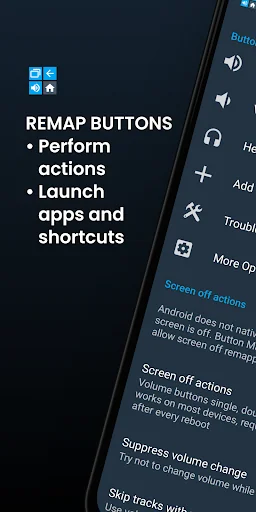
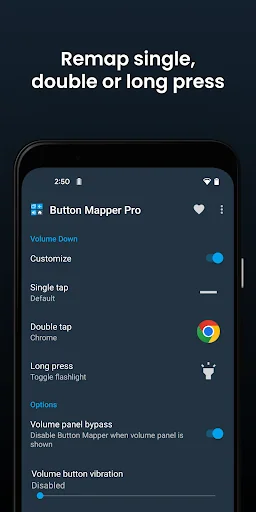
Button Mapper makes it easy to remap custom actions to your volume buttons and other hardware buttons. Remap buttons to launch any app, shortcut or custom action with a single, double press or long press.
Button Mapper can remap most physical or capacitive keys and buttons, such as volume buttons, some assist buttons, and capacitive home, back and recent apps keys. Button Mapper can also remap buttons on many gamepads, remotes and other peripheral devices.
Root is not required for most actions, however some require an adb command from a connected PC if not rooted. Button Mapper does not work when the screen is off unless your device is rooted or you run an adb command.
A few examples of remapping you can do with Button Mapper:
-long press to toggle your flashlight
-remap your TV remote control
-press to broadcast custom intents, scripts or commands
-long press to open camera and take a photo
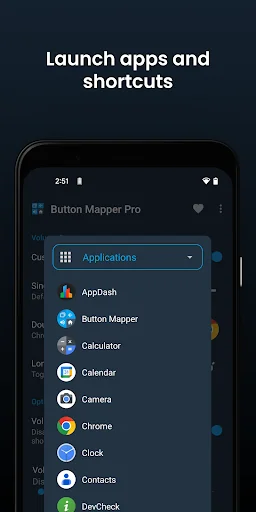
-double tap to launch your favorite app or shortcut
-double tap to open your notifications
-swap your back and recent apps keys (capacitive buttons only!)
-use your volume buttons to adjust screen brightness
-long press to toggle "do not disturb" mode
-and much more
Additional features unlocked in the pro version:
-Simulate keycodes (requires adb command or root)
-Swap volume keys on orientation change
-Default to ring volume on Pie or later
-Pocket detection
-Themes
-Change back and recents buttons
-Customization of haptic feedback (vibration) on button press and long press
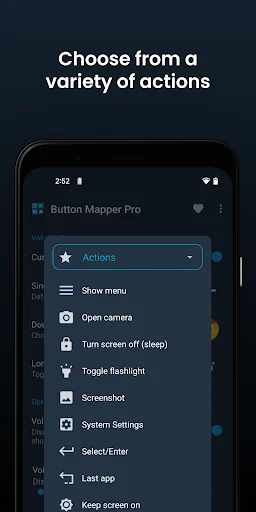
Actions that can be mapped to buttons or keys:
-Launch any app or shortcut
-Disable the button
-Broadcast intents (PRO)
-Run scripts (PRO)
-Camera shutter
-Turn screen off
-Toggle flashlight
-Quick settings
-Show notifications
-Power dialog
-Take screenshot
-Music: previous/next track and play/pause
-Adjust volume or mute
-Last app switch
-Toggle do not disturb
-Adjust brightness
-Now on tap (root)
-Menu button (root)
-Choose custom keycode (root and PRO)
-Root command (root and PRO)
-Toggle WiFi
-Toggle Bluetooth
-Toggle rotation
-Clear notifications
-Split screen
-Scroll up/down (root)
-And many more...
Buttons supported:
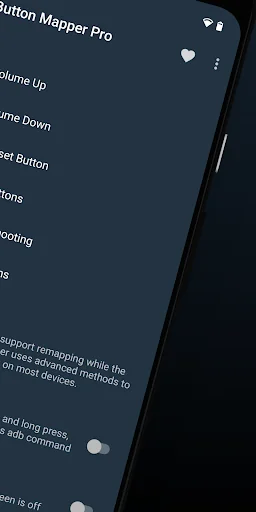
-Physical home, back and recent apps/menu buttons
-Volume up
-Volume down
-Most camera buttons
-Many headset buttons
-Custom buttons: add other buttons (active, mute, etc) on your phone, headphones, gamepads, TV remote and other peripheral devices
Additional options:
-change the long press or double tap duration
-delay initial button press for better double tap operation
-disable Button Mapper while using specific apps
-plus many more customizations
Troubleshooting:
-Make sure Button Mapper accessibility service is enabled and allowed to run in the background
-Button Mapper does not work with onscreen buttons (such as soft keys or the navigation bar) or the power button.
-The options shown in the app depend on the buttons available on your phone. Not all phones have home, back and recents buttons!
This app uses Accessibility services. Accessibility is used to detect when the physical or capacitive buttons are pressed on your device so they can be remapped to custom actions to accommodate your needs. It is not used to see what you type. Button Mapper does not collect or share any of your personal information, it is safe and your privacy is respected.
This app uses the Device Administrator permission. (BIND_DEVICE_ADMIN)
This permission is used to lock the screen if the "Turn screen off" action is chosen. If you want to remove this permission, open Button Mapper, click on the menu (three dots in the upper right corner) and select "Uninstall"
Button Mapper can remap most physical or capacitive keys and buttons, such as volume buttons, some assist buttons, and capacitive home, back and recent apps keys. Button Mapper can also remap buttons on many gamepads, remotes and other peripheral devices.
Root is not required for most actions, however some require an adb command from a connected PC if not rooted. Button Mapper does not work when the screen is off unless your device is rooted or you run an adb command.
A few examples of remapping you can do with Button Mapper:
-long press to toggle your flashlight
-remap your TV remote control
-press to broadcast custom intents, scripts or commands
-long press to open camera and take a photo
-double tap to launch your favorite app or shortcut
-double tap to open your notifications
-swap your back and recent apps keys (capacitive buttons only!)
-use your volume buttons to adjust screen brightness
-long press to toggle "do not disturb" mode
-and much more
Additional features unlocked in the pro version:
-Simulate keycodes (requires adb command or root)
-Swap volume keys on orientation change
-Default to ring volume on Pie or later
-Pocket detection
-Themes
-Change back and recents buttons
-Customization of haptic feedback (vibration) on button press and long press
Actions that can be mapped to buttons or keys:
-Launch any app or shortcut
-Disable the button
-Broadcast intents (PRO)
-Run scripts (PRO)
-Camera shutter
-Turn screen off
-Toggle flashlight
-Quick settings
-Show notifications
-Power dialog
-Take screenshot
-Music: previous/next track and play/pause
-Adjust volume or mute
-Last app switch
-Toggle do not disturb
-Adjust brightness
-Now on tap (root)
-Menu button (root)
-Choose custom keycode (root and PRO)
-Root command (root and PRO)
-Toggle WiFi
-Toggle Bluetooth
-Toggle rotation
-Clear notifications
-Split screen
-Scroll up/down (root)
-And many more...
Buttons supported:
-Physical home, back and recent apps/menu buttons
-Volume up
-Volume down
-Most camera buttons
-Many headset buttons
-Custom buttons: add other buttons (active, mute, etc) on your phone, headphones, gamepads, TV remote and other peripheral devices
Additional options:
-change the long press or double tap duration
-delay initial button press for better double tap operation
-disable Button Mapper while using specific apps
-plus many more customizations
Troubleshooting:
-Make sure Button Mapper accessibility service is enabled and allowed to run in the background
-Button Mapper does not work with onscreen buttons (such as soft keys or the navigation bar) or the power button.
-The options shown in the app depend on the buttons available on your phone. Not all phones have home, back and recents buttons!
This app uses Accessibility services. Accessibility is used to detect when the physical or capacitive buttons are pressed on your device so they can be remapped to custom actions to accommodate your needs. It is not used to see what you type. Button Mapper does not collect or share any of your personal information, it is safe and your privacy is respected.
This app uses the Device Administrator permission. (BIND_DEVICE_ADMIN)
This permission is used to lock the screen if the "Turn screen off" action is chosen. If you want to remove this permission, open Button Mapper, click on the menu (three dots in the upper right corner) and select "Uninstall"
Profile & Insights
Everything we know — and don't — about this app and its company.
Identification
- App name
- Button Mapper: Remap your keys
- Developer
- flar2
- Bundle ID
- flar2.homebutton
- App Store URL
- Open in App Store
- Category
- Personalization
- Content rating
- Not found
- Languages
- Not found
Company
- Website
- Not found
- Tagline
- Not found
- Description
- Not found
- Founded
- Not found
- HQ / Address
- Not found
- Employees
- Not found
- Logo
- Not found
Revenue
- Verified revenue / mo
- Not found
- AI revenue estimate / mo
- Not found
- AI annual estimate
- Not found
- ML model estimate / mo
- $1.4K/mo
- Top-grossing rank
- Not found
- All-time revenue
- Not found
- Pricing
- Not found
Founder
- Name
- Not found
- X / Twitter
- Not found
- Not found
- GitHub
- Not found
- X followers
- Not found
- Public statements
- Not found
Funding
- Total raised
- Not found
- Last round
- Not found
- Investors
- Not found
- Crunchbase
- Not found
- AngelList
- Not found
Press & Links
- Articles found
- Not found
- Listed on
- Not found
- Blog
- Not found
- Press / News
- Not found
Contacts & Socials
- Socials
- Not found
- Not found
- Phone
- Not found
- Contact page
- Not found
- About page
- Not found
Profile is built from iTunes Lookup + developer site scrape + ML revenue model. Empty fields show "Not found" — additional sources (Crunchbase, X, IndieHackers, Acquire.com) coming.
More by flar2
View all →More Personalization
Zedge™ Wallpapers & Ringtones
★ 4.7 · 17,479,309 reviews
GO Launcher -Themes&Wallpapers
★ 4.3 · 7,264,707 reviews
APUS System
★ 4.0 · 5,670,266 reviews
Parallel Space - app cloning
★ 4.1 · 5,117,897 reviews
Make Money: Play to Earn Cash
★ 4.5 · 3,558,520 reviews
Yandex Browser with Alice AI
★ 4.4 · 2,966,323 reviews
GO Keyboard Lite - Many Theme
★ 3.5 · 2,526,227 reviews
Backgrounds HD (Wallpapers)
★ 4.2 · 2,337,645 reviews
Browse BU Analytics
📚 All 55,000+ Books
🜍 Alchemy & Hermeticism
🔮 Magic & Ritual
🌙 Witchcraft & Paganism
⭐ Astrology & Cosmology
🃏 Divination & Tarot
📜 Personalization
✡️ Kabbalah & Jewish Mysticism
🕉️ Mysticism & Contemplation
🕊️ Theosophy & Anthroposophy
🏛️ Freemasonry & Secret Societies
👻 Spiritualism & Afterlife
📖 Sacred Texts & Gnosticism
👁️ Supernatural & Occult Fiction
🧘 Spiritual Development
📚 Esoteric History & Biography
Info
About BU Analytics