67
BU Score
Solid
GPS Speedometer with HUD
✍️ BU Analytics Review
“
GPS Speedometer with HUD is an Android app from BeshevGames in the Maps & Navigation category, currently rated 4.7★ across 6,706 ratings. Initial signal reads as largely positive sentiment, users highlighting consistency and feature depth.
Our BU Score puts it at 67 — Solid (established niche player). For a Maps & Navigation app, that means established niche player.
Track changes month-over-month in the Performance section below — live snapshot history and revenue forecast included.
creator
📊 Performance Tracking LIVE
Loading…
Rating
—
Reviews
—
Forecast Revenue / mo
—
Snapshots tracked
0
since first record
Range:
💰 Forecast Revenue / mo
MODELRevenue forecast computed from BU's 234 trigger model on each snapshot. Calibrated against ground-truth from 58 verified-revenue apps.
🔬Forecast Breakdown — Why This Estimate?Top 3 of 3 triggers
Our ML model uses 200+ signals from public data. These are the most influential for this app:
| Excellent rating (4.7★)METRIC | +$2,200 | |
| Low install base (6,706 ratings)METRIC | +$1,500 | |
| Ad-supported / freemiumMETRIC | +$600 |
METRIC = structural app data · REVIEW = mined from user reviews · ✓ VERIFIED = Stripe-verified anchor (TrustMRR)
📈 Reviews Growth
LIVECumulative review count from first BU snapshot. Each point = a tracked update.
⭐ Rating Trend
LIVEAverage rating evolution. Updates with each new review batch.
🗓️ Snapshot Timeline
HISTORYEach bar shows a tracked update and the metric delta from the previous snapshot.
App Specs
🔐 Own this app? Claim & verify MRR →🔖 v3.6.0.2🔄 updated 11y ago📂 Maps & Navigation💰 Free
📝 About this app
<a href="https://play.google.com/store/apps/details?id=klb.digital.speedometer">Digital GPS Speedometer</a>
PLEASE, if there are problems with the app - tell me what is wrong so I can fix it. Don't vote with one star and no comment, thank you!
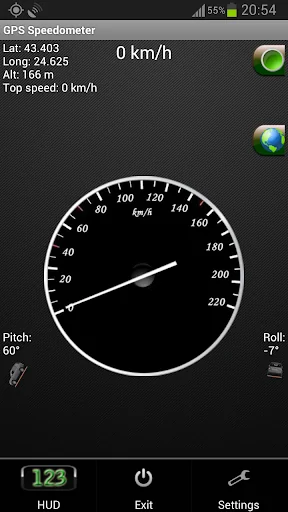
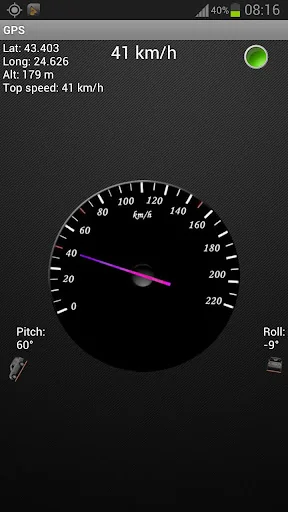
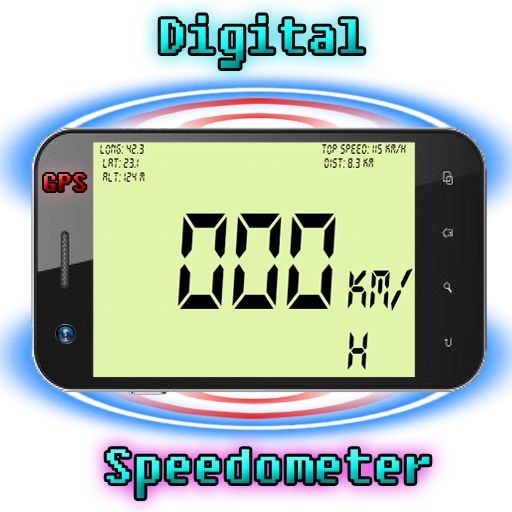
GPS Speedometer - this GPS SPEED application is a free software for Android devices with built-in GPS antenna. It acts as a normal speed gauge, which you may find in any car, showing the velocity of the vehicle you are in in kph and mph - useful when cycling, running, flying, sailing.
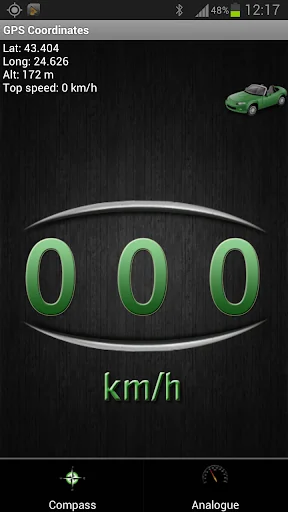
GPS Coordinates is a powerful and reliable mobile application designed to provide you with accurate and precise information about your current location. Whether you're hiking, traveling, or simply exploring your city, GPS Coordinates is the perfect app for you.
With GPS Coordinates, you can quickly and easily obtain your latitude and longitude coordinates, as well as your altitude and speed. The app uses your device's GPS sensor to provide you with accurate location information in real-time, so you always know where you are.
One of the key features of GPS Coordinates is its user-friendly interface. The app's simple design makes it easy to navigate and use, and you can access your location information with just a few taps.
In addition to its core features, GPS Coordinates also offers a variety of customization options. You can customize the app's settings to suit your preferences, including adjusting the display units for your location data and enabling or disabling location services.
We try our best to make all readings as accurate as possible, but the accuracy also depends your device's GPS sensor and should only be treated as approximations.
*This is an ad-supported application. The ads are located on the bottom of the screen.
There is also a flashlight available in GSpeed. You turn it on and off by simply clicking the green button, located in the top right corner of the app.
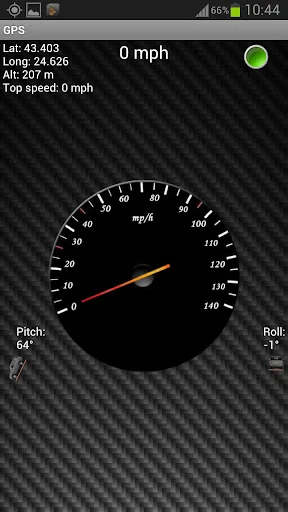
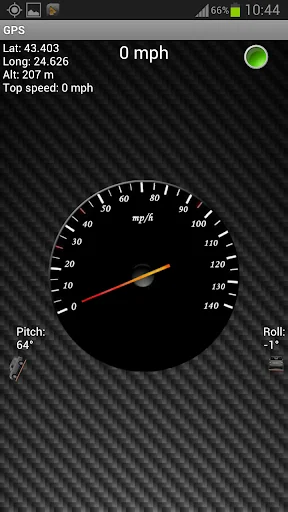
In miles per hour (MPH)
You can set the app to kmh or mph.
Some features of the speed app include:
GPS Coordinates
-Shows you your current GPS position - Longitude, Latitude and Altitude, as well as your top speed.
GPS Speed
-Your current speed and your maximum velocity, according to the sattelites.
Google Maps for newer versions of Android (4.0.3 and above)
-Added Google Maps view. With a single click you can view your current position on the map, which may help you navigate to your current destination.
Vehicle position
-The pitch and roll of the vehicle you are in (the device must be in upright position according to the vehicle)
Units
-Both the analog and digital speedometer views can be either in miles or kilometers per hour.
HUD - heads up display
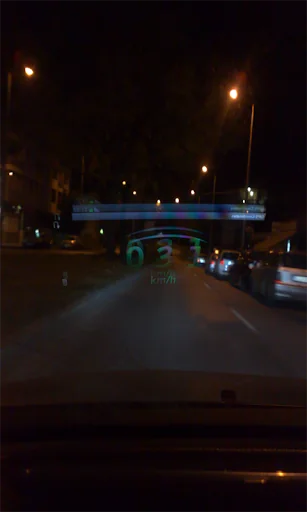
-You can switch to HUD mode, which will show you your velocity digitally with large green numbers.
Mirror HUD mode
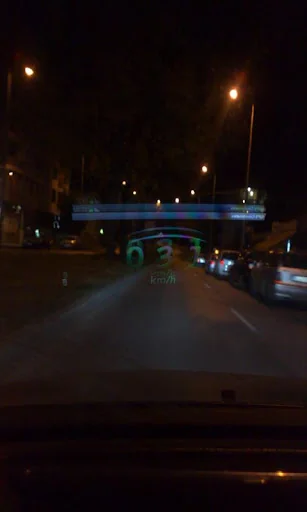
-A mirror view of the digits, allowing you to put your phone on the dash of the vehicle, so that the readings of your speed in kilometers per hour can be reflected from the windshield at night.
*Permanently set to KM/H or MPH
*Change your background
*Change needle color
*Choose to keep screen lit(or not) when app is active.
*Added a software menu button if no hardware one detected
*Move to SD card
*Fixed Altitude readings
*Added Google Map view
*Some bug fixes
*Set screen size
*Tested on Samsung Galaxy S III, Samsung Galaxy Tab 2 7.0' and a Chinese phone with Android 2.3.4
Video of the HUD mode of the application:
http://www.youtube.com/watch?v=KUkrA3AbHnQ
**** EU Cookie law ****
We use device identifiers to personalise content and ads, to provide social media features and to analyse our traffic. We also share such identifiers and other information from your device with our social media, advertising and analytics partners.
PLEASE, if there are problems with the app - tell me what is wrong so I can fix it. Don't vote with one star and no comment, thank you!
GPS Speedometer - this GPS SPEED application is a free software for Android devices with built-in GPS antenna. It acts as a normal speed gauge, which you may find in any car, showing the velocity of the vehicle you are in in kph and mph - useful when cycling, running, flying, sailing.
GPS Coordinates is a powerful and reliable mobile application designed to provide you with accurate and precise information about your current location. Whether you're hiking, traveling, or simply exploring your city, GPS Coordinates is the perfect app for you.
With GPS Coordinates, you can quickly and easily obtain your latitude and longitude coordinates, as well as your altitude and speed. The app uses your device's GPS sensor to provide you with accurate location information in real-time, so you always know where you are.
One of the key features of GPS Coordinates is its user-friendly interface. The app's simple design makes it easy to navigate and use, and you can access your location information with just a few taps.
In addition to its core features, GPS Coordinates also offers a variety of customization options. You can customize the app's settings to suit your preferences, including adjusting the display units for your location data and enabling or disabling location services.
We try our best to make all readings as accurate as possible, but the accuracy also depends your device's GPS sensor and should only be treated as approximations.
*This is an ad-supported application. The ads are located on the bottom of the screen.
There is also a flashlight available in GSpeed. You turn it on and off by simply clicking the green button, located in the top right corner of the app.
In miles per hour (MPH)
You can set the app to kmh or mph.
Some features of the speed app include:
GPS Coordinates
-Shows you your current GPS position - Longitude, Latitude and Altitude, as well as your top speed.
GPS Speed
-Your current speed and your maximum velocity, according to the sattelites.
Google Maps for newer versions of Android (4.0.3 and above)
-Added Google Maps view. With a single click you can view your current position on the map, which may help you navigate to your current destination.
Vehicle position
-The pitch and roll of the vehicle you are in (the device must be in upright position according to the vehicle)
Units
-Both the analog and digital speedometer views can be either in miles or kilometers per hour.
HUD - heads up display
-You can switch to HUD mode, which will show you your velocity digitally with large green numbers.
Mirror HUD mode
-A mirror view of the digits, allowing you to put your phone on the dash of the vehicle, so that the readings of your speed in kilometers per hour can be reflected from the windshield at night.
*Permanently set to KM/H or MPH
*Change your background
*Change needle color
*Choose to keep screen lit(or not) when app is active.
*Added a software menu button if no hardware one detected
*Move to SD card
*Fixed Altitude readings
*Added Google Map view
*Some bug fixes
*Set screen size
*Tested on Samsung Galaxy S III, Samsung Galaxy Tab 2 7.0' and a Chinese phone with Android 2.3.4
Video of the HUD mode of the application:
http://www.youtube.com/watch?v=KUkrA3AbHnQ
**** EU Cookie law ****
We use device identifiers to personalise content and ads, to provide social media features and to analyse our traffic. We also share such identifiers and other information from your device with our social media, advertising and analytics partners.
Profile & Insights
Everything we know — and don't — about this app and its company.
Identification
- App name
- GPS Speedometer with HUD
- Developer
- BeshevGames
- Bundle ID
- gps.coordinates.software
- App Store URL
- Open in App Store
- Category
- Maps & Navigation
- Content rating
- Not found
- Languages
- Not found
Company
- Website
- Not found
- Tagline
- Not found
- Description
- Not found
- Founded
- Not found
- HQ / Address
- Not found
- Employees
- Not found
- Logo
- Not found
Revenue
- Verified revenue / mo
- Not found
- AI revenue estimate / mo
- Not found
- AI annual estimate
- Not found
- ML model estimate / mo
- $995/mo
- Top-grossing rank
- Not found
- All-time revenue
- Not found
- Pricing
- Not found
Founder
- Name
- Not found
- X / Twitter
- Not found
- Not found
- GitHub
- Not found
- X followers
- Not found
- Public statements
- Not found
Funding
- Total raised
- Not found
- Last round
- Not found
- Investors
- Not found
- Crunchbase
- Not found
- AngelList
- Not found
Press & Links
- Articles found
- Not found
- Listed on
- Not found
- Blog
- Not found
- Press / News
- Not found
Contacts & Socials
- Socials
- Not found
- Not found
- Phone
- Not found
- Contact page
- Not found
- About page
- Not found
Profile is built from iTunes Lookup + developer site scrape + ML revenue model. Empty fields show "Not found" — additional sources (Crunchbase, X, IndieHackers, Acquire.com) coming.
More by BeshevGames
View all →In-Game Guide all platforms
★ 3.9 · 9,044 reviews
Digital GPS Speedometer
★ 4.1 · 2,903 reviews
My Bright LED flashlight
★ 4.0 · 1,304 reviews
GStop Stopwatch - Chronometer
★ 3.8 · 1,063 reviews
Keep It Safe 2 racing game
★ 3.8 · 1,044 reviews
Treadmill finger workout
★ 3.2 · 574 reviews
Pedometer and step counter
★ 3.3 · 364 reviews
Shooting Hoops basketball game
★ 3.8 · 306 reviews
More Maps & Navigation
Grab - Taxi & Food Delivery
★ 4.8 · 16,301,698 reviews
inDrive. Rides with fair fares
★ 4.8 · 14,419,666 reviews
Yandex Go: Taxi Food Delivery
★ 4.7 · 13,846,529 reviews
Bolt: Request a Ride
★ 4.8 · 9,965,117 reviews
Rapido: Bike-Taxi, Auto & Cabs
★ 4.8 · 4,086,095 reviews
Ola: Book Cab, Auto, Bike Taxi
★ 4.8 · 3,464,588 reviews
Yango: taxi, food, delivery
★ 4.8 · 3,215,778 reviews
99: Rides, Food, Pay
★ 4.3 · 3,010,021 reviews
Browse BU Analytics
📚 All 55,000+ Books
🜍 Alchemy & Hermeticism
🔮 Magic & Ritual
🌙 Witchcraft & Paganism
⭐ Astrology & Cosmology
🃏 Divination & Tarot
📜 Maps & Navigation
✡️ Kabbalah & Jewish Mysticism
🕉️ Mysticism & Contemplation
🕊️ Theosophy & Anthroposophy
🏛️ Freemasonry & Secret Societies
👻 Spiritualism & Afterlife
📖 Sacred Texts & Gnosticism
👁️ Supernatural & Occult Fiction
🧘 Spiritual Development
📚 Esoteric History & Biography
Info
About BU Analytics