53
BU Score
Solid
RaiPlay Sound: radio e podcast
✍️ BU Analytics Review
“
RaiPlay Sound: radio e podcast is an Android app from RAI Radiotelevisione Italiana S.p.A. in the Music & Audio category, currently rated 2.7★ across 13,813 ratings. Initial signal reads as mixed reviews — supporters praise core features while critics cite stability/value gaps.

Our BU Score puts it at 53 — Solid (established niche player). For a Music & Audio app, that means established niche player.
Track changes month-over-month in the Performance section below — live snapshot history and revenue forecast included.
📊 Performance Tracking LIVE
Loading…
Rating
—
Reviews
—
Forecast Revenue / mo
—
Snapshots tracked
0
since first record
Range:
💰 Forecast Revenue / mo
MODELRevenue forecast computed from BU's 234 trigger model on each snapshot. Calibrated against ground-truth from 58 verified-revenue apps.
🔬Forecast Breakdown — Why This Estimate?Top 3 of 3 triggers
Our ML model uses 200+ signals from public data. These are the most influential for this app:
| Mid install base (13,813 ratings)METRIC | +$5,500 | |
| Below-average rating (2.7★)METRIC | −$1,500 | |
| Ad-supported / freemiumMETRIC | +$600 |
METRIC = structural app data · REVIEW = mined from user reviews · ✓ VERIFIED = Stripe-verified anchor (TrustMRR)
📈 Reviews Growth
LIVECumulative review count from first BU snapshot. Each point = a tracked update.
⭐ Rating Trend
LIVEAverage rating evolution. Updates with each new review batch.
🗓️ Snapshot Timeline
HISTORYEach bar shows a tracked update and the metric delta from the previous snapshot.
App Specs
🔐 Own this app? Claim & verify MRR →🔖 vVaries with device🔄 updated 3w ago📂 Music & Audio💰 Free
📝 About this app
RaiPlay Sound is the free platform where you can listen, via live streaming and on-demand, to all Rai Radio live broadcasts and programs, hundreds of audiobooks read by top performers, unreleased podcasts, audio-described films and TV series, audio documentaries, and much more.
You can access the RaiPlay Sound app with or without registration. Registration is free. If you access without registering, you can listen to live broadcasts from all Rai Radio channels, all national and regional news programs, audio clips, and bonus content from podcasts of your choice. By registering, you can also listen on-demand to full episodes of radio and TV programs, original podcasts, audiobooks, playlists, and audio descriptions of films and TV series. You can also enable notifications for your favorite content and download titles to the app to listen to offline.
If this is your first time accessing a Rai multimedia platform, you can register your Rai account from the RaiPlay Sound app. If you already have a Rai account that you use to access RaiPlay, you can also use it to access RaiPlay Sound.
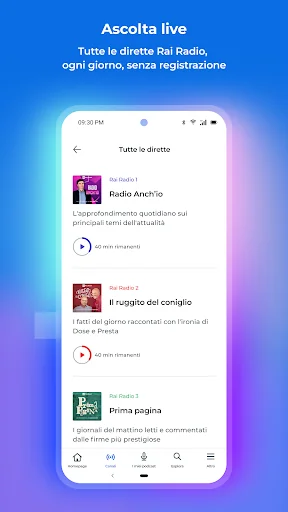
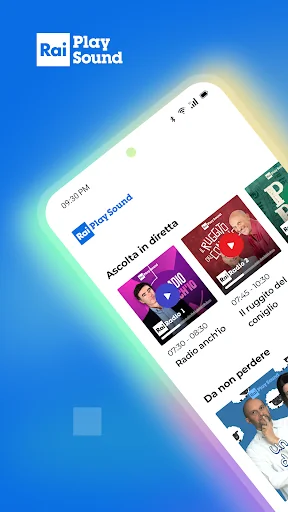
To listen to live radio broadcasts, simply open the app and choose your preferred radio channel from the "Listen Live" section at the top of the homepage or in the "Channels" section of the app. In addition to tuning in to the live broadcast, you can view the programs for the day and the following week and, if you're registered, re-listen to episodes from previous days. You can also access the complete list of podcasts associated with each channel.
From the live radio player, you can listen to a program that has already started and return to the live broadcast; you can switch to "car mode," change the channel you're listening to, view upcoming programs, share the live broadcast, access information and podcasts for the program currently airing, and set a sleep timer. If the program offers this service, you can also contact the editorial staff using your device. If you're registered, you can add the program you're listening to to your favorites.
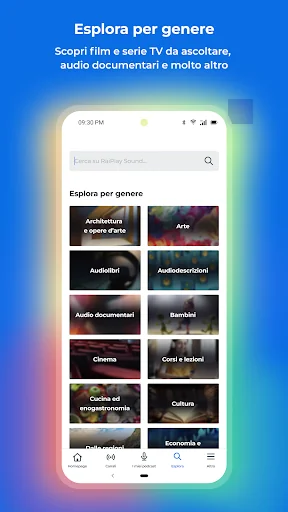
From the "Explore" section, you can search for content by title and keywords and discover the selection of podcasts available on demand and organized by genre. From the on-demand player, you can also share the content you're listening to, set a sleep timer, skip to the next or previous episode, and view information about the audio currently playing.
By registering, in addition to having access to the entire catalog, you can also access the "My Podcasts" area and customize your listening experience: you can add podcasts to your favorites (Followed) and, for each podcast you follow, activate notifications to be notified when new episodes of that podcast are released; download the titles you're interested in to the app for offline listening (Download); create personal playlists (Add to playlist) and track a specific point in an audio file to find it again later (Add bookmark).
In the "My Podcasts" section, you can find and manage your most recent listening sessions to resume where you left off, the podcasts you follow, the bookmarks and playlists you've created, your in-app downloads, and use the Alarm Clock feature.
From the "More" section, you can create and manage your Rai account and notifications, access FAQs and the help center, and choose whether to enable streaming and downloading content when your device is connected to Wi-Fi.
CONTACTS
rai.it/centroassistenza
supporto@rai.it
www.raiplaysound.it
Privacy policy: https://www.rai.it/privacy
In accordance with Law No. 4 of January 9, 2004, we have published the accessibility statement for the RaiPlay Sound app at the following webpage: https://www.rai.it/corporate/disclaimer/dichiarazione-di-accessibilita
You can access the RaiPlay Sound app with or without registration. Registration is free. If you access without registering, you can listen to live broadcasts from all Rai Radio channels, all national and regional news programs, audio clips, and bonus content from podcasts of your choice. By registering, you can also listen on-demand to full episodes of radio and TV programs, original podcasts, audiobooks, playlists, and audio descriptions of films and TV series. You can also enable notifications for your favorite content and download titles to the app to listen to offline.
If this is your first time accessing a Rai multimedia platform, you can register your Rai account from the RaiPlay Sound app. If you already have a Rai account that you use to access RaiPlay, you can also use it to access RaiPlay Sound.
To listen to live radio broadcasts, simply open the app and choose your preferred radio channel from the "Listen Live" section at the top of the homepage or in the "Channels" section of the app. In addition to tuning in to the live broadcast, you can view the programs for the day and the following week and, if you're registered, re-listen to episodes from previous days. You can also access the complete list of podcasts associated with each channel.
From the live radio player, you can listen to a program that has already started and return to the live broadcast; you can switch to "car mode," change the channel you're listening to, view upcoming programs, share the live broadcast, access information and podcasts for the program currently airing, and set a sleep timer. If the program offers this service, you can also contact the editorial staff using your device. If you're registered, you can add the program you're listening to to your favorites.
From the "Explore" section, you can search for content by title and keywords and discover the selection of podcasts available on demand and organized by genre. From the on-demand player, you can also share the content you're listening to, set a sleep timer, skip to the next or previous episode, and view information about the audio currently playing.
By registering, in addition to having access to the entire catalog, you can also access the "My Podcasts" area and customize your listening experience: you can add podcasts to your favorites (Followed) and, for each podcast you follow, activate notifications to be notified when new episodes of that podcast are released; download the titles you're interested in to the app for offline listening (Download); create personal playlists (Add to playlist) and track a specific point in an audio file to find it again later (Add bookmark).
In the "My Podcasts" section, you can find and manage your most recent listening sessions to resume where you left off, the podcasts you follow, the bookmarks and playlists you've created, your in-app downloads, and use the Alarm Clock feature.
From the "More" section, you can create and manage your Rai account and notifications, access FAQs and the help center, and choose whether to enable streaming and downloading content when your device is connected to Wi-Fi.
CONTACTS
rai.it/centroassistenza
supporto@rai.it
www.raiplaysound.it
Privacy policy: https://www.rai.it/privacy
In accordance with Law No. 4 of January 9, 2004, we have published the accessibility statement for the RaiPlay Sound app at the following webpage: https://www.rai.it/corporate/disclaimer/dichiarazione-di-accessibilita
Profile & Insights
Everything we know — and don't — about this app and its company.
Identification
- App name
- RaiPlay Sound: radio e podcast

- Developer
- RAI Radiotelevisione Italiana S.p.A.
- Bundle ID
- it.radiorai
- App Store URL
- Open in App Store
- Category
- Music & Audio
- Content rating
- Not found
- Languages
- Not found
Company
- Website
- Not found
- Tagline
- Not found
- Description
- Not found
- Founded
- Not found
- HQ / Address
- Not found
- Employees
- Not found
- Logo
- Not found
Revenue
- Verified revenue / mo
- Not found
- AI revenue estimate / mo
- Not found
- AI annual estimate
- Not found
- ML model estimate / mo
- $1.0K/mo
- Top-grossing rank
- Not found
- All-time revenue
- Not found
- Pricing
- Not found
Founder
- Name
- Not found
- X / Twitter
- Not found
- Not found
- GitHub
- Not found
- X followers
- Not found
- Public statements
- Not found
Funding
- Total raised
- Not found
- Last round
- Not found
- Investors
- Not found
- Crunchbase
- Not found
- AngelList
- Not found
Press & Links
- Articles found
- Not found
- Listed on
- Not found
- Blog
- Not found
- Press / News
- Not found
Contacts & Socials
- Socials
- Not found
- Not found
- Phone
- Not found
- Contact page
- Not found
- About page
- Not found
Profile is built from iTunes Lookup + developer site scrape + ML revenue model. Empty fields show "Not found" — additional sources (Crunchbase, X, IndieHackers, Acquire.com) coming.
More Music & Audio
JioSaavn - Music & Podcasts
★ 4.3 · 8,580,068 reviews
Audiomack: Music Downloader
★ 4.8 · 8,111,919 reviews
YouTube Music
★ 4.5 · 7,592,744 reviews
YouTube Music
★ 4.3 · 7,592,575 reviews
JOOX Music
★ 4.1 · 6,242,860 reviews
Wynk Music: Hellotunes
★ 4.2 · 5,965,873 reviews
Lark Player:Music Player & MP3
★ 4.6 · 5,155,179 reviews
Gaana: Music App, MP3 Songs
★ 4.2 · 5,140,385 reviews
Browse BU Analytics
📚 All 55,000+ Books
🜍 Alchemy & Hermeticism
🔮 Magic & Ritual
🌙 Witchcraft & Paganism
⭐ Astrology & Cosmology
🃏 Divination & Tarot
📜 Music & Audio
✡️ Kabbalah & Jewish Mysticism
🕉️ Mysticism & Contemplation
🕊️ Theosophy & Anthroposophy
🏛️ Freemasonry & Secret Societies
👻 Spiritualism & Afterlife
📖 Sacred Texts & Gnosticism
👁️ Supernatural & Occult Fiction
🧘 Spiritual Development
📚 Esoteric History & Biography
Info
About BU Analytics