69
BU Score
Solid
Calculator
✍️ BU Analytics Review
“
Calculator is an Android app from Appsys in the Productivity category, currently rated 4.3★ across 22,581 ratings. Initial signal reads as largely positive sentiment, users highlighting consistency and feature depth.
Our BU Score puts it at 69 — Solid (established niche player). For a Productivity app, that means established niche player.
Track changes month-over-month in the Performance section below — live snapshot history and revenue forecast included.
creator
📊 Performance Tracking LIVE
Loading…
Rating
—
Reviews
—
Forecast Revenue / mo
—
Snapshots tracked
0
since first record
Range:
💰 Forecast Revenue / mo
MODELRevenue forecast computed from BU's 234 trigger model on each snapshot. Calibrated against ground-truth from 58 verified-revenue apps.
🔬Forecast Breakdown — Why This Estimate?Top 3 of 3 triggers
Our ML model uses 200+ signals from public data. These are the most influential for this app:
| Mid install base (22,581 ratings)METRIC | +$5,500 | |
| Good rating (4.3★)METRIC | +$800 | |
| Ad-supported / freemiumMETRIC | +$600 |
METRIC = structural app data · REVIEW = mined from user reviews · ✓ VERIFIED = Stripe-verified anchor (TrustMRR)
📈 Reviews Growth
LIVECumulative review count from first BU snapshot. Each point = a tracked update.
⭐ Rating Trend
LIVEAverage rating evolution. Updates with each new review batch.
🗓️ Snapshot Timeline
HISTORYEach bar shows a tracked update and the metric delta from the previous snapshot.
App Specs
🔐 Own this app? Claim & verify MRR →🔖 v6.3.6🔄 updated 2w ago📂 Productivity💰 Free
📝 About this app
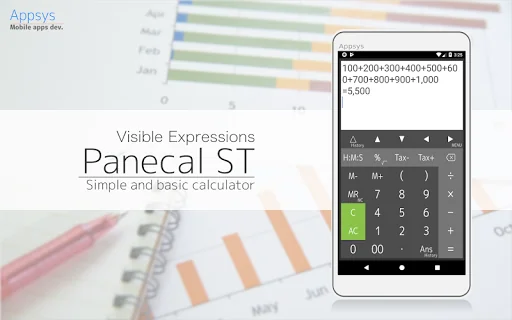
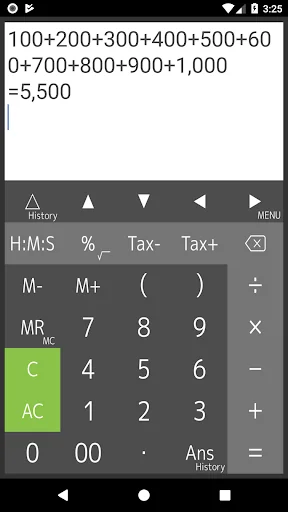
This is calculator app that allows you to display and modify formulas. It allows you to enter formulas while checking them, which prevents you from typing incorrectly or making calculation errors. It is also possible to reuse past formulas to change only certain values to calculate them.
The cursor indicates on the display, and you can tap or press the arrow keys to quickly navigate to where you want to edit. It has a powerful, flexible and intuitive user interface with support for swiping to scroll through formulas and long-tap to copy and paste.
[ Features ]
- Easy operation for editing formulas
- Re-calculation by using history
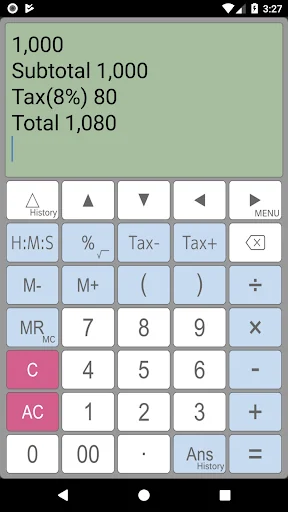
- Four arithmetic operations, root, percentages, time, tax and parentheses calculations
- Memory, M+, M-, MR, MC
- Scroll up/down lines
- Cut, copy and paste
- Expressions and answer history
- Grouping separator and decimal point
- Various settings (Long tap MENU key)
[ What do you use "Calculator" for ]
- General calculator
- Tax and VAT
- Sales, profit and cost
- Split a payments at restaurant
- Long formulas calculation
- Formula include parenthesis
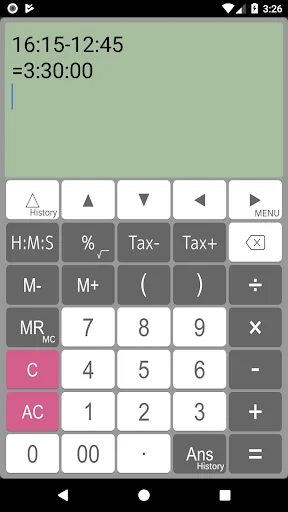
- Elapsed time, time addition and subtraction, production time, costing from time
[ Four arithmetic operations ]
1 + 2 - 3 × 4 ÷ 5 = 0.6
[ Time calculation ]
16:15 - 12:45 = 3:30:00
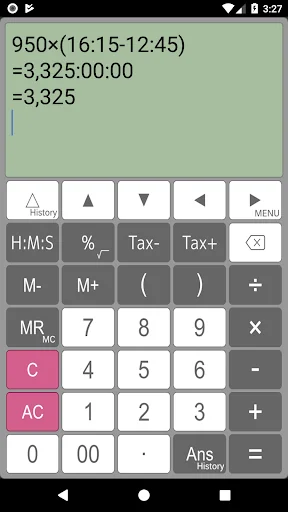
1.5 × (16:15 - 12:45) = 5:15:00
Press [H:M:S] key for changing value after calculation.
=5.25
[ Root calculation (Long press)]
√( 2 × 2) = 2
[ Percentage calculation ]
500 + 20% = 600
500 - 20% = 400
500 × 20% = 100
100 ÷ 500% = 20
[ Tax calculation ]
500 Tax+ = 525
525 Tax- = 500
[ Parenthesis calculation ]
( 1 + 2 ) × ( 3 + 4 ) = 21
( 1 + 2 ) ( 3 + 4 ) ( 5 + 6 ) = 231
[ Display ]
Calculator indicates long expressions on the display. If you may mistake to input expressions, you can correct this expressions easily and quickly using by back space key, arrow keys and C(clear) key.
[ Re-play and history functions ]
Calculator has "Re-play function". It indicates expressions that you inputted in the recently using by △(re-play)key. If you long-press re-play key, expressions history table is available.
[ Last answer and history functions ]
Last answer is that indicates the last calculation result by using Ans key. If you long-press Ans key, a last answer history table is available.
[ Percent calculator ]
If you would like to calculate “20% more $50”, you can input 50+20% and get a result.
[ Tax calculator ]
This calculator can store tax rate in the setting. And you can get price including / excluding tax easily and quickly using by Tax+/Tax- keys.
[ Disclaimer ]
Please note in advance that Appsys is not responsible for any damage or lost profits caused by the use of this software, or any claims from third parties.
The cursor indicates on the display, and you can tap or press the arrow keys to quickly navigate to where you want to edit. It has a powerful, flexible and intuitive user interface with support for swiping to scroll through formulas and long-tap to copy and paste.
[ Features ]
- Easy operation for editing formulas
- Re-calculation by using history
- Four arithmetic operations, root, percentages, time, tax and parentheses calculations
- Memory, M+, M-, MR, MC
- Scroll up/down lines
- Cut, copy and paste
- Expressions and answer history
- Grouping separator and decimal point
- Various settings (Long tap MENU key)
[ What do you use "Calculator" for ]
- General calculator
- Tax and VAT
- Sales, profit and cost
- Split a payments at restaurant
- Long formulas calculation
- Formula include parenthesis
- Elapsed time, time addition and subtraction, production time, costing from time
[ Four arithmetic operations ]
1 + 2 - 3 × 4 ÷ 5 = 0.6
[ Time calculation ]
16:15 - 12:45 = 3:30:00
1.5 × (16:15 - 12:45) = 5:15:00
Press [H:M:S] key for changing value after calculation.
=5.25
[ Root calculation (Long press)]
√( 2 × 2) = 2
[ Percentage calculation ]
500 + 20% = 600
500 - 20% = 400
500 × 20% = 100
100 ÷ 500% = 20
[ Tax calculation ]
500 Tax+ = 525
525 Tax- = 500
[ Parenthesis calculation ]
( 1 + 2 ) × ( 3 + 4 ) = 21
( 1 + 2 ) ( 3 + 4 ) ( 5 + 6 ) = 231
[ Display ]
Calculator indicates long expressions on the display. If you may mistake to input expressions, you can correct this expressions easily and quickly using by back space key, arrow keys and C(clear) key.
[ Re-play and history functions ]
Calculator has "Re-play function". It indicates expressions that you inputted in the recently using by △(re-play)key. If you long-press re-play key, expressions history table is available.
[ Last answer and history functions ]
Last answer is that indicates the last calculation result by using Ans key. If you long-press Ans key, a last answer history table is available.
[ Percent calculator ]
If you would like to calculate “20% more $50”, you can input 50+20% and get a result.
[ Tax calculator ]
This calculator can store tax rate in the setting. And you can get price including / excluding tax easily and quickly using by Tax+/Tax- keys.
[ Disclaimer ]
Please note in advance that Appsys is not responsible for any damage or lost profits caused by the use of this software, or any claims from third parties.
Profile & Insights
Everything we know — and don't — about this app and its company.
Identification
- App name
- Calculator
- Developer
- Appsys
- Bundle ID
- jp.Appsys.PanecalST
- App Store URL
- Open in App Store
- Category
- Productivity
- Content rating
- Not found
- Languages
- Not found
Company
- Website
- Not found
- Tagline
- Not found
- Description
- Not found
- Founded
- Not found
- HQ / Address
- Not found
- Employees
- Not found
- Logo
- Not found
Revenue
- Verified revenue / mo
- Not found
- AI revenue estimate / mo
- Not found
- AI annual estimate
- Not found
- ML model estimate / mo
- $1.3K/mo
- Top-grossing rank
- Not found
- All-time revenue
- Not found
- Pricing
- Not found
Founder
- Name
- Not found
- X / Twitter
- Not found
- Not found
- GitHub
- Not found
- X followers
- Not found
- Public statements
- Not found
Funding
- Total raised
- Not found
- Last round
- Not found
- Investors
- Not found
- Crunchbase
- Not found
- AngelList
- Not found
Press & Links
- Articles found
- Not found
- Listed on
- Not found
- Blog
- Not found
- Press / News
- Not found
Contacts & Socials
- Socials
- Not found
- Not found
- Phone
- Not found
- Contact page
- Not found
- About page
- Not found
Profile is built from iTunes Lookup + developer site scrape + ML revenue model. Empty fields show "Not found" — additional sources (Crunchbase, X, IndieHackers, Acquire.com) coming.
More Productivity
Microsoft Outlook
★ 4.8 · 8,891,395 reviews
Google Drive – online backup
★ 4.8 · 7,526,498 reviews
ChatGPT
★ 4.8 · 7,136,919 reviews
Yahoo Mail – Alles im Blick
★ 4.7 · 4,623,459 reviews
HP
★ 4.6 · 4,011,497 reviews
Google Docs
★ 4.8 · 3,078,214 reviews
Microsoft Word
★ 4.7 · 2,843,856 reviews
Gmail – E-Mail von Google
★ 4.7 · 2,406,337 reviews
Browse BU Analytics
📚 All 55,000+ Books
🜍 Alchemy & Hermeticism
🔮 Magic & Ritual
🌙 Witchcraft & Paganism
⭐ Astrology & Cosmology
🃏 Divination & Tarot
📜 Productivity
✡️ Kabbalah & Jewish Mysticism
🕉️ Mysticism & Contemplation
🕊️ Theosophy & Anthroposophy
🏛️ Freemasonry & Secret Societies
👻 Spiritualism & Afterlife
📖 Sacred Texts & Gnosticism
👁️ Supernatural & Occult Fiction
🧘 Spiritual Development
📚 Esoteric History & Biography
Info
About BU Analytics