69
BU Score
Solid
McDonald's Japan
✍️ bumetric analysis
“
McDonald's Japan is an Android app from 日本マクドナルド株式会社 in the Food & Drink category, currently rated 3.8★ across 208,188 ratings. Initial signal reads as mostly critical sentiment so far: users flag rough edges and unmet expectations.
Our BU Score puts it at 69: Solid (established niche player). For a Food & Drink app, that means established niche player.
Track changes month-over-month in the Performance section below: live snapshot history and revenue forecast included.
📊 Performance Tracking LIVE
Loading…
Rating
—
Reviews
—
Forecast Revenue / mo
—
Snapshots tracked
0
since first record
Range:
💰 Forecast Revenue / mo
MODELRevenue forecast computed from BU's 234 trigger model on each snapshot. Calibrated against ground-truth from 58 verified-revenue apps.
📈 Reviews Growth
LIVECumulative review count from first BU snapshot. Each point = a tracked update.
⭐ Rating Trend
LIVEAverage rating evolution. Updates with each new review batch.
🗓️ Snapshot Timeline
HISTORYEach bar shows a tracked update and the metric delta from the previous snapshot.
App Specs
🔐 Own this app? Claim & verify MRR →🔖 v5.5.20(1313)🔄 updated 3w ago📂 Food & Drink💰 Free
📝 About this app
McDonald's Official App for Japan
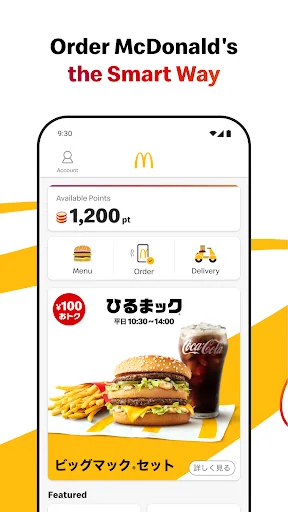
The McDonald's official app offers not only daily coupons and latest information but also allows you to complete your order and payment seamlessly.
Features Available:
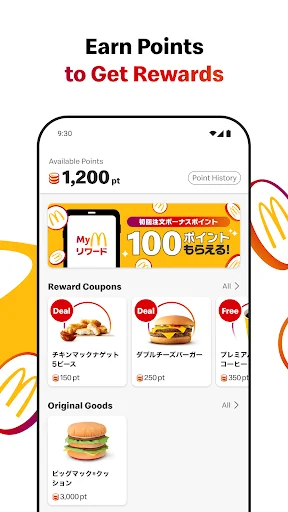
• Access to the Latest Coupons
Enjoy exclusive coupons that can be used in-store or through mobile orders. Show the coupon number to the staff by selecting "Use in Store" or choose a coupon from the mobile order menu category.
• Check McDonald’s Menu
Access detailed information about McDonald's products, including ingredients, allergy information, and nutritional content.
• Discover the Latest News
Find recommended news and products tailored to you right on the home screen.
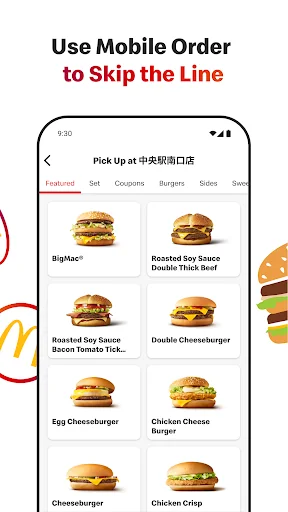
• Order and pay via the App with Mobile Order
You can complete your order and payment entirely through the app. Skip the line and receive your food directly at your table (not available in certain restaurants or hours).
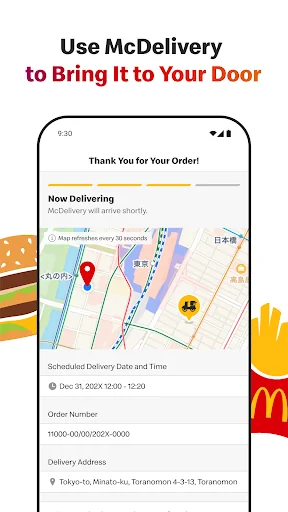
• Order from home and have your meal delivered by McDelivery® Service via the App.
How to Use Mobile Order:
Step 1: Log In
To use coupons or place an order, you need to register and log in. If you've forgotten your password, you can reset it via the "Forgot Password" option. Please ensure that you can receive emails from info@nsp.mdj.jp.
Step 2: Choose a Restaurant
Select the restaurant where you would like to receive your order. Please check the available restaurants in the app.
Step 3: Select Your Menu
Choose your favorite menu items. Coupons can also be used. Please note that some coupons available for mobile orders may differ from those available at the Front Counter.
Step 4: Choose Your Pickup Method
Select from table delivery (table service), counter pickup, takeout, park & go, or Drive-Thru. Pickup options may vary by restaurant and time. Table service, park & go, and drive-thru are not available at all locations.
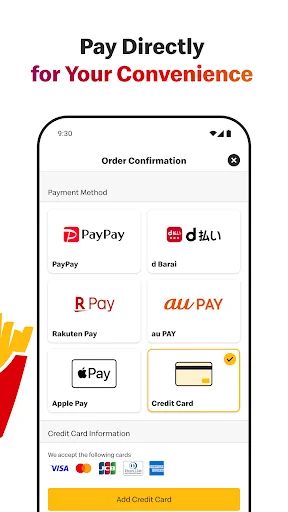
Step 5: Choose Your Payment Method
You can pay with a credit card (VISA, Master, JCB, Diners, American Express), d-Barai, PayPay, Rakuten Pay, au PAY, LINE Pay, or Google Pay .
Please Complete the Following Step After Arriving at the Restaurant
Step 6: Receive Your Order
Once you arrive at the restaurant, confirm your payment to start the preparation of your order. Enjoy your freshly prepared food.
How to Use McDelivery® Service:
Step 1: Log In
To place an order, you need to register and log in. If you've forgotten your password, you can reset it via the "Forgot Password" option. Please ensure that you can receive emails from info@nsp.mdj.jp.
Step 2: Select Delivery Address and Time
Choose whether you want to order now or reserve a delivery time. Reservations can be made from one day to two hours prior to the desired delivery time.
Step 3: Select Your Menu
Choose your favorite menu items.
Step 4: Choose Your Payment Method
You can pay with cash, credit card (VISA, Master, JCB, Diners, American Express), d-barai, PayPay, Rakuten Pay, au PAY, LINE Pay, or Google Pay . Please note that cash payments are not available at some locations.
Step 5: Receive Your Order
Our delivery staff will bring your freshly prepared meal to your specified address. If you prefer a no-contact delivery, you can select the "Leave at the Door" option when ordering.
• Please note:
• Delivery times vary by location.
• Orders for the breakfast menu must be placed by 10:20 AM.
• Minimum order value is ¥1,500 (¥1,000 for breakfast).
• A delivery fee of ¥300 applies.
The McDonald's official app offers not only daily coupons and latest information but also allows you to complete your order and payment seamlessly.
Features Available:
• Access to the Latest Coupons
Enjoy exclusive coupons that can be used in-store or through mobile orders. Show the coupon number to the staff by selecting "Use in Store" or choose a coupon from the mobile order menu category.
• Check McDonald’s Menu
Access detailed information about McDonald's products, including ingredients, allergy information, and nutritional content.
• Discover the Latest News
Find recommended news and products tailored to you right on the home screen.
• Order and pay via the App with Mobile Order
You can complete your order and payment entirely through the app. Skip the line and receive your food directly at your table (not available in certain restaurants or hours).
• Order from home and have your meal delivered by McDelivery® Service via the App.
How to Use Mobile Order:
Step 1: Log In
To use coupons or place an order, you need to register and log in. If you've forgotten your password, you can reset it via the "Forgot Password" option. Please ensure that you can receive emails from info@nsp.mdj.jp.
Step 2: Choose a Restaurant
Select the restaurant where you would like to receive your order. Please check the available restaurants in the app.
Step 3: Select Your Menu
Choose your favorite menu items. Coupons can also be used. Please note that some coupons available for mobile orders may differ from those available at the Front Counter.
Step 4: Choose Your Pickup Method
Select from table delivery (table service), counter pickup, takeout, park & go, or Drive-Thru. Pickup options may vary by restaurant and time. Table service, park & go, and drive-thru are not available at all locations.
Step 5: Choose Your Payment Method
You can pay with a credit card (VISA, Master, JCB, Diners, American Express), d-Barai, PayPay, Rakuten Pay, au PAY, LINE Pay, or Google Pay .
Please Complete the Following Step After Arriving at the Restaurant
Step 6: Receive Your Order
Once you arrive at the restaurant, confirm your payment to start the preparation of your order. Enjoy your freshly prepared food.
How to Use McDelivery® Service:
Step 1: Log In
To place an order, you need to register and log in. If you've forgotten your password, you can reset it via the "Forgot Password" option. Please ensure that you can receive emails from info@nsp.mdj.jp.
Step 2: Select Delivery Address and Time
Choose whether you want to order now or reserve a delivery time. Reservations can be made from one day to two hours prior to the desired delivery time.
Step 3: Select Your Menu
Choose your favorite menu items.
Step 4: Choose Your Payment Method
You can pay with cash, credit card (VISA, Master, JCB, Diners, American Express), d-barai, PayPay, Rakuten Pay, au PAY, LINE Pay, or Google Pay . Please note that cash payments are not available at some locations.
Step 5: Receive Your Order
Our delivery staff will bring your freshly prepared meal to your specified address. If you prefer a no-contact delivery, you can select the "Leave at the Door" option when ordering.
• Please note:
• Delivery times vary by location.
• Orders for the breakfast menu must be placed by 10:20 AM.
• Minimum order value is ¥1,500 (¥1,000 for breakfast).
• A delivery fee of ¥300 applies.
Profile & Insights
Everything we know — and don't — about this app and its company.
Identification
- App name
- McDonald's Japan
- Developer
- 日本マクドナルド株式会社
- Bundle ID
- jp.co.mcdonalds.android
- App Store URL
- Open in App Store
- Category
- Food & Drink
- Content rating
- Not found
- Languages
- Not found
Company
- Website
- Not found
- Tagline
- Not found
- Description
- Not found
- Founded
- Not found
- HQ / Address
- Not found
- Employees
- Not found
- Logo
- Not found
Revenue
- Verified revenue / mo
- Not found
- AI revenue estimate / mo
- Not found
- AI annual estimate
- Not found
- ML model estimate / mo
- $2.7K/mo
- Top-grossing rank
- Not found
- All-time revenue
- Not found
- Pricing
- Not found
Founder
- Name
- Not found
- X / Twitter
- Not found
- Not found
- GitHub
- Not found
- X followers
- Not found
- Public statements
- Not found
Funding
- Total raised
- Not found
- Last round
- Not found
- Investors
- Not found
- Crunchbase
- Not found
- AngelList
- Not found
Press & Links
- Articles found
- Not found
- Listed on
- Not found
- Blog
- Not found
- Press / News
- Not found
Contacts & Socials
- Socials
- Not found
- Not found
- Phone
- Not found
- Contact page
- Not found
- About page
- Not found
Profile is built from iTunes Lookup + developer site scrape + ML revenue model. Empty fields show "Not found" — additional sources (Crunchbase, X, IndieHackers, Acquire.com) coming.
More by 日本マクドナルド株式会社
View all →Full revenue analysis
Read the article-style breakdown for McDonald's Japan: category rank, percentile, growth signal, comparable apps, and how the forecast is calibrated against verified-MRR anchors in this niche.