
66
BU Score
Solid
AppDefender (App Lock)
✍️ bumetric analysis
“
AppDefender (App Lock) is an Android app from telemarks.co.jp in the Tools category, currently rated 4.1★ across 7,618 ratings. Initial signal reads as mixed reviews: supporters praise core features while critics cite stability and value gaps.
Our BU Score puts it at 66: Solid (established niche player). For a Tools app, that means established niche player.
Track changes month-over-month in the Performance section below: live snapshot history and revenue forecast included.
📊 Performance Tracking LIVE
Loading…
Rating
—
Reviews
—
Forecast Revenue / mo
—
Snapshots tracked
0
since first record
Range:
💰 Forecast Revenue / mo
MODELRevenue forecast computed from BU's 234 trigger model on each snapshot. Calibrated against ground-truth from 58 verified-revenue apps.
🔬Forecast Breakdown — Why This Estimate?Top 3 of 3 triggers
Our ML model uses 200+ signals from public data. These are the most influential for this app:
| Low install base (7,618 ratings)METRIC | +$1,500 | |
| Good rating (4.1★)METRIC | +$800 | |
| Ad-supported / freemiumMETRIC | +$600 |
METRIC = structural app data · REVIEW = mined from user reviews · ✓ VERIFIED = Stripe-verified anchor (TrustMRR)
📈 Reviews Growth
LIVECumulative review count from first BU snapshot. Each point = a tracked update.
⭐ Rating Trend
LIVEAverage rating evolution. Updates with each new review batch.
🗓️ Snapshot Timeline
HISTORYEach bar shows a tracked update and the metric delta from the previous snapshot.
App Specs
🔐 Own this app? Claim & verify MRR →🔖 vVaries with device📂 Tools💰 Free
📝 About this app
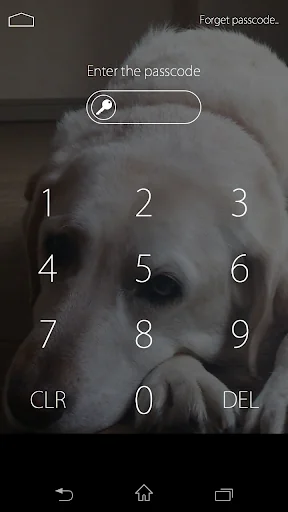
AppDefender is an app to block your private information such as your browsing history or text messages from being peeked when you happened to hand your phone to friends.
It locks the apps which you don’t want to be seen by others and protect your privacy.
An app to prevent peeping by your friends or family.
Also if someone enters wrong password 5 times, the inside camera will take a picture of the person without his/her noticing and keep the record.
You will be free from the worry that your boyfriend/girlfriend may have seen your phone secretly.
[App Lock Function]
Lock specified apps by a password.
You will be free from the worry below by specifying apps such as SNS or Text messages which you don’t want to be seen by your family, friends or boyfriend/girlfriend.
- You have a feeling that your phone may be peeked while you are taking bath.
- You worry that your text messages or browsing history may be peeked when you hand your smartphone to friends.
- The phone in your bag activates unexpectedly during travel.
- Your kids change the setting without your permission.
[Function of taking a picture of peeking]
If someone press wrong password 5 times, the inside camera takes a picture of the person secretly.
You can find out who tries to peek your private information.
-This app is available from Android 4.0 or above and you need the device model with front camera.
-You need this app to be ON in the settings window.
[Other functions]
Equipped with reminder function when you forget the password and password clear from Google account identification.
You can still unlock the apps even if you forget the password.
. The key order can be random to prevent being guessed the password from the movement of fingers.
. Effective time of unlock can be set to prevent repeatedly appearing lock screen.
[Steps to use ]
1. User support setting (from OS 5.0 and above)
The setting is necessary for this App to work. Please follow the instructions on the screen.
2. Setting password
The password setting will appears when you first time activate this App.
3. Select the Google account in case you forget the password.
Login the Google account to unlock the Apps.
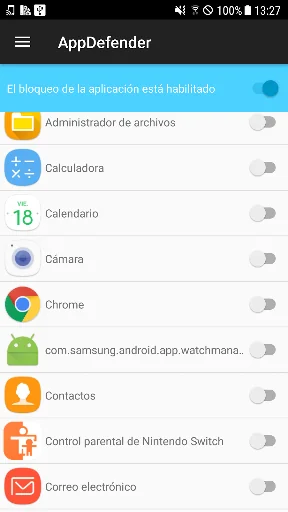
4. Select apps to be locked.
Select the apps to be locked by password from the main screen.
5. Closing AppDefender
Press the back button to close the Apps lock.
The password entering window will appear when the specified app is activated.
[ FAQ]
-How to uninstall
When you are using advanced protection, please take the following steps to uninstall.
1.Start the app and open the settings window.
2.Tap the disable advanced protection.
3.After taking the above steps, then you can uninstall this app with the same way of as uninstalling other apps.
-The lock window of GalaxyS8/S8+ is shorter than the device screen.
If you use the Samsung GalaxyS8/S8+, you need to set your device to display full screen.
Go to Settings→Display→FullScreen apps to set AppDefender ON and allow using full screen.
You can display FAQ from the settings of AppDefender.
If this app is not working properly, please refer FAQ.
[Uses Permissions]
-User Accessibility: To detect foreground app.(Android5.0+)
-Get account: To forgot password recovery
-Draw over other apps: To lock app
-Fingerprint auth: To unlock app
-Internet Access:Used for ads
-Camera: To capture photos
-Run at startup: To start service when device boots up
-Get task: To detect foreground app
**This app uses the device administrator. (Only when using advanced protection)
Advanced protection :Activate Device Administrator to prevent others from uninstalling app.
It is used only for this purpose, we do not use any policies of Device Administrator.
**This app uses Accessibility services.
Android 5.0 later users must grant accessibility for Appdefender to enable App Lock.
It locks the apps which you don’t want to be seen by others and protect your privacy.
An app to prevent peeping by your friends or family.
Also if someone enters wrong password 5 times, the inside camera will take a picture of the person without his/her noticing and keep the record.
You will be free from the worry that your boyfriend/girlfriend may have seen your phone secretly.
[App Lock Function]
Lock specified apps by a password.
You will be free from the worry below by specifying apps such as SNS or Text messages which you don’t want to be seen by your family, friends or boyfriend/girlfriend.
- You have a feeling that your phone may be peeked while you are taking bath.
- You worry that your text messages or browsing history may be peeked when you hand your smartphone to friends.
- The phone in your bag activates unexpectedly during travel.
- Your kids change the setting without your permission.
[Function of taking a picture of peeking]
If someone press wrong password 5 times, the inside camera takes a picture of the person secretly.
You can find out who tries to peek your private information.
-This app is available from Android 4.0 or above and you need the device model with front camera.
-You need this app to be ON in the settings window.
[Other functions]
Equipped with reminder function when you forget the password and password clear from Google account identification.
You can still unlock the apps even if you forget the password.
. The key order can be random to prevent being guessed the password from the movement of fingers.
. Effective time of unlock can be set to prevent repeatedly appearing lock screen.
[Steps to use ]
1. User support setting (from OS 5.0 and above)
The setting is necessary for this App to work. Please follow the instructions on the screen.
2. Setting password
The password setting will appears when you first time activate this App.
3. Select the Google account in case you forget the password.
Login the Google account to unlock the Apps.
4. Select apps to be locked.
Select the apps to be locked by password from the main screen.
5. Closing AppDefender
Press the back button to close the Apps lock.
The password entering window will appear when the specified app is activated.
[ FAQ]
-How to uninstall
When you are using advanced protection, please take the following steps to uninstall.
1.Start the app and open the settings window.
2.Tap the disable advanced protection.
3.After taking the above steps, then you can uninstall this app with the same way of as uninstalling other apps.
-The lock window of GalaxyS8/S8+ is shorter than the device screen.
If you use the Samsung GalaxyS8/S8+, you need to set your device to display full screen.
Go to Settings→Display→FullScreen apps to set AppDefender ON and allow using full screen.
You can display FAQ from the settings of AppDefender.
If this app is not working properly, please refer FAQ.
[Uses Permissions]
-User Accessibility: To detect foreground app.(Android5.0+)
-Get account: To forgot password recovery
-Draw over other apps: To lock app
-Fingerprint auth: To unlock app
-Internet Access:Used for ads
-Camera: To capture photos
-Run at startup: To start service when device boots up
-Get task: To detect foreground app
**This app uses the device administrator. (Only when using advanced protection)
Advanced protection :Activate Device Administrator to prevent others from uninstalling app.
It is used only for this purpose, we do not use any policies of Device Administrator.
**This app uses Accessibility services.
Android 5.0 later users must grant accessibility for Appdefender to enable App Lock.
Profile & Insights
Everything we know — and don't — about this app and its company.
Identification
- App name
- AppDefender (App Lock)
- Developer
- telemarks.co.jp
- Bundle ID
- jp.co.telemarks.security.appguard
- App Store URL
- Open in App Store
- Category
- Tools
- Content rating
- Not found
- Languages
- Not found
Company
- Website
- Not found
- Tagline
- Not found
- Description
- Not found
- Founded
- Not found
- HQ / Address
- Not found
- Employees
- Not found
- Logo
- Not found
Revenue
- Verified revenue / mo
- Not found
- AI revenue estimate / mo
- Not found
- AI annual estimate
- Not found
- ML model estimate / mo
- $1.0K/mo
- Top-grossing rank
- Not found
- All-time revenue
- Not found
- Pricing
- Not found
Founder
- Name
- Not found
- X / Twitter
- Not found
- Not found
- GitHub
- Not found
- X followers
- Not found
- Public statements
- Not found
Funding
- Total raised
- Not found
- Last round
- Not found
- Investors
- Not found
- Crunchbase
- Not found
- AngelList
- Not found
Press & Links
- Articles found
- Not found
- Listed on
- Not found
- Blog
- Not found
- Press / News
- Not found
Contacts & Socials
- Socials
- Not found
- Not found
- Phone
- Not found
- Contact page
- Not found
- About page
- Not found
Profile is built from iTunes Lookup + developer site scrape + ML revenue model. Empty fields show "Not found" — additional sources (Crunchbase, X, IndieHackers, Acquire.com) coming.
More by telemarks.co.jp
View all →Full revenue analysis
Read the article-style breakdown for AppDefender (App Lock): category rank, percentile, growth signal, comparable apps, and how the forecast is calibrated against verified-MRR anchors in this niche.


