73
BU Score
Strong
Yahoo!かんたんバックアップ
✍️ bumetric analysis
“
Yahoo!かんたんバックアップ is an Android app from Yahoo! JAPAN (LY Corporation) in the Productivity category, currently rated 4.3★ across 92,260 ratings. Initial signal reads as largely positive sentiment, users highlighting consistency and feature depth.
Our BU Score puts it at 73: Strong (healthy traction). For a Productivity app, that means healthy traction.
Track changes month-over-month in the Performance section below: live snapshot history and revenue forecast included.
📊 Performance Tracking LIVE
Loading…
Rating
—
Reviews
—
Forecast Revenue / mo
—
Snapshots tracked
0
since first record
Range:
💰 Forecast Revenue / mo
MODELRevenue forecast computed from BU's 234 trigger model on each snapshot. Calibrated against ground-truth from 58 verified-revenue apps.
🔬Forecast Breakdown — Why This Estimate?Top 3 of 3 triggers
Our ML model uses 200+ signals from public data. These are the most influential for this app:
| Mid install base (92,260 ratings)METRIC | +$5,500 | |
| Good rating (4.3★)METRIC | +$800 | |
| Ad-supported / freemiumMETRIC | +$600 |
METRIC = structural app data · REVIEW = mined from user reviews · ✓ VERIFIED = Stripe-verified anchor (TrustMRR)
📈 Reviews Growth
LIVECumulative review count from first BU snapshot. Each point = a tracked update.
⭐ Rating Trend
LIVEAverage rating evolution. Updates with each new review batch.
🗓️ Snapshot Timeline
HISTORYEach bar shows a tracked update and the metric delta from the previous snapshot.
App Specs
🔐 Own this app? Claim & verify MRR →🔖 vVaries with device📂 Productivity💰 Free
📝 About this app
<b>Yahoo's official backup app</b>
<font color="#376bfb"><b>Do you have enough space on your smartphone?
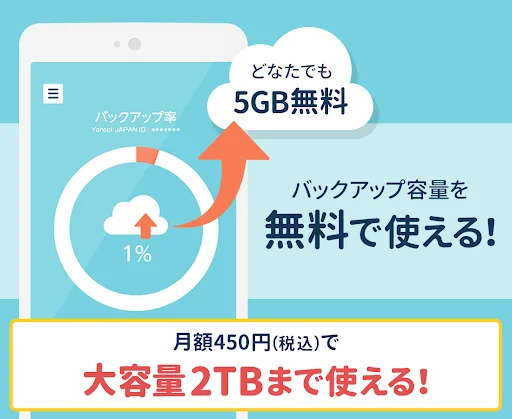
Large-capacity 2TB backup available at a bargain price of 450 yen (tax included) per month!
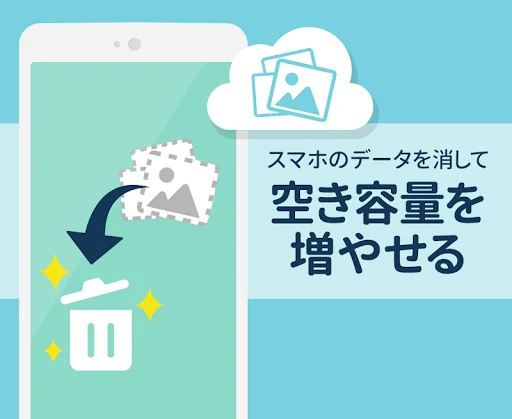
If you back up your important data (photos, videos, contacts) to the cloud, you can erase the data on your smartphone and increase its capacity</b></font>
----------------------------------------
<b>◇◇Main features◇◇
◆Backup</b>
- You can back up your contacts, images (photos), and videos.
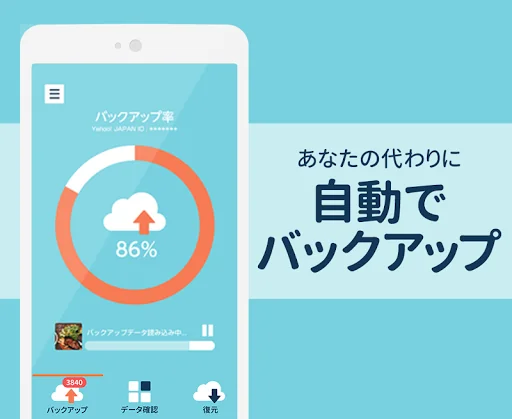
- Backups are automatic, so you can use other apps while the backup is in progress
- Backup status will be notified via regular notifications
- If there are newly added or updated images (photos), videos, or contacts on your smartphone, the app will automatically back them up.
- The backed up data will be saved in My Box of Yahoo! Box (online storage service/cloud service)
<b> ◆ Check backup data </b>
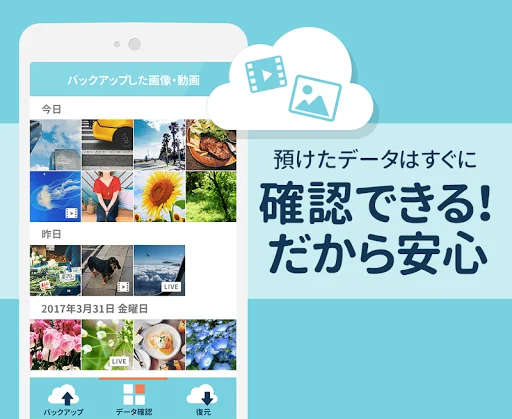
- You can check backed up images (photos) and videos within the app
- Data can be saved to your smartphone and shared to SNS
<b> ◆ Restore (data migration) </b>
- Easily transfer backed up data in case of model change or data loss
- Just select the contacts, images (photos), and video data you want to restore, there are no troublesome operations or settings.
- You can save contacts, images (photos), and videos backed up to storage on your smartphone all at once.
- Easily transfer data from Android to iPhone and iPhone to Android
- The restored contact data will be imported to your smartphone's Contacts app.
<b> ◆ Storage management </b>
- You can check the backup usage capacity and backup available capacity in a graph
- You can delete backup data that is no longer needed from the app
<b> ◇◇ Recommended for such scenes ◇◇
◆In case of failure or loss</b>
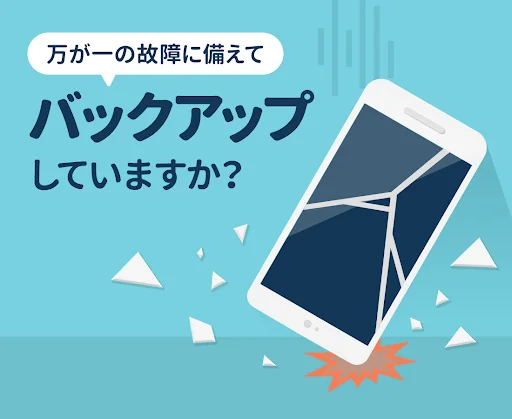
Data loss due to smartphone malfunction, loss, or operational error is unpredictable.
If you back it up just in case, you won't have to worry about losing your precious photos and videos! Data recovery can be done easily without any troublesome operations, so even those who are new to smartphones can use it.
<b> ◆ When the model is changed </b>
If you back up the data on your old smartphone using Yahoo! Easy Backup, you can easily transfer the data to your new smartphone. Your contacts will still be available.
<b>◆Data continues to increase every day and you don't have enough space on your smartphone! </b>
Photos (images), videos, and contacts on your smartphone are automatically backed up to Yahoo's cloud, so you don't have to worry about deleting unnecessary data.
Save your smartphone data to the cloud and solve the problem of insufficient storage space!
----------------------------------------
◇◇Notes◇◇
・This app can be used on smartphones and tablets with Android OS 7.0 or later.
・Internet connection is required when backing up or restoring. Not available offline.
・The backup data will be saved in My Box of Yahoo! Box.
- Data exceeding 2GB per file cannot be backed up.
- Data that exceeds the capacity of the backup destination cannot be backed up. If you don't have enough backup space, we recommend changing your capacity plan.
- To comfortably back up and restore large amounts of photos and videos, we recommend connecting to a Wi-Fi connection and using your smartphone with it charged.
[About the 2TB plan]
■Fees/Payment
The monthly fee is 450 yen (tax included).
Charges will be made to your Google Account.
■About purchasing
This application's paid services utilize the Google Play subscription mechanism.
A Google account is required for purchase. You cannot purchase with a Google account that has already been purchased.
Additionally, purchase and cancellation procedures may differ depending on the Android version you are using. If you have any questions about your Google account, please check Google's help.
The monthly fee will be charged immediately from the application date, and unless you cancel your subscription, it will automatically renew every month even if you are not using the service. If you wish to stop, please cancel your subscription before it is renewed.
■About plan cancellation
You cannot cancel your subscription from this Yahoo! Easy Backup app or the Yahoo! JAPAN website. Please go to Google Play.
Please note that even if LINE Yahoo Japan Co., Ltd. restricts your usage, such as by suspending the use of your Yahoo! JAPAN ID, you will not be charged for paid services. Not stopped.
Please be sure to stop automatic updates yourself from Google Play.
We will not be able to provide a refund even if you do not cancel the billing process yourself.
In addition, when canceling the 2TB plan and changing to the previous plan, if there are files saved that exceed the previous capacity, the entire used capacity of Yahoo! Box will be reduced to the previous capacity within 90 days of cancellation. Please in the following.
Once you start using the service, you cannot cancel the current month's billing.
Your Google Account will be renewed within 24 hours before the end of the current period and we will identify the cost of the renewal.
Therefore, if you wish to stop automatic renewal, please complete the procedure at least 24 hours before the next month's billing date.
[About app access rights (permissions)]
App permissions are used to read the data to be backed up (contacts, photos, videos) and restart the backup when the smartphone is started.
[About contact items that can be backed up and restored]
Please note that the contact items that can be backed up and restored vary depending on the environment of the backup source and restore destination devices, OS, etc.
The contact items that will allow you to correctly restore backed up files are as follows:
・Name: "Mr." and "First name" excluding furigana
・Telephone number: Up to 1 per contact
・Email address: Up to 1 per contact
Other items such as company name, group, second and subsequent phone numbers and email addresses may or may not be restored depending on your usage environment.
[About unlimited smartphone backup capacity]
With Yahoo! Easy Backup Unlimited, the storage capacity of this app is unlimited, but if the following conditions apply, backup execution may be temporarily restricted from the perspective of service maintenance.
・If it is confirmed that backups are being performed in a way that affects services.
・When backing up a large amount of data in a short period of time
・When backing up images or videos taken or created with a device other than a smartphone
In the following cases, we may change the content provided.
・If there is a change in the service environment, etc.
・When it is necessary to continue to store customer data safely and securely
Please understand this before using the service.
[Terms of use]
・Yahoo! JAPAN ID is required for use.
・This app cannot be used from the European Economic Area (EEA) or the United Kingdom.
・Please check the LINE Yahoo Common Terms of Use (including software guidelines) and privacy policy before using this app.
LINE Yahoo Common Terms of Use
https://www.lycorp.co.jp/ja/company/terms/
Software rules (guidelines)
https://www.lycorp.co.jp/ja/company/terms/#anc2
privacy policy
https://www.lycorp.co.jp/ja/company/privacypolicy/
Privacy center
https://privacy.lycorp.co.jp/ja/
About providing backup
https://privacy.lycorp.co.jp/ja/acquisition/#backup
<font color="#376bfb"><b>Do you have enough space on your smartphone?
Large-capacity 2TB backup available at a bargain price of 450 yen (tax included) per month!
If you back up your important data (photos, videos, contacts) to the cloud, you can erase the data on your smartphone and increase its capacity</b></font>
----------------------------------------
<b>◇◇Main features◇◇
◆Backup</b>
- You can back up your contacts, images (photos), and videos.
- Backups are automatic, so you can use other apps while the backup is in progress
- Backup status will be notified via regular notifications
- If there are newly added or updated images (photos), videos, or contacts on your smartphone, the app will automatically back them up.
- The backed up data will be saved in My Box of Yahoo! Box (online storage service/cloud service)
<b> ◆ Check backup data </b>
- You can check backed up images (photos) and videos within the app
- Data can be saved to your smartphone and shared to SNS
<b> ◆ Restore (data migration) </b>
- Easily transfer backed up data in case of model change or data loss
- Just select the contacts, images (photos), and video data you want to restore, there are no troublesome operations or settings.
- You can save contacts, images (photos), and videos backed up to storage on your smartphone all at once.
- Easily transfer data from Android to iPhone and iPhone to Android
- The restored contact data will be imported to your smartphone's Contacts app.
<b> ◆ Storage management </b>
- You can check the backup usage capacity and backup available capacity in a graph
- You can delete backup data that is no longer needed from the app
<b> ◇◇ Recommended for such scenes ◇◇
◆In case of failure or loss</b>
Data loss due to smartphone malfunction, loss, or operational error is unpredictable.
If you back it up just in case, you won't have to worry about losing your precious photos and videos! Data recovery can be done easily without any troublesome operations, so even those who are new to smartphones can use it.
<b> ◆ When the model is changed </b>
If you back up the data on your old smartphone using Yahoo! Easy Backup, you can easily transfer the data to your new smartphone. Your contacts will still be available.
<b>◆Data continues to increase every day and you don't have enough space on your smartphone! </b>
Photos (images), videos, and contacts on your smartphone are automatically backed up to Yahoo's cloud, so you don't have to worry about deleting unnecessary data.
Save your smartphone data to the cloud and solve the problem of insufficient storage space!
----------------------------------------
◇◇Notes◇◇
・This app can be used on smartphones and tablets with Android OS 7.0 or later.
・Internet connection is required when backing up or restoring. Not available offline.
・The backup data will be saved in My Box of Yahoo! Box.
- Data exceeding 2GB per file cannot be backed up.
- Data that exceeds the capacity of the backup destination cannot be backed up. If you don't have enough backup space, we recommend changing your capacity plan.
- To comfortably back up and restore large amounts of photos and videos, we recommend connecting to a Wi-Fi connection and using your smartphone with it charged.
[About the 2TB plan]
■Fees/Payment
The monthly fee is 450 yen (tax included).
Charges will be made to your Google Account.
■About purchasing
This application's paid services utilize the Google Play subscription mechanism.
A Google account is required for purchase. You cannot purchase with a Google account that has already been purchased.
Additionally, purchase and cancellation procedures may differ depending on the Android version you are using. If you have any questions about your Google account, please check Google's help.
The monthly fee will be charged immediately from the application date, and unless you cancel your subscription, it will automatically renew every month even if you are not using the service. If you wish to stop, please cancel your subscription before it is renewed.
■About plan cancellation
You cannot cancel your subscription from this Yahoo! Easy Backup app or the Yahoo! JAPAN website. Please go to Google Play.
Please note that even if LINE Yahoo Japan Co., Ltd. restricts your usage, such as by suspending the use of your Yahoo! JAPAN ID, you will not be charged for paid services. Not stopped.
Please be sure to stop automatic updates yourself from Google Play.
We will not be able to provide a refund even if you do not cancel the billing process yourself.
In addition, when canceling the 2TB plan and changing to the previous plan, if there are files saved that exceed the previous capacity, the entire used capacity of Yahoo! Box will be reduced to the previous capacity within 90 days of cancellation. Please in the following.
Once you start using the service, you cannot cancel the current month's billing.
Your Google Account will be renewed within 24 hours before the end of the current period and we will identify the cost of the renewal.
Therefore, if you wish to stop automatic renewal, please complete the procedure at least 24 hours before the next month's billing date.
[About app access rights (permissions)]
App permissions are used to read the data to be backed up (contacts, photos, videos) and restart the backup when the smartphone is started.
[About contact items that can be backed up and restored]
Please note that the contact items that can be backed up and restored vary depending on the environment of the backup source and restore destination devices, OS, etc.
The contact items that will allow you to correctly restore backed up files are as follows:
・Name: "Mr." and "First name" excluding furigana
・Telephone number: Up to 1 per contact
・Email address: Up to 1 per contact
Other items such as company name, group, second and subsequent phone numbers and email addresses may or may not be restored depending on your usage environment.
[About unlimited smartphone backup capacity]
With Yahoo! Easy Backup Unlimited, the storage capacity of this app is unlimited, but if the following conditions apply, backup execution may be temporarily restricted from the perspective of service maintenance.
・If it is confirmed that backups are being performed in a way that affects services.
・When backing up a large amount of data in a short period of time
・When backing up images or videos taken or created with a device other than a smartphone
In the following cases, we may change the content provided.
・If there is a change in the service environment, etc.
・When it is necessary to continue to store customer data safely and securely
Please understand this before using the service.
[Terms of use]
・Yahoo! JAPAN ID is required for use.
・This app cannot be used from the European Economic Area (EEA) or the United Kingdom.
・Please check the LINE Yahoo Common Terms of Use (including software guidelines) and privacy policy before using this app.
LINE Yahoo Common Terms of Use
https://www.lycorp.co.jp/ja/company/terms/
Software rules (guidelines)
https://www.lycorp.co.jp/ja/company/terms/#anc2
privacy policy
https://www.lycorp.co.jp/ja/company/privacypolicy/
Privacy center
https://privacy.lycorp.co.jp/ja/
About providing backup
https://privacy.lycorp.co.jp/ja/acquisition/#backup
Profile & Insights
Everything we know — and don't — about this app and its company.
Identification
- App name
- Yahoo!かんたんバックアップ
- Developer
- Yahoo! JAPAN (LY Corporation)
- Bundle ID
- jp.co.yahoo.android.ybackup
- App Store URL
- Open in App Store
- Category
- Productivity
- Content rating
- Not found
- Languages
- Not found
Company
- Website
- Not found
- Tagline
- Not found
- Description
- Not found
- Founded
- Not found
- HQ / Address
- Not found
- Employees
- Not found
- Logo
- Not found
Revenue
- Verified revenue / mo
- Not found
- AI revenue estimate / mo
- Not found
- AI annual estimate
- Not found
- ML model estimate / mo
- $2.0K/mo
- Top-grossing rank
- Not found
- All-time revenue
- Not found
- Pricing
- Not found
Founder
- Name
- Not found
- X / Twitter
- Not found
- Not found
- GitHub
- Not found
- X followers
- Not found
- Public statements
- Not found
Funding
- Total raised
- Not found
- Last round
- Not found
- Investors
- Not found
- Crunchbase
- Not found
- AngelList
- Not found
Press & Links
- Articles found
- Not found
- Listed on
- Not found
- Blog
- Not found
- Press / News
- Not found
Contacts & Socials
- Socials
- Not found
- Not found
- Phone
- Not found
- Contact page
- Not found
- About page
- Not found
Profile is built from iTunes Lookup + developer site scrape + ML revenue model. Empty fields show "Not found" — additional sources (Crunchbase, X, IndieHackers, Acquire.com) coming.
Full revenue analysis
Read the article-style breakdown for Yahoo!かんたんバックアップ: category rank, percentile, growth signal, comparable apps, and how the forecast is calibrated against verified-MRR anchors in this niche.