
KDE Connect

 68
68


KDE Connect is an Android app from KDE Community in the Productivity category, currently rated 4.1★ across 28,049 ratings. Initial signal reads as mixed reviews: supporters praise core features while critics cite stability and value gaps.
Quality Score is 68: Solid (established niche player). For a Productivity app, that means established niche player. The full BU Investment Matrix below scores 8 dimensions including monetisation, growth, and operational risk.
Track changes month-over-month in the Performance section below: live snapshot history and revenue forecast included.
- Title & subtitle keyword fit
- Description hook & conversion structure
- Screenshots, ratings, reviews strategy
📊 Performance Tracking LIVE
Synthetic estimate. Inputs: category complexity, file size, screen count, monetization layer, platform reach, age × team-size proxy. Calibrated against 2024-2026 indie-agency rate surveys. Full math + source list on /methodology.
| 🧱 MVP baseline (design + 1-store ship) | +$28K |
| 📱 5 unique screens × $4.5K | +$22K |
| ⚙ Productivity complexity ×1.10 | +$5K |
| 🌐 Cross-platform reach (iOS + Android) | +$30K |
| ⚙ 13.1y maintenance × ~1-person team | +$78K |
Synthetic estimate. Multiple band derived from ad-supported + age, rating quality, category demand, and user-base maturity. Calibrated against 2024-2026 indie-app-marketplace closed-deal medians. Full math + comparable deal list on /methodology.
| 📺 Ad-supported base | 15× MRR |
| 📅 13.1y proven track record | +20% |
| 🏷 Productivity category multiple | +8% |
Synthetic estimate from ratings × category benchmarks. Calibrated against 2024-2026 mobile-attribution retention + DAU/MAU reports. Numbers are US-storefront-equivalent — true global audience can be 5-10× larger for international apps. Full math + source list on /methodology.
| 📲 Productivity engagement | ~75 installs / rating |
| 📅 13.1y of rating accumulation | -30% |
| 🔁 Productivity D30 retention | 30% |
| 📍 DAU / MAU stickiness | 0.45 |
Heuristic guess from app bundle size, category, store description signals, and release-date stack era. Bumetric does not disassemble binaries — for binary-level certainty you would need an SDK intelligence tool or the manifest itself. Reasoning chain on the right. Full ruleset on /methodology.
| 🏷 Category context | Productivity |
| 📦 Compact Android bundle | → Native Kotlin |
Heuristic risk score from time-since-last-update + ratings velocity proxy + Editor's Choice / curated featuring signals. Calibrated against 2024-2025 app-store ranking decay reports. Not a guarantee — a quiet app with a healthy codebase looks the same as an abandoned one until something breaks. Full math on /methodology.
| 📅 29 days since last update | Active development |
How we forecast this revenue
MEDIUM CONFIDENCEBU Investment Matrix
Below median · 48/100MID TIERunderperforming peers- 💰 Revenue: Modest — $3K - $7K/mo · MID tier · medium confidence, trajectory unclear.
- ⭐ Quality: 4.08★ across 28,049 reviews — strong (top 10%).
- 📍 Market: Not yet charting in any of the 9 monitored markets.
- 📈 Growth: Insufficient signal to assess trajectory.
- ⚠️ Risk: Low — no material risk signals detected.
💰 Forecast Revenue / mo
MODEL| Mid install base (28,049 ratings)METRIC | +$5,500 | |
| 5 starREVIEW | +$1,800 | |
| excellent appREVIEW | +$1,500 | |
| Mature app (13y old)METRIC | +$1,500 | |
| Good rating (4.1★)METRIC | +$800 | |
| Ad-supported / freemiumMETRIC | +$600 |
📈 Reviews Growth
LIVE⭐ Rating Trend
LIVEProfile & Insights
Identification
- App name
- KDE Connect
- Developer
- KDE Community
- Bundle ID
- org.kde.kdeconnect_tp
- App Store URL
- Open in App Store
- Category
- Productivity
- Content rating
- Not found
- Languages
- Not found
Company
- Website
- kdeconnect.kde.org
- Tagline
- Not found
- Description
- Not found
- Founded
- Not found
- HQ / Address
- Not found
- Employees
- Not found
- Logo
- Not found
Revenue
- Reported revenue signal / mo
- Not found
- AI revenue estimate / mo
- Not found
- AI annual estimate
- Not found
- Model estimate / mo
- $5.0K/mo
- Top-grossing rank
- Not found
- All-time revenue
- Not found
- Pricing
- Not found
Founder
Funding
Press & Links
Contacts & Socials
📝 About this app
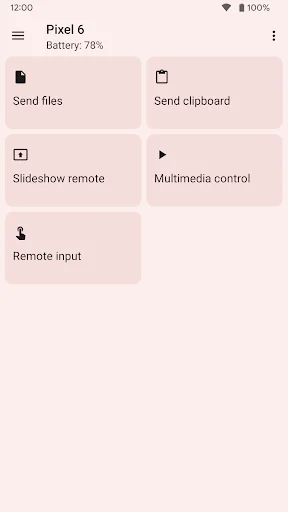
- Transfer files between your devices.
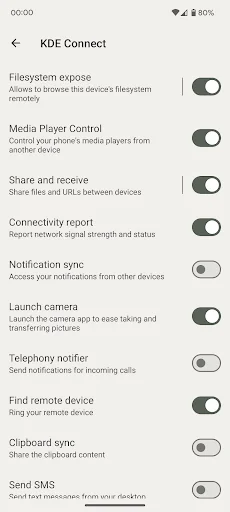
- Access files on your phone from your computer, without wires.
- Shared clipboard: copy and paste between your devices.
- Get notifications for incoming calls and messages on your computer.
- Virtual touchpad: Use your phone screen as your computer's touchpad.
- Notifications sync: Access your phone notifications from your computer and reply to messages.
- Multimedia remote control: Use your phone as a remote for Linux media players.… View full description on the official store →
What Worked™ · Development Pipeline
5 EVENTS TRACKEDTrack this app’s revenue
FREE📝 Description
95
More by KDE Community
View all →


Why high confidence: 28,049 ratings · no founder-verified revenue (model estimate only).