56
BU Score
Solid
Sketcher
✍️ BU Analytics Review
“
Sketcher is an Android app from Android Tools (ru) in the Tools category, currently rated 3.6★ across 8,145 ratings. Initial signal reads as mixed reviews — supporters praise core features while critics cite stability/value gaps.
Our BU Score puts it at 56 — Solid (established niche player). For a Tools app, that means established niche player.
Track changes month-over-month in the Performance section below — live snapshot history and revenue forecast included.
📊 Performance Tracking LIVE
Loading…
Rating
—
Reviews
—
Forecast Revenue / mo
—
Snapshots tracked
0
since first record
Range:
💰 Forecast Revenue / mo
MODELRevenue forecast computed from BU's 234 trigger model on each snapshot. Calibrated against ground-truth from 58 verified-revenue apps.
📈 Reviews Growth
LIVECumulative review count from first BU snapshot. Each point = a tracked update.
⭐ Rating Trend
LIVEAverage rating evolution. Updates with each new review batch.
🗓️ Snapshot Timeline
HISTORYEach bar shows a tracked update and the metric delta from the previous snapshot.
App Specs
🔐 Own this app? Claim & verify MRR →🔖 v2.0.66🔄 updated 8mo ago📂 Tools💰 Free
📝 About this app
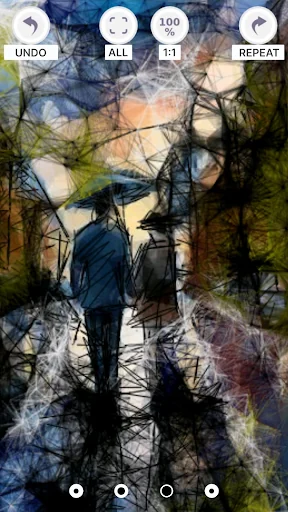
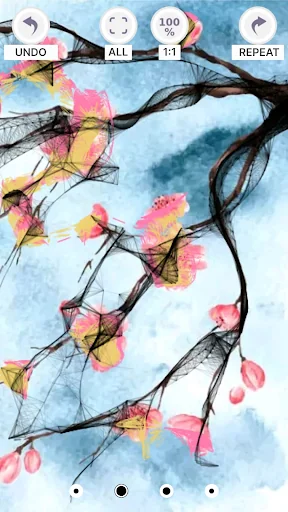
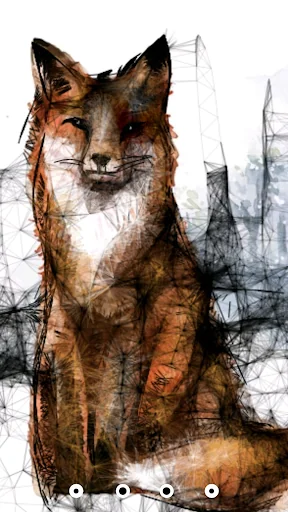
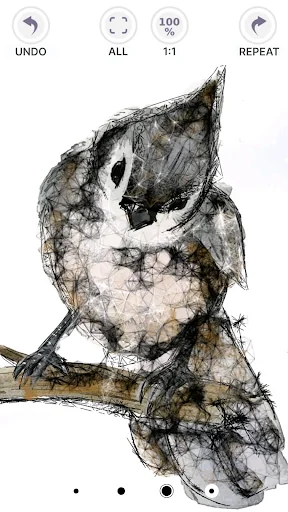
We have created the best Sketcher drawing app. With the help of many tools in the app, you will learn procedural graphic drawing from scratch. In contrast to the numerous drawing tools, this drawing app has the capabilities of procedural texture generation in addition to traditional drawing methods. These features have the following significant advantages:
- high speed of creating new content based on existing developments by modifying and combining them;
- ability to make changes to any stage of image formation;
- increase or decrease the size of the texture without loss of detail;
- using procedural generators to create the base texture and many other advantages.
Discover your creative potential with Sketcher, use it for educational purposes, or just have fun! Sketcher is available on devices with any version of the operating system absolutely free of charge.
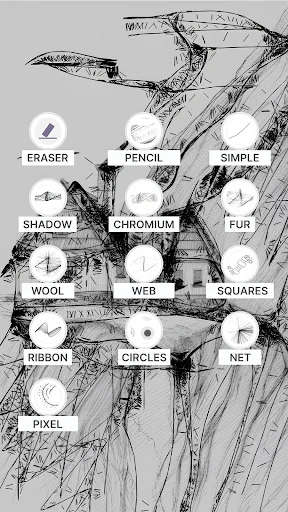
You will have access to the following procedural drawing tools:
- pencil (imitation of pencil strokes depending on the tilt and pressure),
- a simple line (a flat line with the ability to determine its size),
- shadow (drawing shadow strokes with automatic detection of transparency),
- chrome (automatic contrast setting of light and dark tones, clear lines and smooth transitions with one touch)
- fur (automatic rendering of the fur texture),
- wool (automatic rendering of wool texture),
- web (a technique for drawing web connections between drawn lines),
- squares (drawing a line that consists of squares and rectangles)
- ribbon (drawing with a ribbon),
- circles (creating circles with automatic Diametric expansion depending on the length of the line),
- grid-pixel (drawing in pixel style).
For easy drawing and full use of all tools, you can use your finger or stylus. The app is adapted for different screen sizes and resolutions, so you can draw on your phone or tablet. On devices with a large screen, it is convenient to draw with your finger, especially for children.
The functionality of the drawing tool is simple and intuitive, which allows you to start drawing immediately after installing the app.
Sketcher Functions:
- canvas selection (tracing mode, color background, loading images from your device),
- tincture of the size and orientation of the canvas,
- ability to clear the canvas at any stage of drawing creation,
- drawing on the background,
- choose the background color using a wide color palette,
- color adjustment (RGB, transparency, syringe),
- 11 brushes + eraser,
- selecting the color of the brush, pen, etc.,
- cancel the last action,
- repeat the action,
- color picker,
- zoom the image with a single pinch,
- automatically save the drawing to your device when you exit the app (save it to your SD card),
- ability to share a drawing in the app,
- drawing text,
- drawing tools: pencil, simple line, shadow, chrome, fur, wool, web, squares, ribbon, circles, grid-pixel.
The unique "tracing" mode for the canvas will create an extraordinary background for your future work of art. You can also use the background drawing function to quickly create a new drawing.
The Sketcher drawing app will help you create works of art for masters and professional artists, and is also suitable for teaching drawing to novice artists. It is also suitable for creating sketches, quick drawings and sketches. Install our app and feel the magic of drawing!
You can share your work or just chat in the community of like minded people in our Facebook group https://www.facebook.com/groups/142209259135086
- high speed of creating new content based on existing developments by modifying and combining them;
- ability to make changes to any stage of image formation;
- increase or decrease the size of the texture without loss of detail;
- using procedural generators to create the base texture and many other advantages.
Discover your creative potential with Sketcher, use it for educational purposes, or just have fun! Sketcher is available on devices with any version of the operating system absolutely free of charge.
You will have access to the following procedural drawing tools:
- pencil (imitation of pencil strokes depending on the tilt and pressure),
- a simple line (a flat line with the ability to determine its size),
- shadow (drawing shadow strokes with automatic detection of transparency),
- chrome (automatic contrast setting of light and dark tones, clear lines and smooth transitions with one touch)
- fur (automatic rendering of the fur texture),
- wool (automatic rendering of wool texture),
- web (a technique for drawing web connections between drawn lines),
- squares (drawing a line that consists of squares and rectangles)
- ribbon (drawing with a ribbon),
- circles (creating circles with automatic Diametric expansion depending on the length of the line),
- grid-pixel (drawing in pixel style).
For easy drawing and full use of all tools, you can use your finger or stylus. The app is adapted for different screen sizes and resolutions, so you can draw on your phone or tablet. On devices with a large screen, it is convenient to draw with your finger, especially for children.
The functionality of the drawing tool is simple and intuitive, which allows you to start drawing immediately after installing the app.
Sketcher Functions:
- canvas selection (tracing mode, color background, loading images from your device),
- tincture of the size and orientation of the canvas,
- ability to clear the canvas at any stage of drawing creation,
- drawing on the background,
- choose the background color using a wide color palette,
- color adjustment (RGB, transparency, syringe),
- 11 brushes + eraser,
- selecting the color of the brush, pen, etc.,
- cancel the last action,
- repeat the action,
- color picker,
- zoom the image with a single pinch,
- automatically save the drawing to your device when you exit the app (save it to your SD card),
- ability to share a drawing in the app,
- drawing text,
- drawing tools: pencil, simple line, shadow, chrome, fur, wool, web, squares, ribbon, circles, grid-pixel.
The unique "tracing" mode for the canvas will create an extraordinary background for your future work of art. You can also use the background drawing function to quickly create a new drawing.
The Sketcher drawing app will help you create works of art for masters and professional artists, and is also suitable for teaching drawing to novice artists. It is also suitable for creating sketches, quick drawings and sketches. Install our app and feel the magic of drawing!
You can share your work or just chat in the community of like minded people in our Facebook group https://www.facebook.com/groups/142209259135086
Profile & Insights
Everything we know — and don't — about this app and its company.
Identification
- App name
- Sketcher
- Developer
- Android Tools (ru)
- Bundle ID
- org.sketcher
- App Store URL
- Open in App Store
- Category
- Tools
- Content rating
- Not found
- Languages
- Not found
Company
- Website
- Not found
- Tagline
- Not found
- Description
- Not found
- Founded
- Not found
- HQ / Address
- Not found
- Employees
- Not found
- Logo
- Not found
Revenue
- Verified revenue / mo
- Not found
- AI revenue estimate / mo
- Not found
- AI annual estimate
- Not found
- ML model estimate / mo
- $997/mo
- Top-grossing rank
- Not found
- All-time revenue
- Not found
- Pricing
- Not found
Founder
- Name
- Not found
- X / Twitter
- Not found
- Not found
- GitHub
- Not found
- X followers
- Not found
- Public statements
- Not found
Funding
- Total raised
- Not found
- Last round
- Not found
- Investors
- Not found
- Crunchbase
- Not found
- AngelList
- Not found
Press & Links
- Articles found
- Not found
- Listed on
- Not found
- Blog
- Not found
- Press / News
- Not found
Contacts & Socials
- Socials
- Not found
- Not found
- Phone
- Not found
- Contact page
- Not found
- About page
- Not found
Profile is built from iTunes Lookup + developer site scrape + ML revenue model. Empty fields show "Not found" — additional sources (Crunchbase, X, IndieHackers, Acquire.com) coming.
More by Android Tools (ru)
View all →Wi-Fi password manager
★ 3.5 · 81,735 reviews
PDF Reader & Viewer
★ 4.3 · 29,541 reviews
Simple PDF Reader
★ 4.1 · 7,295 reviews
Mini Pdf Reader & Viewer (Ads Free)
★ 4.5 · 6,782 reviews
System App Manager Device Info
★ 2.4 · 5,307 reviews
eReader 📗 (reader of all formats)
★ 4.3 · 3,027 reviews
DjVu Reader & Viewer
★ 4.2 · 1,769 reviews
MCBox — skins for minecraft, skin editor
★ 4.2 · 1,564 reviews
More Tools
Phone by Google
★ 4.5 · 47,248,471 reviews
Google Play services
★ 4.3 · 44,619,167 reviews
★ 4.1 · 29,135,018 reviews
Gboard - the Google Keyboard
★ 4.5 · 18,500,531 reviews
SHAREit: Transfer, Share Files
★ 4.3 · 18,247,718 reviews
gov.br
★ 4.5 · 12,551,225 reviews
MyTelkomsel – Buy Internet
★ 3.7 · 11,917,556 reviews
myIM3: Data Plan & Buy Package
★ 4.4 · 10,992,500 reviews
Browse BU Analytics
📚 All 55,000+ Books
🜍 Alchemy & Hermeticism
🔮 Magic & Ritual
🌙 Witchcraft & Paganism
⭐ Astrology & Cosmology
🃏 Divination & Tarot
📜 Tools
✡️ Kabbalah & Jewish Mysticism
🕉️ Mysticism & Contemplation
🕊️ Theosophy & Anthroposophy
🏛️ Freemasonry & Secret Societies
👻 Spiritualism & Afterlife
📖 Sacred Texts & Gnosticism
👁️ Supernatural & Occult Fiction
🧘 Spiritual Development
📚 Esoteric History & Biography
Info
About BU Analytics