78
BU Score
Strong
Clock Vault-Hide Photos,Videos
✍️ BU Analytics Review
“
Clock Vault-Hide Photos,Videos is an Android app from WS INFOTECH in the Tools category, currently rated 4.5★ across 505,230 ratings. Initial signal reads as largely positive sentiment, users highlighting consistency and feature depth.
Our BU Score puts it at 78 — Strong (healthy traction). For a Tools app, that means healthy traction.
Track changes month-over-month in the Performance section below — live snapshot history and revenue forecast included.
creator
📊 Performance Tracking LIVE
Loading…
Rating
—
Reviews
—
Forecast Revenue / mo
—
Snapshots tracked
0
since first record
Range:
💰 Forecast Revenue / mo
MODELRevenue forecast computed from BU's 234 trigger model on each snapshot. Calibrated against ground-truth from 58 verified-revenue apps.
🔬Forecast Breakdown — Why This Estimate?Top 3 of 3 triggers
Our ML model uses 200+ signals from public data. These are the most influential for this app:
| High install base (505,230 ratings)METRIC | +$12,000 | |
| Good rating (4.5★)METRIC | +$800 | |
| Ad-supported / freemiumMETRIC | +$600 |
METRIC = structural app data · REVIEW = mined from user reviews · ✓ VERIFIED = Stripe-verified anchor (TrustMRR)
📈 Reviews Growth
LIVECumulative review count from first BU snapshot. Each point = a tracked update.
⭐ Rating Trend
LIVEAverage rating evolution. Updates with each new review batch.
🗓️ Snapshot Timeline
HISTORYEach bar shows a tracked update and the metric delta from the previous snapshot.
App Specs
🔐 Own this app? Claim & verify MRR →🔖 v80.0🔄 updated 3w ago📂 Tools💰 Free
📝 About this app
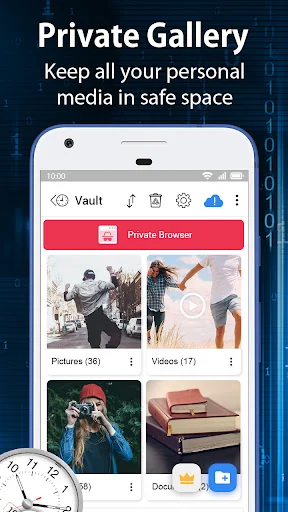
Clock Vault (Secret Photo locker & Video Locker) is great privacy protection app to keep it safe & easily hide photos, hide videos app within privacy protecting gallery to lock files that you do not want others to see in your device.
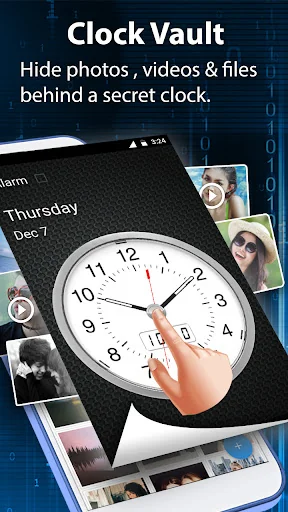
Photo video vault feature hidden behind Clock App for protecting your privacy by keep it safe behind your secret time password!
Secure the albums of the gallery to View, Import, Move & Restore the pictures, movies & documents.
<b>Highlight Features: </b>
<b>• Hide Pictures: </b> Easily hide photos from your gallery to the secret vault with gallery clock vault. Now it has photo crop and rotate features in personal Picture viewer within the hider app.
<b>• Hide Videos: </b> You can hide personal videos in many format movies. You can also play video using another video player app in your phone without unlock the file.
<b>• Album Cover: </b> You can set your desired folder cover inside your vault hidden albums. Also you can set album cover by picture view screen options.
<b>• Launcher Icon Change: </b> Make your secret Clock Icon even more secret with other icons like Whether, Music, Calculator, etc.
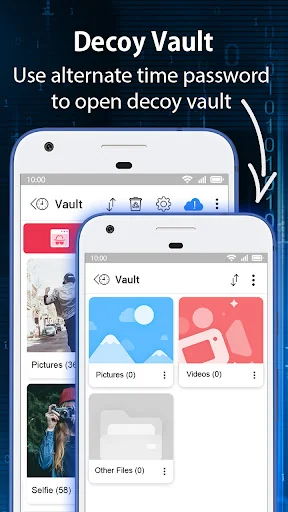
<b>• Fake Password(Decoy Vault): </b> Hide the files in the decoy vault when you input fake password to protect real gallery photo lock. It is alternate vault with another password when you need.
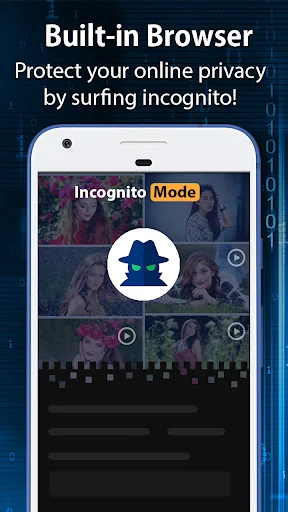
<b>• Private Browser: </b> Private web browser to download and Lock photos, hide videos and music audios from Internet & leaves no tracks in your system.
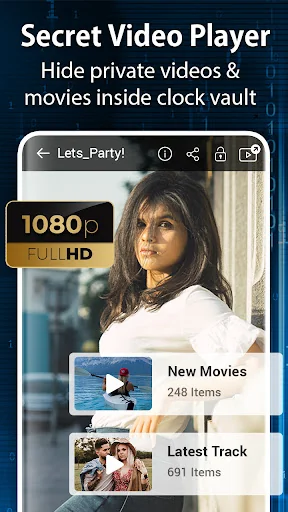
<b>• Video Player: </b> Super Inbuilt Video player to watch videos inside video Vault. Supports video locker with many formats.
<b>• Fingerprint Unlock app: </b> Vault security can be unlocked with fingerprint also with fingerprint supported and enabled devices with our settings.
<b>• Cloud Backup:</b>
Safeguard your important files by storing them in your personal online storage. This feature helps protect your files in case your phone is lost, broken, or stolen. You can easily download your vault files to a new device from the cloud.
Security Note: Your files are securely stored online and cannot be accessed outside of the app.
Important: Only files that were uploaded prior to losing access to your old phone will be available for download.
<b>How to set up the password? </b>
Step 1: Launch our gallery clock vault app and the clock hands will be moved at 00:00 position for setup.
Step 2: Move the hour or minute clock hand to set a desired time password and press the middle button of the clock.
Step 3: Now repeat the same password again and press the center button of the clock to confirm. The vault will be open!
<b>How to unlock the app? </b>
Step 1: Press Center button of the clock. Hands will be moved to the 00:00 positions.
Step 2: Now you can move the clock hour and minute hands manually to your password position and press Center button again to validate! That’s it! Now you can hide photos, videos & other secret files.
<b>IMPORTANT:</b> Do not uninstall this Video Vault before restoring your personal files to the public gallery. Any files not uploaded online will be permanently lost.
<b>Question Answers</b>
What can I do if I forgot my password of the secret vault?
- Launch Clock Vault and press middle button of the clock. Set 10:10 time by moving hour and minute clock hands and press middle button again. It will show password recovery options.
Are my hidden files stored online?
Your hidden files are stored locally on your device by default. They are only stored online if you have enabled the Cloud Backup feature and manually uploaded them.
Important: Before transferring to a new device, performing a factory reset, or uninstalling the app, make sure to unlock and back up all hidden files. Any files not uploaded or restored may be permanently lost.
Contact our developer team for any help you need.
Photo video vault feature hidden behind Clock App for protecting your privacy by keep it safe behind your secret time password!
Secure the albums of the gallery to View, Import, Move & Restore the pictures, movies & documents.
<b>Highlight Features: </b>
<b>• Hide Pictures: </b> Easily hide photos from your gallery to the secret vault with gallery clock vault. Now it has photo crop and rotate features in personal Picture viewer within the hider app.
<b>• Hide Videos: </b> You can hide personal videos in many format movies. You can also play video using another video player app in your phone without unlock the file.
<b>• Album Cover: </b> You can set your desired folder cover inside your vault hidden albums. Also you can set album cover by picture view screen options.
<b>• Launcher Icon Change: </b> Make your secret Clock Icon even more secret with other icons like Whether, Music, Calculator, etc.
<b>• Fake Password(Decoy Vault): </b> Hide the files in the decoy vault when you input fake password to protect real gallery photo lock. It is alternate vault with another password when you need.
<b>• Private Browser: </b> Private web browser to download and Lock photos, hide videos and music audios from Internet & leaves no tracks in your system.
<b>• Video Player: </b> Super Inbuilt Video player to watch videos inside video Vault. Supports video locker with many formats.
<b>• Fingerprint Unlock app: </b> Vault security can be unlocked with fingerprint also with fingerprint supported and enabled devices with our settings.
<b>• Cloud Backup:</b>
Safeguard your important files by storing them in your personal online storage. This feature helps protect your files in case your phone is lost, broken, or stolen. You can easily download your vault files to a new device from the cloud.
Security Note: Your files are securely stored online and cannot be accessed outside of the app.
Important: Only files that were uploaded prior to losing access to your old phone will be available for download.
<b>How to set up the password? </b>
Step 1: Launch our gallery clock vault app and the clock hands will be moved at 00:00 position for setup.
Step 2: Move the hour or minute clock hand to set a desired time password and press the middle button of the clock.
Step 3: Now repeat the same password again and press the center button of the clock to confirm. The vault will be open!
<b>How to unlock the app? </b>
Step 1: Press Center button of the clock. Hands will be moved to the 00:00 positions.
Step 2: Now you can move the clock hour and minute hands manually to your password position and press Center button again to validate! That’s it! Now you can hide photos, videos & other secret files.
<b>IMPORTANT:</b> Do not uninstall this Video Vault before restoring your personal files to the public gallery. Any files not uploaded online will be permanently lost.
<b>Question Answers</b>
What can I do if I forgot my password of the secret vault?
- Launch Clock Vault and press middle button of the clock. Set 10:10 time by moving hour and minute clock hands and press middle button again. It will show password recovery options.
Are my hidden files stored online?
Your hidden files are stored locally on your device by default. They are only stored online if you have enabled the Cloud Backup feature and manually uploaded them.
Important: Before transferring to a new device, performing a factory reset, or uninstalling the app, make sure to unlock and back up all hidden files. Any files not uploaded or restored may be permanently lost.
Contact our developer team for any help you need.
Profile & Insights
Everything we know — and don't — about this app and its company.
Identification
- App name
- Clock Vault-Hide Photos,Videos
- Developer
- WS INFOTECH
- Bundle ID
- ws.clockthevault
- App Store URL
- Open in App Store
- Category
- Tools
- Content rating
- Not found
- Languages
- Not found
Company
- Website
- Not found
- Tagline
- Not found
- Description
- Not found
- Founded
- Not found
- HQ / Address
- Not found
- Employees
- Not found
- Logo
- Not found
Revenue
- Verified revenue / mo
- Not found
- AI revenue estimate / mo
- Not found
- AI annual estimate
- Not found
- ML model estimate / mo
- $4.0K/mo
- Top-grossing rank
- Not found
- All-time revenue
- Not found
- Pricing
- Not found
Founder
- Name
- Not found
- X / Twitter
- Not found
- Not found
- GitHub
- Not found
- X followers
- Not found
- Public statements
- Not found
Funding
- Total raised
- Not found
- Last round
- Not found
- Investors
- Not found
- Crunchbase
- Not found
- AngelList
- Not found
Press & Links
- Articles found
- Not found
- Listed on
- Not found
- Blog
- Not found
- Press / News
- Not found
Contacts & Socials
- Socials
- Not found
- Not found
- Phone
- Not found
- Contact page
- Not found
- About page
- Not found
Profile is built from iTunes Lookup + developer site scrape + ML revenue model. Empty fields show "Not found" — additional sources (Crunchbase, X, IndieHackers, Acquire.com) coming.
More Tools
Phone by Google
★ 4.5 · 47,248,471 reviews
Google Play services
★ 4.3 · 44,619,167 reviews
★ 4.1 · 29,135,018 reviews
Gboard - the Google Keyboard
★ 4.5 · 18,500,531 reviews
SHAREit: Transfer, Share Files
★ 4.3 · 18,247,718 reviews
gov.br
★ 4.5 · 12,551,225 reviews
MyTelkomsel – Buy Internet
★ 3.7 · 11,917,556 reviews
myIM3: Data Plan & Buy Package
★ 4.4 · 10,992,500 reviews
Browse BU Analytics
📚 All 55,000+ Books
🜍 Alchemy & Hermeticism
🔮 Magic & Ritual
🌙 Witchcraft & Paganism
⭐ Astrology & Cosmology
🃏 Divination & Tarot
📜 Tools
✡️ Kabbalah & Jewish Mysticism
🕉️ Mysticism & Contemplation
🕊️ Theosophy & Anthroposophy
🏛️ Freemasonry & Secret Societies
👻 Spiritualism & Afterlife
📖 Sacred Texts & Gnosticism
👁️ Supernatural & Occult Fiction
🧘 Spiritual Development
📚 Esoteric History & Biography
Info
About BU Analytics