ML revenue forecast.
Calibrated against 77129 apps in this category.
Confidence band
±15%
High — many comparable apps with verified data
At a glance
Earns 2.69× more than the category median (189/mo).
Ranks #11,110 of 77,129 in Tools (top 14.4% by revenue).
Launched Dec 29, 2020.
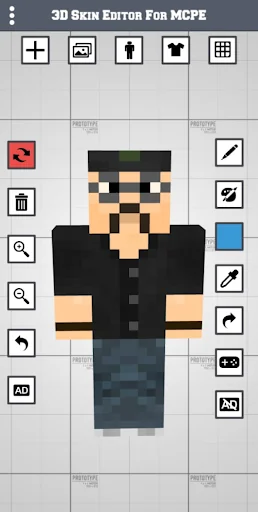
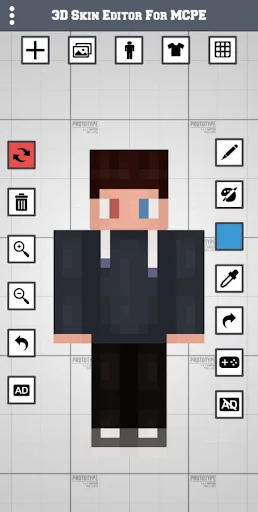
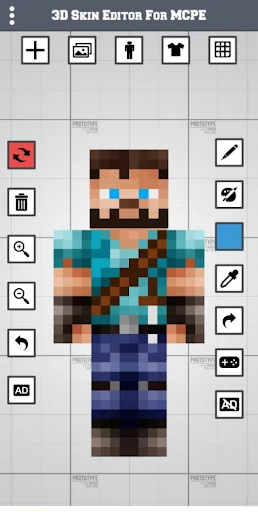
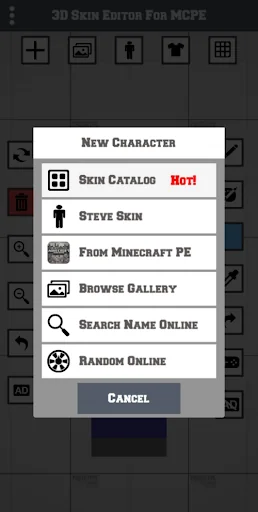
What the app looks like
Live screenshots from the Play Store, captured by our snapshot worker. Tap any image to enlarge.
3D Skin Editor for MCPE's revenue trajectory
Forecast revenue from snapshot history. Last 1 months.
Where 3D Skin Editor for MCPE sits in Tools
Revenue distribution of 77129 comparable apps. 3D Skin Editor for MCPE highlighted.
3D Skin Editor for MCPE vs comparable apps
Revenue trajectory side-by-side. Bold = 3D Skin Editor for MCPE, ghosted = peers.
App spec
Version
Varies with device
Launched
Dec 29, 2020
Price
Free
Monetization
Free
What 3D Skin Editor for MCPE actually does (from store listing)
Welcome to the most useful, powerful, and popular 3D Skin Editor!
1. Create New 3D Minecraft Skins
Using New Skin: Create your own design with a blank skin.
Browse Online Skins: Explore over 10,000 skins online from the 3D Skin Editor for MCPE application.
Copy Player Skins: Find and copy your favorite online player's skin by searching their name.
Random Amazing Skins: Discover random amazing skins online for you in the 3D Skin Editor for MCPE.
Direct Import: Import skins directly …
Welcome to the most useful, powerful, and popular 3D Skin Editor!
1. Create New 3D Minecraft Skins
Using New Skin: Create your own design with a blank skin.
Browse Online Skins: Explore over 10,000 skins online from the 3D Skin Editor for MCPE application.
Copy Player Skins: Find and copy your favorite online player's skin by searching their name.
Random Amazing Skins: Discover random amazing skins online for you in the 3D Skin Editor for MCPE.
Direct Import: Import skins directly from Minecraft PE into the 3D Skin Editor for MCPE.
Gallery: Browse the gallery in the 3D Skin Editor for MCPE.
2. Edit and Improve Your Skins
Paintbrush Tools: Use various brush sizes for detailed painting.
Paint Bucket Tools: Fill large areas with the paint bucket tool.
Color Grid Selector: Choose colors from a grid.
Color Gradient Selector: Pick colors from gradients.
Eyedropper Tool: Read and use any color from your skin.
Zoom In/Out: Zoom in for details or out for a full view.
Rotating Tools: Rotate your skin for a better view.
Undo and Redo: Easily fix mistakes with undo and redo buttons.
3. Adjust Visibility
Easily adjust the visibility of each body part of your MCPE character. This makes creating awesome skins very simple.
4. Export Your Skins
Direct Export to MCPE: Send your skins directly to Minecraft PE.
Save to Gallery: Export skins to your gallery and save them for future use.
3D Skin Editor for Pocket Edition is not developed by Mojang. Minecraft is a trademark of Mojang AB. Please note that we are not affiliated with Mojang AB but we adhere to the terms set out by Mojang AB at https://www.minecraft.net/terms
Comparable Android apps
The five apps in Tools with the closest revenue to 3D Skin Editor for MCPE. Click any to see its detail page.
Each forecast combines App Store rating, ratings count, monetisation model, pricing tier, IAP signals and ad-supported flag.
The base estimate is then multiplied by a per-category scaling factor learned from apps with founder-verified MRR.
Every number on this page comes from public APIs and bumetric's own snapshot history.
Full methodology covers input variables, accuracy bands per category and how we treat apps without comparable anchors.
See also the live data on 3D Skin Editor for MCPE's tracker page for current rating, reviews and snapshot timeline.
Building something similar? Get a free AI audit with $-revenue forecasts for every recommendation.


 Wi-Fi Info Widget
 My Security
 TN-ALERT
 Triangle and Right Angle Calc
 SMS Auto Forwarder & Messaging