What A2 - Area Measurement DEMO actually does (from store listing)
A2 is an application dedicated to the surface measurement, perimeter and distance. The land measured can be in the world and can be of that magnitude. This application is useful for measuring agricultural land, sports, roofs of houses, plots but also lakes, countries, continents etc...
The display area may be: m2 square feet, square yard, Acre, are and hectare.
A2 can measure and display the perimeter of the ground, intermediate distances and angles between each point. The measurement can be d…
A2 is an application dedicated to the surface measurement, perimeter and distance. The land measured can be in the world and can be of that magnitude. This application is useful for measuring agricultural land, sports, roofs of houses, plots but also lakes, countries, continents etc...
The display area may be: m2 square feet, square yard, Acre, are and hectare.
A2 can measure and display the perimeter of the ground, intermediate distances and angles between each point. The measurement can be displayed in feet, Inch, Yard or Feet.
A2 can save plans, edit them and export them via e-mail and Bluetooth with the format "KML" (for use with software like Google Earth, Google Maps, Google Mobile, World Wind, Sketchup ... ) and "DXF" (AutoCAD).
A2 uses Google MAP and GPS for geotagging.
Multilingual: English, French, German, Spanish, Italian and Portuguese.
A2 has three operating modes:
- GPS: The user is on the ground to measure. It validates a series of points that best describe the ground through the position provided by GPS.
- Manual: the user enters the points manually without having to travel by locating on the map.
- Mixed: the user is on the ground and grabbed the points via GPS and can be added manually (for example access difficult).
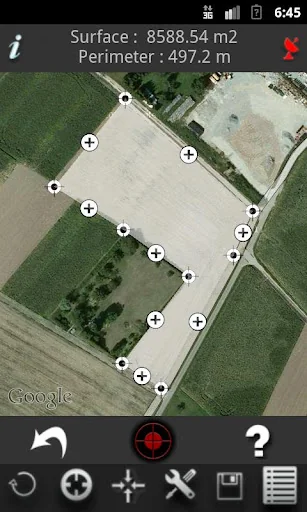
The calculation of the surface is effected and displayed at each point before. The result can be stated in m2 square feet, square yard, are, ha.
Flexibility of A2.
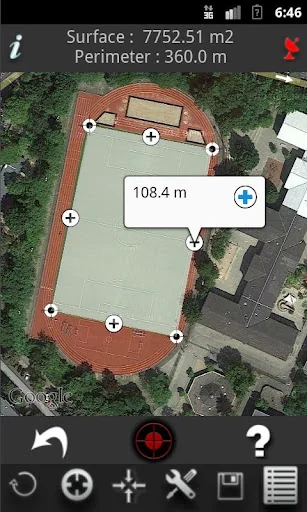
- Viewing the perimeter and intermediate distances.
- Display all angles of ground measured.
- Viewing a compass and altitude for better geolocation.
- Address search to easily find a field to be measured.
- Information on the items seized:
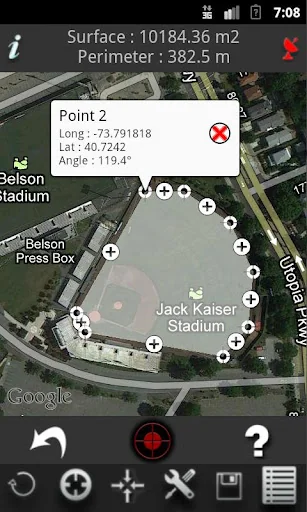
At any time, the user can know the GPS coordinates of points entered.
- Manually move a point:
Each entered point can be moved with the finger to adjust its position.
- Deleting a point:
A point can be deleted individually.
- Manually inserting a new point between two existing points:
You can insert a new point between two existing points to refine the tracing of the plan.
- Display of the surface:
The area is calculated and displayed before each new point.
- Archiving of measures:
Each field measured can be archived with a custom name. Each record can be reopened and again be edited.
- Ability to use a Bluetooth external GPS to improve geolocation.
- GPS reception indicator:
The icon at the top right corner of the application indicates the quality of GPS reception. Green indicates good reception, orange and red mean a poor reception.
- GPS Information:
The "information" button will display the location information from GPS.
- Export plans to KML format.
- Export plans to DXF format.
- The backup list shows the date, the area and perimeter of the land saved.
- Function "undo" to undo the last action performed.
Options.
Several measurement options are available:
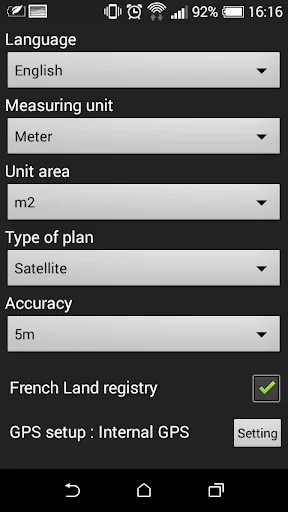
- Unit of measure: meter, inch, feet and yards.
- Surface unit: m2 square feet, square yard, Acre, are, ha.
- Map Type: Map, Satellite, Hybrid (map + satellite).
- Accuracy in GPS mode: <100m, <10m, <5m. This option will not allow the seized one point if the GPS accuracy is below the setpoint.
- Possibility to display the French Land registry with overlay on the map.
Comparable Android apps
The five apps in Tools with the closest revenue to A2 - Area Measurement DEMO. Click any to see its detail page.
Each forecast combines App Store rating, ratings count, monetisation model, pricing tier, IAP signals and ad-supported flag.
The base estimate is then multiplied by a per-category scaling factor learned from apps with founder-verified MRR.
Every number on this page comes from public APIs and bumetric's own snapshot history.
Full methodology covers input variables, accuracy bands per category and how we treat apps without comparable anchors.
See also the live data on A2 - Area Measurement DEMO's tracker page for current rating, reviews and snapshot timeline.
Building something similar? Get a free AI audit with $-revenue forecasts for every recommendation.


 Stopwatch and Countdown
 LivingSense
 Eagle Eye Viewer
 Planner for AC: NH
 Color Detector - Live Cam Scan