How much does الكتابة على الصورـ بخطوط عربية earn?
Android app
from Video Mobile VM
· Photography
ML forecast★ 4.3 · 14KFree
~1.2K/mo
ML revenue forecast.
Calibrated against 20485 apps in this category.
Confidence band
±15%
High — many comparable apps with verified data
At a glance
Earns 6.05× more than the category median (192/mo).
Ranks #1,218 of 20,485 in Photography (top 5.9% by revenue).
Launched Feb 15, 2019 · last updated Feb 17, 2025.
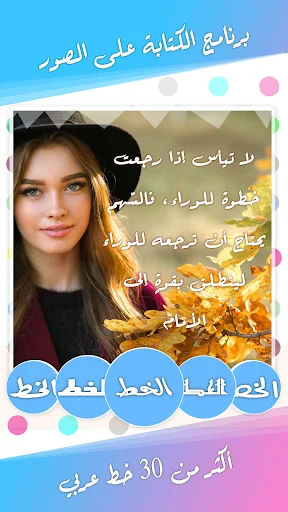
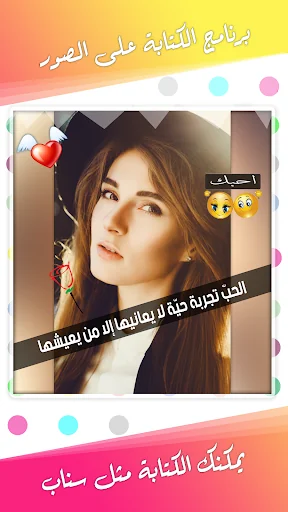
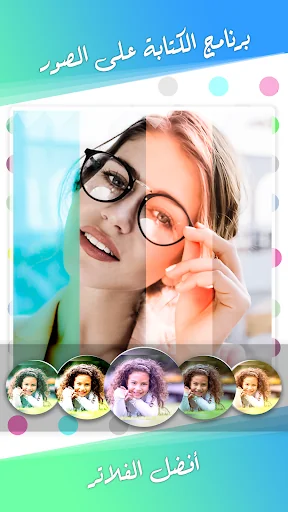
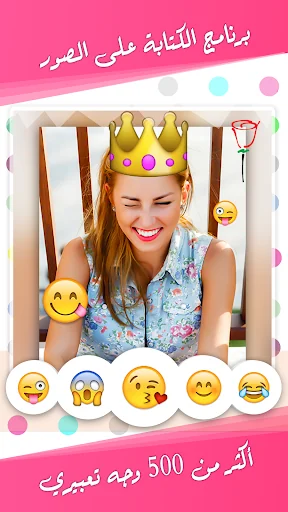
What the app looks like
Live screenshots from the Play Store, captured by our snapshot worker. Tap any image to enlarge.
الكتابة على الصورـ بخطوط عربية's revenue trajectory
Forecast revenue from snapshot history. Last 1 months.
Where الكتابة على الصورـ بخطوط عربية sits in Photography
Revenue distribution of 20485 comparable apps. الكتابة على الصورـ بخطوط عربية highlighted.
الكتابة على الصورـ بخطوط عربية vs comparable apps
Revenue trajectory side-by-side. Bold = الكتابة على الصورـ بخطوط عربية, ghosted = peers.
App spec
Version
1.8.0
Last update
Feb 17, 2025
Launched
Feb 15, 2019
Price
Free
Monetization
Free
What الكتابة على الصورـ بخطوط عربية actually does (from store listing)
Writing on pictures with Arabic fonts is a wonderful new application that allows you to design pictures and write on them in Arabic and English using special fonts. It is the first application of its kind designed by Arab designers.
This new version of the app has some really cool stuff! It now has really clear and beautiful images and designs. There is also a special menu on the side where you can control different parts of your design. You can also move objects and combine different images.…
Writing on pictures with Arabic fonts is a wonderful new application that allows you to design pictures and write on them in Arabic and English using special fonts. It is the first application of its kind designed by Arab designers.
This new version of the app has some really cool stuff! It now has really clear and beautiful images and designs. There is also a special menu on the side where you can control different parts of your design. You can also move objects and combine different images. If you make a mistake, you can undo it or go back to where you were before. You can also flip things on the screen, as if you wanted to turn something upside down. You can even write words in different colors. There are also special effects you can use to make your design look cool. There is a grid to help you arrange things perfectly. If you want to use the same thing over and over again, you can copy it. You can also lock and hide things so they don't move or appear. Finally, there is a special tool to choose different background colors for your design.
We listened to what our users had to say and made changes to our app based on their feedback. We've made the app better for people in the Arab region by changing its look and adding new things to use.
In this app, you can start by choosing a photo or a colorful background to design on. If you choose an image, you can make it the appropriate size for different social media sites. If you choose a color, you can also choose what size the background should be.
Now that you have chosen the design background, you will notice that the application has different things that you can do, such as writing, drawing with a brush, adding additional objects, making special effects, and using shapes.
This is a tool that helps you write words on pictures. You can choose different writing styles and colors for the words. You can also make words appear to have a shadow or make them look 3D. This can be useful if you want to write on slanted surfaces or pages in the book.
There are special tools that can be used for different types of text. For example, you can make text larger or smaller, change the way it appears below words, add a line in the middle of text, use a different writing style such as Italian font, make text bold, make sure words are arranged straight, and control the amount of space between each A line of sentences. There are more tools you can use too!
We have some new features that can make your designs more fun and creative! You can now add images to your designs and make them transparent if you want. We also have a huge collection of cute stickers and emojis that you can use. There are also new shapes you can add to your designs, such as a message shape or a scribble shape behind text. We also have some phrases written in beautiful handwriting, such as "Congratulations" on special occasions. For Arabic fonts, we have what is called “Tashkeel” which allows you to add different decorations and control their color and transparency.
If you like the application, please leave a great rating :)
If you encounter a problem or would like to suggest something for the application, you can write it in a comment - we follow all responses -
Or you can write to us at the email available at the bottom of the application page.
Comparable Android apps
The five apps in Photography with the closest revenue to الكتابة على الصورـ بخطوط عربية. Click any to see its detail page.
Each forecast combines App Store rating, ratings count, monetisation model, pricing tier, IAP signals and ad-supported flag.
The base estimate is then multiplied by a per-category scaling factor learned from apps with founder-verified MRR.
Every number on this page comes from public APIs and bumetric's own snapshot history.
Full methodology covers input variables, accuracy bands per category and how we treat apps without comparable anchors.
See also the live data on الكتابة على الصورـ بخطوط عربية's tracker page for current rating, reviews and snapshot timeline.
Building something similar? Get a free AI audit with $-revenue forecasts for every recommendation.


 Before After Collages
 Photo Exif Editor - Metadata
 Auto Background Changer
 FUJIFILM Camera Remote
 Boy Hair Photo Editor