Enjoy the convenience of accessing the Welfare Portal's key features anytime, anywhere on your smartphone.
[Key Features]
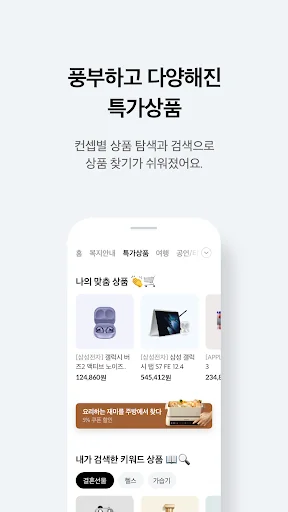
1) Special Offers
Unparalleled shopping privileges! Enjoy the Welfare Portal's special offers, exclusive to employees.
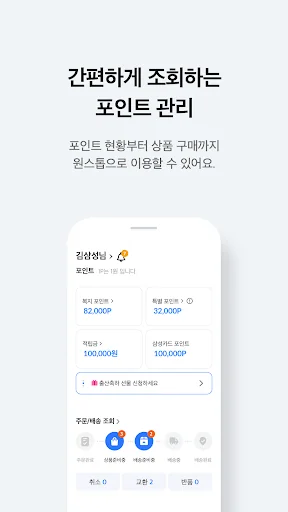
2) Point Redemption Request
Request deductions for card purchases at welfare businesses and affiliated stores.
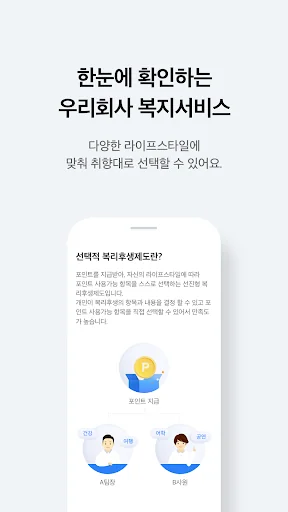
3) Recommended Benefits
We recommend a wide selection of carefully selected benefits offered by the Welfare Portal.
4) Order/Delivery Trac…
Enjoy the convenience of accessing the Welfare Portal's key features anytime, anywhere on your smartphone.
[Key Features]
1) Special Offers
Unparalleled shopping privileges! Enjoy the Welfare Portal's special offers, exclusive to employees.
2) Point Redemption Request
Request deductions for card purchases at welfare businesses and affiliated stores.
3) Recommended Benefits
We recommend a wide selection of carefully selected benefits offered by the Welfare Portal.
4) Order/Delivery Tracking
[Notes]
- To maintain the security of your device, we recommend updating your operating system and antivirus software to the latest version. Also, regularly check your device using antivirus software.
- When using services that involve financial transactions or require personal information, avoid using Wi-Fi from unknown sources or with insecure settings. Instead, use a mobile network (3G, LTE, 5G).
[App Access Permissions Guide]
For a more convenient app experience, please grant the following permissions: - (Optional) Phone: Connect to a customer service call
- (Optional) Microphone: Voice search
- (Optional) Address Book: Send a gift
- (Optional) Notifications: Send notification messages
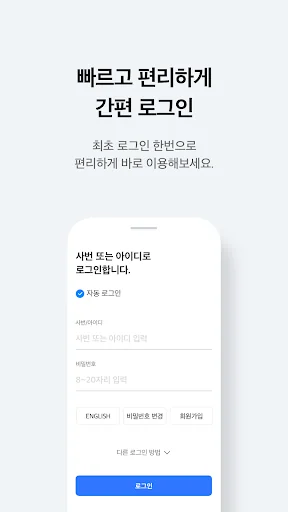
- (Optional) Biometric authentication: Log in
- (Optional) Storage: Save transaction history images (* Only applicable to Android versions 9 and below)
※ Even if you do not agree to the optional access permissions, you can still use the app for other functions.
※ To prevent voice phishing and electronic financial transaction incidents, we may collect and use risk information such as your mobile phone number and malicious apps installed on your mobile device.
※ Starting with Android 6.0 and higher, you can now consent to required and optional access permissions separately. Therefore, we recommend updating to version 6.0 or higher. After updating, you must delete and reinstall the app to reset access permissions.
※ Access permissions can be changed under Settings > Applications > Samsung Welfare Portal > Permissions. However, the path may vary depending on your phone model.
[Call-Related Screen Service Information]
This app displays informative mobile content provided by the caller, including Samsung Card. For this purpose, we provide phone numbers and app notification information to the service provider, Bridgetech (Colgate).
- Functions provided: Call-related screen services (digital ARS, etc.)
- Retention and usage period: Until the provider withdraws consent
- Refusal of provision and withdrawal of consent
· Samsung Card representative number: 1588-8700
· Samsung Card app email consultation
※ Data charges may apply depending on your subscribed plan when using the screen service.
Comparable Android apps
The five apps in Lifestyle with the closest revenue to 삼성복지포탈. Click any to see its detail page.
Each forecast combines App Store rating, ratings count, monetisation model, pricing tier, IAP signals and ad-supported flag.
The base estimate is then multiplied by a per-category scaling factor learned from apps with founder-verified MRR.
Every number on this page comes from public APIs and bumetric's own snapshot history.
Full methodology covers input variables, accuracy bands per category and how we treat apps without comparable anchors.
See also the live data on 삼성복지포탈's tracker page for current rating, reviews and snapshot timeline.
Building something similar? Get a free AI audit with $-revenue forecasts for every recommendation.


 GreenSnap - 植物・花の名前が判る写真共有アプリ
 Bottega Verde
 Tiptapp - Moves & Disposals
 Status, Câu Nói Hay
 Landrys Select Club