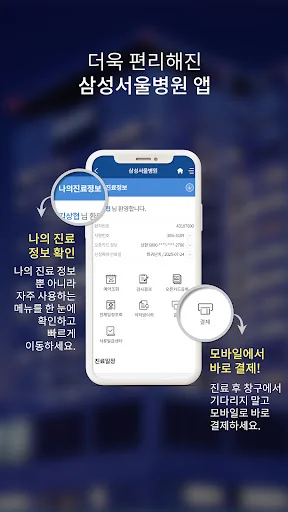
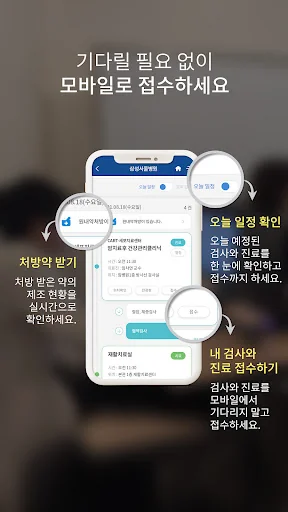
The Samsung Seoul Hospital app provides functions to conveniently use medical treatment, such as schedule information, treatment/test registration, waiting status inquiry, location view, payment, and document issuance.
[main function]
1. Schedule information
: Timeline schedule inquiry and notification according to today’s treatment order
2. Application for medical treatment/examination
: Smartphone application without waiting at the reception desk
3. Waiting status inquiry (waiting el…
The Samsung Seoul Hospital app provides functions to conveniently use medical treatment, such as schedule information, treatment/test registration, waiting status inquiry, location view, payment, and document issuance.
[main function]
1. Schedule information
: Timeline schedule inquiry and notification according to today’s treatment order
2. Application for medical treatment/examination
: Smartphone application without waiting at the reception desk
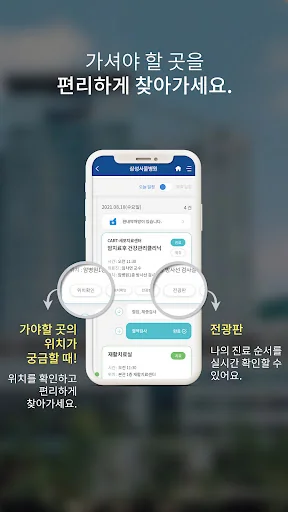
3. Waiting status inquiry (waiting electronic signboard)
: Outpatient/test waiting status available anywhere
4. View location
: Check the location of where you need to go
5. Payment
: Convenient mobile smartphone payment
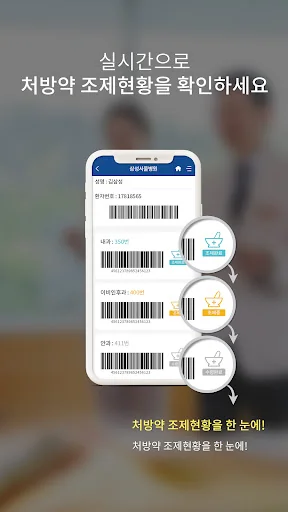
6. Prescription
: Dispensing status that can be checked on a smartphone and transmission of prescriptions to external pharmacies
7. Document Issuance Center
: Issuance of a PDF copy of medical records, Issuance of a PDF copy of medical records
[App permission information information]
We will inform you of the access rights used in the app as follows.
Access rights are divided into mandatory access rights and optional access rights. In the case of optional access rights, you can use the app even if you do not agree to the permission.
■ Optional access rights
· Notification: Used for notification services such as treatment schedule information.
· Telephone: Used to connect to customer service centers and hospitals.
■ If you are using a smartphone with Android OS version 6.0 or lower, all access rights can be applied as essential access rights without optional access rights. In this case, you must upgrade the operating system to 6.0 or higher and reinstall the app to set access permissions properly.
■ If you are using a smartphone with Android OS 13 or lower, all notification access rights can be applied as mandatory access rights without optional access rights. In this case, you must upgrade the operating system to version 13 or higher and reinstall the app to set access permissions properly. Additionally, based on the Personal Information Protection Act and Medical Services Act, we would like to inform you that medical treatment information notification messages for medical treatment purposes may be delivered without consent. (Based on: Personal information protection guidelines during medical treatment_Ministry of Health and Welfare)
■ If you are using an existing app, you must delete and reinstall the app to set access permissions.
※ The Samsung Seoul Hospital app requests minimum access permissions to ensure smooth use of the app.
※ You can use the service even if you do not agree to the optional access rights, but there may be restrictions on the use of some functions.
※ How to change access rights: Mobile phone settings > Application (app) management > Samsung Seoul Hospital > Permissions
※ Samsung Seoul Hospital Online Help Desk: +82221487277, smcoperator@gmail.com
[please! Please check]
- The Samsung Seoul Hospital app account (ID) is the same as www.samsunghospital.com.
-You can use it in both WIFI and 5G/LTE/3G environments, but data charges may apply depending on your plan.
- The service cannot be used on terminals whose operating systems have been altered, such as rooted.
- Please continue to update to stabilize the application.
Comparable Android apps
The five apps in Medical with the closest revenue to 삼성서울병원. Click any to see its detail page.
Each forecast combines App Store rating, ratings count, monetisation model, pricing tier, IAP signals and ad-supported flag.
The base estimate is then multiplied by a per-category scaling factor learned from apps with founder-verified MRR.
Every number on this page comes from public APIs and bumetric's own snapshot history.
Full methodology covers input variables, accuracy bands per category and how we treat apps without comparable anchors.
See also the live data on 삼성서울병원's tracker page for current rating, reviews and snapshot timeline.
Building something similar? Get a free AI audit with $-revenue forecasts for every recommendation.


 CIMS - Drug, Disease, News
 Cara Care: FODMAP, IBD, IBS Tr
 IMAIOS e-Anatomy
 Contractions
 Halza
Halza