● <b>Auto Capture</b>
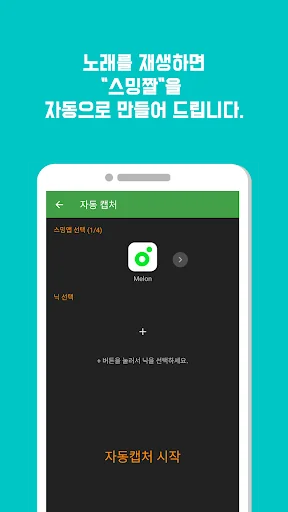
- When you play a song, a “smiling jjal” will be created automatically.
- Supports Melon, Genie, Vibe, FLO, Bugs, Music Mate, YouTube, and Naver TV.
- Select ‘Auto Capture’ from the left menu and follow the instructions.
● <b>Manual Merge</b>
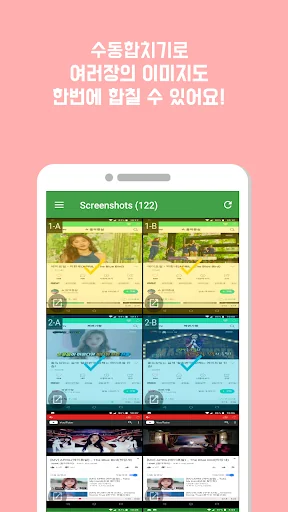
- Combine selected images to create a “smiling jjal”.
- You can choose how many images to combine in the settings. (Support for chapters 1 to 4)
- It is possible to combine multiple images at once.
Example) You can…
● Auto Capture - When you play a song, a “smiling jjal” will be created automatically.
- Supports Melon, Genie, Vibe, FLO, Bugs, Music Mate, YouTube, and Naver TV.
- Select ‘Auto Capture’ from the left menu and follow the instructions.
● Manual Merge - Combine selected images to create a “smiling jjal”.
- You can choose how many images to combine in the settings. (Support for chapters 1 to 4)
- It is possible to combine multiple images at once.
Example) You can select 10 pairs of images, 2 at a time, and combine them.
● Screenshot helper - Instead of using a physical button, a button that allows you to easily take screenshots appears on the screen.
- Take a screenshot when you touch the button.
- Select ‘Screenshot Assistant’ from the left menu and follow the instructions.
- You can hide the top bar and add date/time. (Can be changed in settings)
● Various settings - After creating a streaming image, the original image can be automatically deleted.
- You can automatically reduce the size of streaming photos by selecting the resize ratio.
- You can use the Hide Top Bar option to hide the messy top bar.
- Provides various decoration settings such as drawing dates and dividing lines.
● How to make a streaming jjal (manual merging) 1. Select all the images you want to make into streaming memes.
- The color is automatically switched and checked for the number of images pre-specified in the settings.
2. When all selections have been made, click the [Create] button.
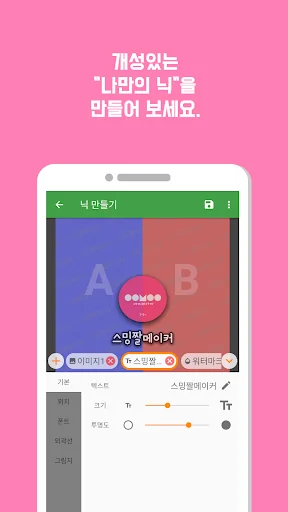
3. When the nickname selection screen appears, select the “nick” you want to include in the streaming meme.
- Nicks can be created in the ‘Nick Management’ tab.
4. The end!
No matter how many streaming photos you have, you can make them all at once using the above method.
Comparable Android apps
The five apps in Photography with the closest revenue to 스밍짤메이커. Click any to see its detail page.
Each forecast combines App Store rating, ratings count, monetisation model, pricing tier, IAP signals and ad-supported flag.
The base estimate is then multiplied by a per-category scaling factor learned from apps with founder-verified MRR.
Every number on this page comes from public APIs and bumetric's own snapshot history.
Full methodology covers input variables, accuracy bands per category and how we treat apps without comparable anchors.
See also the live data on 스밍짤메이커's tracker page for current rating, reviews and snapshot timeline.
Building something similar? Get a free AI audit with $-revenue forecasts for every recommendation.



 Photography Calculator Tools
 Split Camera
 Christmas Photo Frames
 Siren Head Photo Maker
 Slim Long Legs - Photo Editing