This is the official app for corporate customers provided by Sumitomo Mitsui Banking Corporation. It allows you to use some Web21 functions and additional authentication functions (one-time password app) used with Web21, etc.
-----------------------------------------------------------------------------------------------
■Service Details
◇Web21
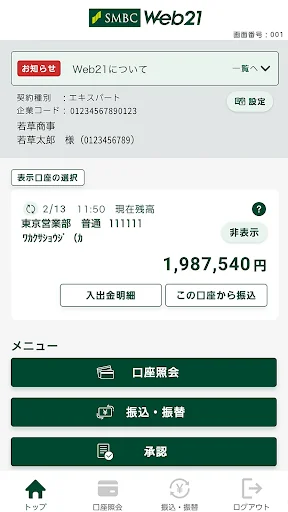
1. Transaction Account Inquiry (Balance Inquiry, Deposit/Withdrawal Statement Inquiry, Transfer Deposit Statement Inquiry)
• Applicable account typ…
This is the official app for corporate customers provided by Sumitomo Mitsui Banking Corporation. It allows you to use some Web21 functions and additional authentication functions (one-time password app) used with Web21, etc.
-----------------------------------------------------------------------------------------------
■Service Details
◇Web21
1. Transaction Account Inquiry (Balance Inquiry, Deposit/Withdrawal Statement Inquiry, Transfer Deposit Statement Inquiry)
• Applicable account types are ordinary, current, notice, installment, and time deposit.
• Report display and file download are not available.
• The inquiry period varies depending on the Web21 contract type.
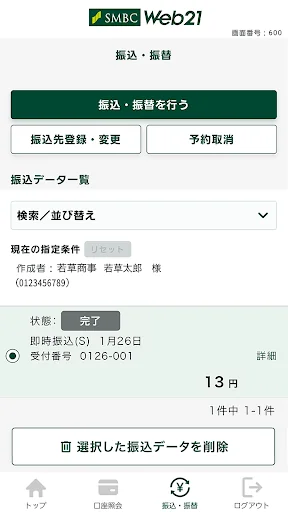
2. Transfers
• Applicable account types are ordinary and current.
• The maximum transfer amount per transaction can be checked in the Web21 PC screen under Settings > Security Management.
• Transfer fees are the same as Web21 (PC use).
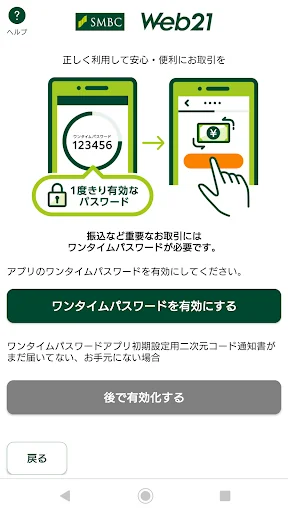
• A one-time password is required when executing a transfer.
• Result inquiries are not available.
◇One-Time Password App
* This is an additional authentication method used with Web21, etc., that uses an app for authentication.
* In addition to the function of generating a 6-digit one-time password, similar to the card type, it also has a function to verify that the contents have not been tampered with before executing a transfer when making a transfer on Web21.
■Target Users
◇Web21
* Available to customers who have a Web21 contract.
* ValueDoor ID can only use password authentication.
◇One-Time Password App
* Customers who have selected "One-Time Password App" as additional authentication for ValueDoor (can be selected for each ValueDoor ID).
* The One-Time Password App cannot be used with IDs that are currently using a One-Time Password Card or Camera-equipped Token. If you wish to use the One-Time Password App, please apply online or at a store to switch to the app.
■Operating Environment for This App
* Recommended devices are smartphones with Android 8.0 to 16.X. Tablet devices are not supported.
* If your smartphone has been rooted even once, this app may not start or function correctly.
* If USB debugging is enabled on your smartphone, the app will not launch. Please disable USB debugging before use.
* Depending on your smartphone, some transactions and screen displays may be restricted.
* The available environments may change without notice. Please check the ValueDoor website (About ValueDoor > Available Environments) for the latest information.
■ How to Use
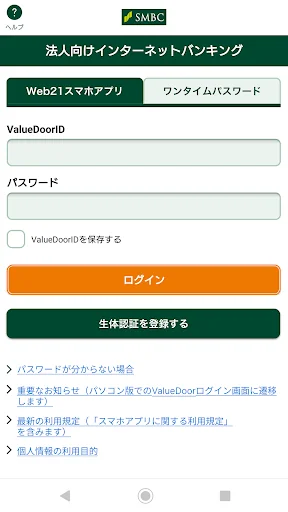
* Download the Web21 smartphone app and log in with your password-authenticated user ID.
* Customers with contracts other than Web21 must log in from a PC using their management ID and grant the necessary permissions to their user ID.
* For the initial setup of the one-time password app, you will need the "One-Time Password App Setup QR Code Notification" which will be mailed to you separately. Please complete the initial setup using this app after receiving it.
■ Notes
* There are no initial or monthly fees for this app. However, bank transfer fees and smartphone communication charges will be charged separately. * You can save your ValueDoorID used to log in to this app within the Web21 smartphone app (partially displayed as "***"), but please manage it carefully, such as not storing your password on the same device. If you forget your password, please contact your branch office.
* Please manage your smartphone, one-time password card, and camera-equipped token carefully.
* You can install this app on multiple smartphones, but you cannot log in simultaneously with a single user ID.
* If you uninstall this app, your one-time password app information will be deleted.
Comparable Android apps
The five apps in Finance with the closest revenue to 法人用アプリ. Click any to see its detail page.
Each forecast combines App Store rating, ratings count, monetisation model, pricing tier, IAP signals and ad-supported flag.
The base estimate is then multiplied by a per-category scaling factor learned from apps with founder-verified MRR.
Every number on this page comes from public APIs and bumetric's own snapshot history.
Full methodology covers input variables, accuracy bands per category and how we treat apps without comparable anchors.
See also the live data on 法人用アプリ's tracker page for current rating, reviews and snapshot timeline.
Building something similar? Get a free AI audit with $-revenue forecasts for every recommendation.


 Easy Alligator (13, 8, 5)
 AHCML Tick
 Easy Tenkan Kijun Cross
 GSC4myCLAC
 Confidence Investment