ML revenue forecast.
Calibrated against 35236 apps in this category.
Confidence band
±15%
High — many comparable apps with verified data
At a glance
Tracks close to the Android app category median (151/mo).
Ranks #16,122 of 35,236 in Productivity (top 45.8% by revenue).
Launched May 06, 2026.
What the app looks like
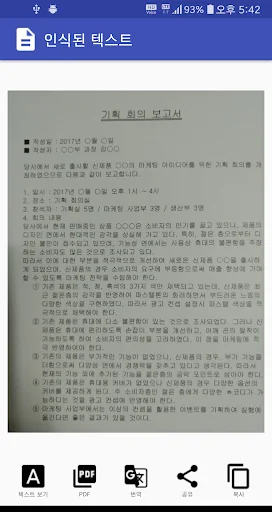
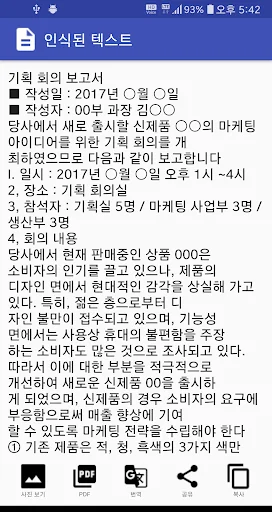
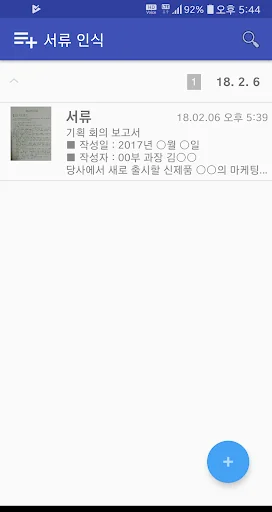
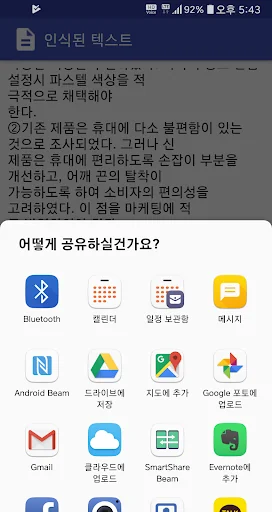
Live screenshots from the Play Store, captured by our snapshot worker. Tap any image to enlarge.
서류 인식 프로 - 문서 사진을 텍스트로 변환's revenue trajectory
Forecast revenue from snapshot history. Last 1 months.
Where 서류 인식 프로 - 문서 사진을 텍스트로 변환 sits in Productivity
Revenue distribution of 35236 comparable apps. 서류 인식 프로 - 문서 사진을 텍스트로 변환 highlighted.
서류 인식 프로 - 문서 사진을 텍스트로 변환 vs comparable apps
Revenue trajectory side-by-side. Bold = 서류 인식 프로 - 문서 사진을 텍스트로 변환, ghosted = peers.
App spec
Version
Varies with device
Launched
May 06, 2026
Price
Free
Monetization
Free
What 서류 인식 프로 - 문서 사진을 텍스트로 변환 actually does (from store listing)
This app is a monthly subscription product that is charged 3600 won per month.
No more cumbersome work of typing on the keyboard while viewing documents.
You don't have to memorize the contents of printed documents.
The document recognition app will do it for you.
A built-in interpreter is helpful for travel or business.
A business card recognition function is added so you can easily manage business cards.
The document recognition app supports the following features.
● Extract text …
This app is a monthly subscription product that is charged 3600 won per month.
No more cumbersome work of typing on the keyboard while viewing documents.
You don't have to memorize the contents of printed documents.
The document recognition app will do it for you.
A built-in interpreter is helpful for travel or business.
A business card recognition function is added so you can easily manage business cards.
The document recognition app supports the following features.
● Extract text from photos.
- Take a picture of a document with a camera and convert it into text quickly and accurately within seconds.
- You can easily extract text from a photo by simply taking a picture without complicated operations.
- Document images already taken from the gallery can be converted into text.
● You can jump directly to links included in recognized text.
- By tapping the URL of the recognized text, you can launch the browser and go to the website immediately.
- You can launch the email app directly by tapping the email address in the recognized text.
- You can make a call immediately by tapping the phone number in the recognized text.
● Recognized photos and texts are automatically saved in the app's recognition history.
- Recognition history is automatically saved without having to remember when it was recognized.
- Through the recognition history, you can check previously recognized photos and texts.
- By entering the keyword you are looking for, you can search the recognition history and easily find the document.
- Grouped by date, you can check the recognition history at a glance.
- A summary of the recognized text is displayed, so you can immediately check the content of the document.
● Share photos and recognized text.
- Send to business partners, friends and acquaintances using e-mail or MMS.
- Share the recognized content through SNS.
- Recognized text can be modified. Please edit and share as needed.
● Share multiple recognized texts at once. (new feature)
[1] Enter the basic list screen of the app.
[2] In the list, press and hold the list item you want to share at the same time.
[3] Click any other list item you want to share with.
[4] From the menu at the top, tap "Share".
[5] When asked "Are you sure you want to consolidate and share all the contents of the selected history?", click "OK".
[6] Select a sharing method. In the video, "mail" was used.
[7] Attach the shared file to the mail and send it.
[8] Open the attached file of the received mail.
[9] Confirm that the two recognized texts are saved as one file.
https://youtu.be/LEYepspkOsE
● You can copy the recognized text to the clipboard and use it in other apps.
- Copy the recognized text to the clipboard and paste it into a document editor app.
● Create PDF documents from images.
- Create PDF documents from document photos taken.
● Recognized images can be enlarged.
- Zoom in on the image with two fingers and compare it with the recognized text.
● Translate recognized text.
- In conjunction with the Google Translate app, it is directly connected within the app.
example)
■ office worker
- You can manage items and amounts by taking receipts when you are on a business trip.
- You can recognize business documents and share them with your partner via email, MMS, messenger apps (KakaoTalk, Line, Skype, etc.).
- You can send the recognized text of business documents to your email and paste them to other documents on your PC.
■ Student
- You can take a picture of a foreign language document and translate the recognized text.
- You can take a picture of some pages of a book in a library or bookstore, and send the recognized text to your email to use in a report.
■ Housewife, when going camping
- By taking a picture of a cookbook, you can always check recognized recipes and recipes like a memo.
[Description of app access rights]
* Address book access permission (required)*
Business card recognition is an essential function used for address book management, and address book access is required to save recognized business card items in the address book.
* Permission to take photos and videos (required) *
In order to recognize documents and business cards, it is done through camera shooting, and camera access rights are required for this.
* Photo, media, file access rights (required) *
Access to the file is required to import documents and business card photos that have already been saved and recognize the text content of the photos.
* Call status and dialing permission (required) *
Calling access is required to make a direct call from the business card contents that have been registered for business card recognition.
* Microphone and voice recording access rights (required) *
Access to the microphone and voice recording is required to register business cards through voice and use the interpreter.
Comparable Android apps
The five apps in Productivity with the closest revenue to 서류 인식 프로 - 문서 사진을 텍스트로 변환. Click any to see its detail page.
Each forecast combines App Store rating, ratings count, monetisation model, pricing tier, IAP signals and ad-supported flag.
The base estimate is then multiplied by a per-category scaling factor learned from apps with founder-verified MRR.
Every number on this page comes from public APIs and bumetric's own snapshot history.
Full methodology covers input variables, accuracy bands per category and how we treat apps without comparable anchors.
See also the live data on 서류 인식 프로 - 문서 사진을 텍스트로 변환's tracker page for current rating, reviews and snapshot timeline.
Building something similar? Get a free AI audit with $-revenue forecasts for every recommendation.


 Everyday Business Calendar
 로또행운 : 로또당첨 예상번호 조합 생성
 VHP Housekeeping
 KACST
KACST
 Trimble SR Portal