What Контроль выручки онлайн касс actually does (from store listing)
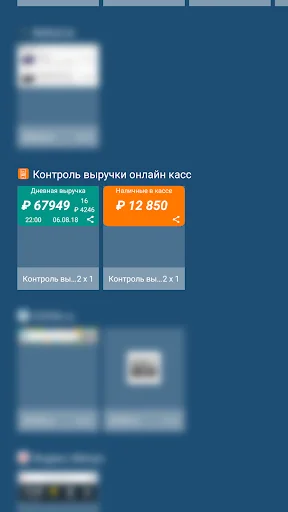
The app does not appear in the labels of the programs, it is available from the widget menu. Touch free area on the home screen and hold it. Click on the "Widgets" icon. Find a list of available widget, tap and hold. The images main screens. Slide the widget to the desired screen and release your finger.
We work with all the online cash registers connected to the platform and the CRF with smart terminals Evotor, connected to any operator fiscal data.
Widget controls the most important for …
The app does not appear in the labels of the programs, it is available from the widget menu. Touch free area on the home screen and hold it. Click on the "Widgets" icon. Find a list of available widget, tap and hold. The images main screens. Slide the widget to the desired screen and release your finger.
We work with all the online cash registers connected to the platform and the CRF with smart terminals Evotor, connected to any operator fiscal data.
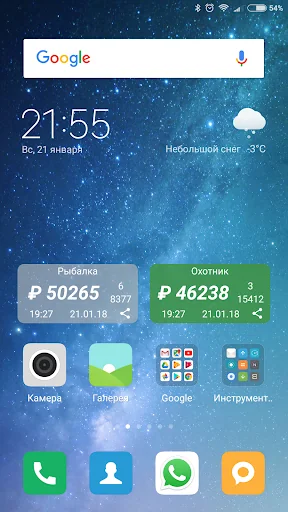
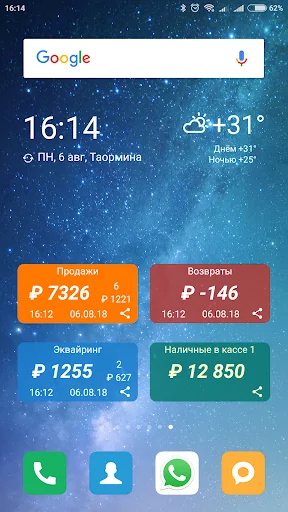
Widget controls the most important for the small business performance indicator - the daily proceeds of retail point.
Now your store revenues, number of checks and the average check you have always before my eyes, somewhere near the clock, weather forecast and a list of important things to do on the home screen of the smartphone or tablet.
Periodically synchronized with the cloud, synchronization is necessary to gain access to the cloud by installing the application in a private office user Evotor (https://goo.gl/YC6pBd) or Platform CRF (https://goo.gl/sdgnrj). Log in to your personal account, the app store, section "Analytics & Reports" and find the application "Monitoring of revenue." Install and open the settings page.
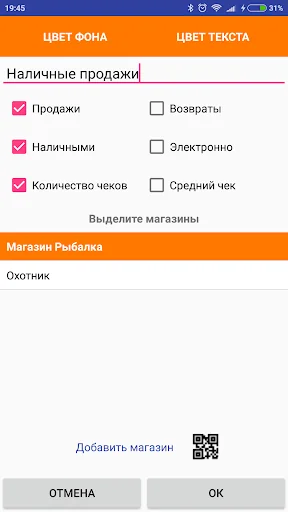
In the Settings window, click the button with the image of the QR-code links to the right of the "Add store". Scan the QR-code with the app's settings screen in your account. Note the shops, payment types, check whether to show the number of checks or the average check is necessary, enter the widget's header, set the color and click "OK".
If your tablet is not equipped with a camera, copy token from your account and enter it in the widget's settings by clicking the inscription "Add store".
If a lot of shops and want to control them individually - add several widgets on the screen, customize the title and color to taste. Similarly divided cash and electronic payment, sales and refunds.
If the widget settings, enable the "cash for change indicators", revenue and other figures will be calculated according to the latest box office shifts on each of the store terminals. This will be useful for those who cash change close after midnight, and for those who work around the clock.
The information is updated automatically every 30 minutes.
To update the information manually, click on the amount of revenue.
What would change the widget's settings, click on its title.
To send information via instant messenger, SMS, e-mail or the clipboard, click on the icon in the lower right corner of the widget.
Comparable Android apps
The five apps in Business with the closest revenue to Контроль выручки онлайн касс. Click any to see its detail page.
Each forecast combines App Store rating, ratings count, monetisation model, pricing tier, IAP signals and ad-supported flag.
The base estimate is then multiplied by a per-category scaling factor learned from apps with founder-verified MRR.
Every number on this page comes from public APIs and bumetric's own snapshot history.
Full methodology covers input variables, accuracy bands per category and how we treat apps without comparable anchors.
See also the live data on Контроль выручки онлайн касс's tracker page for current rating, reviews and snapshot timeline.
Building something similar? Get a free AI audit with $-revenue forecasts for every recommendation.


 Account Manager
 哈TV行動客服
 Fasal
Fasal
 Reliant Parking - Resident
 NEXON-PORT+