What Acode - code editor | OSS actually does (from store listing)
Welcome to Acode!
A powerful, lightweight code editor, and web IDE for Android. Now enhanced with cutting-edge features and updates to transform your coding experience.
What's New?
Step into the future of coding with our innovative Plugin System. This brand new feature supports a wide range of plugins, boosting the functionality of Acode to meet all your development needs. With over 30 plugins already available in the Plugin Store, the possibilities are endless.
Latest Updates Includ…
A powerful, lightweight code editor, and web IDE for Android. Now enhanced with cutting-edge features and updates to transform your coding experience.
What's New?
Step into the future of coding with our innovative Plugin System. This brand new feature supports a wide range of plugins, boosting the functionality of Acode to meet all your development needs. With over 30 plugins already available in the Plugin Store, the possibilities are endless.
Latest Updates Include:
- Enhanced Ace Editor: Now updated to version 1.22.0 for more efficient editing.
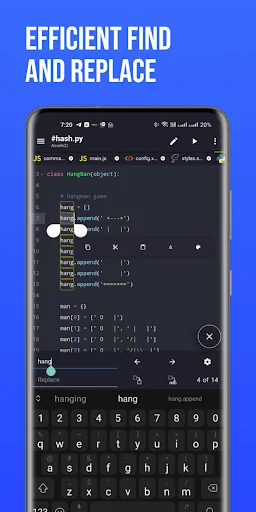
- Search in All Files: Our beta feature lets you search and replace text in all files within your opened projects.
- Customizable Quick Tools: Personalize your quick tools to enhance your workflow.
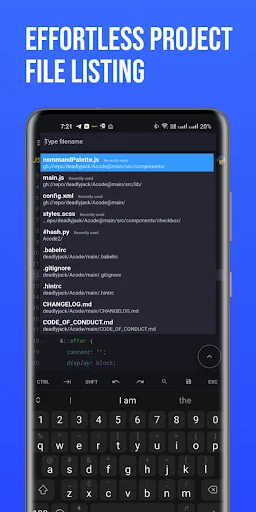
- Fast File Listing in Find Files (Ctrl + P): Acode now loads and caches files at startup, leading to faster file listing.
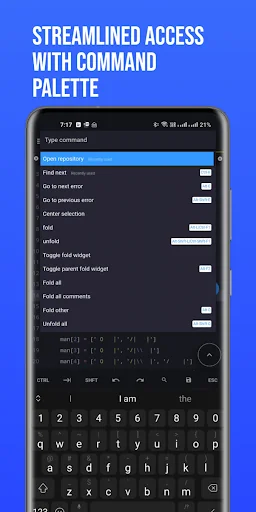
- Ctrl Key Functionality: Take advantage of keyboard shortcuts for actions such as save (Ctrl+S) and open command palette (Ctrl+Shift+P).
Why Choose Acode?
Acode lets you build and run websites directly within your browser, debug with ease using the integrated console, and edit a wide range of source files - from Python and CSS to Java, JavaScript, Dart, and more.
Key Features:
- Universal File Editor: Edit any file directly from your device.
- GitHub Integration: Seamlessly sync your projects with GitHub.
- FTP/SFTP Support: Manage your files efficiently with FTP/SFTP.
- Extensive Syntax Highlighting: Supports over 100 programming languages.
- Personalized Themes: Choose from dozens of unique themes to match your style.
- User-Friendly Interface: Navigate with ease through our intuitive design.
- In-App Preview: Instantly view your HTML/MarkDown files within the app.
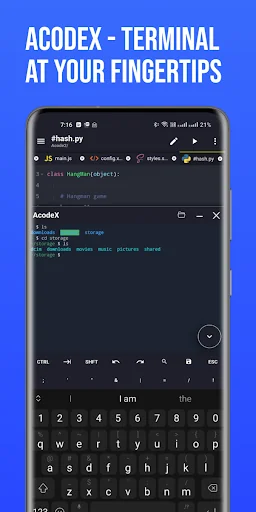
- Interactive JavaScript Console: Debug JavaScript code right from the console.
- In-App File Browser: Access your files directly within Acode.
- Open Source: Benefit from our transparent and community-driven project.
- High Performance: Supports files with over 50,000 lines, ensuring smooth workflow.
- Multi-File Support: Work on multiple files simultaneously for productive multitasking.
- Customizable Interface: Adapt Acode to your personal coding style.
- Keyboard Shortcuts: Speed up your coding with handy shortcuts.
- File Recovery: Never lose your work with our reliable file recovery feature.
- File Management: Keep your projects organized with effective file management.
Start your streamlined coding journey with Acode today. Join our ever-growing community of developers and experience the difference for yourself!
Comparable Android apps
The five apps in Productivity with the closest revenue to Acode - code editor | OSS. Click any to see its detail page.
Each forecast combines App Store rating, ratings count, monetisation model, pricing tier, IAP signals and ad-supported flag.
The base estimate is then multiplied by a per-category scaling factor learned from apps with founder-verified MRR.
Every number on this page comes from public APIs and Bumetric's own snapshot history.
Full methodology covers input variables, accuracy bands per category and how we treat apps without comparable anchors.
See also the live data on Acode - code editor | OSS's tracker page for current rating, reviews and snapshot timeline.
Building something similar? Get a free AI audit with $-revenue forecasts for every recommendation.


 Family Shared Calendar: FamCal
 Debian noroot
 pptx to pdf converter
 Malayalam Text & Image Editor
 Galego Keyboard Plugin