How much does Add Quick Event - fast and eas earn?
Android app
from Adam Grodzki
· Productivity
ML forecast★ 4.5 · 143Free
~250/mo
ML revenue forecast.
Calibrated against 35236 apps in this category.
Confidence band
±15%
High — many comparable apps with verified data
At a glance
Earns 1.65× more than the category median (151/mo).
Ranks #8,689 of 35,236 in Productivity (top 24.7% by revenue).
Launched Jul 18, 2013 · last updated Mar 21, 2023.
What the app looks like
Live screenshots from the Play Store, captured by our snapshot worker. Tap any image to enlarge.
Add Quick Event - fast and eas's revenue trajectory
Forecast revenue from snapshot history. Last 1 months.
Where Add Quick Event - fast and eas sits in Productivity
Revenue distribution of 35236 comparable apps. Add Quick Event - fast and eas highlighted.
Add Quick Event - fast and eas vs comparable apps
Revenue trajectory side-by-side. Bold = Add Quick Event - fast and eas, ghosted = peers.
App spec
Version
2.1.130
Last update
Mar 21, 2023
Launched
Jul 18, 2013
Price
Free
Monetization
Free
What Add Quick Event - fast and eas actually does (from store listing)
Do you have a nightmare using your calendar app to add a new event?
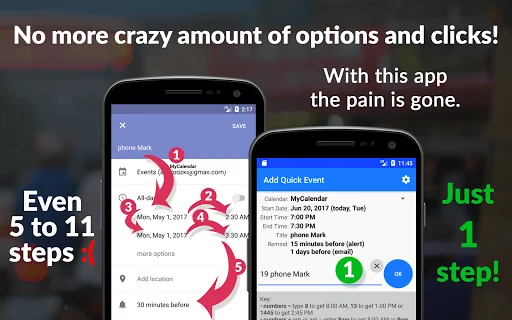
Takes too long? Crazy amount of options and clicks?
With Add Quick Event the pain is gone.
Arrange events using a single text field!
You can update calendar almost with no time.
No need to jump from one place to another setting many options.
Everything will be put in the right field while you type. Prepare new entry instantly!
You can quickly add two custom reminders. Type "phone mum 19 r15 r30" to create reminder …
Do you have a nightmare using your calendar app to add a new event?
Takes too long? Crazy amount of options and clicks?
With Add Quick Event the pain is gone.
Arrange events using a single text field!
You can update calendar almost with no time.
No need to jump from one place to another setting many options.
Everything will be put in the right field while you type. Prepare new entry instantly!
You can quickly add two custom reminders. Type "phone mum 19 r15 r30" to create reminder about calling mum at 19:00. You will be reminded twice: 15 and 30 minutes before the event (if both of them are set for minutes). Basically it changes reminders values of which you have in settings. It activates them even any of them is switched off. If a reminder is set for days, "2r" will set reminder 2 days before the event occurs.
Just use easy to memorise key words.
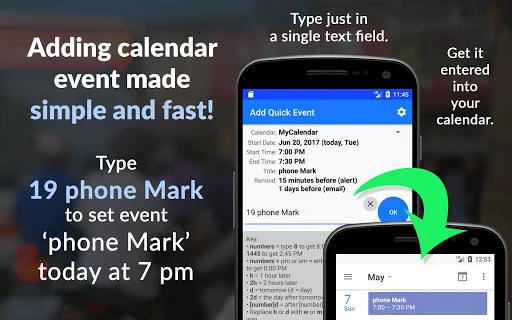
- Type ‘9 phone Mark’ to schedule ‘phone Mark’ today at 9:00.
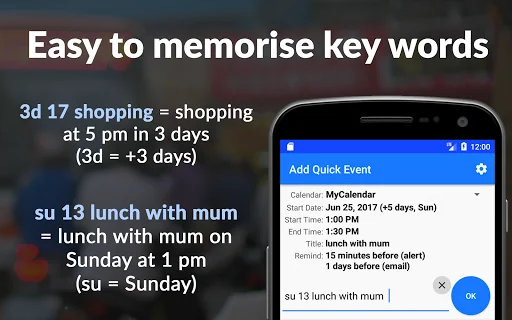
- Pints this Friday? Enter: 'fr 18 pub'
- Do you have lunch with mom next Sunday? Simply type: '2su 13 lunch with mum'
- Enter ‘7.8 2w working from home’ to set event that on 7th of August you will start working from home for 2 weeks.
Key:
• numbers = type 8 to get 8:00 AM, 13 to get 1:00 PM or 1445 to get 2:45 PM
• numbers + pm or am = enter 8am to get 8:00 AM or 8pm to get 8:00 PM
• h = 1 hour later
• 2h = 2 hours later
• d = tomorrow
• 2d = the day after tomorrow
• [number]d = after [number] days (3d, 4d, 10d, etc)
• Replace h or d with w or m to set weeks or months same way
• mm/dd or mm/dd/yy = month/day (11/30) or month/day/year (7/15/2017)
• mo or tu/we/th/fr/sa/su = selects coming day of a week (mo = Monday, tu = Tuesday, etc)
• 2mo or [number]tu = selects next Monday or n-th Tuesday
• 45r = remind 45 minutes before (overrides default reminder)
Examples:
• 9 phone Mark = phone Mark today at 9:00 AM
• 3h check emails = check emails after 3 hours (if the current time is 2:15 PM, the event will be set at 5:15 PM)
• Dan's birthday = Dan's birthday (today, all day event)
• w 17 catch up//my desk//budget jane@mywork.com = catch up, my desk (location), budget (description) next week at 5:00 PM + adds guest and sends invitation on email provided
• fr 18 drinks = drinks at 6:00 PM on this Friday
• 2su 13 lunch with mum = next Sunday lunch with mum at 1:00 PM
• 9/17 2w working from home = working from home since 9/17/2017 for 2 weeks
• 8/14 8/20 holiday = holiday from 8/14/17 to 8/20/2017
• 11/22 830 930 breakfast with boss = breakfast with boss on 11/22/2017 from 8:30 AM to 9:30 AM
Personalise your settings:
- Set regular duration of your meeting. You can also set ending of an appointment by typing: ‘15 16 meeting with Jane'.
- Set when you usually want to be reminded about an appointment.
- You can also set custom reminder by typing: ‘20 45r phone Rich’. ‘45r’ = remind 45 minutes before, so you will be reminded about that phone call 45 minutes before 20:00.
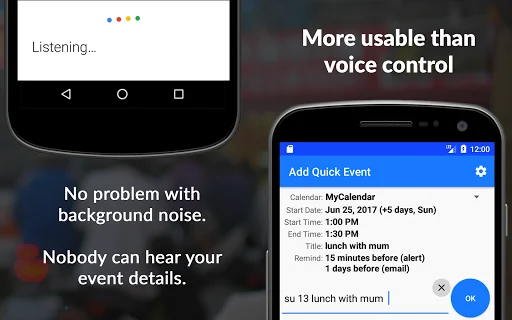
This app is more usable than voice control. No problem with background noise. Nobody can hear your meeting details. Scheduling is safe and reliable.
You can manage your diary easily creating entries just in a single text field.
It easily analyses the text as you type and put into right fields instantly so you make sure that the appointment or meeting will be created properly.
No need for jumping from one box to another, dealing with many confusing options. Organise your diary flawlessly.
Comparable Android apps
The five apps in Productivity with the closest revenue to Add Quick Event - fast and eas. Click any to see its detail page.
Each forecast combines App Store rating, ratings count, monetisation model, pricing tier, IAP signals and ad-supported flag.
The base estimate is then multiplied by a per-category scaling factor learned from apps with founder-verified MRR.
Every number on this page comes from public APIs and bumetric's own snapshot history.
Full methodology covers input variables, accuracy bands per category and how we treat apps without comparable anchors.
See also the live data on Add Quick Event - fast and eas's tracker page for current rating, reviews and snapshot timeline.
Building something similar? Get a free AI audit with $-revenue forecasts for every recommendation.


 CLASSROOM+ | Students
 Dwelo: Smart Apartments
 Calculation of roofs
 Pomodoro
 PAS GPS