Live screenshots from the Play Store, captured by our snapshot worker. Tap any image to enlarge.
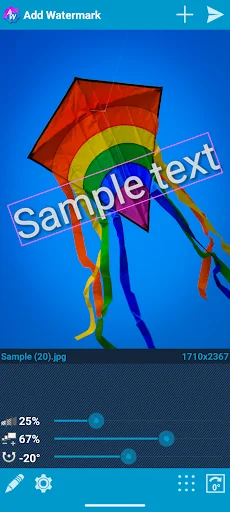
<b>Add watermarks to your photos.</b> Protect your copyright, brand your images with custom text or logos, and create a professional workflow. Adjust size, transparency, and alignment, then save and share your results. With batch mode, automatic processing, and many advanced options, <b>Add Watermark</b> is the ultimate tool for photographers and creators.
<b>Full feature list:</b>
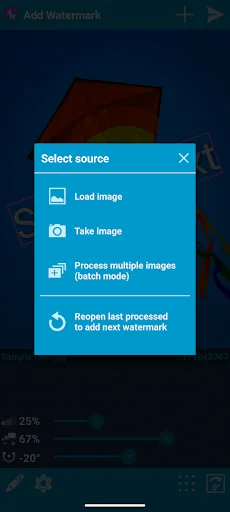
• Batch mode for processing multiple images at once
• Automatic processing when sharing images from other apps…
Read full description →
Add watermarks to your photos. Protect your copyright, brand your images with custom text or logos, and create a professional workflow. Adjust size, transparency, and alignment, then save and share your results. With batch mode, automatic processing, and many advanced options, Add Watermark is the ultimate tool for photographers and creators.
Full feature list:
• Batch mode for processing multiple images at once
• Automatic processing when sharing images from other apps
• Fonts, colors, and advanced text styling (shadows, outlines, etc.)
• 130 built-in fonts, plus support for importing up to 20 custom fonts
• Built-in sticker collection
• Support for transparent PNG images as watermarks
• Quick sharing to Instagram and other social apps
• Backup and restore your settings
• Quick access to recently used watermark presets
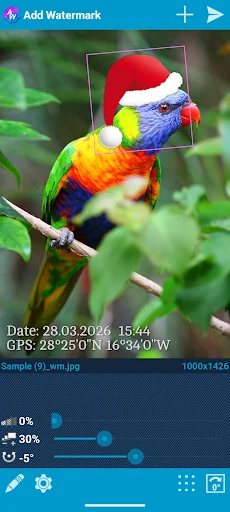
• Placeholders for timestamps, filenames, and values like camera settings, shooting parameters, and GPS data
• Support for EXIF and XMP metadata
• Support for 360° panoramas
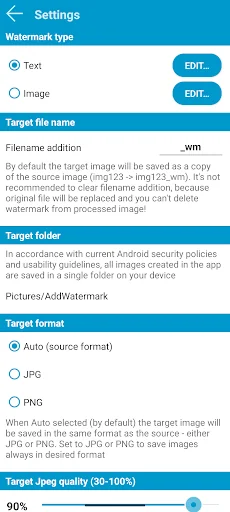
• Saving in JPG or PNG format
• Rename and resize images when saving
Free Version & Premium Features:
You can use the app for free, or unlock professional features with in-app purchases.
Please note the limitations of the free plan:
• No custom image/logo watermarks (but you can still use built-in stickers or emojis!)
• JPG format only, resized to 1024 px on the long side
• No batch mode and no automatic processing when sharing from other apps
• The full feature matrix can be found in Settings > Access & Features.
Useful tips:
• To add a watermark automatically, select photos in your Gallery, then tap Share > Add Watermark.
• To reuse a previously used watermark with all its settings, open watermark settings, then tap Recent.
• To add multiple watermarks to the same image, apply the first watermark, save your work, and tap the Reopen button in the dialog that appears.
• To add a date stamp to a photo, insert the placeholder %date% into the watermark text in Settings.
• Import up to 20 custom fonts in the settings for text watermarks.
Important note for legacy users:
Future improvements and updates will focus on this free version with optional in-app purchases. To simplify future development, the separate paid version, now called Add Watermark Classic, is no longer under active development and will only receive essential security updates.
If you previously purchased the older paid app, you are highly welcome to switch to this version! As a thank you for your past support, you can receive a special migration offer with unlimited access to all premium features. Check Settings > About to learn how to migrate.
Support & Contact:
If you need help or have suggestions, please contact me via email or visit my website.
Email: androidvilla@gmail.com
Blog: http://androidvilla.wordpress.com
Special thanks to the community translators:
Ben (for Samia), MarcyArtistic, Renek, Muchamad Mahrus, TomoS, ene49 (CepTeam), Milly Zecchinato, Tristan Lyonnet, Martin Lehmann Madsen, Magichannel, Martin Sotelano.
The five apps in Photography with the closest revenue to Add Watermark. Click any to see its detail page.
Each forecast combines App Store rating, ratings count, monetisation model, pricing tier, IAP signals and ad-supported flag.
The base estimate is then multiplied by a per-category scaling factor learned from apps with founder-verified MRR.
Every number on this page comes from public APIs and bumetric's own snapshot history.


 Presets For LR - Photo Filters
 Wood wall photo Frames
 Photo montage photography
 Flickr
 Photo Collage