What Adding Machine 10Key iPhone actually does (from App Store listing)
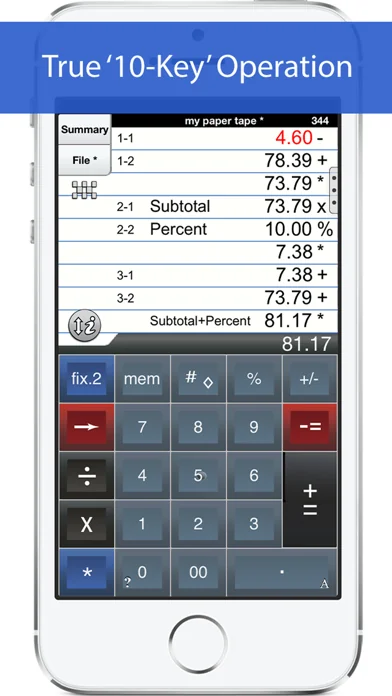
'Adding Machine 10Key for iPhone’ behaves like a true '10 Key' or 'adding machine' like those made by Monroe, Casio, Sharp and others. Press asterisk (*) for a total, operator entry is reversed, and calculate percentages by multiplying and adding to a stream of numbers. SEE THE 1ST FAQ BELOW.
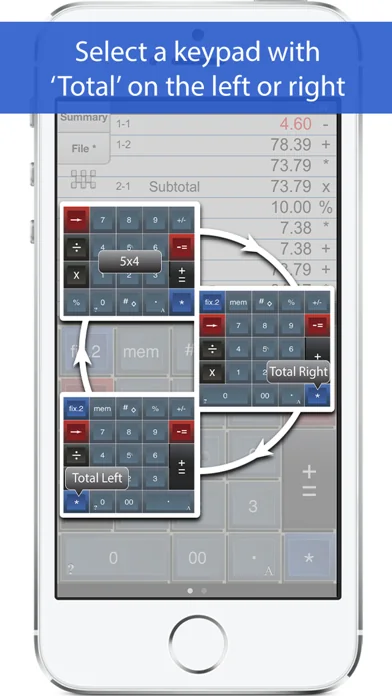
The total (*) key can be on either the left or right side (Sharp or Canon style) and the keypad is expandable to show more or less paper tape history.
Also. Review & edit numbers, add or delete lines. Sav…
'Adding Machine 10Key for iPhone’ behaves like a true '10 Key' or 'adding machine' like those made by Monroe, Casio, Sharp and others. Press asterisk (*) for a total, operator entry is reversed, and calculate percentages by multiplying and adding to a stream of numbers. SEE THE 1ST FAQ BELOW.
The total (*) key can be on either the left or right side (Sharp or Canon style) and the keypad is expandable to show more or less paper tape history.
==== Recent Press ===== Has been featured in iTunes "What's Hot" in the Finance Category.
Strategic Finance (Tools of the Trade): "If you're looking for a professional desk calculator that can give you full 10-key accounting functions with a tape you can name and save, edit, e-mail, or print, check out Interlocken's 10 Key for iPad." =================
Q1. What is the difference between 'Adding Machine 10Key Univ', and 'Accountant Calc' in the App. Store.? A1. Both calculators are single-column adding machines or calculators with full-size (1:1) keypads and are optimized for the iPad User Interface. '10 Key' behaves the same as a 10 Key Adding Machine with reversed operator entry while ‘Accountant Calc’ supports free chaining of +, -, x, /, %, √, 1/x. It is easier to use if you are not familiar with how a '10-key' works.
Q2. Can I touch-type? A2. Only the iPad version includes ‘TypeTone’, a key will guide your finger back to the center of a key with an audio tone.
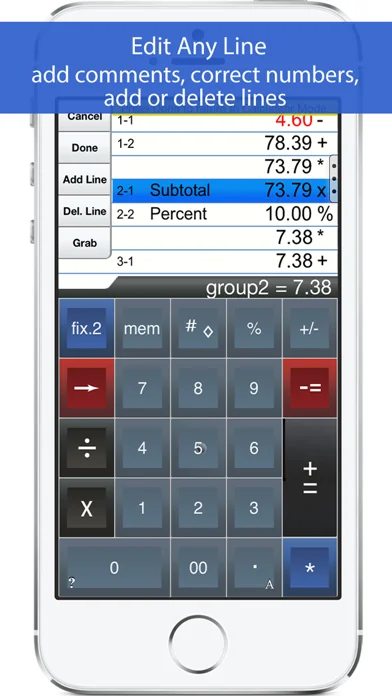
Q3. How can I edit an incorrect number or add & delete lines from the paper tape? A3. Touch any line of the paper tape for edit mode. Touch the side controls: Add Line, Delete Line. You can also edit numbers, split Add/Sub or Mul/Div groups. Press Done to return to Calculator mode.
Q4. Tell me about Email, Printing, and Exporting a Paper Tape. A4. Email includes a pdf attachment. Print requires an AirPrint capable printer. Open-In will cause a menu of 3rd party Apps to appear. Once exported, print directly to a network reachable printer (even if it is NOT AirPrint capable).
============================ TERMS AND CONDITIONS Your use of this application is governed by Interlocken Technology's Terms of Use (http://s354819480.onlinehome.us/InterlockenPrivacyPolicy/Interlocken%20Technology%20Privacy%20Policy.pdf) and Privacy Policy (http://s354819480.onlinehome.us/InterlockenPrivacyPolicy/InterlockenTechnologyTermsOfUse.pdf)
🆕 What's new · v7.10k
v7.10
====
1. Support for iOS 12.4 and newer.
Comparable iOS apps
The five apps in Finance with the closest revenue to Adding Machine 10Key iPhone. Click any to see its detail page.
Each forecast combines App Store rating, ratings count, monetisation model, pricing tier, IAP signals and ad-supported flag.
The base estimate is then multiplied by a per-category scaling factor learned from apps with founder-verified MRR.
Every number on this page comes from public APIs and bumetric's own snapshot history.
Full methodology covers input variables, accuracy bands per category and how we treat apps without comparable anchors.
See also the live data on Adding Machine 10Key iPhone's tracker page for current rating, reviews and snapshot timeline.
Building something similar? Get a free AI audit with $-revenue forecasts for every recommendation.


 TSB Mobile Banking
 Propel: EBT, SNAP, WIC, & more
 Military Reserve Retirement
 Penny Stocks Pro
 PREMIER Credit Card