What AirMirror: AirPlay Receiver actually does (from store listing)
AirMirror is Receiver App on Android for Screen Mirroring and Casting from Apple devices. An Apple device can be an iPhone, an iPad, a MacBook or a iMac. Using AirMirror Receiver, the Android device can mirror screen of an Apple device or can playback audio/video/photos stored on Apple device or can play YouTube video link from Apple device over the local network. This is highly useful for sharing the screen and content of Apple device with family, friends, colleagues, customers or business part…
AirMirror is Receiver App on Android for Screen Mirroring and Casting from Apple devices. An Apple device can be an iPhone, an iPad, a MacBook or a iMac. Using AirMirror Receiver, the Android device can mirror screen of an Apple device or can playback audio/video/photos stored on Apple device or can play YouTube video link from Apple device over the local network. This is highly useful for sharing the screen and content of Apple device with family, friends, colleagues, customers or business partners.
Features:
-------------
o Mirroring of Screen of Apple Devices (iOS version 9 to 15).
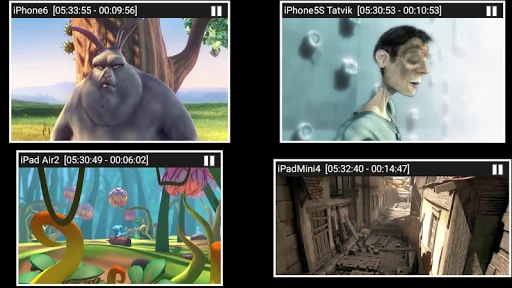
o Mirror/cast from up to 4 Apple devices simultaneously.
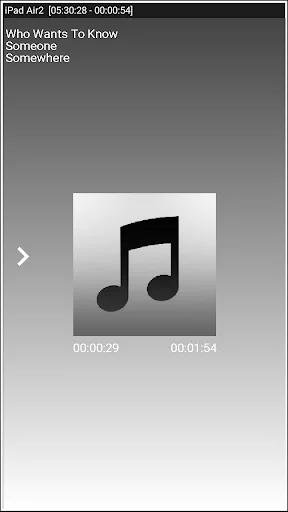
o Playback of Apple device’s media content.
o Slideshow of photos, images and videos of Apple device.
o Restrict unauthorized user from sharing his Apple device using passcode feature.
o Playback of YouTube free content from Apple device to AirMirror receiver.
o Resize and move the mirroring/casting window in the App view.
o Share game screen while playing game on Apple device.
o Share game screen while playing game on Apple device.
o Bluetooth Low Energy based advertising to mirror devices across different subnets.
Instructions of using AirMirror App:
1. Launch AirMirror App on Android Device. The App will start advertising Android Device as a Receiver to screen mirror an Apple Device. The default name of the Receiver is Android Device’s name.
2. On Apple Device, enable Screen Mirroring and select AirMirror Receiver's name from the list. Enable Mirroring using the slider. The Apple device should be in the same network as the Android Device.
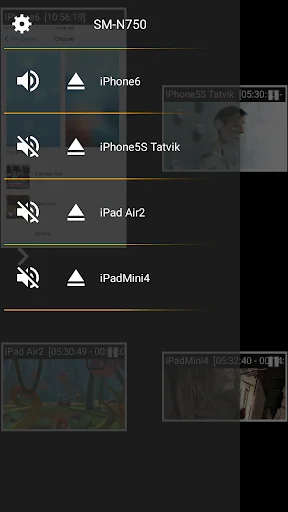
3. On AirMirror App, the list of Apple devices connected to the App are shown in semi transparent control-screen which slides out on touching ">". For unhindered mirroring, slide control -screen to left by swiping it to left or by touching outside the control-screen.
4. One can disconnect Apple device and mute/unmute the mirroring/casting by touching mirroring window in the App for about two seconds, or by going to control screen and perform disconnect and mute/unmute.
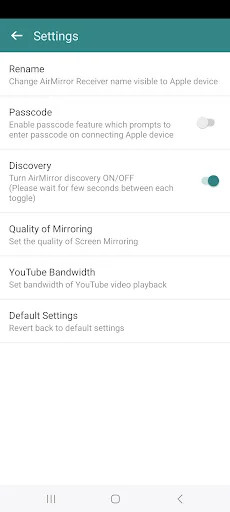
5. Touching Settings icon on the control-screen, the user can navigate to Settings, where user can rename AirMirror Receiver's name, enable/disable password for authentication, toggle AirMirror Receiver discovery to on/off, change quality of mirroring, set YouTube bandwidth, or reset to default settings.
Known Limitation:
1. The app does not work with DRM protected content like Netflix, paid iTunes videos, paid Google Movies etc.
2. App has limited capability for Live TV from only some Apps or websites.
You may reach us at sales@neoyantra.com.
Disclaimer: Apple, iPhone, iPad, MacBook, iMac, Airplay, iTunes, YouTube, NetFlix, Google, Android etc. are trademarks/tradenames of their respective owners. We do not have any association with Apple or Google or any other entity.
Comparable Android apps
The five apps in Video Players & Editors with the closest revenue to AirMirror: AirPlay Receiver. Click any to see its detail page.
Each forecast combines App Store rating, ratings count, monetisation model, pricing tier, IAP signals and ad-supported flag.
The base estimate is then multiplied by a per-category scaling factor learned from apps with founder-verified MRR.
Every number on this page comes from public APIs and bumetric's own snapshot history.
Full methodology covers input variables, accuracy bands per category and how we treat apps without comparable anchors.
See also the live data on AirMirror: AirPlay Receiver's tracker page for current rating, reviews and snapshot timeline.
Building something similar? Get a free AI audit with $-revenue forecasts for every recommendation.


 Imgur: Funny Memes & GIF Maker
 GIPHY: GIFs, Stickers & Clips
 XBMC/Kodi Wrapper
 TV (Samsung) Remote Control
 Video Merge: Joiner & Combiner