What Always visible power button actually does (from store listing)
Smart Screen Lock & Floating Control Button
Easily lock your screen and control essential functions using convenient floating buttons, notification shortcuts, and gestures.
🔹 Main Features
Screen Lock
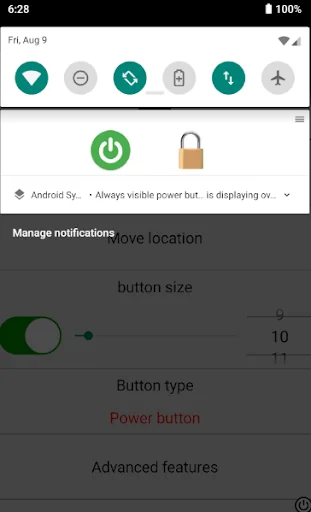
• Lock screen from notification bar
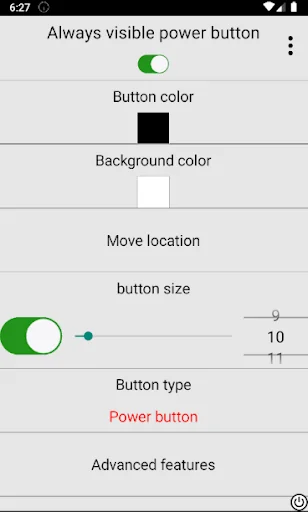
• Floating on-screen power button
• Home screen widget
• Long-press Back button to lock
• Shake to lock screen
• Set automatic screen lock timer (hours / minutes / seconds)
Floating Control Buttons
• Customizable floating button icon
• Quick S…
Easily lock your screen and control essential functions using convenient floating buttons, notification shortcuts, and gestures.
🔹 Main Features
Screen Lock
• Lock screen from notification bar
• Floating on-screen power button
• Home screen widget
• Long-press Back button to lock
• Shake to lock screen
• Set automatic screen lock timer (hours / minutes / seconds)
Floating Control Buttons
• Customizable floating button icon
• Quick Settings panel shortcut (pull down notification panel)
• Screen scroll button
• Screen brightness control button
• Screen timeout (lock time) control button
• Mobile data status display
Navigation Buttons
• Home
• Back
• Recents
Screen Activity Log
• View screen on/off history records
🔹 How to Use
Enable Accessibility Service (required for screen lock and navigation functions).
Enable Overlay Permission to display floating buttons.
Activate Advanced Features to use long-press actions.
(Optional) Enable Shake feature — may increase battery usage.
To wake the screen, please use your device's physical power button, fingerprint, or double-tap feature (if supported).
🔹 Important Permissions
Accessibility Service
This permission is used only to perform screen lock and navigation button functions selected by the user.
This app does NOT collect, store, or share any personal data.
Foreground Service Permission
Required to keep floating buttons visible and responsive.
If the service stops, floating buttons will disappear.
Overlay Permission
Required to display floating controls over other apps.
Comparable Android apps
The five apps in Tools with the closest revenue to Always visible power button. Click any to see its detail page.
Each forecast combines App Store rating, ratings count, monetisation model, pricing tier, IAP signals and ad-supported flag.
The base estimate is then multiplied by a per-category scaling factor learned from apps with founder-verified MRR.
Every number on this page comes from public APIs and bumetric's own snapshot history.
Full methodology covers input variables, accuracy bands per category and how we treat apps without comparable anchors.
See also the live data on Always visible power button's tracker page for current rating, reviews and snapshot timeline.
Building something similar? Get a free AI audit with $-revenue forecasts for every recommendation.

 MyLocalAccount
 Calculator# Hide Photos Videos
 Hmarik Reminder
 Qibla Finder Compass
 Device Info: IMEI & Hardware