What Analog Clock-7 Mobile actually does (from store listing)
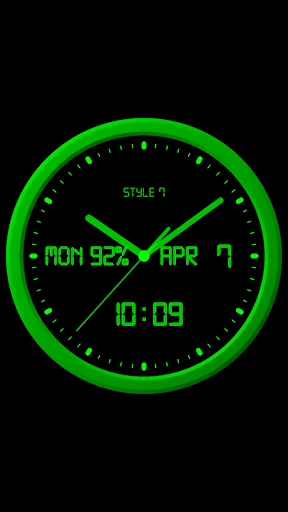
The analog clock also shows the current date, day of the week, month, battery charge. It also shows a digital clock. The clock uses a digital font (except for the widget), but you can also use a regular font.
The clock can tell you the current time by voice by double-tapping (except for the widget) or at a certain interval, for example, every hour.
Use the analog clock as a Live Wallpaper. Set the size and position of the clock on the Home screen.
Use the analog clock as an app widget. …
The analog clock also shows the current date, day of the week, month, battery charge. It also shows a digital clock. The clock uses a digital font (except for the widget), but you can also use a regular font.
The clock can tell you the current time by voice by double-tapping (except for the widget) or at a certain interval, for example, every hour.
Use the analog clock as a Live Wallpaper. Set the size and position of the clock on the Home screen.
Use the analog clock as an app widget. Set the size of the clock and its position on the Home screen in the standard way. Starting with Android 12, the second hand is shown. You can also open the Alarm app by tapping.
Use the analog clock on top of all windows on the Home screen. The clock will stay in place when you swipe. You can set the size of the clock and its position on the Home screen.
Use the analog clock in full-screen mode with the display always on.
Use the analog clock as screensaver while a device is charging.
🕒 Use analog clocks as “Night Clock” — a calm mode with economy style (black background and dark‑gray hands) that saves battery.
Random position change every minute protects the screen from burn‑in.
All options work in Fullscreen mode, Live Wallpaper, and Screensaver.
🌙 Use analog clocks as “Always on Screen” — the clock remains visible even when the screen is turned off. ⚠ Important: the function does not start automatically, you need to launch it manually in Fullscreen mode.
“Always on Display” emulation works through additional options: 🔆 brightness control and Auto‑lock on exit.
In the settings, you can choose any color for the clock and also hide any additional information on the dial.
Comparable Android apps
The five apps in Tools with the closest revenue to Analog Clock-7 Mobile. Click any to see its detail page.
Each forecast combines App Store rating, ratings count, monetisation model, pricing tier, IAP signals and ad-supported flag.
The base estimate is then multiplied by a per-category scaling factor learned from apps with founder-verified MRR.
Every number on this page comes from public APIs and Bumetric's own snapshot history.
Full methodology covers input variables, accuracy bands per category and how we treat apps without comparable anchors.
See also the live data on Analog Clock-7 Mobile's tracker page for current rating, reviews and snapshot timeline.
Building something similar? Get a free AI audit with $-revenue forecasts for every recommendation.


 Drei Kundenzone
 Catlendar & Diary HD
 Conecta Recife App
 穿梭Transocks-海外华人访问中国加速器追剧听歌看比赛
 WiFi - Internet Speed Test